
Muster — Time de IA para Gestão de Produtos
sandhuka/muster-ai
Equipe de IA especializada com memória persistente para construir produtos completos
Ver no GitHubFramework multi-agente que transforma Claude Code em um time coordenado de oito especialistas (PM, dev, design, QA, conteúdo, marketing, legal, pesquisa) com memória persistente e contexto filtrado. Elimina amnésia entre sessões armazenando decisões e tarefas em arquivos markdown, permitindo que cada agente mantenha continuidade sem re-briefings.
Instalação
npx convez-ai sandhuka/muster-ai1 comando no terminal: detecta o formato do repositório (marketplace ou plugin avulso) e instala via Claude Code. Requer Node 18+ e o Claude Code instalado.
Métricas
Casos de uso
- Coordenar design, desenvolvimento e QA simultaneamente em um único projeto
- Manter contexto de produto consistente entre múltiplas sessões Claude
- Acelerar descoberta de produto e planejamento de sprint com especialistas IA
Veredito

Abordagem pragmática para orquestração multi-agente que prioriza persistência e contexto filtrado sobre comunicação complexa. Validado em projeto real; excelente para founders e pequenos times que precisam cobrir múltiplos domínios sem infraestrutura de framework.
README
A tradução para o português deste README ainda está na fila.
Muster
Ship a product. Without a team.
Eight AI specialists. Persistent memory. Just Claude Code.
A real product needs design, code, QA, content, marketing, legal, and research.
You can't hire all of that. You don't have to.
Muster turns Claude Code into a coordinated team of eight AI specialists with persistent memory, quality guardrails, and conversational continuity. Every decision persists. Every sprint plans itself forward. Every specialist remembers the discussion across follow-ups — no re-briefing on every turn, no Claude amnesia between sessions.
Just markdown files. No external frameworks. No API wiring. No subscriptions.
You (Founder)
     |
     v
  Open Claude in project   →   Pick a role at session start
                                       |
                                       v
                              Session bound to ONE role:
                       PM | Dev | UI/UX | QA | Content | Mkt | Legal | Research
The PM coordinates: plans sprints, makes decisions, cascades context to specialists. Specialists do the domain work in their own session and file handoffs. Status line shows [muster: <role>] so you always know which tab is which.
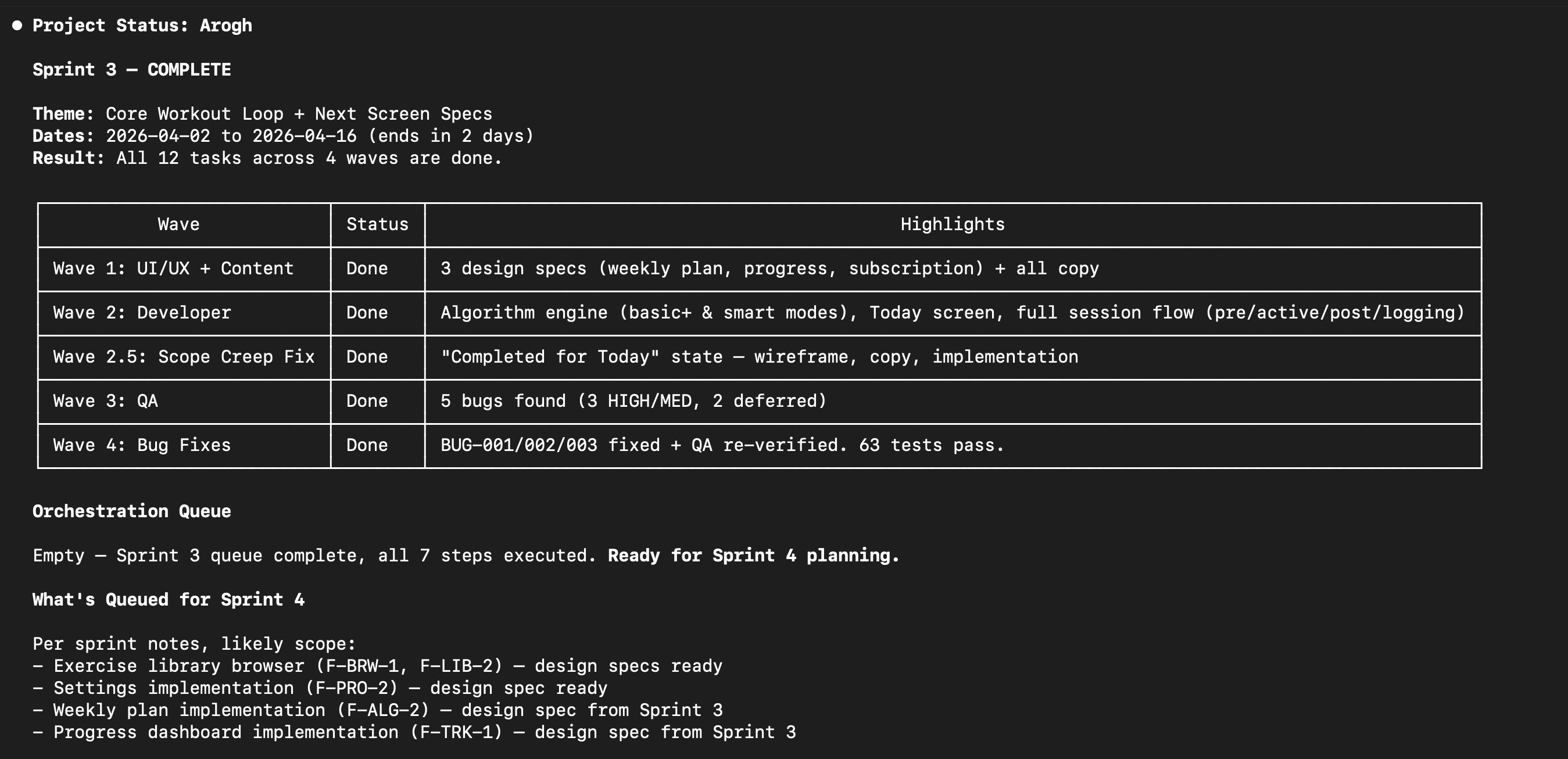
Built and validated on a real iOS app, mid-construction. Not framework theory.
Just open Claude Code. Pick a role. Ship.
The problem
Most multi-agent frameworks optimize for agent communication — how agents pass messages to each other. The real bottleneck is context. Claude Code agents forget everything between sessions. If you're building a product across design, dev, legal, marketing, and QA, you need persistent memory and a way to keep each agent focused on what matters.
How Muster solves it
Three-tier reading model
Each agent reads roughly 80 lines at startup — its role, filtered product context, and the current task. Full docs are loaded on demand. Files meant for other agents are never loaded at all.
PM as context translator
When a decision is made, the PM doesn't tell every agent to go read the decision log. The PM updates each agent's context file with only what that agent needs. Decisions cascade through filtered summaries, not shared inboxes.
Files as persistent memory
Agent brains, orchestration queues, handoff logs, and decision records persist as markdown. No session starts from zero — every agent picks up where the last one left off.
Self-improving skills
During sprint planning, the PM scans for methodology gaps. New skills are classified as generic or product-specific. Generic skills are contributed back to the framework, so every project makes Muster sharper for the next one.
Quick start
New project
curl -fsSL https://raw.githubusercontent.com/sandhuka/muster-ai/main/scripts/setup-project.sh | bash -s my-project
cd ~/Desktop/my-project
claude
When Claude starts in a fresh project, the greenfield welcome fires automatically (no picker — onboarding is PM-driven). Tell Claude your product idea. The welcome walks you through five Discovery stages — idea share, market research, go/no-go decision, draft review, Sprint 1 plan. Total founder time is ~1–2 hours across ~3 sessions over a day or two.
See getting-started.md for the full walkthrough.
Existing project
If you already have code — a mobile app you've been building for months, a web app with real users, a backend service, a CLI tool — Muster has a dedicated adoption path. It reverse-discovers your product into a populated knowledge base and plans Sprint 1. Takes about two hours of focused time.
cd ~/path/to/your-existing-project
curl -fsSL https://raw.githubusercontent.com/sandhuka/muster-ai/main/scripts/setup-existing-project.sh | bash
See adopting-existing-project.md for the full walkthrough.
How it works
You describe your idea in the first session — PM is auto-bound for the greenfield welcome. PM sends Research to investigate the market, then writes the product spec, plans a sprint, and queues up agent tasks if the idea is viable.
After Discovery, you follow the orchestration queue. For each step, open a Claude session — pick the listed role from the picker (or set MUSTER_ROLE=<role> to skip the picker for scripts/automation). Sessions can run in parallel across separate terminals when tasks are independent. Each session reads its filtered context, does the work, files a handoff, and promotes the next step. Repeat until shipped.
The status line shows [muster: <role>] so you always know which role this session is bound to. /rebind swaps roles mid-session if you picked wrong.
Three ways to run it
Muster runs the same team three ways — pick by how much you want to drive.
| Mode | What it is | Use it when |
|---|---|---|
| Manual | A warm tab per role; you hop between them | You're thinking with one agent — planning, debugging, design |
| Assisted | One PM tab spawns each specialist as a subagent | PM coordinates a short sequence while you watch |
| Autonomous | A script walks the queue unattended in a git worktree | You've planned a sprint and want to walk away |
Planning is always interactive; execution is where you choose — and you can switch mid-sprint. See operating-modes.md for the full guide, including the cost and quality tradeoffs.
Framework help — the Guide
Stuck on how Muster runs — which mode to use, why a run stopped, tuning a budget, upgrading? Type /muster in any tab. The Guide is Muster's built-in concierge for the framework itself: it answers process questions — operating modes, run status, .muster/config knobs, version upgrades, friction reports — and routes product questions (specs, decisions, sprint content) to PM. It rides alongside your current role: in a role-bound tab, /muster answers once without changing what that tab is bound to.
Agent roster
| Agent | Role |
|---|---|
| PM | Plans sprints, cascades context, reviews deliverables, makes decisions |
| Research | Market analysis, competitive teardowns, user insights, product validation |
| Developer | Production code, architecture, testing — iOS, backend, web, and generic skills |
| UI/UX | Wireframes, user flows, component specs, design tokens |
| QA | Test strategy, bug tracking, release validation |
| Content | In-app copy, blog, email, store listings, help docs |
| Marketing | Growth strategy, campaigns, user acquisition, analytics |
| Legal | Compliance, privacy, terms of service, IP protection (guidance, not legal advice) |
All eight are peer roles bound the same way (picker or MUSTER_ROLE env var). PM is special only in what it owns (knowledge-base writes), not in how sessions bind to it.
How is this different?
| CrewAI / AutoGen / LangGraph | Muster | |
|---|---|---|
| Solves | Agent communication | Agent memory and context efficiency |
| Built on | Python libraries, API layers | Markdown files and Claude Code |
| Requires | Code to define agents | No code — file-based configuration |
| Built from | Framework design theory | A real iOS app, mid-build |
| Includes | Agent orchestration primitives | Operational patterns — growth caps, cascade lag prevention, decision autonomy, pre-handoff self-review |
| Improves | Manual updates by maintainers | Projects discover skill gaps and contribute generic skills back to the framework |
Architecture
Muster uses a two-repo model.
my-project/
├── .claude/
│   ├── agents/            # Bootloaders for all 8 roles (invoke via picker or @<role>)
│   ├── skills/rebind/     # /rebind slash command (mid-session role swap)
│   ├── skills/muster/     # /muster slash command (the framework Guide)
│   ├── statusline.sh      # Status-line script (shows [muster: <role>])
│   └── settings.json      # Wires statusline + Claude Code config
├── CLAUDE.md              # Product info + project-specific rules + bootstrap routing
├── muster/                # <-- Git submodule (this repo)
├── knowledge-base/
│   ├── agent-context/     # Per-agent filtered product context (PM writes, agents read)
│   ├── product-spec.md
│   ├── orchestration-queue.md
│   ├── agent-requests.md
│   └── .muster-bind-log   # Audit trail of role binds per session
└── src/                   # Your code
Muster (this repo) contains agent roles, skills, and protocols — shared across all projects via git submodule. Your project contains product context, knowledge base, and source code. One framework, many projects.
Documentation
| Doc | What it covers | Read when |
|---|---|---|
| getting-started.md | Step-by-step setup and first sprint | Setting up a new (greenfield) project |
| adopting-existing-project.md | Reverse-discovery onboarding for projects with existing code | Adopting Muster into an existing codebase |
| architecture-and-design.md | Architecture deep dive — data flow, context management, agent communication | Evaluating whether to adopt Muster |
| system-guide.md | Templates, extensibility, verification checklist | Adding agents, skills, or modifying the framework |
| operating-modes.md | The three ways to run a sprint — Manual, Assisted, Autonomous — with cost/quality tradeoffs | Choosing how to run a sprint |
| MIGRATING-V3-TO-V4.md | Upgrade an existing v3 project to v4 (autonomous sprint execution) | Adopting v4 from an existing v3 project |
| MIGRATING-V2-TO-V3.md | Upgrade an existing v2 project to v3 (role-picker, status line, /rebind) | Adopting v3 from an existing v2 project |
| MIGRATING-V1-TO-V2.md | One-shot migration for projects set up before v2 | A muster/ update halted with "Pre-v2 Muster setup detected" |
| CHANGELOG.md | Version history — what changed at each bump | Tracing behavior to a framework version |
Current framework version: 4.2 (the Guide/XO framework agent, .muster/config knobs, and autonomous-loop operability; see CHANGELOG.md). Upgrading an existing v3 project to v4? Bump the muster/ submodule and run muster/scripts/migrate-v3-to-v4.sh — see MIGRATING-V3-TO-V4.md. The 4.1 → 4.2 bump is additive: bump the submodule, then re-run migrate-v3-to-v4.sh to seed the new project-level files (the /muster front door, the test runner) — or let the Guide coach the upgrade for you (below).
Upgrading and want it done for you? From any version, bump the muster/ submodule, then tell Claude: "Read muster/MUSTER.md and act as the Guide; coach me through upgrading this project to the latest Muster." The Guide runs the migration with backups and per-step verification — see the callout atop each MIGRATING-*.md.
Stay updated
Star or watch this repo for release notifications on GitHub. For major version notes — new agents, new skills, framework improvements — subscribe to email updates. Release notes only.
License
MIT License. See LICENSE.