
Daily Dashboard — Painel de Contexto de Trabalho
SamuelBostic29/Daily-Dashboard
Agregador local de email, PRs e issues com triage sem abas
Ver no GitHubMCP server que agrega emails do Microsoft 365, pull requests e issues do GitHub em um painel local único, acionado por workflows Claude Code. Sem servidor, sem build — apenas dados JavaScript estáticos renderizados em HTML vanilla que sincroniza automaticamente com as fontes.
Instalação
npx convez-ai SamuelBostic29/Daily-Dashboard1 comando no terminal: detecta o formato do repositório (marketplace ou plugin avulso) e instala via Claude Code. Requer Node 18+ e o Claude Code instalado.
Métricas
Casos de uso
- Briefing matinal automatizado de contexto de trabalho (email, PRs, issues)
- Sincronização local em tempo real de múltiplas fontes sem deixar o dashboard
- Gerenciamento de TODO persistente em localStorage para rastreamento de trabalho em andamento
Veredito

Solução pragmática e bem arquitetada para desenvolvedores que querem contexto de trabalho centralizado. A abordagem de agentes paralelos via Claude Code é inteligente, mas depende de integração manual com tarefas agendadas do SO — ideal para quem quer automação sem infraestrutura.
README
A tradução para o português deste README ainda está na fila.
Daily Dashboard
A personal dashboard that aggregates your work context from Microsoft 365 and GitHub into a single local view. Instead of being a standalone app, the dashboard is driven by a Claude Code workflow: Claude fetches your latest data, writes it to a set of small JavaScript files, and a static HTML template stitches them together into a clean, glanceable page.
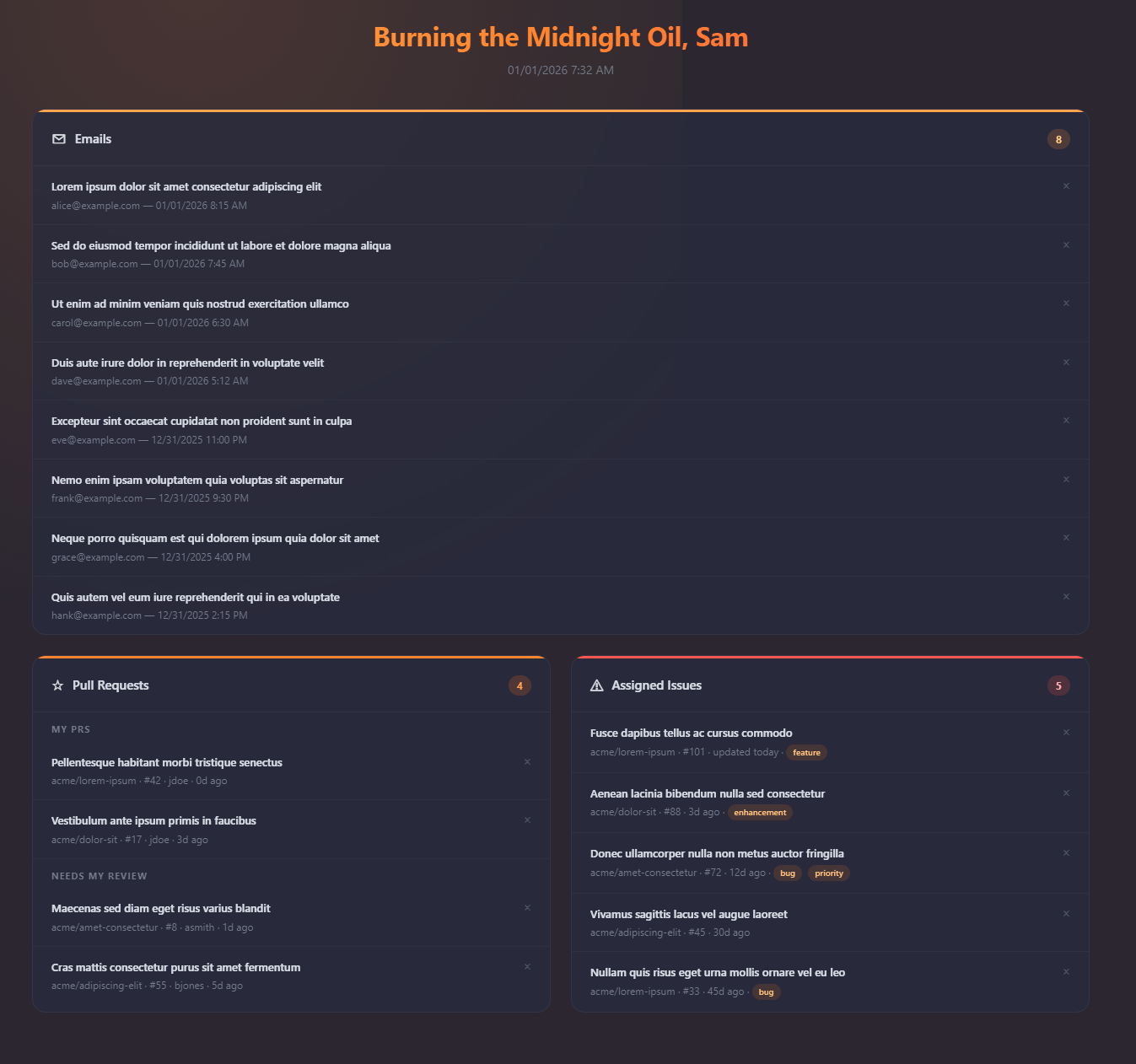
The generated dashboard: unread email, your PR queue, and assigned issues at a glance (shown with placeholder data).
Run it whenever you want a fresh read on your day, and let the Windows scheduled task refresh it automatically on weekday mornings.
What It Does
When you tell Claude Code to "Run the morning briefing", it spins up three agents in parallel — one per data source — and surfaces:
| Source | Data |
|---|---|
| Microsoft 365 Mail | Your 25 most recent unread emails (AI code-review bot noise filtered out) |
| GitHub Pull Requests | Open PRs you authored and PRs that involve you (split into "My PRs" and "Needs My Review") |
| GitHub Issues | All open issues currently assigned to you, across every accessible repo |
Each item is rendered in a local dashboard with click-through links to the original, per-day dismiss tracking, and a time-of-day-aware greeting — so you can triage without jumping between tabs.
The TODO view
The dashboard answers "what came in?"; the TODO view (second tab on the same page) answers "what am I actually doing today?". Click Add to TODO on the Dashboard to enter a multi-select mode and push the items that matter into one compact list, grouped under Emails / Pull Requests / Issues / Custom sub-headers. + New Item adds custom entries (label, description, link) for work the dashboard doesn't surface.
The list persists in localStorage and — unlike the per-day dismiss state — carries across days: a dismiss means "done looking at this today", a TODO means "I still owe this work", so entries stay until you remove them with their × button. Briefing refreshes never touch the TODO list.
How It Works
The project has no build step, server, or runtime framework. The moving parts are:
"Run the morning briefing"  →  Claude Code (CLAUDE.md workflow)
        │
        ├─ Agent 1 ── M365 email search (MCP) ──→ dashboard/data/emails.js
        ├─ Agent 2 ── gh api (PRs)            ──→ dashboard/data/prs.js
        └─ Agent 3 ── gh api (issues)         ──→ dashboard/data/issues.js
                                                       │
   Orchestrator ── writes dashboard/data/meta.js (last) ─┘
                                                          │
   dashboard/template/template.html ── polls data/meta.js, reloads in place on change
CLAUDE.mddefines the briefing workflow. Each agent deletes its target data file and writes a fresh one — it never returns JSON to the orchestrator. The briefing does not open a browser: under all-day polling it runs windowless and headless, so opening one would be disruptive.dashboard/template/template.htmlis a no-build page (vanilla HTML/CSS/JS) that links the shared../css/styles.css,../renderers.js, and../behavior.js. On load it reads the fourdata/*.jsfiles, each of which assigns a global (window.BRIEFING_EMAILS,window.BRIEFING_PRS,window.BRIEFING_ISSUES,window.BRIEFING_META), and stitches them intowindow.BRIEFING_DATAfor rendering. It then pollsdata/meta.jsonce a minute and, whengeneratedAtchanges, reloads all data files and re-renders in place — preserving scroll and dismissed state — so a dashboard left open on a spare screen stays current all day.- The generated
data/*.jsfiles are git-ignored — they hold your live personal data and are regenerated on every run.
Data sources in detail
- Email is fetched via the Microsoft 365 MCP tool (
outlook_email_search) using the queryisRead:false NOT body:"claude[bot]" NOT body:"@Copilot", which dropsclaude[bot]and@Copilotautomated PR-review comments while keeping human messages. - PRs and issues come from
gh api search/issues(the GitHub CLI), notgh search, which returns empty under OAuth tokens. The queries are scoped to a specific GitHub login — see Configuration to point them at your own account.
Tech Stack
| Layer | Choice |
|---|---|
| Orchestration | Claude Code CLI (claude) driven by the CLAUDE.md workflow |
| Dashboard UI | Static template/template.html — vanilla HTML/CSS/JS, no framework, no build |
| Data files | Generated data/*.js files assigning window.BRIEFING_* globals |
| Email source | Microsoft 365 MCP server (outlook_email_search) |
| GitHub source | GitHub CLI (gh api) |
| Scheduler | Windows Task Scheduler, configured via PowerShell |
Repository Layout
CLAUDE.md                  The morning-briefing workflow Claude executes
config/schedule.json       Polling schedule: start/end time, interval, days of week
scripts/register-task.ps1  Register / update / unregister the scheduled task
scripts/start-session.ps1  Launches a headless Claude Code briefing session (logged)
scripts/open-dashboard.ps1 Opens the dashboard once in the interactive session
dashboard/template/template.html  The dashboard page (open this to view your briefing)
dashboard/template/template.js    Live-page bootstrap: data wiring, render, auto-reload
dashboard/preview/preview.html    Static design preview with no live data
dashboard/preview/preview.js      Preview bootstrap: render the bundled sample data
dashboard/css/styles.css          Shared stylesheet linked by both pages
dashboard/css/preview.css         Preview-only style overrides (flat background + glows)
dashboard/renderers.js            Shared rendering (html`` escaper + email/PR/issue/TODO renderers)
dashboard/behavior.js             Shared runtime: greeting, delegated dismiss, badges, section collapse, keyboard nav, view tabs, Add-to-TODO selection, custom-item modal
dashboard/todo-store.js           localStorage-backed TODO list store (scoped per page, persists across days)
dashboard/test-data.js            Sample data for previewing the layout
dashboard/data/*.js               Generated live data (git-ignored; folder kept + documented via data/README.md)
logs/                      start-session.ps1 run logs (git-ignored)
WorkingFiles/              Free-form notes / General Logs.txt (git-ignored)
Setup
Prerequisites
- Claude Code CLI —
npm install -g @anthropic-ai/claude-code - GitHub CLI — installed and authenticated:
gh auth login - Microsoft 365 account connected to Claude via the Microsoft 365 MCP server (provides
outlook_email_search) - Windows with PowerShell (for the optional scheduled task)
No language runtime, package install, or build is required — the dashboard is a static file.
Quick Start
# Clone the repo
git clone https://github.com/SamuelBostic29/Daily-Dashboard.git
cd Daily-Dashboard

# Launch Claude Code in the project directory, then prompt:
#   Run the morning briefing
# Claude fetches your data and writes dashboard/data/*.js.

# Open the dashboard once (it auto-reloads as new data arrives):
.\scripts\open-dashboard.ps1
To preview the layout without any live data, just open dashboard/preview/preview.html — it renders the bundled sample data in dashboard/test-data.js.
Configuration
The GitHub queries in CLAUDE.md are scoped to a specific account. To use your own, update the login in both gh api queries:
- PRs:
involves:SBosticParadigm→involves:<your-login> - Issues:
assignee:SBosticParadigm→assignee:<your-login>
The greeting name is the USER_NAME constant at the top of dashboard/behavior.js.
Scheduling automatic refreshes
config/schedule.json controls when the briefing runs automatically:
{
  "daysOfWeek": ["Monday", "Tuesday", "Wednesday", "Thursday", "Friday"],
  "startTime": "07:30",
  "endTime": "17:30",
  "intervalMinutes": 30
}
The task fires at startTime, then repeats every intervalMinutes until endTime — an all-day live agenda rather than a one-shot morning snapshot. Omit intervalMinutes (or set the legacy time key) to fall back to a single daily run.
Register the Windows scheduled task (runs scripts/start-session.ps1, which launches a headless Claude Code session and logs to logs/startup.log):
.\scripts\register-task.ps1                  # register
.\scripts\register-task.ps1 -Action update   # apply schedule.json changes
.\scripts\register-task.ps1 -Action unregister
The task runs only while you're logged on (no admin rights needed to register). Each poll launches windowless via conhost.exe --headless powershell.exe -WindowStyle Hidden, so no console flashes across your screen. It uses StartWhenAvailable, so a run missed because the machine was asleep fires when it next can. Because automated runs are unattended, start-session.ps1 invokes Claude headless (claude -p) with --dangerously-skip-permissions.
The polls only regenerate the data files — they don't open a browser. Open the dashboard once a day with scripts/open-dashboard.ps1 (e.g. a Stream Deck shortcut, which also makes it easy to reopen if you close it); it auto-reloads in place as each poll produces fresh data.
License
MIT