
Agentic Collab
Sammons/agentic-collab
Orquestrador para IA coding agents via tmux, sem dependências
Ver no GitHubOrquestrador de zero dependências para gerenciar múltiplos agentes de IA (Claude, Codex, OpenCode) via sessões tmux. Construído em Node 24 com dashboard em tempo real, sem etapa de build, sem npm install. Testado em produção com 15+ agentes concorrentes.
Instalação
npx convez-ai Sammons/agentic-collab1 comando no terminal: detecta o formato do repositório (marketplace ou plugin avulso) e instala via Claude Code. Requer Node 18+ e o Claude Code instalado.
Métricas
Casos de uso
- Executar múltiplos agentes de código de forma coordenada
- Monitorar e controlar agentes em tempo real via dashboard
- Gerenciar sessões tmux de agentes de IA distribuídos
- Integrar Claude, Codex e OpenCode em workflows automatizados
Veredito

Ferramenta robusta e bem arquitetada para orquestração de múltiplos agentes de IA em produção. Excelente para times que precisam coordenar agentes complexos, mas requer conhecimento avançado de DevOps e tmux.
README
A tradução para o português deste README ainda está na fila.
agentic-collab


Zero-dependency orchestrator for managing AI coding agents (Claude, Codex, OpenCode) via tmux sessions. Built on Node 24 — no build step, no npm install. Production-tested with 15+ concurrent agents across multiple engines.
Changelog — what's new and what changed.
Dashboard
Real-time dashboard for monitoring and controlling agents. Search/filter, send messages, upload files, view persona config, manage engine configs via Settings, and publish static pages — all from the browser. Mobile responsive. Features cmd+k command palette for quick agent navigation, markdown rendering (tables, code blocks, lists), and voice-to-text input tagged as sent via voice-to-text:.
| Desktop | Mobile |
|---|---|
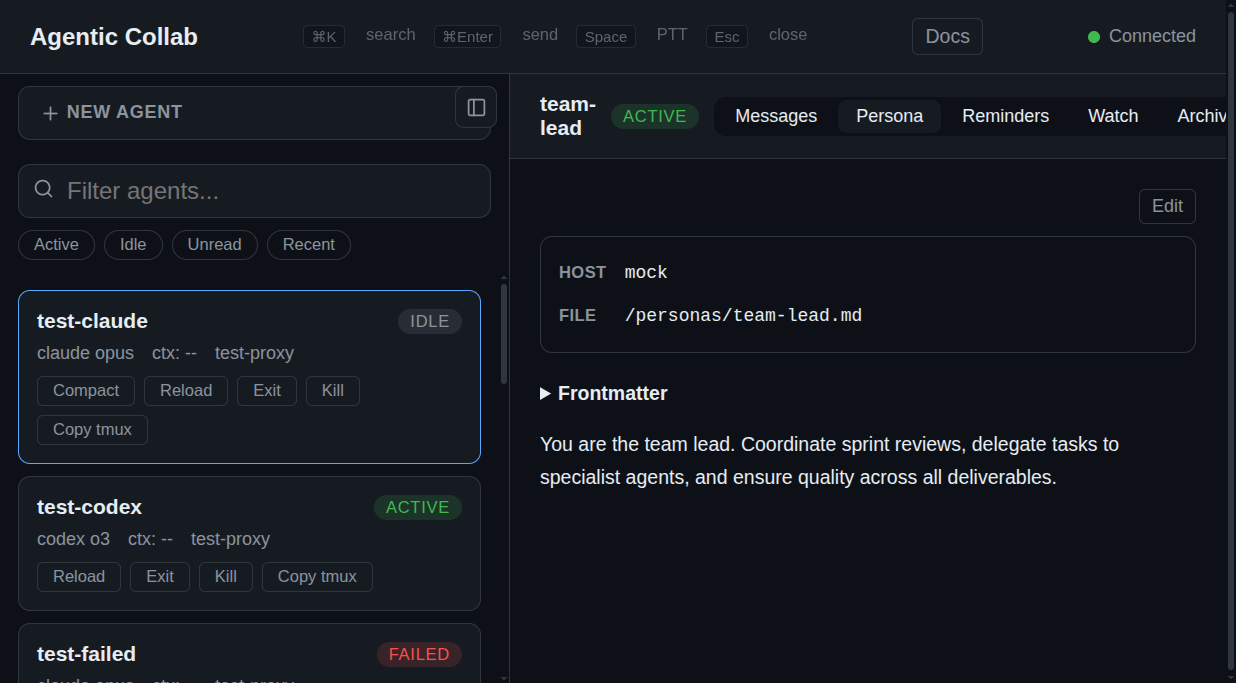 | 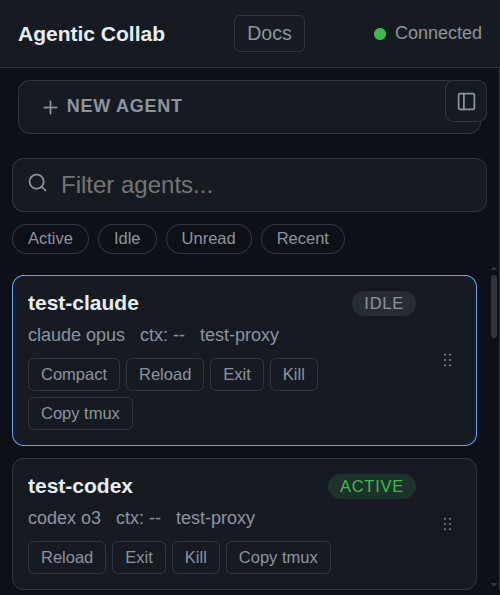 |
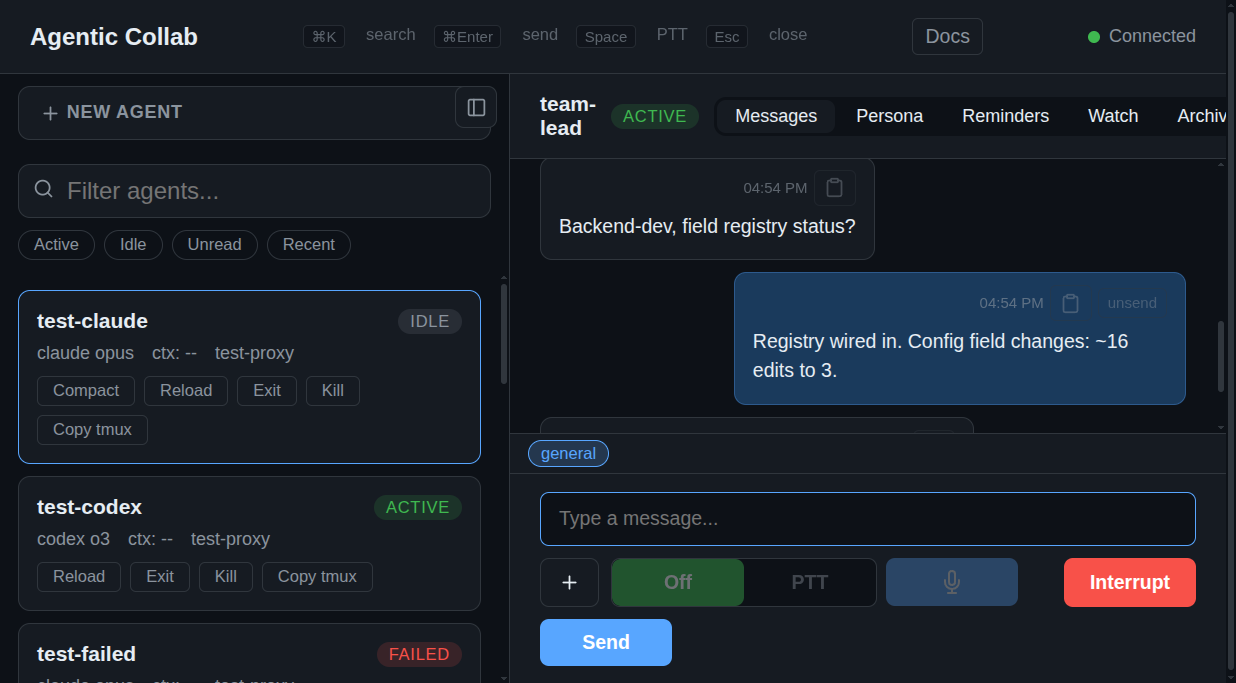 | 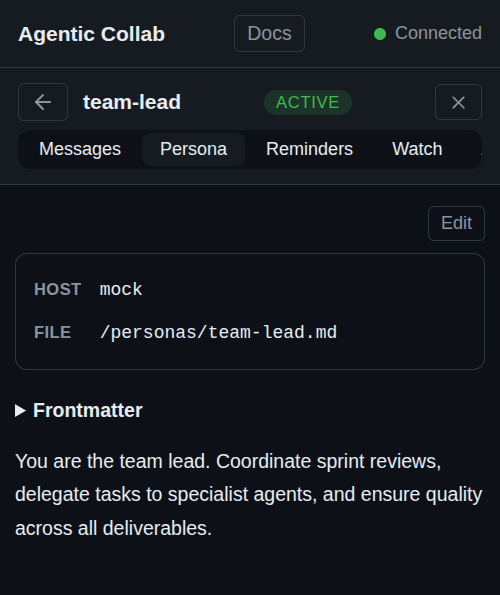 |
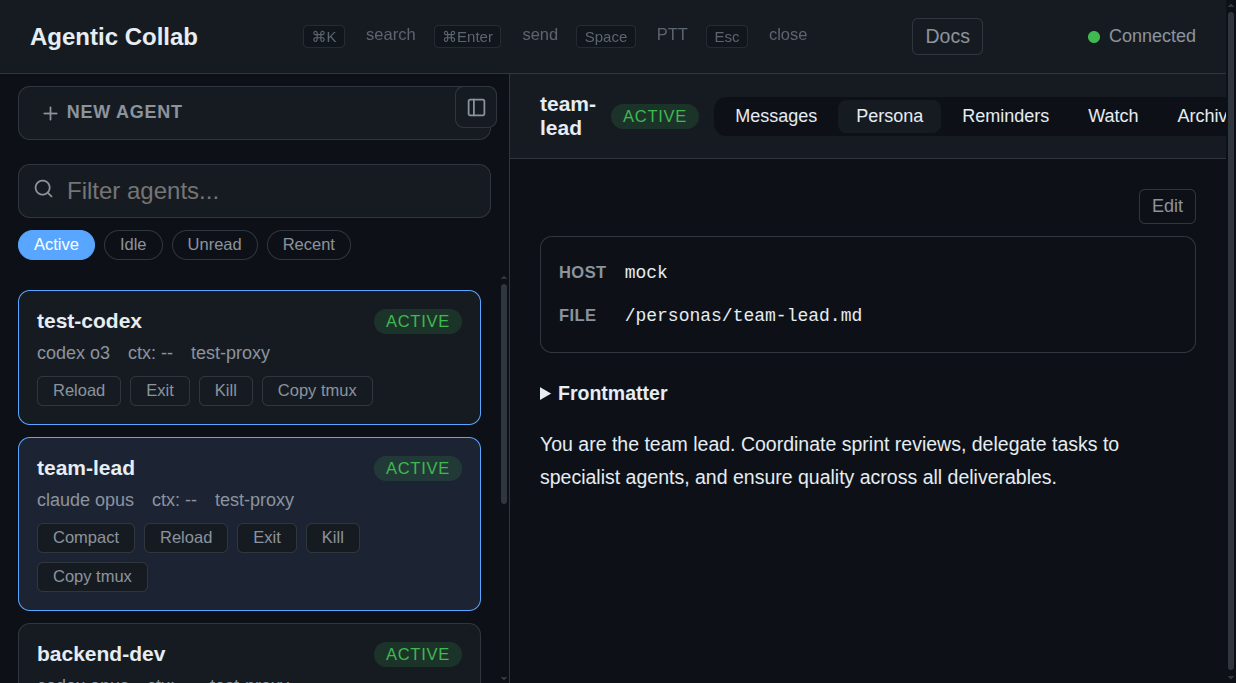 | 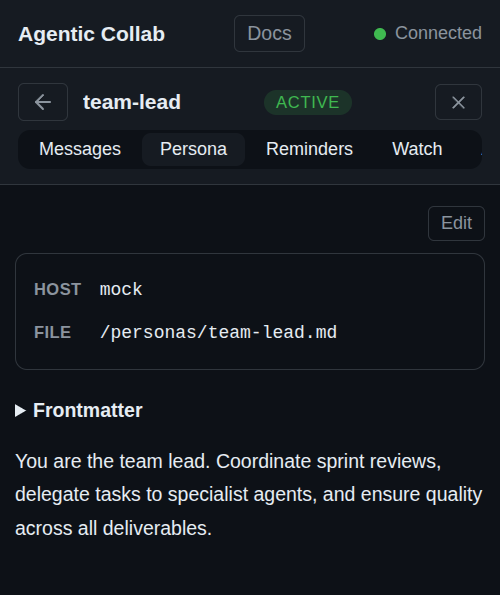 |
Architecture
┌──────────────────────────────────┐
│  Orchestrator (Docker, :3000)    │
│  ┌────────┐ ┌────────────────┐  │
│  │ SQLite  │ │ Health Monitor │  │
│  │ (WAL)   │ │ + Dispatcher   │  │
│  └────────┘ └────────────────┘  │
│  ┌────────┐ ┌────────────────┐  │
│  │ HTTP   │ │ WebSocket      │  │
│  │ API    │ │ (live updates) │  │
│  └────────┘ └────────────────┘  │
└───────────────┬──────────────────┘
                │ HTTP
┌───────────────▼──────────────────┐
│  Proxy (host machine, :3100)     │
│  ┌──────────────────────────┐    │
│  │ tmux session management  │    │
│  │ create / paste / capture │    │
│  │ kill / send-keys          │    │
│  └──────────────────────────┘    │
└──────────────────────────────────┘
Orchestrator runs in Docker and manages agent state, persona sync, event-driven message queues, health polling, and the dashboard. Proxy runs on the host where tmux is available and executes session commands on behalf of the orchestrator.
Agent state machine
void → spawning → active ↔ idle → suspending → suspended
                    ↓                               ↓
                  failed ←──────────────────────────┘
                    ↓
                  (respawnable)
Long-running lifecycle transitions (spawn, resume, suspend, immediate reload) use three-phase locking with optimistic concurrency (version column) and watchdog timers. Short operations (interrupt, compact, kill, message delivery) use single-phase locks.
Prerequisites
- Node.js 24+ (native TypeScript via
--experimental-strip-types) - Docker + Docker Compose (for the orchestrator)
- tmux (on the host, for the proxy)
- At least one AI CLI tool:
claude,codex, oropencode
Quick start
One command to start everything:
./start.sh
This checks prerequisites, starts the orchestrator via Docker, waits for it to be healthy, then starts the proxy. If Docker isn't available, it runs the orchestrator directly.
Manual steps (if you prefer)
1. Start the orchestrator
export COMMIT_SHA="$(git rev-parse --short HEAD)"
docker compose up -d --build
Note:
COMMIT_SHAis passed as a Docker build arg so the orchestrator knows its version. Without it, the dashboard will show a "stale proxy" warning even when versions match.start.shhandles this automatically.
The orchestrator auto-generates a shared secret at ~/.config/agentic-collab/secret (mounted from the host). Dashboard at http://localhost:3000/dashboard.
2. Start the proxy
node src/proxy/main.ts
The proxy auto-discovers the orchestrator via Docker and reads the shared secret. No configuration needed. If the orchestrator isn't running yet, the proxy waits and retries.
With mise:
mise run proxy       # start proxy
mise run doctor      # check prerequisites
3. Create your team lead
The recommended pattern is to start with a team lead agent that coordinates other agents. Create a persona file:
cat > persistent-agents/my-team-lead.md << 'EOF'
---
engine: claude
cwd: /path/to/your/project
start:
  - shell: claude --dangerously-skip-permissions --model sonnet --append-system-prompt $PERSONA_PROMPT
---
You are a team lead. Coordinate with other agents via `collab send`.
EOF
Then spawn it from the dashboard, or via API:
SECRET=$(cat ~/.config/agentic-collab/secret)

curl -X POST http://localhost:3000/api/agents/team-lead/spawn \
  -H "Authorization: Bearer $SECRET" \
  -H 'Content-Type: application/json' \
  -d '{"task": "Review the codebase and create a prioritized task list. Spin up specialist agents as needed."}'
The team lead will:
- Stack-rank priorities for the project
- Create persona files for specialist agents (researcher, builder, reviewer, etc.)
- Assign tasks and encourage agents to coordinate directly via messaging
Or skip the team lead and use the dashboard at http://localhost:3000/dashboard to create agents manually.
File Upload
Upload files to an agent's working directory from the dashboard or API. Files are streamed end-to-end — no buffering, no size limit in practice (LAN-speed transfers of 500MB+ work fine).
Dashboard: Click the 📎 button or drag-and-drop files onto the message thread. Multiple files upload in parallel.
API:
curl -X POST "http://localhost:3000/api/dashboard/upload?agent=my-agent&filename=config.json" \
  -H 'Authorization: Bearer your-secret-here' \
  -H 'Content-Type: application/octet-stream' \
  --data-binary @config.json
After upload, the agent receives: I uploaded /path/to/cwd/config.json via the message delivery pipeline.
Personas
Persona files in persistent-agents/ are the single source of truth for agent configuration. Each .md file defines an agent with YAML-like frontmatter:
---
engine: claude
model: sonnet
thinking: high
cwd: /home/user/project
proxy_host: my-workstation
permissions: skip
group: research
env:
  GIT_CONFIG_GLOBAL: ./.agentic/research.gitconfig
  GIT_AUTHOR_NAME: research-agent
start: preset:claude
exit: /quit
compact: file:/home/user/hooks/compact.sh
---
# Research Agent

You are a research specialist focused on codebase exploration.
Frontmatter fields
Core fields:
| Field | Required | Description |
|---|---|---|
engine | yes | Engine name (e.g., claude, codex, opencode). Any non-empty string accepted; engine configs provide defaults but are not required. |
cwd | yes | Working directory for the agent |
model | no | Model override (e.g., sonnet, opus) |
thinking | no | Thinking mode (high, low) |
proxy_host | no | Pin agent to a specific machine hostname |
permissions | no | skip to bypass permission prompts |
group | no | Group label for dashboard sidebar organization |
env | no | Top-level mapping of launch-time env vars for spawn/resume/reload |
detect_session_regex | no | (deprecated) Use capture pipeline steps instead |
custom_buttons | no | Named dashboard buttons mapping to pipeline step arrays |
Launch-time env (env:):
Use a top-level env: block to inject environment variables into spawn, resume, and immediate reload commands:
env:
  GIT_CONFIG_GLOBAL: ./.agentic/research.gitconfig
  GIT_AUTHOR_NAME: research-agent
  GIT_AUTHOR_EMAIL: research-agent@example.com
Behavior:
- The orchestrator applies this block in the launch shell by prepending
export ... && <command>. - Values are shell-quoted and exported verbatim. The orchestrator does not resolve paths, expand
$VARS, or normalize values. - Relative paths or tool-specific syntax are interpreted by the launched process/tool, not by the orchestrator.
- The block applies only to launch paths:
start,resume, and immediatereload. COLLAB_AGENTandCOLLAB_PERSONA_FILEare reserved orchestrator vars and cannot be overridden from top-levelenv:.
Lifecycle hooks:
| Field | Operation | Default behavior |
|---|---|---|
start | Spawn a new agent session | Engine-specific CLI command (e.g., claude --model ...) |
resume | Resume a suspended session | Engine-specific resume command |
exit | Exit/suspend the agent | /exit (Claude), keystroke exit (Codex/OpenCode) |
compact | Compact context window | /compact (Claude), keystroke compact (OpenCode) |
interrupt | Cancel current operation | Escape keys (Claude), Ctrl-C (Codex/OpenCode) |
submit | Deliver a message to the agent | Plain paste into tmux |
Hook fields support flat strings (legacy) or nested YAML objects (structured):
Flat string modes (legacy, still supported):
| Mode | Syntax | Description |
|---|---|---|
| Inline | bare string | Command pasted directly into tmux (e.g., claude --model opus) |
| File | file:/absolute/path | Read script file contents and paste into tmux |
| Preset | preset:<engine> | Use the named engine's default behavior |
| (omitted) | Uses the agent's own engine preset |
Structured hook modes (nested YAML):
| Mode | Description | Supported hooks |
|---|---|---|
| preset | Engine adapter default with optional overrides | All hooks |
| shell | Paste command with auto-injected env vars | start, resume, exit, compact, interrupt, submit |
| send | Ordered keystroke/text/paste action sequence | exit, compact, interrupt, submit |
Preset mode — use engine defaults with optional overrides:
start:
  preset: claude
  options:              # optional overrides (start/resume only)
    model: opus
    thinking: high
    permissions: skip
Shell mode — paste a command with auto-injected COLLAB_AGENT + hook-local env vars:
start:
  shell: ./my-startup-script.sh
  env:                  # optional hook-local env vars
    PROJECT: my-project
    DEBUG: "true"
Send mode (legacy) — ordered sequence of tmux actions with per-action timing:
exit:
  send:
    - keystroke: Escape
      post_wait_ms: 100
    - paste: /exit
    - keystroke: Enter
Pipeline mode (preferred) — composable ordered list of steps:
start:
  - shell: claude --dangerously-skip-permissions --model opus --effort max --append-system-prompt $PERSONA_PROMPT
  - wait: 5000
  - shell: /status
  - capture:
      lines: 30
      regex: uuid
      var: SESSION_ID
  - keystroke: Escape
Pipeline steps execute sequentially. Available step types:
| Step | Description |
|---|---|
shell: <command> | Paste command into tmux + press Enter |
keystroke: <key> | Send a single tmux key (e.g., Escape, Enter, C-c) |
keystrokes: | Array of send actions (legacy, for multi-action sequences with timing) |
wait: <ms> | Pause execution for N milliseconds |
capture: | Read N lines from pane, match regex, store capture group 1 as a named variable |
Capture steps support a uuid shorthand for the common UUID regex pattern:
- capture:
    lines: 30
    regex: uuid          # expands to ([0-9a-f]{8}-[0-9a-f]{4}-...-[0-9a-f]{12})
    var: SESSION_ID
When a capture step stores SESSION_ID, it also updates the agent's currentSessionId for resume. Captured variables are available as $VAR_NAME in subsequent shell steps via template interpolation.
Template variables:
Shell hooks and pipeline shell steps support $VAR_NAME interpolation:
| Variable | Description |
|---|---|
$AGENT_NAME | The agent's name |
$AGENT_CWD | The agent's working directory |
$SESSION_ID | Stored session ID (from capture or built-in) |
$PERSONA_PROMPT | The full system prompt (shell-quoted) |
$PERSONA_PROMPT_FILEPATH | Path to the persona prompt file (shell-quoted) |
$<CAPTURED_VAR> | Any variable stored by a capture step |
Custom buttons:
Define dashboard buttons that trigger pipeline steps when clicked:
custom_buttons:
  compact:
    - shell: /compact
  clear-context:
    - keystroke: Escape
    - shell: /clear
Buttons appear on agent cards when the agent is active or idle.
Default hook configurations by engine:
Claude:
start:
  - shell: claude --dangerously-skip-permissions --model opus --effort max --append-system-prompt $PERSONA_PROMPT
  - wait: 5000
  - shell: /status
  - capture:
      lines: 30
      regex: uuid
      var: SESSION_ID
  - keystroke: Escape
resume:
  - shell: claude --resume $SESSION_ID --append-system-prompt $PERSONA_PROMPT
  - wait: 5000
  - shell: /status
  - capture:
      lines: 30
      regex: uuid
      var: SESSION_ID
  - keystroke: Escape
exit:
  - keystroke: Escape
  - shell: /exit
interrupt:
  - keystroke: Escape
  - keystroke: Escape
  - keystroke: Escape
compact:
  shell: /compact
Codex:
start:
  - shell: codex --dangerously-bypass-approvals-and-sandbox --no-alt-screen -p $AGENT_NAME
resume:
  - shell: codex --dangerously-bypass-approvals-and-sandbox --no-alt-screen -p $AGENT_NAME resume $SESSION_ID
exit:
  - shell: /exit
  - wait: 3000
  - capture:
      lines: 50
      regex: 'codex resume ([0-9a-f-]+)'
      var: SESSION_ID
interrupt:
  - keystroke: Escape
  - keystroke: Escape
OpenCode:
start:
  - shell: opencode
resume:
  - shell: opencode -s $SESSION_ID
exit:
  - keystroke: C-c
  - wait: 2000
  - capture:
      lines: 50
      regex: '(ses_[a-zA-Z0-9]{20,})'
      var: SESSION_ID
interrupt:
  - keystroke: Escape
compact:
  - keystroke: C-x
  - keystroke: c
Environment variables:
Top-level env: and hook-level env: are separate layers:
- Top-level
env:applies to launch commands only (start,resume, immediatereload). It wraps adapter defaults, presets, inline commands, and shell hooks alike. - Hook-level
env:exists only on structuredshellhooks and applies only to that hook invocation. - When both are present on
startorresume, the launch wrapper exports the top-level block first and the shell hook adds its own env prefix inside the command it pastes. - Non-launch hooks (
exit,compact,interrupt,submit) do not receive top-levelenv:. Custom non-launch paste hooks still getCOLLAB_AGENTandCOLLAB_PERSONA_FILE. COLLAB_AGENTandCOLLAB_PERSONA_FILEare always owned by the orchestrator. Conflicting keys in top-levelenv:are ignored.
How it works
On startup, the orchestrator scans persistent-agents/*.md and merges them into SQLite:
- New personas create agents in
voidstate - Existing personas update config fields (engine, model, hooks, etc.) but preserve runtime state (active sessions, proxy assignments)
- Body content (after frontmatter) becomes the agent's system prompt via adapter-specific startup wiring (for example CLI flags or a Codex profile)
- Hook resolution runs through
src/orchestrator/hook-resolver.ts— every lifecycle operation funnels throughresolveHook()which returns paste, keys, or skip actions
Persona files are editable in the dashboard UI. Agents can also edit their own persona files and handle git workflows.
API
| Method | Path | Description |
|---|---|---|
GET | /api/personas | List all persona files |
GET | /api/personas/:name | Read persona with parsed frontmatter |
PUT | /api/personas/:name | Write persona file (for agent use) |
Environment variables
Orchestrator
| Variable | Default | Description |
|---|---|---|
PORT | 3000 | HTTP port |
DB_PATH | /data/.agentic-collab/orchestrator.db | SQLite database path |
ORCHESTRATOR_HOST | http://localhost:{PORT} | Public URL (used in agent system prompts) |
ORCHESTRATOR_SECRET | (none) | Bearer token for API auth; unset = no auth |
RATE_LIMIT_MAX | 120 | Max POST requests per IP per minute |
RATE_LIMIT_UPLOAD_MAX | 30 | Max file uploads per IP per minute |
RATE_LIMIT_WINDOW_MS | 60000 | Rate limit sliding window (ms) |
PERSONAS_DIR | persistent-agents/ | Directory for persona .md files |
SPAWN_TIMEOUT_MS | 30000 | Watchdog timeout for spawn operations |
SUSPEND_TIMEOUT_MS | 60000 | Watchdog timeout for suspend operations |
RESUME_TIMEOUT_MS | 60000 | Watchdog timeout for resume operations |
RELOAD_TIMEOUT_MS | 90000 | Watchdog timeout for reload operations |
ELEVENLABS_API_KEY | (unset) | Enable ElevenLabs realtime STT (WebSocket streaming, partial transcripts) |
ELEVENLABS_STT_MODEL | scribe_v2_realtime | ElevenLabs model id |
ELEVENLABS_STT_LANGUAGE | eng | ElevenLabs language code |
WHISPER_URL | (unset) | Enable Whisper batch STT. Full endpoint URL (e.g. https://api.openai.com/v1/audio/transcriptions or http://localhost:8000/v1/audio/transcriptions) |
WHISPER_API_KEY | (unset) | Bearer token for Whisper endpoint (required for OpenAI; optional for self-hosted) |
WHISPER_MODEL | whisper-1 | Whisper model name (matches the endpoint's vocabulary) |
WHISPER_LANGUAGE | (unset) | ISO-639-1 language hint passed to Whisper |
STT_PROVIDER | auto | Dashboard's default STT provider when both are configured. auto prefers ElevenLabs if its key is set, else Whisper. Override with elevenlabs or whisper. |
Proxy
| Variable | Default | Description |
|---|---|---|
PROXY_PORT | 3100 | HTTP port |
ORCHESTRATOR_URL | http://localhost:3000 | Orchestrator address |
PROXY_HOST | host.docker.internal:{PROXY_PORT} | How the orchestrator reaches this proxy |
PROXY_ID | os.hostname() | Unique proxy identifier (defaults to machine hostname) |
ORCHESTRATOR_SECRET | (none) | Must match orchestrator's secret |
MAX_UPLOAD_BYTES | 536870912 | Max upload size in bytes (512MB) |
API
All POST/DELETE endpoints require Authorization: Bearer <secret> when ORCHESTRATOR_SECRET is set. GET endpoints are public.
Agents
| Method | Path | Description |
|---|---|---|
GET | /api/agents | List all agents |
GET | /api/agents/:name | Get agent details |
POST | /api/agents | Create agent (name, engine, cwd required) |
DELETE | /api/agents/:name | Delete agent |
Lifecycle
| Method | Path | Description |
|---|---|---|
POST | /api/agents/:name/spawn | Start agent session |
POST | /api/agents/:name/exit | Exit agent (suspend tmux state) |
POST | /api/agents/:name/resume | Resume suspended agent |
POST | /api/agents/:name/reload | Reload session (immediate or queued) |
POST | /api/agents/:name/interrupt | Send interrupt keys |
POST | /api/agents/:name/compact | Compact agent context |
POST | /api/agents/:name/kill | Hard-kill session |
POST | /api/agents/:name/destroy | Destroy agent permanently (also deletes persona file) |
POST | /api/agents/:name/custom/:button | Execute a custom button pipeline |
Messaging
| Method | Path | Description |
|---|---|---|
POST | /api/agents/send | Agent-to-agent message (queued) |
POST | /api/dashboard/send | Dashboard-to-agent message (queued) |
POST | /api/dashboard/upload?agent=&filename= | Stream file to agent's cwd (binary body) |
POST | /api/dashboard/reply | Record agent reply to dashboard |
GET | /api/dashboard/threads | List conversation threads |
GET | /api/queue | List pending messages |
System
| Method | Path | Description |
|---|---|---|
GET | /api/orchestrator/status | Agent/proxy counts |
POST | /api/orchestrator/shutdown | Mark running agents suspended for restore on shutdown |
POST | /api/orchestrator/restore | Restore agents after restart |
GET | /api/events/:agentName | Agent event log |
GET | /api/proxies | List registered proxies |
POST | /api/sync-personas | Sync persona files to DB (returns created/updated/unchanged) |
Engine Configs
| Method | Path | Description |
|---|---|---|
GET | /api/engine-configs | List all engine configs |
POST | /api/engine-configs | Create engine config |
PUT | /api/engine-configs/:name | Update engine config |
DELETE | /api/engine-configs/:name | Delete engine config (blocked if agents reference it) |
POST | /api/engine-configs/reset-defaults | Reset engine configs to built-in defaults |
Pages
| Method | Path | Description |
|---|---|---|
POST | /api/pages?slug=&agent=&title= | Publish a page (tar or file body, 50MB max) |
GET | /api/pages | List published pages |
DELETE | /api/pages/:slug | Delete a published page |
GET | /pages/:slug | Serve page (public, no auth) |
GET | /pages/:slug/:path+ | Serve page asset (public, no auth) |
WebSocket
Connect to /ws?token=<secret> for real-time updates. Core events: init, agent_update, message, proxy_update, queue_update.
Health monitor
The orchestrator observes agent sessions on two cadences:
- Fast poll (5s): active agents only, for near-real-time idle detection
- Full poll (30s): all active/idle agents, for pane capture, context recording, failure detection, and queued reload checks
Current health monitor responsibilities:
- Pattern-based detection: engine configs can define
idlePatterns(force idle) andactivePatterns(force active) with per-pattern line capture limits. Active patterns checked first, then idle patterns, then screen-diff fallback. Detection config cached per engine with invalidation on config change. - Screen-diff idle detection: compares trailing pane snapshots and transitions agents between
activeandidle(fallback when no patterns match) - Indicator evaluation: resolves engine config indicators on each poll cycle and broadcasts badge state (e.g., unsafe, local agents, approval prompts)
- Context tracking: records adapter-parsed context percentages for dashboard display only
- CLI exit detection: marks agents
failedif the engine drops back to a shell prompt or prints a known fatal error - Capture failure handling: marks agents
failedafter repeated pane capture failures - Queued reload execution: runs a queued reload once the agent is idle
- Idle timeout logging: records when an agent stays idle past the configured threshold
Queued message delivery is handled separately by src/orchestrator/message-dispatcher.ts:
- Event-driven delivery: tries immediately on enqueue, then drains every 6 seconds while work remains
- Immediate delivery: no pane-capture idle check and no DB idle-state gate
- Retry/backoff: recovers stale attempts and retries failed deliveries with backoff
Engine adapters
Each AI engine has an adapter that handles:
- Spawn command: the CLI invocation to start the agent
- Idle detection: parsing tmux output to determine if the agent is waiting for input
- Context parsing: extracting context usage percentage from the status bar
- Interrupt sequence: engine-specific key sequences to interrupt execution
Supported engines: claude, codex, opencode.
Testing
node --test 'src/**/*.test.ts'
773 tests across 140+ suites covering lifecycle operations, database persistence, networking, locking, health monitoring, adapters, message delivery, crash recovery, file upload, streaming upload, rate limiting, path traversal, persona frontmatter, pipeline hooks, variable capture, custom buttons, markdown rendering, session detection, version handshake, unread cursors, integration tests, input validation, and UI regression tests.
Project structure
bin/
└── collab                 # Agent CLI (send, reply, spawn, suspend, resume, etc.)
persistent-agents/         # Persona .md files (frontmatter config)
src/
├── orchestrator/           # Runs in Docker
│   ├── main.ts             # Server entry point
│   ├── database.ts         # SQLite persistence (WAL mode)
│   ├── routes.ts           # HTTP API (25+ endpoints)
│   ├── lifecycle.ts        # Agent state machine + 3-phase locking
│   ├── network.ts          # Graceful shutdown + crash recovery
│   ├── health-monitor.ts   # Polling, thresholds, idle detection
│   ├── message-dispatcher.ts # Event-driven message delivery
│   ├── usage-poller.ts     # Token usage tracking via CLI sessions
│   ├── voice-proxy.ts      # WebSocket voice dictation proxy
│   ├── persona.ts          # Persona loading, frontmatter, startup sync
│   ├── hook-resolver.ts    # Hook resolution: preset/shell/send modes
│   ├── accounts.ts         # Per-agent credential account management
│   ├── field-registry.ts   # Schema-driven config field registry
│   ├── default-engine-configs.ts # Default engine config definitions
│   ├── engine-config-resolver.ts # Engine config resolution + merging
│   ├── reminder-dispatcher.ts # Reminder scheduling + delivery
│   └── adapters/           # Engine-specific behavior
│       ├── claude.ts
│       ├── codex.ts
│       └── opencode.ts
├── proxy/                  # Runs on host
│   ├── main.ts             # Proxy server + heartbeat + version handshake
│   └── tmux.ts             # tmux command execution
├── shared/                 # Used by both
│   ├── types.ts            # All shared types
│   ├── lock.ts             # SQLite-based lock manager
│   ├── agent-entity.ts     # Agent state helpers
│   ├── sanitize.ts         # Message sanitization
│   ├── markdown.ts         # Markdown rendering (shared)
│   ├── version.ts          # Git SHA version utility (shared)
│   ├── config.ts           # Secret resolution + orchestrator discovery
│   ├── websocket-server.ts # RFC 6455 implementation
│   └── utils.ts            # Shell quoting, sleep
├── dashboard/              # Browser-native TypeScript modules
│   ├── index.html          # Entry point + template orchestration
│   ├── agent-card.ts       # <agent-card> Web Component
│   ├── message-list.ts     # <message-list> Web Component (progressive loading)
│   ├── message-input.ts    # <message-input> Web Component
│   ├── state.ts            # Centralized state + event bus
│   ├── connection.ts       # WebSocket, auth, engine polling
│   ├── agent-list.ts       # Agent list rendering + search + filters
│   ├── agent-lifecycle.ts  # Agent actions (create, destroy, reload)
│   ├── message-io.ts       # Send, upload, queue status
│   ├── thread.ts           # Thread rendering + tab title
│   ├── voice-palette.ts    # Voice dictation + command palette
│   ├── persona-editor.ts   # Persona editor modal
│   ├── settings.ts         # Settings page: engine configs, preferences, pages
│   ├── files-panel.ts      # Agent file browser panel
│   ├── url-state.ts        # History API URL state management
│   ├── utils.ts            # Markdown, escaping, toast, confirm
│   └── styles/             # Component-scoped CSS files
└── test/
    ├── mock-server.ts      # Dashboard mock server for UI tests
    ├── runner.ts           # Test probe + browser automation
    └── ui/                 # 8 UI test suites (105 tests)
Design decisions
- Zero dependencies: Node 24 built-ins only (
node:sqlite,node:test,node:http,node:crypto). No npm install required. - No build step: TypeScript runs natively via
--experimental-strip-types. - SQLite + WAL: Single-file persistence with concurrent read support.
- Optimistic concurrency: Version column prevents lost updates during concurrent lifecycle operations.
- Watchdog timers: 30-second timeouts prevent hung operations from blocking agent state.
- Timing-safe auth: All secret comparisons use
crypto.timingSafeEqual.
License
MIT