
Quill — Editor Colaborativo com Claude
sam-powers/quill
Documentos Markdown colaborativos com IA integrada e tracked changes
Ver no GitHubEditor Markdown local com rastreamento de mudanças, comentários inline e integração com Claude Code. Funciona como modo sugestão do Google Docs, permitindo que o mesmo agente IA que redigiu o documento responda perguntas contextualizadas via @claude em threads de comentários.
Instalação
npx convez-ai sam-powers/quill1 comando no terminal: detecta o formato do repositório (marketplace ou plugin avulso) e instala via Claude Code. Requer Node 18+ e o Claude Code instalado.
Métricas
Casos de uso
- Revisar e iterar documentos gerados por Claude Code com sugestões e comentários
- Rascunhos de relatórios, planos e propostas com rastreamento de edições aceitar/rejeitar
- Trabalho colaborativo humano-IA com contexto histórico da sessão que gerou o documento
Veredito

Ferramenta sólida que preenche lacuna entre CLI do Claude Code e editor visual. A integração @claude com persistência de contexto de sessão é genuinamente diferencial para workflows de escrita assistida, apesar de limitado ao ecossistema local.
README
A tradução para o português deste README ainda está na fila.
Quill
A collaborative writing environment for you and Claude — take the plans, reports, and docs your agent drafts out of the CLI and work on them together in a real editor, with Google-Docs-style tracked changes, inline comments, and @claude replies from the session that wrote the document.
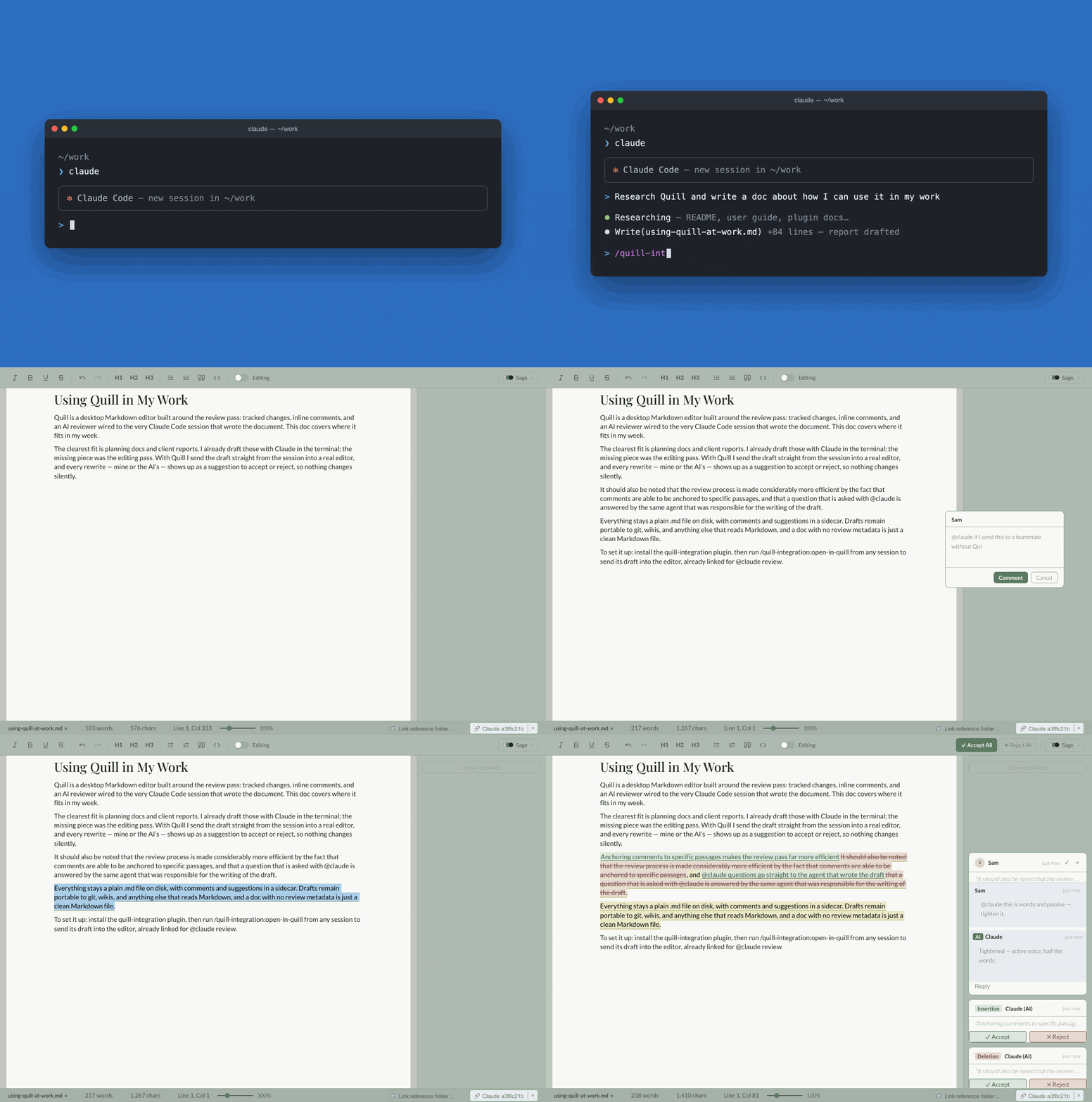
Files are plain .md on disk; review metadata rides alongside in a sidecar, so the Markdown stays portable and editable anywhere.
The defining feature: a document can be linked to the Claude Code session that authored it. A reviewer can reply to a comment with
@claudeand get an inline, context-aware answer from the same agent — even after that session has been compacted.
Features
- WYSIWYG Markdown editing built on Tiptap/ProseMirror, with a formatting toolbar (bold, italic, underline, strikethrough, headings, lists, blockquote, inline code) and undo/redo.
- Suggesting mode — a Google-Docs-style toggle that tracks edits as insertions and deletions instead of applying them directly. Each pending change gets a margin card with per-change Accept / Reject, plus Accept All / Reject All.
- Inline comments — anchor a threaded comment to a text range; reply, resolve, and delete. Comment cards live in the right margin with collision-avoidance so they never overlap.
@claudereplies — link a document to its authoring Claude Code session and ask questions in a comment thread. Answers stream back inline. Quill sends a line diff of what changed (or the full document, if the session's context was compacted).- AI-authored tracked changes — ask Claude in a comment to revise the text ("tighten this", "fix the grammar") and it writes the edits straight into the document as tracked changes attributed to Claude — reviewed as ordinary Accept / Reject suggestion cards, just like a human's. Scope follows your phrasing: the highlighted text by default, or "this paragraph" / "the whole document".
- Reference folder — link a document to a folder of source material (notes, research, data files). Every
@clauderequest grants Claude read access to that folder and includes a manifest of its contents, so it can pull in the relevant sources before answering. - Deep links —
quill://open?file=…opens a document directly, e.g. launched from a Claude Code session, restoring its comments, suggestions, and session binding. - Quality-of-life — document zoom (60–240%), four persisted color themes, a live status bar (word/char count, line/column, dirty indicator), and standard file shortcuts (New, Open, Save, Save As).
Persistence model
Every saved document is two files:
| File | Contents |
|---|---|
<name>.md | Portable Markdown — the document itself. |
<name>.comments.json | Sidecar holding comments, suggestions, the linked Claude session, and the reference folder. |
The sidecar is deleted automatically on save when it holds nothing, so a document with no review metadata is just a clean .md file.
Install
Grab the installer for your Mac from the latest GitHub Release:
| Platform | File |
|---|---|
| macOS (Apple Silicon) | …_aarch64.dmg |
| macOS (Intel) | …_x64.dmg |
Releases are macOS-only for now — the @claude integration locates the Claude CLI and its sessions via Unix paths, and we'd rather not ship builds that can't deliver the full experience. Windows and Linux users can still build from source (on Linux everything works, including @claude; on Windows the editor works but @claude is not yet supported).
macOS: the app is not yet code-signed, so the first launch is blocked by Gatekeeper. Right-click (or Control-click) Quill.app and choose Open, then Open again in the dialog — only needed once. (Alternatively: xattr -dr com.apple.quarantine /Applications/Quill.app.)
New to Quill? Start with the User Guide — no programming knowledge required.
Setting up @claude
Editing, tracked changes, and comments work standalone. The @claude features — AI replies and AI-authored tracked changes — need the Claude Code CLI on the same machine:
-
Install Claude Code (skip if
claude --versionalready works):curl -fsSL https://claude.ai/install.sh | bash -
Sign in — run
claudein a terminal and follow the login prompt. Quill talks to the CLI under your account; there are no API keys to configure. -
Launch Quill once so macOS registers the
quill://deep-link scheme. -
Install the Quill plugin for Claude Code — this adds the slash command that sends a document from a Claude Code session straight into Quill:
claude plugin marketplace add sam-powers/quill
claude plugin install quill-integration@quill-official
The loop this enables: draft a document with Claude Code, run /quill-integration:open-in-quill draft.md in the session, and the document opens in Quill already linked to that session — comment @claude … anywhere and the agent that wrote the document answers, or revises it as tracked changes for you to accept or reject. See the plugin README for details.
Building from source
Prerequisites: Node.js 22+, a Rust toolchain, and the Tauri 2 system dependencies for your platform. The @claude feature additionally requires the Claude Code CLI on your PATH.
# Install JS dependencies
npm install

# Run the full desktop app with hot reload
npm run tauri dev

# Produce a distributable bundle for your platform
npm run tauri build
npm run dev runs only the Vite frontend in a browser (no native window, no file I/O) — useful for UI work.
Development
npm run typecheck     # tsc --noEmit
npm run lint          # eslint
npm run format:check  # prettier --check
npm test              # vitest (unit + component)
npx playwright test   # end-to-end (requires browsers: npx playwright install)

cd src-tauri && cargo test && cargo clippy -- -D warnings && cargo fmt --check
CI runs the full frontend and Rust suites on every push and pull request to main. Pushing a version tag (v*) triggers the release workflow, which builds macOS installers (Apple Silicon + Intel) and attaches them to a draft GitHub Release for a maintainer to review and publish.
Project layout
src/                  React/TypeScript frontend
  App.tsx             Top-level orchestration (editor, comments, suggestions, shortcuts)
  components/         Editor, toolbar, comment/suggestion cards, footer, session picker
  extensions/         Tiptap extensions: TrackChanges, Comment
  hooks/              File I/O, comment/suggestion state, Claude replies
  types/              Shared data contract (Comment, Suggestion, SidecarFile, …)
  utils/              Pure helpers (sidecar paths, tracked-edit diffing)
  test/               Vitest unit/component tests
src-tauri/            Rust/Tauri backend (file I/O, dialogs, Claude session integration)
e2e/                  Playwright end-to-end specs
plugin/               Claude Code plugin that opens files in Quill via deep link
.claude-plugin/       Marketplace manifest so `claude plugin marketplace add` finds the plugin
docs/                 Design references and supporting docs
See PRD.md for the full as-built product spec and CLAUDE.md for architecture notes.
License
Released under the Apache License 2.0.