
LLM Workbench
roymcfarland/llm-workbench
Plano de controle para pipelines LLM com auditoria, replay e gates humanas
Ver no GitHubPlano de controle open-source e agnóstico a modelos para aplicações LLM, oferecendo interface human-gated com histórico de rastreamento completo, telemetria de custos e replay de execuções. Implementa gates de aprovação humana, auditoria e controle de fluxo para pipelines de IA em produção.
Instalação
npx convez-ai roymcfarland/llm-workbench1 comando no terminal: detecta o formato do repositório (marketplace ou plugin avulso) e instala via Claude Code. Requer Node 18+ e o Claude Code instalado.
Métricas
Casos de uso
- Implementar camada de aprovação humana em fluxos de IA
- Auditar e revisar execuções de agentes LLM com histórico completo
- Monitorar custos e telemetria de chamadas a modelos
- Executar e reexecutar workflows de IA com rastreamento total
Veredito

Ferramenta madura e bem-arquitetada para quem precisa de controle produtivo sobre agentes LLM em ambientes corporativos. MIT license e npm packages consolidadas; exige profundidade técnica em TypeScript e MCP, mas resolve um problema real de governança que ferramentas genéricas não endereçam.
README
A tradução para o português deste README ainda está na fila.
LLM Workbench




An open-source control plane for LLM-powered products.
LLM Workbench gives AI applications a production-grade human interface for the messy parts that matter: workflow state, artifacts, rules, human review gates, trace history, model I/O, cost telemetry, import/export, and replay.
It is not another chat UI. It is the layer you bolt onto an LLM pipeline when you want non-technical users to inspect, edit, approve, branch, audit, and learn from the work your system is doing.
The runtime is headless, model-agnostic, and environment-agnostic. It does not call OpenAI, Anthropic, local models, or any other provider directly. Your host application owns prompts, tools, models, and policy. LLM Workbench records what happened and gives humans a clean control surface over it.
License: MIT — free to use, modify, and distribute. The five core libraries are published to npm under the
@llm-workbenchscope.
Status
October 2026: merge CI runs the audit gate
(node scripts/audit-gate.mjs --mode=gate), and the daily
audit-autofix.yml workflow opens lockfile fix PRs when needed. Web fonts are
self-hosted via next/font/local; the CSP no longer allows Google font hosts
and adds Vercel-toolbar sources only on preview deployments. Dependabot majors
are declined unless an advisory, EOL, or unblocking driver exists (see
ROADMAP.md).
July 2026 — docs and quality pass: packages ship JSDoc with
@packageDocumentation blocks in ui, adapters-react, ai-sdk, and mcp,
and @param/@returns/@throws on public APIs, backing a generated
API reference that's rebuilt from
source on every deploy rather than hand-maintained. New
Getting Started and
Architecture guides join
the existing protocol reference.
CI now reports test coverage via Codecov, and the README gained an honest
comparison against adjacent tools (see
"How LLM Workbench Compares" below). Packages
version independently via changesets
— a release can bump some packages and not others, so don't assume all five
always move in lockstep; check each package's own CHANGELOG.md for its
real current version.
v0.3.x (June 2026): LLM Workbench is now open source under the MIT License
and published to npm under the @llm-workbench
scope (five packages: runtime, ui, adapters-react, ai-sdk, mcp). This
release focused on making the packages genuinely installable and safe to depend on:
a CI smoke test that imports the built packages under plain Node ESM (not just a
bundler), removal of the last unsafe-eval from the production CSP by precompiling
JSON-Schema validators at build time, cleared dependency advisories, a
severity-scoped audit gate in CI, secret scanning, and packages published with
build provenance. See the launch post:
llm-workbench-is-now-open-source.
v0.2.0 (2026-04-27): the runtime adds Trace 2.0 (hierarchical spans, OTel
GenAI mapper), hierarchical supervision (runChildrenOf, cancelRunCascade),
and an externalizable ArtifactStore; @llm-workbench/ai-sdk wraps Vercel
AI SDK v5 with automatic trace events; the UI ships scoped lwb- CSS,
accessible @dnd-kit reorder, virtualized trace, and a WorkflowGraph;
and a hosted reference deployment lands at apps/web.
See CHANGELOG.md for the full list.
Project spec: PROJECT.md is the authoritative source of truth for purpose, scope, non-goals, and the rules that automated reviewers enforce on every PR.
See It Live
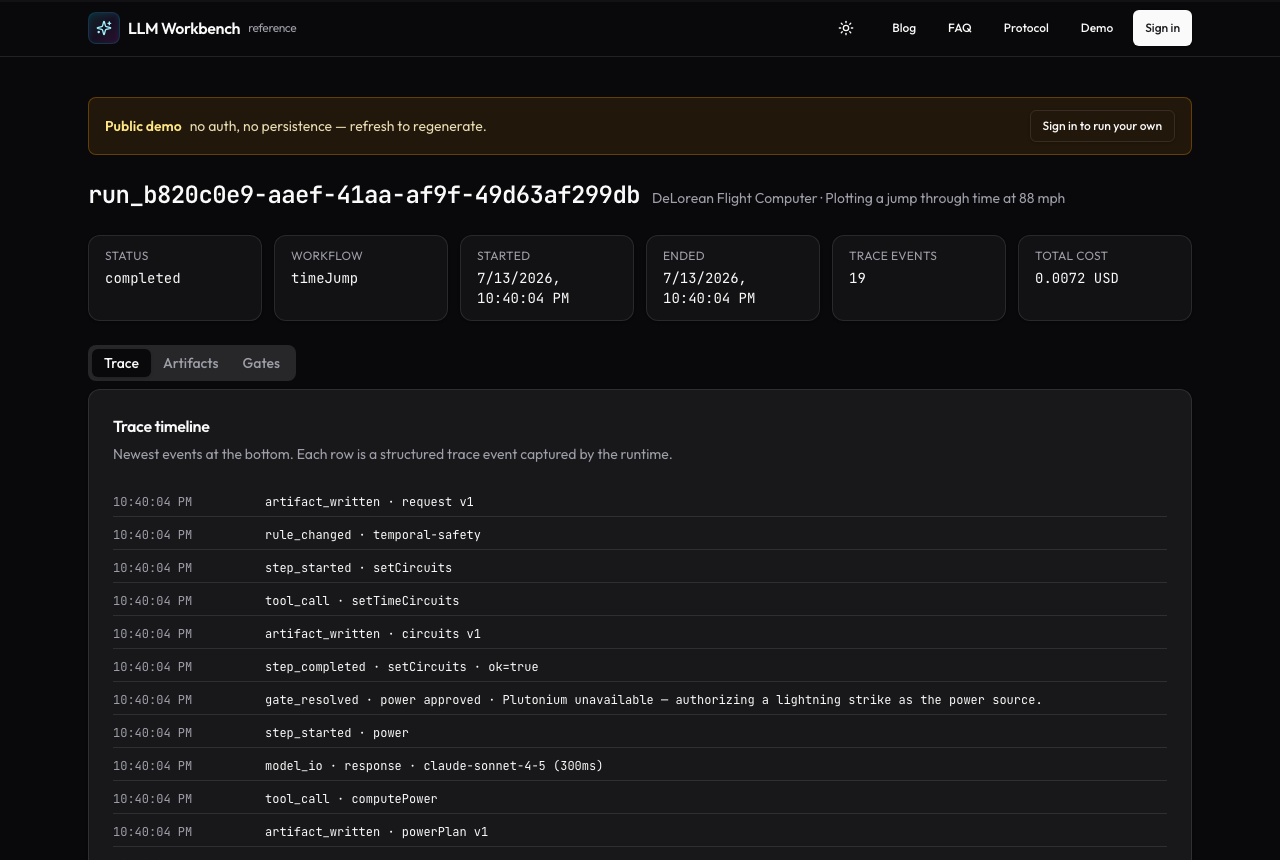
- Interactive demo (no signup): https://www.llmworkbench.io/runs/demo — a read-only LLM Workbench run rendered exactly as an authenticated run is.
- Overview & docs: https://www.llmworkbench.io · https://www.llmworkbench.io/docs/protocol
Install
npm install @llm-workbench/runtime
Optional companion packages:
npm install @llm-workbench/ui @llm-workbench/adapters-react   # React control surface
npm install @llm-workbench/ai-sdk                              # Vercel AI SDK tracing
npm install @llm-workbench/mcp                                 # expose runs over MCP
All five libraries are published under the
@llm-workbench scope (MIT, ESM,
tested on Node 22, 24, and 26). The runtime has no React or framework dependency — it runs in the
browser, Node, or edge-style runtimes. Jump to the
60-second integration for a complete example.
For Reviewers
If you're reviewing this repo, a useful 15-minute path is:
- Open the live demo first: https://www.llmworkbench.io/runs/demo.
- Skim PROJECT.md, then the Architecture section below.
- Read one representative source file:
packages/runtime/src/runtime/session.ts. - Read one representative test suite:
packages/runtime/src/runtime/workbench.test.ts.
How This Repo Is Built
Most changes are shipped as deliberately small slices. The maintainer acts as architect/advisor: designing scope, grounding the prompt in repository recon, catching spec errors, reviewing the implementation, and deciding whether to merge. A coding agent then implements the scoped PR, and a separate verifier agent independently checks it against PROJECT.md with a structured APPROVE/REJECT verdict.
The process artifacts are there on purpose. PROJECT.md is the contract both agents are held to; each slice's build record (closeout) lives in its PR description. VERIFIER-AUDIT-PR8.md and VERIFIER-AUDIT-PR10.md are independent verification transcripts from specific PRs.
Security and automation
Alongside human/agent review, branch protection requires only build & test (node 22)
and build & test (node 24). Other workflows report findings or automate scheduled
and push-triggered work; they are not PR gates. Defined in .github/workflows/:
| Workflow | Checks or automation |
|---|---|
ci.yml | Runs on PRs and pushes to main and autopublish/**. Build & test jobs on Node 22, 24, and 26: build, AI SDK 5/7 type compatibility, ESM smoke, tests, typecheck, lint, audit gate and production build. CI runs node scripts/audit-gate.mjs --mode=gate, wrapping audit-ci and audit-ci.jsonc: high/critical advisories fail; registry outages warn and pass without evaluating; unrecognised failures fail. Coverage, Codecov uploads and Playwright run on Node 24 only. |
codeql.yml | Reports static analysis of first-party code (javascript-typescript) and workflows (actions); not a required check and does not block merging. |
gitleaks.yml | Secret scan checks commits on PRs and pushes to main using gitleaks/gitleaks-action@v3 and the test-placeholder allowlist. See SECURITY.md for private reporting. |
audit-autofix.yml | Daily/manual gate check; opens or updates one chore/audit-autofix PR, never auto-merges. Verifies with a clean install, npm run audit:check and npm run ci on Node 24; the PR’s CI adds Node 22 and 26 jobs, plus coverage and Playwright on Node 24. An unchanged fix fails for triage; registry failure during the gate check warns and opens no PR. Raw verification fails on registry outages. Review all version moves: npm audit fix can change packages the gate did not require. A separate job fails the run when the autofix PR has been open more than 48 hours (the daily 06:00 UTC cadence means it first fires on day 3). |
blog-autopublish.yml | Scheduled/manual weekly source-grounded blog publisher, not a PR gate (see docs/blog-autopublish.md). |
release.yml | On pushes to main, when enabled, publishes packages to npm via OIDC trusted publishing with provenance; not a PR gate. |
Dependabot checks npm workspaces and GitHub Actions weekly. npm minor and patch updates are grouped, while eligible majors get individual PRs. See ROADMAP.md for the upgrade policy and current exceptions.
Why It Exists
LLM apps fail in boring, expensive ways:
- Outputs change and nobody knows why.
- Prompts, rules, artifacts, and human edits drift apart.
- Non-technical reviewers get a black box instead of useful controls.
- Teams cannot replay what happened after a bad run.
- Model spend is logged somewhere, but not where product decisions happen.
- "Add AI" becomes a pile of custom debugging panels and brittle JSON editors.
LLM Workbench turns that chaos into an inspectable run graph.
How LLM Workbench Compares
LLM Workbench records model calls, cost, and traces as part of workflow execution. The vendor features below were checked in November 2026.
Helicone offers an OpenAI-compatible gateway for forwarding and logging model requests across providers, including OpenAI and Anthropic. The gateway supports routing, fallbacks, and session tracking. An existing OpenAI SDK integration can point its base URL at Helicone and use a Helicone API key. Helicone also documents an asynchronous logging integration. See the AI Gateway overview and integration options.
Langfuse offers tracing, prompt management, datasets, experiment comparison, and LLM-as-judge scoring. Its annotation queues let reviewers score and comment on recorded traces, observations, and sessions. The core platform is MIT-licensed and self-hostable. See the platform overview, annotation queues, experiments, LLM-as-judge scoring, and self-hosting license.
LangSmith is LangChain's platform for tracing, evaluation, prompt experimentation, and agent debugging. It integrates with LangGraph and supports other stacks, including OpenAI, Anthropic, and the Vercel AI SDK. LangSmith Studio provides interactive debugging, including replaying a LangGraph run from a checkpoint. The Playground lets you test changes to prompts and models. Self-hosted LangSmith is an Enterprise add-on. See observability, evaluation, Studio, LangGraph replay, Playground, and self-hosting.
LLM Workbench embeds workflow state and human review into your app via
WorkbenchRuntime and WorkbenchSession. Your code calls methods such as
writeArtifact, logModelIO, and resolveGate and keeps control of its
model calls and provider URLs. The step policies PAUSE_BEFORE, PAUSE_AFTER,
and CHECKPOINT pause execution until the host calls session.resolveGate().
See the project scope for how this fits alongside
evaluation and model routing tools.
Run bundles carry a SHA-256 hash over canonical JSON, so a consumer can
check the export against that hash. Recorded gate events capture approval
decisions, and the host authenticates the producer. The host also chooses
where run data goes through RunRepository (memory, IndexedDB, HTTP, or
a custom backend).
What You Get
- Model-agnostic runtime. The host decides which provider, model, prompt strategy, and tool registry to use. The runtime records model I/O and tool calls through explicit APIs.
- Workflow-shaped execution. Workflows are DAGs with step-level gate
policies:
AUTO,PAUSE_BEFORE,PAUSE_AFTER, andCHECKPOINT. - Human review gates. Pause before or after important steps, collect approvals, rejections, edits, and notes, then resume with traceable intent.
- Schema validation for artifacts and rules. Register JSON Schemas with
SchemaRegistryand usevalidatedWriteArtifactorvalidatedReplaceRuleSetto validate with Ajv before writing. The runtime also supports JSON Patch and redacted user-bundle exports. - Tamper-evident run bundles. Exports carry a SHA-256 integrity hash over canonical JSON. Imports verify integrity by default.
- Telemetry-ready traces. Track provider, model, usage, duration, cost, user, tenant, account, and plan metadata without locking into a vendor.
- Cost and usage summaries.
summarizeModelTelemetryturns raw trace events into a typed ledger grouped by provider, model, step, user, tenant, and plan. - Pluggable persistence. Use memory, IndexedDB, or HTTP behind one
RunRepositoryinterface. The HTTP adapter supports auth headers, timeouts, retries, and abort signals. - Composable UI. Use
WorkbenchShellas a ready-made React control panel, or build your own UI against the headless runtime.
Architecture
host app
  owns models, prompts, tools, business logic
  calls runtime APIs as work happens

@llm-workbench/runtime
  records workflow state, artifacts, rules, gates, traces, bundles, telemetry
  runs in browser, Node, or edge-style runtimes

@llm-workbench/ui
  React shell for artifact editing, rules, trace history, gates, import/export

@llm-workbench/adapters-react
  subscription hooks for live runtime state
Repository Layout
packages/
  runtime/              @llm-workbench/runtime
  ui/                   @llm-workbench/ui
  adapters-react/       @llm-workbench/adapters-react
  ai-sdk/               @llm-workbench/ai-sdk
  mcp/                  @llm-workbench/mcp (MCP server + HTTP adapter)
examples/
  job-search-demo/    Vite demo app exercising the full surface
  run-repo-server/    Reference REST store for HttpRunRepository
apps/
  web/                Hosted reference deployment (Next.js + Supabase + AI Gateway + Clerk)
| Package | What it gives you |
|---|---|
@llm-workbench/runtime | Protocol types, WorkbenchRuntime, WorkbenchSession, SchemaRegistry, persistence adapters, bundle import/export, telemetry summaries, and structured WorkbenchError. |
@llm-workbench/ui | WorkbenchShell, a themeable React interface for artifacts, rules, traces, gates, and bundles. |
@llm-workbench/adapters-react | useWorkbenchRunRevision for subscribing React components to live run state. |
@llm-workbench/ai-sdk | Vercel AI SDK v5 and v7 wrappers (tracedGenerateText, tracedStreamText, tracedGenerateObject, tracedStreamObject, traceTools) that emit correlated model_io, tool_call, and gateway-cost trace events automatically. |
@llm-workbench/mcp | Model Context Protocol server factory plus HTTP handler (createWorkbenchMcpHttpHandler) for exposing the runtime over MCP — see packages/mcp/README.md. |
Local Development
The workspace uses TypeScript 6 and Vitest 5. The hosted app uses Next.js 16, React 19, Tailwind CSS 4, Clerk, Supabase Postgres, and Vercel AI SDK 7. The UI and React adapter libraries support React 18 and 19 as peers.
Use a Node.js release that satisfies engines.node in
package.json. CI exercises Node 22, 24, and 26. Use the npm
bundled with your supported Node installation for workspace commands
and the npm lockfile.
npm ci
npm run build              # Build the workspace libraries
npm test
npm run demo               # Vite demo app at http://localhost:5173
npm run demo:http-server   # Reference REST store for HttpRunRepository
The Vite demo and reference store run locally without service configuration. See CONTRIBUTING.md for the local CI sequence and PR process, and the web app guide to run the hosted reference app locally.
Web app environment
Set local app variables in apps/web/.env.local and hosted variables in the
appropriate Vercel project environments. Keep server-side credentials scoped
to the server.
| Name | Purpose | Required? | Where to set |
|---|---|---|---|
NEXT_PUBLIC_CLERK_PUBLISHABLE_KEY, CLERK_SECRET_KEY | Clerk client and server authentication | Yes for the web app | Local, Vercel |
NEXT_PUBLIC_CLERK_SIGN_IN_URL, NEXT_PUBLIC_CLERK_SIGN_UP_URL | Clerk's hosted app entry paths | Configure if needed for your Clerk instance | Local, Vercel |
NEXT_PUBLIC_CLERK_SIGN_IN_FALLBACK_REDIRECT_URL, NEXT_PUBLIC_CLERK_SIGN_UP_FALLBACK_REDIRECT_URL | Clerk redirects when there is no return URL | No | Local, Vercel |
NEXT_PUBLIC_SUPABASE_URL, SUPABASE_SERVICE_ROLE_KEY | Supabase project URL and server-side run storage access | Yes for run persistence | Local, Vercel |
AI_GATEWAY_API_KEY | Authenticate model calls to Vercel AI Gateway | Yes for model calls without OIDC | Local, Vercel if using a key |
VERCEL_OIDC_TOKEN | Platform-managed authentication for AI Gateway | Alternative to the Gateway API key | Vercel supplies it when OIDC is enabled |
NEXT_PUBLIC_SITE_ORIGIN | Metadata base and origin fallback when there is no request host | Set for your own deployment | Local, Vercel |
UPSTASH_REDIS_REST_URL, UPSTASH_REDIS_REST_TOKEN or KV_REST_API_URL, KV_REST_API_TOKEN | Redis connection for API rate limiting | Yes for proxy-matched APIs under a production build unless explicitly opted out | Local for production-build testing, Vercel |
RATE_LIMIT_ALLOW_UNCONFIGURED | Allow proxy-matched APIs to run under a production build without Redis | No | Local for production-build testing, Vercel |
CSP_EXTRA_CONNECT_SRC | Allow additional CSP connection origins | No | Local, Vercel |
RESEND_API_KEY, RESEND_FROM | Enable and configure run-completion emails | Both needed for email | Local, Vercel |
GOOGLE_SITE_VERIFICATION, BING_SITE_VERIFICATION, YANDEX_SITE_VERIFICATION | Search engine verification metadata. The aliases NEXT_PUBLIC_GOOGLE_SITE_VERIFICATION, NEXT_PUBLIC_BING_SITE_VERIFICATION, and NEXT_PUBLIC_YANDEX_SITE_VERIFICATION also work | No | Local, Vercel |
Next.js sets NODE_ENV. Vercel provides VERCEL for hosted analytics and
VERCEL_ENV for preview-specific CSP settings. See the
Playwright guide, web app guide,
HTTP example, and
blog automation guide for tool-specific variables.
Deploy flow
Vercel builds preview deployments from PR branches and the production
deployment from main. With apps/web as the project root,
vercel.json installs from the workspace root, builds the
libraries, then generates the API reference and builds the web app.
See the deployment runbook for project setup and
PROJECT.md for architecture and scope.
60-Second Integration
import {
  WorkbenchRuntime,
  SchemaRegistry,
  registerDemoSchemas,
  summarizeModelTelemetry,
  validatedWriteArtifact,
} from "@llm-workbench/runtime";

const registry = new SchemaRegistry();
registerDemoSchemas(registry);

const runtime = new WorkbenchRuntime();
const { runId } = runtime.startRun({
  workflow: {
    id: "my-pipeline",
    version: 1,
    steps: [
      { id: "parse", gatePolicy: "PAUSE_BEFORE", inputs: [], outputs: [] },
      { id: "score", gatePolicy: "AUTO", inputs: [], outputs: [] },
    ],
    edges: [{ id: "e1", from: "parse", to: "score" }],
  },
  subject: {
    userId: "user_123",
    tenantId: "team_456",
    planId: "pro",
  },
});

const session = runtime.session(runId);

session.resolveGate({
  stepId: "parse",
  gate: "PAUSE_BEFORE",
  decision: "approved",
});

session.beginStep("parse");

validatedWriteArtifact(registry, session, {
  artifactKey: "compiledProfile",
  typeId: "compiledProfile",
  data: {
    headline: "TypeScript engineer",
    skills: ["typescript", "react", "systems"],
    summary: "Strong full-stack builder with AI workflow experience.",
  },
});

session.logModelIO({
  stepId: "parse",
  direction: "response",
  provider: "openai",
  model: "gpt-example",
  usage: { inputTokens: 120, outputTokens: 40 },
  cost: { amount: 0.0012, currency: "USD" },
  durationMs: 900,
});

session.completeStep("parse");

const telemetry = summarizeModelTelemetry(session.snapshot());
console.log(telemetry.totals, telemetry.byProviderModel);
Drop the shell anywhere in your app:
import { WorkbenchShell } from "@llm-workbench/ui";
import "@llm-workbench/ui/theme.css";

<WorkbenchShell runtime={runtime} runId={runId} registry={registry} />
Runtime Principles
- The runtime never hides state behind provider-specific abstractions.
- Structured outputs should be schema-validated before they become product state.
- Human edits and approvals are first-class trace events, not side notes.
- Exported runs should be useful for debugging, audits, demos, and learning.
- Model telemetry should be close enough to the workflow that cost and quality can be managed together.
- The public protocol should be boring, explicit, and durable.
License
LLM Workbench is released under the MIT License — free to use,
modify, and distribute, including commercially. The same license applies to every
package under packages/*.
Contributing
Contributions are welcome. Open an issue to discuss a change or report a bug via GitHub Issues, and see CONTRIBUTING.md for local setup and the PR process. Please also read the Code of Conduct.
Security
Please report security issues through the process in SECURITY.md.