
Editable HTML Slides
rossyao2022/editable-html-slides
Torne decks HTML gerados por IA editáveis no navegador, sem dependências
Ver no GitHubEditor WYSIWYG sem dependências que torna qualquer deck HTML editável diretamente no navegador. Permite edição inline de texto, inserção de imagens, drag-and-drop, undo/redo, reordenação de slides e exportação — sem alterar o design original nem exigir build.
Instalação
npx convez-ai rossyao2022/editable-html-slides1 comando no terminal: detecta o formato do repositório (marketplace ou plugin avulso) e instala via Claude Code. Requer Node 18+ e o Claude Code instalado.
Métricas
Casos de uso
- Corrigir e editar apresentações HTML geradas por IA sem voltar ao código
- Permitir que usuários não-técnicos modifiquem slides após geração
- Adicionar capacidade de edição visual a decks reveal.js ou html-ppt existentes
Veredito

Solução prática que preenche um gap real: IA gera decks bonitos, mas editar requer sair do navegador. Lightweight e sem efeitos colaterais no design original, funciona bem com padrões de deck existentes.
README
A tradução para o português deste README ainda está na fila.
editable-html-slides
A zero-dependency, in-browser WYSIWYG editor you can bolt onto any HTML slide deck — so the deck stays editable after it's generated.
AI coding agents are great at generating beautiful HTML decks, but the output
is read-only to a normal user — to change a title or swap an image they'd have to
open the source. This skill closes that gap with two small files
(editor.js + editor.css) that layer a visual editor on top of an existing
deck, without touching its design and without a build step, Node, or npm.
It pairs especially well with html-ppt
/ reveal-style decks — it preserves their presenter view and speaker notes — but
works on any deck using the .slide / .is-active convention.
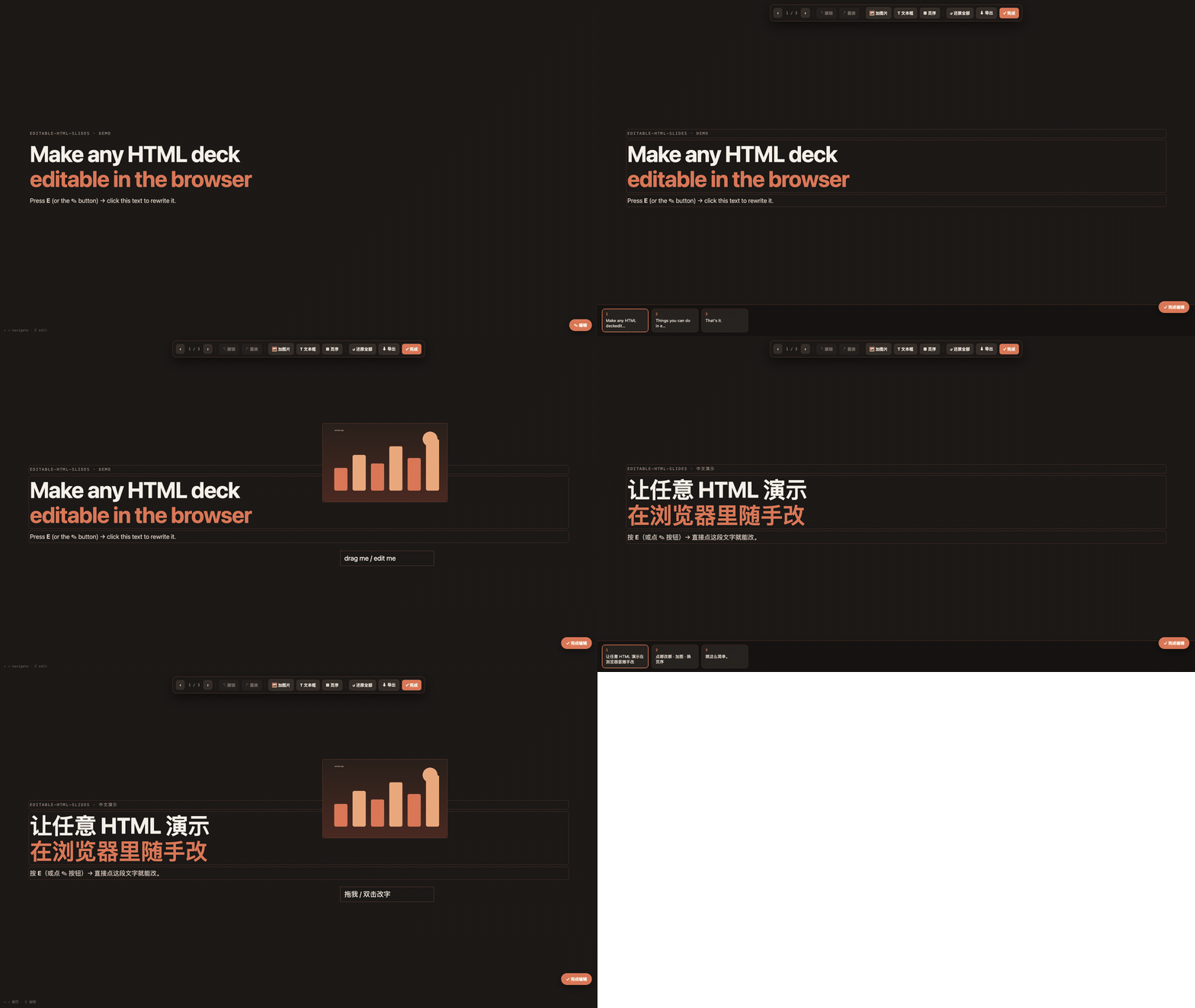
中文:把 AI 生成的静态 HTML 演示变成能在浏览器里随手改的演示——点字直接改、 拖图片进去、撤销重做、拖缩略图换页序、自动保存、导出干净 HTML。零依赖,不毁原设计, 保留逐字稿。按 E 或点 ✎ 进入编辑。
Features
- ✏️ Inline text editing — click any heading/paragraph/list item and type
- 🖼 Add images — local file (embedded as data URL) or paste with ⌘/Ctrl+V
- 🔤 Add text boxes — free-floating, double-click to edit
- ✋ Drag / resize / delete added objects
- ↶ Undo / redo — ⌘/Ctrl+Z, ⌘/Ctrl+Shift+Z (80-step snapshot history)
- ▦ Reorder slides — draggable thumbnail filmstrip
- 💾 Autosave to
localStorage+ ⬇ export a clean standalone HTML - 🎤 Non-edit mode is unchanged — still presentable (S / arrows / themes, etc.)
Toggle with the ✎ button or the E key. Esc / ✓ to exit.
Install as a Claude skill
npx skills add rossyao2022/editable-html-slides -g
or clone into your skills directory:
git clone https://github.com/rossyao2022/editable-html-slides \
  ~/.claude/skills/editable-html-slides
Use it on a deck
python3 scripts/inject.py /abs/path/to/your-deck/index.html
# then open index.html and press E
The injector copies editor.css + editor.js next to your deck and wires two
tags in (idempotently). Prefer to do it by hand? Add:
<link rel="stylesheet" href="editor.css">      <!-- in <head> -->
<script src="editor.js"></script>               <!-- before </body>, AFTER the deck's runtime -->
Try the demo
Open examples/demo.html — a tiny self-contained deck (with
a 30-line minimal runtime) — and press E. No other dependencies.
How it works
See references/runtime-notes.md for the design:
the slot-fixed, content-swap reorder model (so it never disturbs a presenter
runtime's cached page order), the snapshot-based undo stack, the .overview
double-count gotcha, and how to retarget the selectors for a non-standard deck.
Requirements
The deck's slides should use class .slide, with the visible one marked
.is-active, ideally inside a .deck container. Speaker notes in
<aside class="notes"> are preserved and never turned into editable on-slide
text. No Node, npm, build, or network required.
How it compares to other slide / PPT skills
These tools mostly generate decks. editable-html-slides is different — it
adds editing to a deck you already have, so it composes with the generators
rather than competing with them. An honest side-by-side:
| editable-html-slides (this) | html-ppt | frontend-slides | frontend-slides-editable | Claude for PowerPoint | |
|---|---|---|---|---|---|
| Primary job | make an existing deck editable | generate HTML decks (+ presenter mode) | generate HTML decks | generate + edit HTML decks | generate/edit native .pptx |
| Dependencies | none (no Node/npm/build) | none | Node (+ Python for PPT import) | Node 18+ | PowerPoint + paid plan |
| In-browser text edit | ✅ | ❌ (edit source) | ✅ (light) | ✅ | ✅ |
| Add image / drag / resize | ✅ | ❌ | ⚠️ limited | ✅ (+ multi-select, video) | ✅ |
| Undo / redo | ✅ | ❌ | ❌ | ✅ | ✅ |
| Reorder slides (drag) | ✅ filmstrip | via source | ❌ | ✅ | ✅ |
| Import existing PPT/PDF | ❌ | ❌ | ✅ PPT→HTML | ✅ (lossy redesign) | — (already PPT) |
| Export | ✅ single-file HTML | — | ✅ + deploy URL / PDF | ✅ single-file | native .pptx |
| Keeps your existing design + speaker notes | ✅ untouched | n/a (it is the deck) | ❌ regenerates | ❌ conversion redesigns | ❌ |
Pick this when you've already generated a deck you like (e.g. with html-ppt)
and just want it to stay editable for non-developers — without a build step or
losing the design/notes. Pick a generator (html-ppt, frontend-slides) when
you need to create a deck from scratch. Pick frontend-slides-editable when you
want a heavier editor (multi-select, video, PPT import) and don't mind Node.
Pick Claude for PowerPoint when the deliverable must be a native .pptx.
License
MIT © rossyao2022