
Claude Ableton
rohailaltaf/claude-ableton
Produção de música em Ableton Live controlada por voz/chat com Claude
Ver no GitHubMCP server que permite controlar Ableton Live 12 via chat com Claude. Crie tracks, instrumenetos, clips MIDI, progressões de acordes, mixagens e automações apenas conversando — 132 ferramentas integradas para produção de música generativa.
Instalação
npx convez-ai rohailaltaf/claude-ableton1 comando no terminal: detecta o formato do repositório (marketplace ou plugin avulso) e instala via Claude Code. Requer Node 18+ e o Claude Code instalado.
Métricas
Casos de uso
- Gerar beats e progressões musicais descrevendo o que deseja
- Automatizar workflows repetitivos de produção musical
- Prototipagem rápida de ideias musicais sem tocar no mouse
Veredito

Ferramenta especializada e bem executada para produtores que usam Ableton. Excelente integração via MCP com suporte a 132 operações, mas limitada ao macOS e Live 12. Genuinamente útil para quem trabalha com música eletrônica.
README
A tradução para o português deste README ainda está na fila.
claude-ableton
Make music in Ableton Live 12 by talking to Claude. claude-ableton is a Claude plugin that lets you create tracks, load instruments / drum kits / samples, write MIDI clips and chord progressions, mix, route sidechains, automate parameters, build arrangements, and master — all by chatting.
"Make a lo-fi beat at 82 BPM: Boom Bap drums, a warm Rhodes on
 Cmaj7 → Am7 → Dm7 → G7 with smooth voicing, a sub bass sidechained
 to the kick, and a tape-wobble auto-filter on the keys."
Everything materializes in your open Live set. 132 tools.
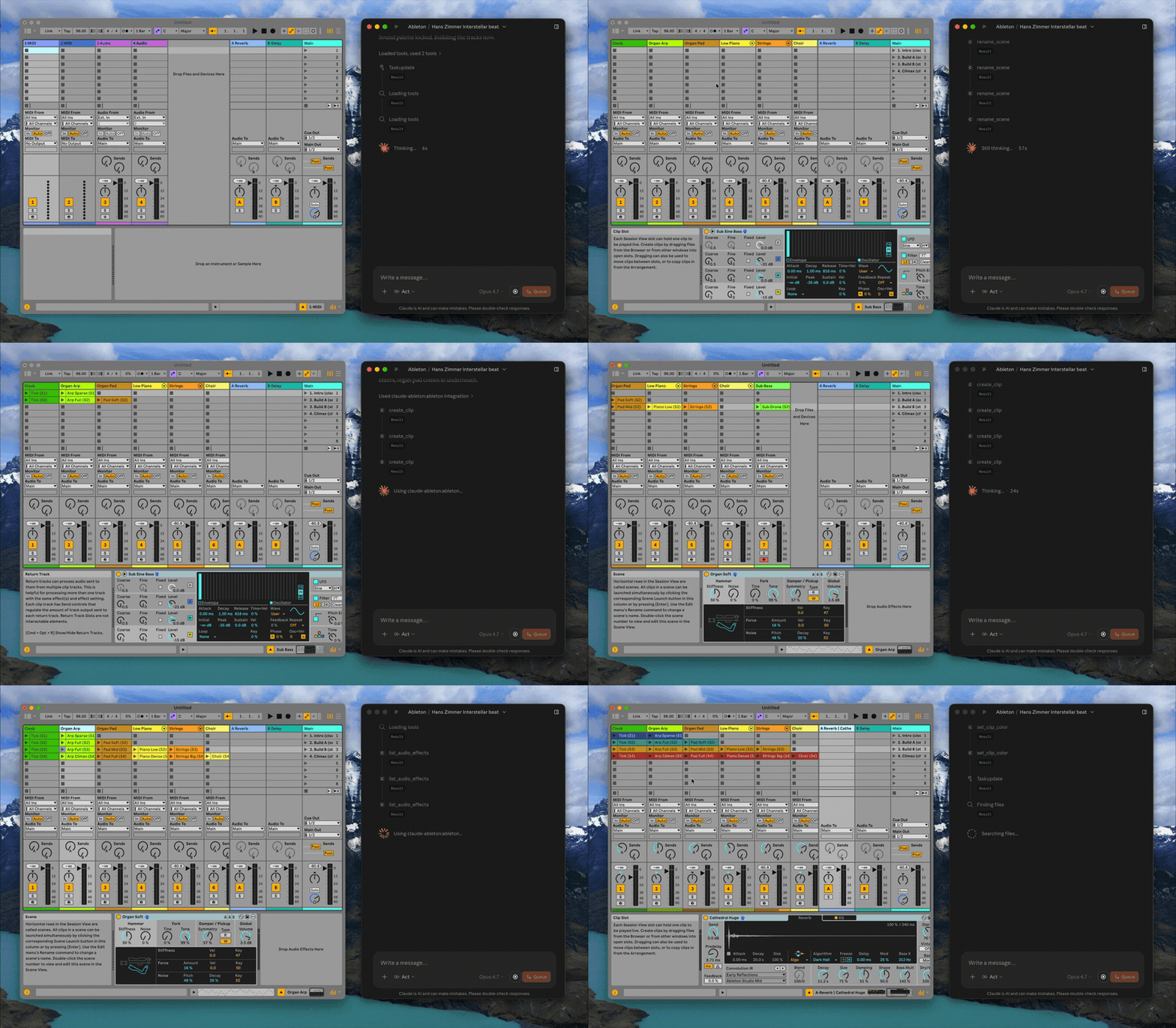
A real session, sped way up — Claude building a track hands-free.
Requirements
- macOS — Windows support is planned.
- Ableton Live 12 — Suite recommended; Intro/Standard ship fewer built-in instruments.
- Claude Code or Claude Desktop for the one-step plugin install — or any other MCP client (Cursor, Codex, …) via the manual config below.
- Node 18+ only if you install via the
npxpath below. Claude Code and Claude Desktop bundle their own Node, so the plugin install needs nothing extra.
Install
Claude Code
Add the marketplace, then install:
/plugin marketplace add rohailaltaf/claude-ableton
/plugin install claude-ableton@claude-ableton
Claude Desktop
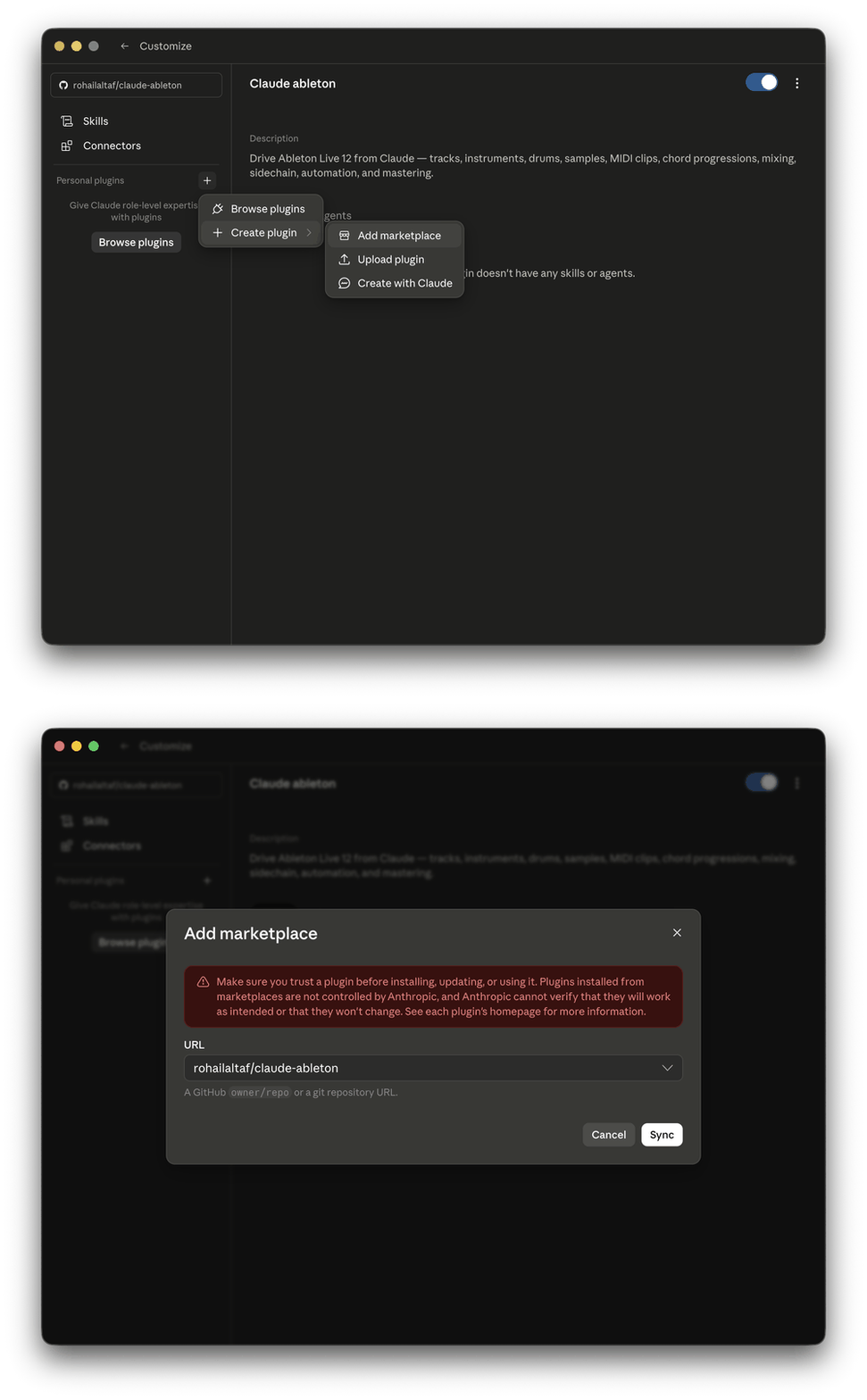
Use Claude Desktop's Add marketplace feature (in its plugin settings), add
rohailaltaf/claude-ableton, then install the claude-ableton plugin.
Cursor, Codex, or any other MCP client
Add this to your client's MCP config:
{
  "mcpServers": {
    "ableton": {
      "command": "npx",
      "args": ["-y", "github:rohailaltaf/claude-ableton"]
    }
  }
}
One-time Ableton setup
The first time it runs, the plugin installs the bundled AbletonOSC Remote Script into your Live User Library automatically. You then enable it once:
- Start (or restart) Ableton Live.
- Open Settings/Preferences → Link, Tempo & MIDI.
- Under Control Surface, select AbletonOSC. (Leave Input/Output set to None.)
That's it. The plugin checks the Remote Script version on every launch and re-installs it if it changed, so you stay in sync.
How it works
Claude (Code / Desktop / Cursor / …)
   │  MCP (stdio)
   ▼
claude-ableton  ──OSC──▶  127.0.0.1:11000  AbletonOSC Remote Script  ──▶  Live's LOM
                ◀──OSC──   127.0.0.1:11001
The bridge is localhost-only — there is no network listener and nothing is reachable off your machine.
What it can do (132 tools)
- Tracks & instruments — create/duplicate/delete MIDI tracks; load any built-in Live 12 instrument (synths, samplers, racks, Drum Synths) or a named preset by browser path.
- Clips & notes — create MIDI clips, read/add/remove notes, rename, loop, color, quantize, duplicate.
- Chord progressions — parse chord symbols and write block chords with smooth voice-leading (common tones held) or literal root position.
- Drums & samples — load full drum kits, inspect Drum Rack pads, drop samples onto pads, load a sample onto a track (Simpler-wrapped), or drop an audio file straight onto the Session grid as a real audio clip.
- Browser — list instruments, drums, audio/MIDI effects, samples, packs, plugins, sounds, clips, Max for Live, user library, current project — and load from them (presets, sounds, samples, plugins/VSTs, saved racks, pack content, M4L devices).
- Mixing — volume, pan, mute, solo; device parameters; return tracks & sends; sidechain source/channel routing.
- Mastering — load effects on the Main track (Glue Compressor → Limiter), read/set master device params and output level.
- Automation — step envelopes for device and mixer parameters (volume / pan / sends); smooth ramps via many small steps.
- Scenes & arrangement — list/create/duplicate/rename/delete scenes; stamp Session clips onto the Arrangement timeline to build a finite track.
- Transport & state — play/stop/continue, fire scenes/clips, set/read tempo, time signature, playback position.
See DESIGN.md for conventions (pitch numbering, beat units, the instrument allowlist) and design decisions.
Bundled skills
The plugin also ships Agent Skills — workflow recipes that trigger automatically on matching requests:
- mastering-chain — say "master the track" or "make it louder" and Claude builds a Glue Compressor → Limiter chain on the Main track with conservative, streaming-safe settings (and won't stack a second limiter on a chain you already have).
Limitations
- Session-view authoring. Notes and clips are written into the Session grid;
to build a fixed track, stamp clips onto the Arrangement timeline with
duplicate_clip_to_arrangement(the only LOM path to a linear arrangement). - Step automation only. Smooth curves are approximated with many small steps — Live's API doesn't expose breakpoint curves.
- Live API ceilings (not exposed by Live's scripting API, so not buildable):
grouping tracks, saving/loading/exporting the Set, loading browser clips
(
.alcfrom Live's indexed Clips browser) into a Session slot — Live'sapp.browser.load_itemis device-only, no LOM path for clip-type items — freezing/flattening, and clip follow actions (removed from the Clip API in Live 12). (Loading raw audio files does work —load_audio_cliplands any.wav/.aif/.mp3/.flac/.oggdirectly on the Session grid.)
Security
This plugin grants Claude write access to your active Ableton Live session. The OSC bridge is localhost-only (no network port), but treat it like any local automation tool: review what Claude proposes before running it if you have unsaved work. Use Live's Undo (Cmd+Z) freely.
Development
git clone https://github.com/rohailaltaf/claude-ableton.git
cd claude-ableton
npm install
npm run package      # vendor the Remote Script + typecheck + bundle dist/index.js
npm run build— bundlesrc/into a singledist/index.js(esbuild).npm run typecheck—tsc --noEmit.npm run vendor— re-vendor the pinned AbletonOSC fork intovendor/.node scripts/integration-test.mjs— drive all 132 tools against a running Live (needs OSC port 11001 free and a scratch set open).
The plugin's server is bundled into one self-contained file with no runtime
dependencies, so the committed dist/index.js and vendor/AbletonOSC run
directly when the plugin loads.
License & credits
MIT © Rohail Altaf.
Built on AbletonOSC by Daniel
Jones / ideoforms (MIT) — an extended fork is bundled here; its license and
attribution are preserved in vendor/AbletonOSC/LICENSE.md.