
Claudio Symphony
rmtbb/claudio-symphony
Ouça suas sessões Claude como música ambiente — tones in-key para cada ação.
Ver no GitHubAgent que transforma sessões do Claude Code em música ambiente generativa. Cada chamada de ferramenta, edição e conclusão de sub-agent se torna um tom suave e harmônico, criando uma experiência sonora que reflete o estado de trabalho do seu pair-programmer. Oferece 36 presets, console web ao vivo e roteamento por sessão.
Instalação
npx convez-ai rmtbb/claudio-symphony1 comando no terminal: detecta o formato do repositório (marketplace ou plugin avulso) e instala via Claude Code. Requer Node 18+ e o Claude Code instalado.
Métricas
Casos de uso
- Monitorar progresso de sessões Claude sem sair do foco visual
- Diferenciar auditivemente o estado de múltiplas sessões rodando em paralelo
- Criar ambiente sonoro imersivo e não-invasivo para programação pair com IA
Veredito

Solução criativa e bem-executada que usa som como ferramenta cognitiva legítima — não apenas notificação. Implementação enxuta (1.500 linhas, uma dependência) com design generoso (36 presets, console web) torna acessível mesmo para usuários que nunca pensaram em usar áudio para produtividade.
README
A tradução para o português deste README ainda está na fila.
Claudio Symphony 🎼
Hear your Claude Code sessions. Every tool call, file edit, and finished thought becomes a soft, in-key sound — ambient music that moves with your AI pair-programmer.
Claudio listens to Claude Code's hook events and turns them into generative, always-in-key ambient music. Twenty tool calls in three seconds become one soft blur of tones, not twenty separate dings — because that's the difference between music and Slack notifications.
It is not a notification system. It's a room your Claude session is happening inside. After about twenty minutes you stop hearing it as music and start hearing it as the room — and the room moves with your work.
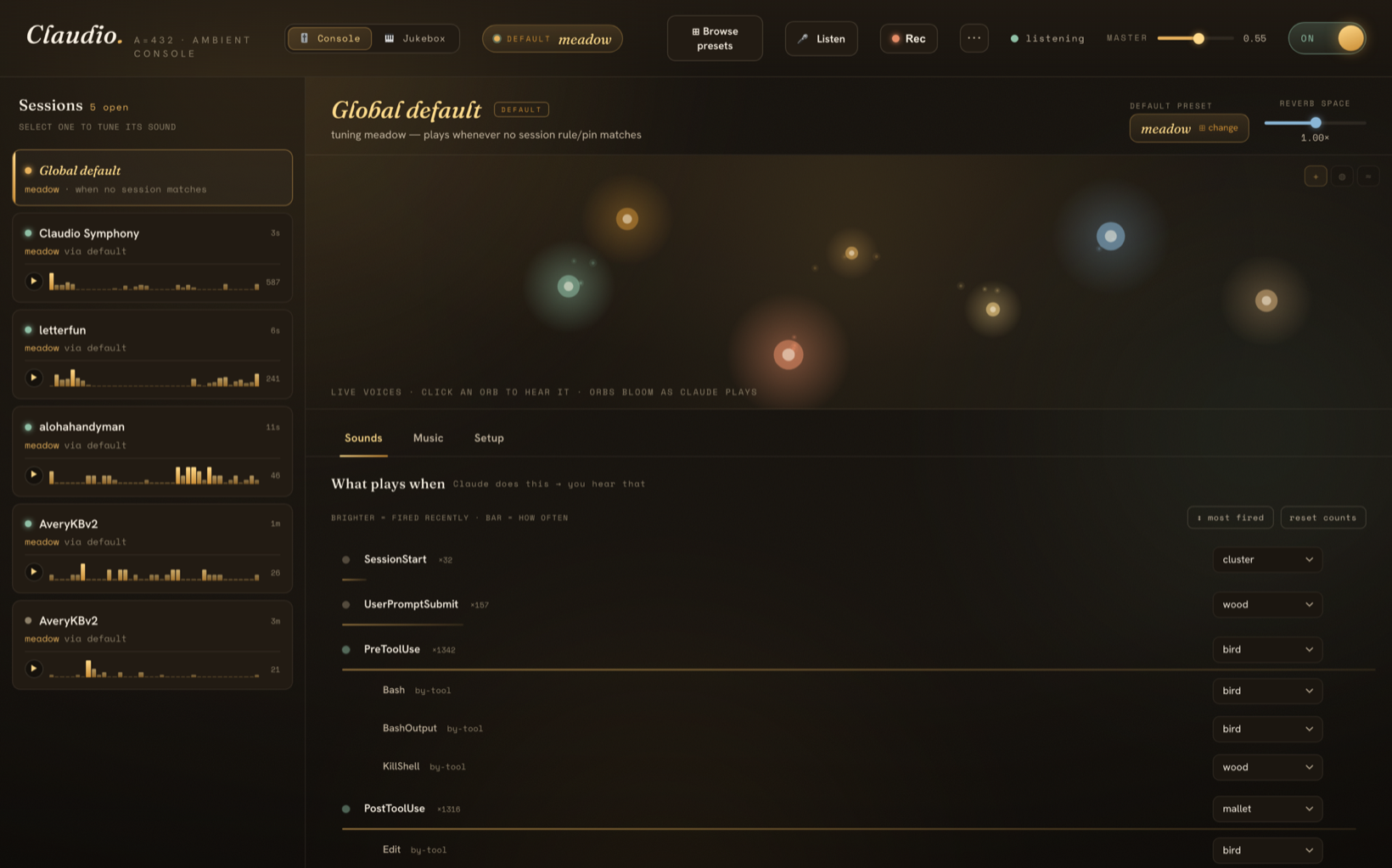
The
claudio webconsole: each voice is a glowing orb that lights up the instant Claude triggers it. Tune everything live; switch any of 36 presets with a click.
✨ Why you'll love it
- 🎧 It's calm, not noisy. No beeps, no buzzes, no notification DNA. Soothing tones, soft mallets, distant bells — everything tuned to the same key (A = 432 Hz) so it never clashes, no matter how fast Claude is moving.
- 👂 You can hear what your agent is doing. A pluck for a tool call, a chime when a sub-agent returns, a slow bloom when a turn finishes. Without looking, you know whether Claude is grinding, waiting, or done.
- 🪟 Hear every session at once. Running Claude in five terminals? Give each project its own room. Now the chord of your whole workspace is audible — you can tell the quiet one finished and the busy one hit an error, eyes closed.
- 🎹 36 presets, each a complete world. Sunlit music box, lush cathedral, near-silent rainfall, plucked koto, vibraphone lounge, handbell carillon, Rhodes warmth… switch live, mid-session, with one command.
- 🖥️ A genuinely beautiful web console. A living constellation of your voices that blooms in real time as Claude plays them. Click an orb to audition; drag a slider to tune.
- 🎚️ Tune everything, or nothing. Sensible defaults out of the box — or open the TUI / web panel and shape every voice, reverb tail, and event mapping to taste.
- 🪶 Featherweight & private. ~1,500 lines of Python, one dependency (numpy), no daemon, no telemetry, no network. Hooks fire async with a 1-second timeout, so they never slow Claude down.
🎧 Listen first
Pick the room you want to work in. meadow is the default — bright, friendly, no drone. Switch any time, live, no restart:
claudio preset use cathedral
A few of the flagship rooms:
🌳 meadow — the happy one (default)
Wooden felt-mallets and kalimba in a sunlit room. A-major pentatonic — universal happy mode, no possible dissonance.
Bright, satisfying, soft attacks. The "thock" of felt on wood for tool calls, kalimba tines for file edits, a small bird-chirp for shell commands, a 9-second major-triad bloom when Claude finishes. Like a music box in a sunny room.
🏛️ cathedral — the lush one
Modal drone bed with a full event palette. Eight voices. Always-on. The Eno / Budd / Frahm lane.
A low drone never stops. Soft felt-piano notes resolve as tools complete; faint airy tones pass by during bash commands; a tuned bell rings when a sub-agent finishes. Nothing has a melody, nothing repeats — the room just moves with the work.
🌧️ rainfall — the quiet one
Sparse drops in a still room with rare long blooms. Silence is the canvas.
Most of the time you hear nothing. PostToolUse plays a tiny 250 ms drop — a single bead of water on a still pond. Once a minute or two, a 25-second pad blooms in the distance and recedes. Late-night, deep-focus, almost-silent.
🎋 koto — the contemplative one
Plucked silk strings and a temple bowl in the A In-Sen scale. Spare, deliberate, like working through a tea ceremony.
A different emotional space from the bright A-major family — minor-leaning, Japanese, unhurried. Koto for melody, bowl for sustains, mokugyo (wooden fish) for accents.
🌌 …and 32 more
Crystal glass bowls (glassbright), vibraphone (lounge), handbell carillon (peal), steel pan (isleshine), hammered dulcimer (shimmerwire), Rhodes EP (tinewarm), vocal-oo choir (choirloft), nylon guitar (courtyard), ocarina (clayround), santoor (sunraga), and many more — each a complete, render-tested room.
Hear them all in seconds:
claudio auditionwalks every preset on your speakers, or open the web panel and click ▶ on any card.
👂 Hear all your sessions at once
This is the part you didn't know you wanted. Claudio routes sound per session, with three lookup tiers (most specific wins):
- Session pin —
claudio session pin <id> cathedral→ that one terminal, forever - Directory rule —
claudio rule add "/Users/me/quiet*" rainfall→ every session under that path - Global default —
claudio preset use meadow→ the catch-all
claudio sessions
#  #  sid       pin  preset      ago    src       cwd
#  1  33159931       meadow      0m     default   ~/Projects/shipping-app
#  2  ab12cd34  📌    rainfall    3m     pin       ~/Projects/quiet-stuff
Give your noisy refactor a different voice than your delicate prod fix, and the two coding sessions become audibly distinct. You stop alt-tabbing to check on them — you just hear which one needs you.
🖥️ The web control panel
claudio web # opens a local, no-deps control panel in your browser
A "warm nocturne observatory" you'll actually want to leave open:
- 🌠 A living constellation — each voice is a glowing orb in a slow-drifting galaxy that blooms in real time the instant Claude triggers it. Watch your session play itself.
- 🎚️ Tune anything live — per-voice gain, reverb, echo; remap any event; switch presets; set per-session rules — all written to the same files the CLI and hooks read, so every change is instant.
- 🔭 Browse 36 presets in a searchable gallery, audition with one click.
- 🎵 Music tab — global scale override, quantize-to-tempo, and MIDI song mode.
Pure Python standard library on the backend (127.0.0.1 only), Fraunces + Hanken + Space Mono on the front. No build step, no node_modules.
🎙️ Record & share your sounds
Found a preset + workflow that sounds amazing? Capture it and show it off.
claudio record           # record 30 seconds (the default)
claudio record 120       # record up to 5 minutes (300s max)
claudio record --drone   # add a faded drone bed for a more song-like clip
claudio record stop      # finish early and save right now
claudio record list      # see your saved clips
Here's the neat part: because Claudio already knows every sound it plays, recording doesn't touch your mic or system audio — it mixes the exact samples back into one clean track. Only Claudio, no room noise, no other apps, no virtual-audio-device setup. Clips land in recordings/ as a .wav plus a small .m4a for easy sharing.
Optional drone bed. The drone stays off for everyday use, but recordings can opt into one (--drone, or the toggle in claudio web). It lays a low, A-rooted drone under the clip and fades it in and out, so the take feels like one cohesive piece rather than scattered sounds. Off by default — it's there when you want body, gone when you don't.
Prefer buttons? Hit ● Rec in claudio web — pick a length, optionally flip on the drone bed, go work in your sessions, and grab the clip with a built-in player and download link.
🎹 Jukebox (a little easter egg). Don't want to wait for Claude to make sounds? Perform a MIDI file through the active preset. Each MIDI track is mapped to an event type — so the "PostToolUse voice" carries the melody while the "SessionStart voice" lays down a bass line — and the Events tab + constellation bloom in time. Start a recording first and you've captured a whole song played in your preset's palette. Click the . after Claudio (or the Music tab's 🎹 Jukebox button) to open it, drop in any .mid, and press play. From the CLI: claudio play <song> (import one with claudio song import <file.mid>).
🎬 Session mini-tracks — replay your workflow. Every Claude session is quietly captured as a tiny symbolic timeline (a few KB of JSON — just what happened, when, no audio). In claudio web, each session in the left rail gets a heavy-traffic sparkline (see the dense, bursty stretches at a glance) and a ▶ replay button. Replay re-runs your actual workflow as music through any preset — so you can audition the same session across presets and tune until it sounds great. Idle gaps are compressed so the busy parts stay punchy. Then ● render WAV bounces it to a shareable clip, or ⤓ score saves the tiny .score.json (far lighter to share than a WAV, and replayable anywhere). From the CLI: claudio replay list, claudio replay <session|latest> [--preset X] [--tempo 1] [--loop] [--render].
Share it! 🎧 Post your clip with the preset name so others can hear how their sessions could sound. The more sounds people share, the richer Claudio gets — and if you tune a combination you love, open a PR with the preset too.
📦 Install
Easiest: let Claude Code install it for you
Paste this straight into Claude Code and let it do the work:
Please clone and install Claudio Symphony for me: https://github.com/rmtbb/claudio-symphony
Clone the repo, run `python3 install.py`, then run `./bin/claudio install` to add the hooks
to ~/.claude/settings.json. When it's done, tell me to start a new session, how to switch presets
with `claudio preset use <name>`, and how to open the web UI with `claudio web`.
Manual
git clone https://github.com/rmtbb/claudio-symphony.git
cd claudio-symphony
python3 install.py            # deps + render samples + write starter config
./bin/claudio install         # adds hooks to ~/.claude/settings.json
Open a new Claude Code session and listen. That's it.
👉 There's a full UI. Run
claudio webto open the browser control panel — a live constellation of your voices where you can tune everything, browse and switch all 36 presets, build your own, and record clips. No build step, runs locally on127.0.0.1. See The web control panel.
Requirements
- 🍎 macOS (uses
afplay— Linux/Windows support is one small patch inevent.py; PRs welcome) - 🐍 Python 3.9+ with numpy
- 💾 ~250 MB free for generated samples (one-time render, then static)
Tip: add alias claudio='~/path/to/claudio-symphony/bin/claudio' to your shell profile.
🎛️ Use it
claudio status                          # what's installed and active
claudio preset list                     # see all 36 presets
claudio preset use cathedral            # switch live (no Claude restart)
claudio off / claudio on                # silence everything / restore
claudio web                             # the browser control panel
claudio tune                            # interactive terminal tuner (TUI)
claudio audition                        # hear every preset, then pick one
claudio test                            # walk every voice in the active preset
claudio volume 0.4                      # master gain
claudio coffee                          # ☕ support the project (see below)
claudio tune — the interactive tuner
─────────────── claudio tune ─────────────────────────────────
 preset: meadow   master: ▰▰▰▰▰▱▱▱▱▱ 0.55              ✓ saved
─ Voices — [gain]  press t for mioi ──────────────────────────
 ▶ mallet     gain ▰▰▰▰▰▱▱▱ 0.55  mioi ▰▰▱▱ 0.35s
   kalimba    gain ▰▰▰▰▰▱▱▱ 0.50  mioi ▰▰▱▱ 0.30s
   bloom      gain ▰▰▰▰▰▱▱▱ 0.55  mioi ▰▰▰▰ 10.00s
─ Events ─────────────────────────────────────────────────────
   PreToolUse              → wood
       · Bash              → bird
   PostToolUse             → mallet
       · Edit              → kalimba
       · on_failure        → chime
   Stop                    → bloom
─ TAB pane │ ↑↓ row │ ←→ value │ SPC play │ s save │ q ──────
Arrow keys move sliders, SPACE previews, s saves, q saves + quits. Changes are live — the next event picks them up without restarting Claude.
Power-user CLI
claudio voice mallet gain 0.45            # per-voice gain in the active preset
claudio voice mallet mioi 0.5             # rate-limit (min seconds between hits)
claudio map PostToolUse:Edit pluck        # remap by tool
claudio map PostToolUse:on_failure -      # silence the failure variant
claudio scale use A_lydian                # global scale override
claudio song use mario                    # drive a voice from a MIDI melody
🎨 Make your own preset
The easy way — build one in the browser. Open claudio web, hit ✚ Build a preset, and you get a palette of every voice from all 36 presets. Audition any sound with ▶, pick the ones you love, name it, and hit Create — Claudio copies those samples into a new, self-contained preset that works everywhere instantly (start blank, or duplicate an existing preset and add to it). No code, no render step.
- Swap a single sound — in the Mix tab, the ↺ button on any voice lets you replace just that one sound with any voice from any preset, keeping its level, echo, and event mappings.
- Manage your presets — custom presets you build get rename (✎) and delete (🗑) right on their gallery card; the 36 shipped presets are protected and can't be deleted.
The hands-on way — author it in code. Each preset is three things:
presets/<your-preset>/
├── preset.json    # voice configs + event → voice mapping
├── render.py      # generates the WAV samples
└── samples/       # output (gitignored — generated by render.py)
render.py imports the shared DSP helpers from the top-level synth.py (FFT-convolved reverb, ADSR envelopes, FFT lowpass, A = 432 frequency math) and writes WAVs into samples/<voice>/.
There's a full composer's brief covering scale choices, palette design, and the anti-machine-gun strategies (per-voice MIOI, pressure accumulators, voice stealing, reverb-as-glue). If you build a room you love, open a PR — we'd genuinely love to hear it.
⚙️ How it actually works
Claude Code event
       │  hook fires (async, timeout 1s — never blocks the agent)
       ▼
event.py  (~50 ms total)
       │  ├─ reads the event JSON from stdin
       │  ├─ resolves the preset:  session pin → cwd rule → global default
       │  ├─ maps event → voice via preset.json
       │  ├─ rate-limits per voice (drops too-soon hits, banks "pressure"
       │  │   that bumps the next note's amplitude)
       │  ├─ picks a pitch melodically (Markov-weighted, stays in scale)
       │  └─ launches `afplay` detached
       ▼
   (your speakers)
event.py is stateless except for tiny per-voice timestamp files. drone.py is the only long-running process, and it auto-exits after 10 minutes of silence. No daemon to babysit, no port to conflict, no config server. ~1,500 lines of Python, one dependency.
🎼 The composer's notes
Three principles shaped every design choice:
- Inverse frequency → prominence. Rare events get the foreground; common events whisper. The end-of-turn bloom feels loud because it happens once every few minutes; tool-starts get the softest, most disposable voice because they fire 5–30× a minute.
- No tempo, no melody, no notification DNA. With nothing to predict and no memorable hook, the ear settles into landscape mode instead of flinch-mode. The instant something sounds like a notification, your nervous system flags every event as a possible interruption.
- The reverb tail is the glue. A long tail on every voice means dense bursts smear into a wash rather than stack as discrete hits. The same patch handles the calm session and the chaotic one — the wash gets thicker, not louder.
Read the full composer's brief — it's worth your time even if you never touch the code.
💛 Why I built this
I wanted my Claude Code sessions to make soothing, pleasant sounds — all in key, all cohesive — so that AI-assisted coding simply felt nicer to sit inside.
Then something happened while I was building it: I started to rely on it. I could suddenly hear what was happening across all of my active coding sessions — which one was busy, which had gone quiet, which just finished. What began as a small idea turned into something I genuinely can't use Claude Code without.
Slack pings condition you to flinch. A cathedral does not. A bell tuned to the room you're working in becomes a fact about the room, not an interruption. The hope is that the room starts to move with your work — and that you fall for it the way I did. 🌙
☕ Support — buy me a coffee
Claudio is free and MIT-licensed, built and maintained in my spare time. If it makes your sessions a little nicer, an on-chain tip means the world and keeps new presets coming. No platform, no cut, no signup — just send to whichever chain you already use:
| Chain | Address | Also accepts | Scan |
|---|---|---|---|
| Bitcoin (BTC) | 3Ht6H531DyWjgsxV289cWLYKJG8tVza2P5 | — | |
| Ethereum (ETH) | 0xB239b34e42b4Bc571158e48a779099950C81C7d8 | USDC (ERC-20) · any EVM token | |
| Solana (SOL) | 2PiDya4hpbpki7iUceyE1uYBDR3dQgW6uCN27JVJUHwS | USDC (SPL) | |
| Dogecoin (DOGE) | D5HMGHjcRnvdcNY5LGAb1EcMpBm8FD8YHN | — |
The Ethereum and Solana addresses receive their native coin first (ETH / SOL) and also take USDC on that chain — same address, no extra step. Send tokens only on the network listed above so they land somewhere I can reach them. You can also pull these up any time with claudio coffee, or via the ☕ Tip button in claudio web (with QR + one-tap copy).
Verifying these addresses: all four live in
donate.jsonas the single source of truth, and the app reads the same file. If an address here ever disagrees withdonate.jsonor your wallet, treat it as a tampered diff and don't send. (These are public receiving addresses — never a private key.)
⭐ Can't tip? Starring the repo and sharing it helps just as much.
🙏 Credits
- The two design briefs in
docs/—SONIC_FRAMEWORK.mdandTRIGGER_SURFACE.md— were drafted as the spec for this project, and are worth reading on their own. - DSP synthesis: pure numpy. Synthetic-IR FFT convolution for the reverb. No scipy, no external audio libraries.
- Inspired by Brian Eno (Music for Airports), Harold Budd (The Pearl), Stars of the Lid, Nils Frahm (Felt), William Basinski, Susumu Yokota.
- Tuning: A = 432 Hz throughout. Drone fundamentals are strictly just-intoned (3:2 root-to-fifth); upper voices are equal-tempered.
📄 License
MIT. Do whatever you want with it. If you build a preset you love, we'd love to see it. 💫
   tune the drone first
   get the reverb right
   add the pluck
   everything else is decoration on those three foundations