
Fleet MCP — Telemetria de Frotas para Agentes IA
ridzkyyy/fleet-mcp
Telemetria de veículos em tempo real via MCP para IA agents
Ver no GitHubServidor MCP que expõe posições veiculares, histórico de viagens, eventos de geofence e parsing NMEA como ferramentas tipadas para agentes IA. Inclui frota de demonstração simulada determinística (Jakarta) sem banco de dados — funciona imediatamente com wall-clock time.
Instalação
npx convez-ai ridzkyyy/fleet-mcp1 comando no terminal: detecta o formato do repositório (marketplace ou plugin avulso) e instala via Claude Code. Requer Node 18+ e o Claude Code instalado.
Métricas
Casos de uso
- Consultar localização de veículos em tempo real
- Analisar histórico de viagens e rotas
- Monitorar eventos de geofence e zonas
- Integrar rastreamento de frotas em aplicações IA
Veredito

MCP bem-estruturado para telemática. Validação de entrada com Zod, NMEA parsing robusto (checksums incluídos), e semantics corretas de offline—pronto para produção. MVP solido com demo funcional (Jakarta live).
README
A tradução para o português deste README ainda está na fila.
🚛 fleet-mcp
Fleet telemetry MCP server — give your AI agent eyes on the road.


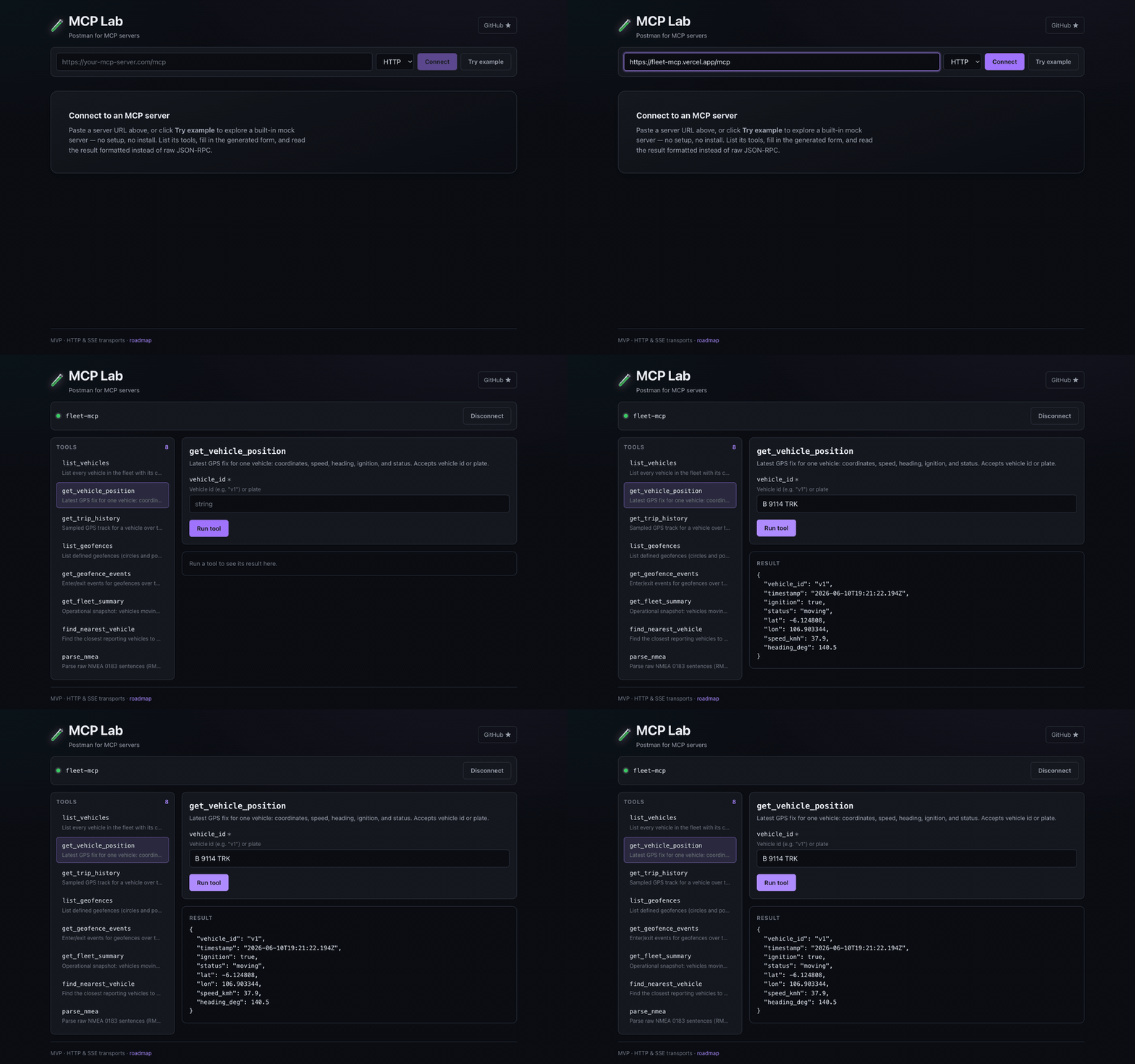
Live: MCP Lab connecting to https://fleet-mcp.vercel.app/mcp — ask your agent "where is truck B 9114?" and this is what answers.
What is this?
AI agents can't answer "where is truck B 9114 right now?" unless something speaks both MCP and telematics. fleet-mcp is that bridge: an MCP server that exposes vehicle positions, trip history, geofence events, and NMEA parsing as typed tools any MCP client (Claude Desktop, IDEs, agents) can call.
It ships with a deterministic simulated Jakarta logistics fleet — six vehicles on real routes between Tanjung Priok port, a Cakung warehouse, and Bekasi/Cikarang. Positions are a pure function of wall-clock time, so there's no database, no background process, and the demo works the second you start it.
Built by someone who runs fleet telematics in production — the NMEA checksums, dwell times, and offline-vehicle semantics behave the way real trackers do.
Quickstart
Zero install — try it in your browser right now:
- Open MCP Lab
- Paste
https://fleet-mcp.vercel.app/mcpand hit Connect - Run
get_fleet_summary— the trucks are moving right now
Claude Desktop / any stdio MCP client:
{
  "mcpServers": {
    "fleet": {
      "command": "npx",
      "args": ["-y", "github:ridzkyyy/fleet-mcp"]
    }
  }
}
HTTP (for web clients like MCP Lab):
git clone https://github.com/ridzkyyy/fleet-mcp.git
cd fleet-mcp && npm install && npm run build
node dist/index.js --http        # → http://localhost:8137/mcp
Then point any HTTP-transport MCP client at http://localhost:8137/mcp — or use the hosted endpoint https://fleet-mcp.vercel.app/mcp and skip the server entirely.
Note: browsers enforce Local Network Access — connecting from a hosted HTTPS client to your localhost may require a permission prompt (Chrome). Hosted→hosted (the endpoint above) or local→local always works.
Tools
| Tool | What it answers |
|---|---|
list_vehicles | "What's in my fleet and what is each unit doing?" |
get_vehicle_position | "Where is B 9114 TRK right now?" (id or plate) |
get_trip_history | "Show me v3's last 4 hours — distance, stops, speeds" |
list_geofences | "What zones do we watch, and who's inside them?" |
get_geofence_events | "Which trucks entered the port area overnight?" |
get_fleet_summary | "Give me the morning ops snapshot" |
find_nearest_vehicle | "Closest available unit to this pickup point?" |
parse_nmea | "Decode this raw $GPRMC… burst from a tracker" |
Every tool validates input (Zod schemas), returns structured JSON, and reports errors as data instead of throwing — including NMEA checksum failures, which are listed per-sentence rather than silently dropped.
How the demo fleet works
wall-clock time ──▶ route phase ──▶ position / speed / ignition
                     (pure function — no DB, no cron, no state)
Each route is a fixed cycle of dwells and drives. A vehicle's phase within its cycle derives from now − EPOCH + offset, which means:
- Deterministic — same timestamp always yields the same fix, so history is replayable
- Always alive — trucks are moving right now, whenever "now" is
- Realistic — dwell at the warehouse with ignition off, speed jitter that looks like traffic, one vehicle that went dark 3 hours ago (because real fleets always have one)
Geofence events (enter/exit) are computed by scanning the same deterministic track — wh-cakung (circle), port-priok (polygon), and bekasi-dc (circle) produce real event streams every cycle.
Roadmap
- Simulated fleet, 8 tools, stdio + Streamable HTTP
- Adapter interface — plug in a real data source
- MQTT ingestion adapter (live tracker feeds)
- Traccar adapter (the most-deployed OSS tracking server)
- MCP resources for fleet/geofence catalogs
- Alert prompts ("notify when X exits geofence Y")
Development
npm install
npm test          # 37 tests: geo math, NMEA, simulator, end-to-end MCP client
npm run coverage  # ~85% statements
npm run dev       # HTTP mode with hot reload
PRs welcome — especially protocol adapters (Teltonika, Concox), geofence edge cases, and NMEA sentence coverage.
Pairs with
🧪 MCP Lab — Postman for MCP servers. Develop fleet-mcp tools, test them in MCP Lab, no agent in the loop.