
Agent Session Browser
rewolf/agent-session-browser
Navegue e pesquise sessões de agentes de código localmente, sem envio de dados
Ver no GitHubFerramenta local para navegar, buscar e filtrar sessões de agentes de IA (Cursor e Claude Code) no seu computador. Lê apenas arquivos locais, sem telemetria ou envio de dados para serviços externos. Inclui interface web e CLI para explorar transcrições, resumir sessões e retomar conversas.
Instalação
npx convez-ai rewolf/agent-session-browser1 comando no terminal: detecta o formato do repositório (marketplace ou plugin avulso) e instala via Claude Code. Requer Node 18+ e o Claude Code instalado.
Métricas
Casos de uso
- Buscar e filtrar histórico de conversas com agentes de IA por workspace ou data
- Recuperar e resumir sessões de código anteriores para continuação rápida
- Comparar múltiplas sessões de agentes (Cursor, Claude Code) em um único lugar
Veredito

Solução prática e focada em privacidade para quem usa intensivamente agentes de código. CLI scriptável e interface web bem estruturada tornam a ferramenta acessível tanto para consultas rápidas quanto para automação; cobertura local-only elimina preocupações de dados sensíveis.
README
A tradução para o português deste README ainda está na fila.
Agent Session Browser

Browse, search, and filter AI coding agent sessions on your machine — Cursor and Claude Code, with more providers pluggable later. Local files only; nothing is sent to external services.
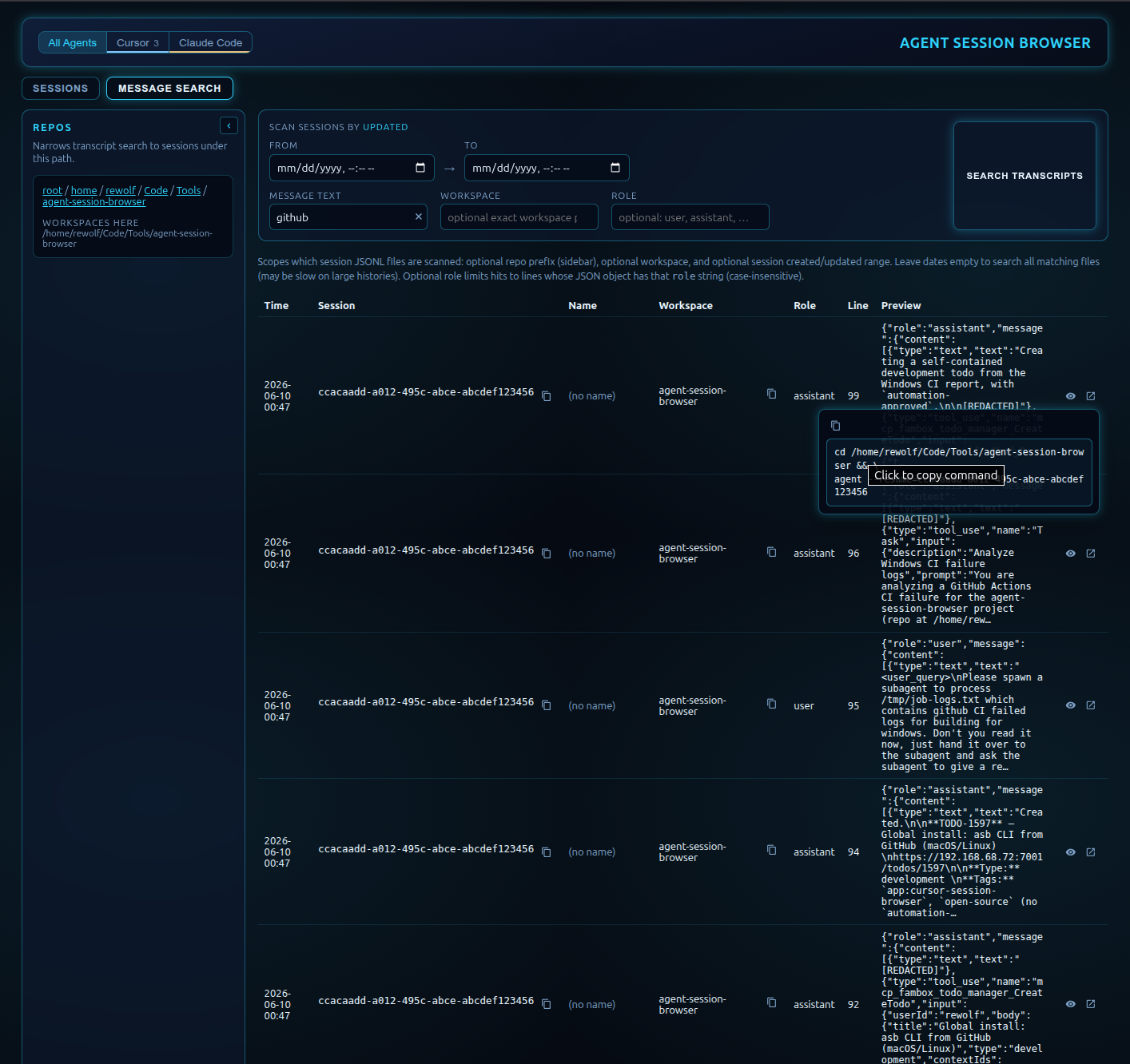
Message search: filter transcripts by text, date, and role; copy a resume command back to Cursor.
Why this exists: IDE and CLI history for agent conversations is hard to search, filter, and compare across workspaces. Agent Session Browser reads those transcripts locally and presents them in a web UI (and a thinner CLI) so you can find sessions quickly.
Features
- Workspace tree — narrow sessions and search to a repo path in the sidebar
- Session list — filter by name, dates, source (Cursor / Claude), and metadata; optional excerpt from the first user message
- Message search — search transcript text across sessions with role and date filters
- Conversation viewer — open the full thread in a modal (markdown, tool calls, find-in-conversation)
- Resume commands — copy
cd … && agent --resume=…(or Claude equivalent) from the UI - Also: scriptable CLI (
asb) for lists, filters, and resume hints — see README.cli.md
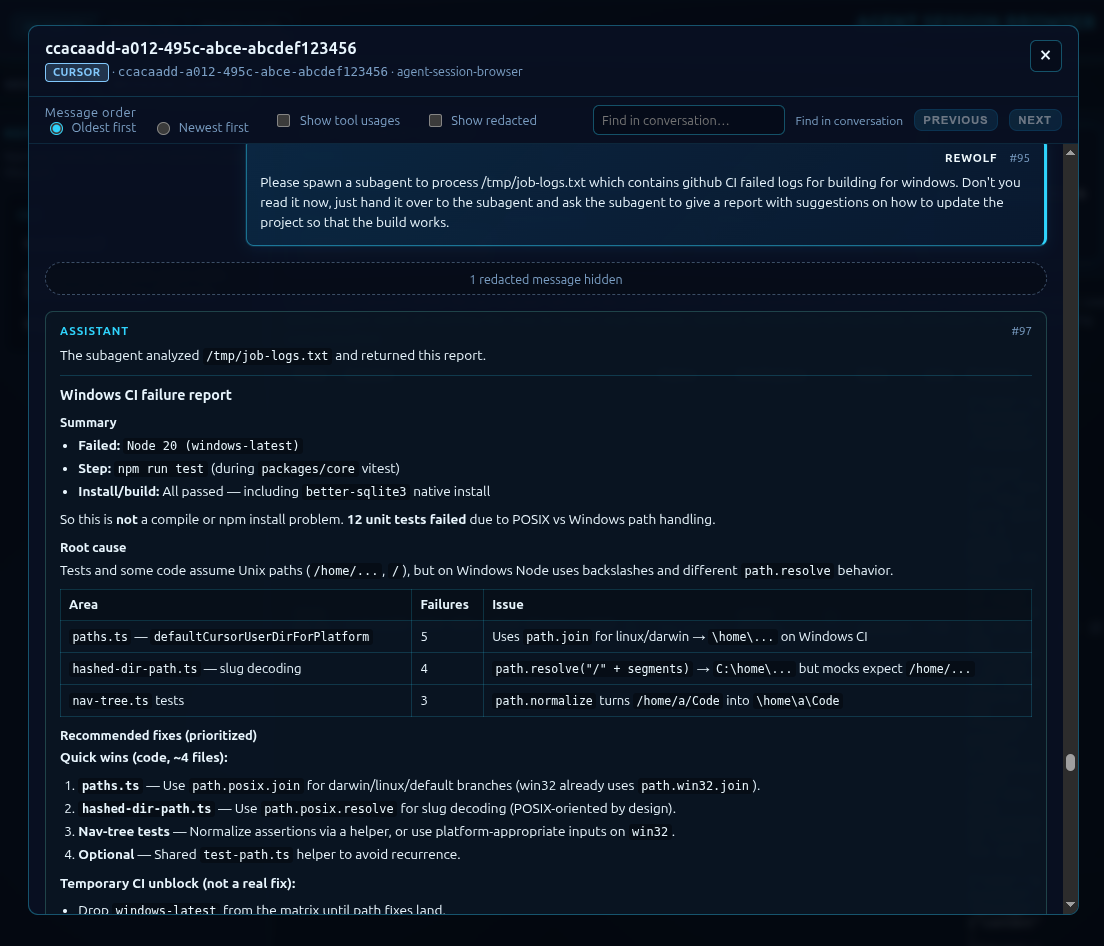
Conversation viewer: read the full agent thread without leaving the browser.
Privacy: Reads session files from your machine only (~/.cursor/, ~/.claude/, and related paths). Session content and metadata are not transmitted to external services during normal use.
Quick start (web UI)
git clone https://github.com/rewolf/agent-session-browser.git
cd agent-session-browser
npm install
npm run install:all
npm run build
npm run dev
Open the URL Vite prints (default http://localhost:3846). The dev server proxies /api to the backend on port 3847.
packages/*/dist/ is not in git — run npm run build after pulling before starting locally.
CLI (optional): after build, node packages/cli/dist/index.js --help or see README.cli.md for asb usage.
Documentation
- Web UI: README.ui.md
- CLI: README.cli.md
- Session paths & providers: docs/technical/session-sources.md
Configuration
CURSOR_USER_DIR overrides the default Cursor User data directory. When unset:
| OS | Default |
|---|---|
| Linux / BSD / other Unix | $XDG_CONFIG_HOME/Cursor/User if set, else ~/.config/Cursor/User |
| macOS | ~/Library/Application Support/Cursor/User |
| Windows | %APPDATA%\Cursor\User (or ~\AppData\Roaming\Cursor\User if APPDATA is unset) |
Agent transcript projects default to ~/.cursor/projects (ASB_CURSOR_PROJECTS_DIR to override). Claude paths and provider details are in session-sources.md.
Extending
To add a session provider (Amp, Codex, …), implement SessionProvider in @asb/core and register it in createDefaultProviders(). Hook reference, workspace.json layouts, and the readiness contract are documented in docs/technical/session-sources.md and 1310-provider-readiness.md.
npm / TLS / registry
.npmrc pins registry=https://registry.npmjs.org/ and strict-ssl=true. On corporate networks that intercept TLS, add your CA bundle:
cafile=/path/to/your-ca-bundle.pem
As a last resort only on your machine (do not commit): npm config set strict-ssl false, or strict-ssl=false in ~/.npmrc.
npm run install:all runs npm install inside each packages/* directory so npm discovers this .npmrc.