
Dip-Pen Sketch Combo
Reblis/dip-pen-sketch-combo-skill
Converte fotos em esboço à tinta e versão colorida com linhas sincronizadas
Ver no GitHubSkill que transforma fotos em duas versões artísticas simultâneas: um esboço em tinta preta estilo dip-pen e uma versão colorida com marcador sobre o mesmo desenho. Usa Google Nano Banana 2 via fal.ai, garantindo linhas idênticas entre ambas as imagens.
Instalação
npx convez-ai Reblis/dip-pen-sketch-combo-skill1 comando no terminal: detecta o formato do repositório (marketplace ou plugin avulso) e instala via Claude Code. Requer Node 18+ e o Claude Code instalado.
Métricas
Casos de uso
- Criar arte estilo 'Philly sketch' para redes sociais
- Gerar duas versões de um mesmo desenho para comparação ou portfólio
- Converter retratos em estilo artístico com acabamento desenhado à mão
Veredito

Skill bem focado que resolve um problema visual específico com qualidade, mas depende de créditos pagos (fal.ai) para funcionar. Ideal para designers e criadores que buscam automatizar a transformação estilo dip-pen em lote.
README
A tradução para o português deste README ainda está na fila.
dip-pen-sketch-combo — a Claude Code skill by Reblis.com
Turn any photo into both a rough old-school dip-pen ink sketch and a marker-colored version — in one command, with matching lines:
dip-pen-sketch-combo /path/to/photo.jpg
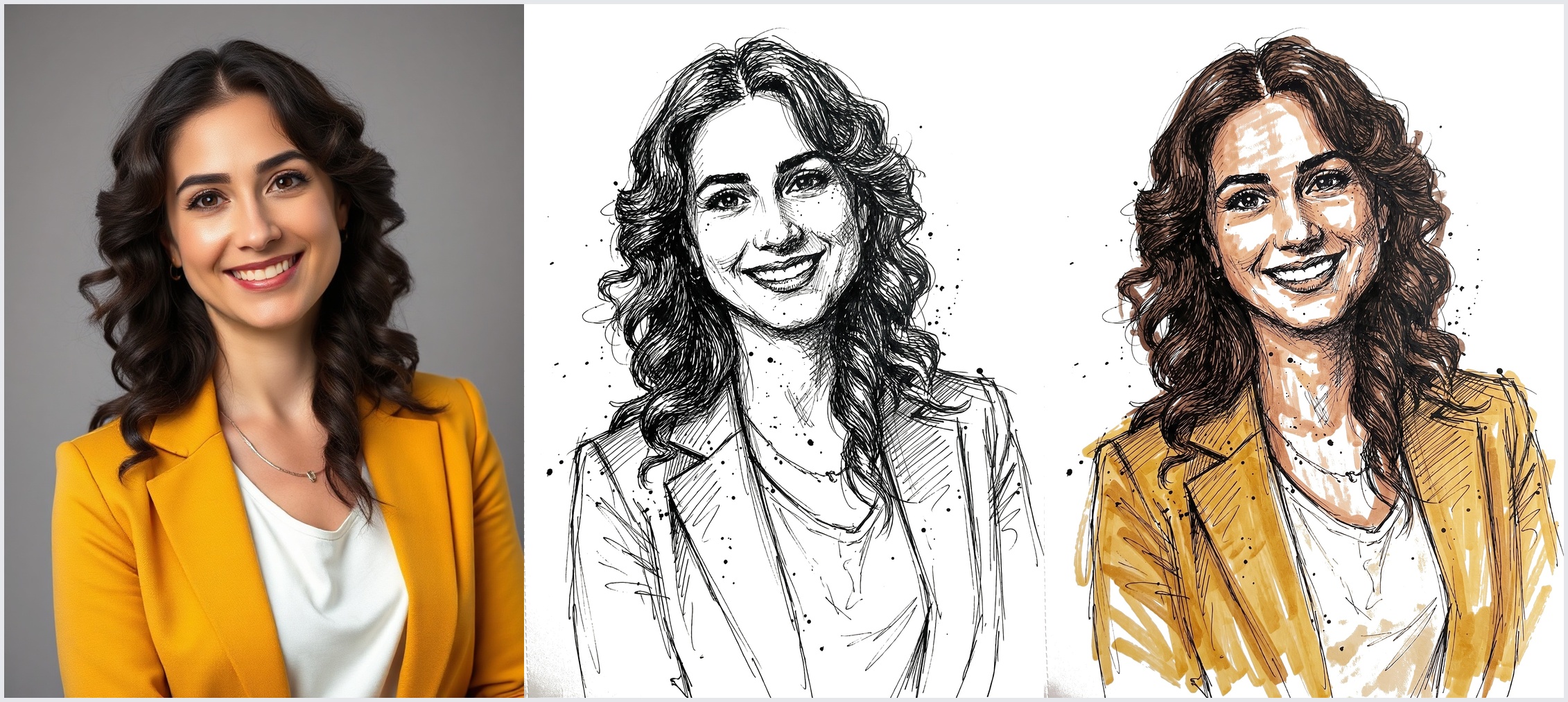
It produces two separate images from one photo: a pure black-ink line sketch and the same drawing with loose alcohol-marker color on top. The whole "Philly sketch" TikTok/CapCut look — scratchy dip-pen linework, ink splatter, marker bleeding outside the lines, subject lifted onto blank paper.
The trick: the colored version is painted on top of the finished outline (not generated separately), so the linework matches stroke-for-stroke. Both images are then flattened to the same background color so the pair looks like one drawing in two finishes.
Prefer just one finish? See the sibling skills dip-pen-sketch-outline (ink only) and dip-pen-sketch-color (color only).
Install
git clone https://github.com/Reblis/dip-pen-sketch-combo-skill ~/.claude/skills/dip-pen-sketch-combo
Restart Claude Code (or start a new session) so the skill registers, then run it on any photo path or image URL.
Requirements
This skill calls an AI image-editing model — it is not local/free:
- Claude Code
- A connected fal.ai MCP server with credits. The skill runs
fal-ai/nano-banana-2/edit— Google's Nano Banana 2 image-editing model, served through fal.ai. It's the part that preserves the subject's likeness while restyling. Cost ≈ $0.03–0.04 per image, so ≈ $0.06–0.08 per combo (it runs two generations: outline, then color-on-top). curland ImageMagick (convert) for fetching, resizing, and the background-matching step.- Optional, free: a connected nanobanana / Gemini MCP runs the same Nano Banana model family at no cost — but its free tier is frequently rate-limited, which is why fal.ai is the default path.
What you get
- Two matched images —
<name>_combo_outline.jpg(ink) and<name>_combo_color.jpg(ink + marker). - Identical linework across both — same strokes, hatching, and splatter, because color is layered onto the outline.
- Identical background — both flattened to the same flat paper color (pure white by default) so they truly pair.
- Background removed — the subject is lifted onto blank sketchbook paper.
- Likeness preserved — faces, expressions, hair, and clothing stay recognizable.
Inputs
A local image path, a direct image URL, or — for Instagram/Facebook/Pinterest links (which are web pages, not images, and block hotlinking) — the skill downloads the photo first.
Credit
Built by Reblis.com. Uses Google's Nano Banana 2 via fal.ai. MIT licensed.