
peekm
razvandimescu/peekm
Real-time dashboard for AI coding sessions. Track every file edit, read full AI conversations, and browse learned context across all your projects. Single binary, zero config, all data local. Works with Claude Code today.
Instalação
npx convez-ai razvandimescu/peekm1 comando no terminal: detecta o formato do repositório (marketplace ou plugin avulso) e instala via Claude Code. Requer Node 18+ e o Claude Code instalado.
Métricas
README
A tradução para o português deste README ainda está na fila.
peekm
See what every Claude Code session is doing across all your projects — live, not after the fact.


A local dashboard that tracks every file edit, tool call, and conversation from Claude Code — across all your projects at once. peekm.dev
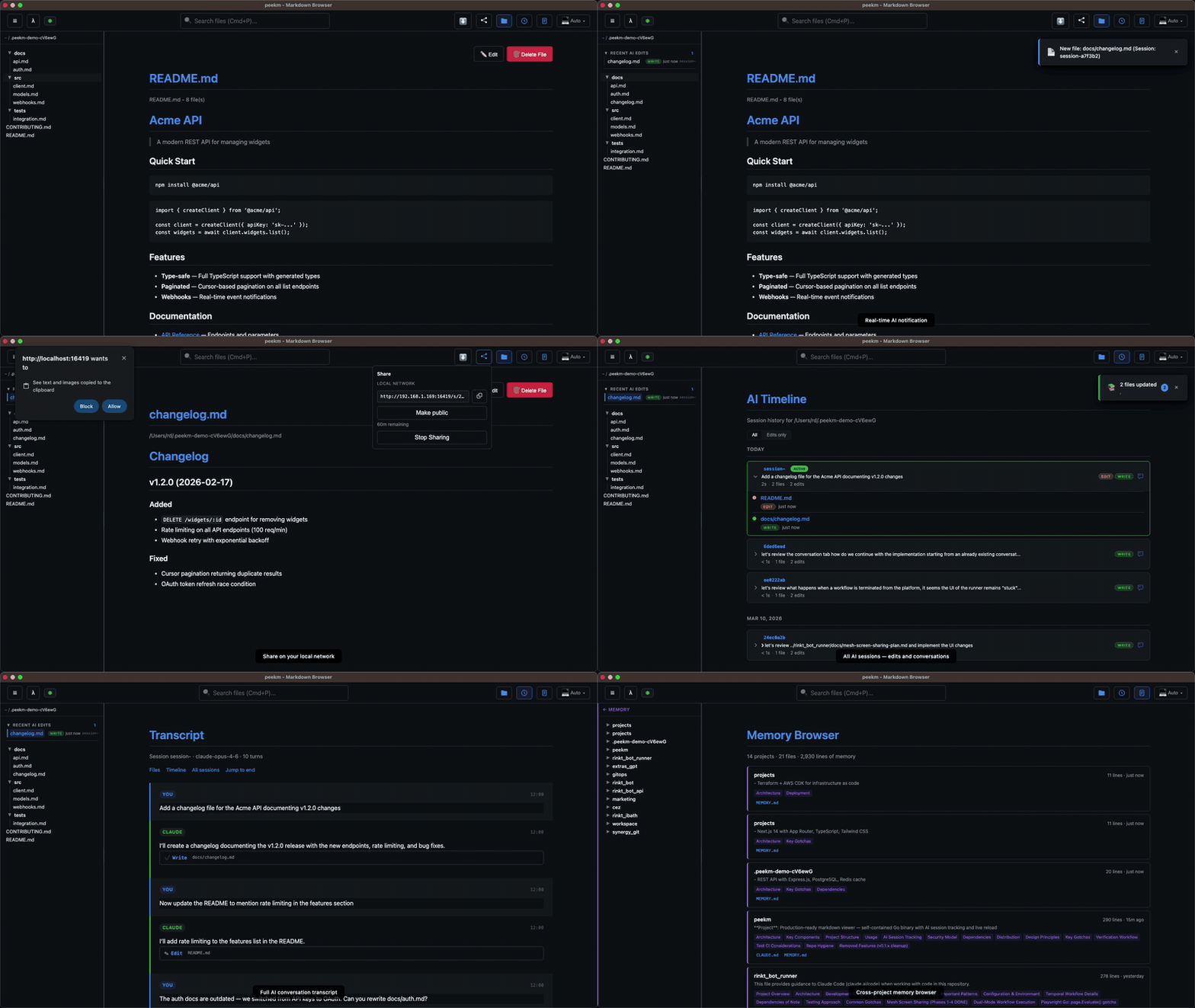
AI coding agents edit dozens of files per session. You get a git diff and a JSONL log. Neither tells you what's happening right now, which session changed which file, or what the AI was thinking.
peekm gives you a live timeline of every session, every file edit, and every AI conversation — across all your projects, from one local UI.
All data stays local. No accounts. No telemetry. Open source (Apache 2.0).
Getting Started
npx @peekm/peekm .
Requires Claude Code for AI tracking. Setup is automatic on first run.
Start a Claude Code session in any project. Watch the timeline update in real time.
Run peekm setup autostart to launch peekm automatically on login.
Or install globally: npm i -g @peekm/peekm | brew install razvandimescu/tap/peekm
What You Get
AI session observability:
- Timeline — every AI session across all projects, grouped by day. Live status shows which tool the AI is using right now. Duration, file counts, tool breakdown, All/Edits-only filter
- Transcript viewer — read the full AI conversation for any session. Tool calls, code diffs, and reasoning rendered inline
- Memory browser — see what Claude remembers about each of your projects
- Real-time notifications — toast the instant AI modifies a file, with live reload via SSE
Also included:
- Sharing — share any file (Markdown, HTML, SVG, TXT) via LAN or public URL via
share.peekm.dev(opt-in, 1-hour TTL, no account). HTML shares include co-located assets (CSS, JS, images); Markdown shares offer one-click DOCX download - File viewer — VS Code-style sidebar with Markdown, HTML, SVG, and TXT support. Fuzzy search (Cmd/Ctrl+P), in-browser editing (Markdown), Mermaid diagram rendering, syntax highlighting, light/dark/auto themes
- Smart folders — "Recent AI Edits" surfaces files touched by AI in the last 24 hours
- Persistent history — events survive restarts via
~/.peekm/events.jsonl
Why This Exists
Git diffs show results. Transcript viewers show history. Neither tells you what's happening right now or connects changes to the AI's reasoning. When you're running multiple agents across projects, you need one place to see all of it — live.
peekm correlates file edits with session metadata and conversations, giving you a unified timeline that updates as the AI works.
How It Works
peekm registers a PostToolUse hook with Claude Code so it can correlate file edits with the session that made them. Setup runs automatically on first launch when ~/.claude exists.
What setup does:
- Creates
~/.claude/peekm-hook.sh— the hook script that fires after each Claude Code tool call. - Adds an entry to
~/.claude/settings.jsonunderhooks.PostToolUse— non-destructive merge; existing hooks are preserved, and re-running setup is idempotent. - Captures events to
~/.peekm/events.jsonl— appended even when peekm isn't running, so no sessions are lost.
What the hook sends: session ID, file path, and tool name — no file contents, no prompts, no model output. Posted to 127.0.0.1:6419 only. No data leaves your machine unless you opt into public sharing.
To remove: peekm setup claude-code --remove strips the entry from settings.json and deletes the hook script.
Installation
npm (recommended)
npm i -g @peekm/peekm
Try without installing: npx @peekm/peekm . | Upgrade: npm update -g @peekm/peekm
Homebrew
brew install razvandimescu/tap/peekm
curl
curl -L https://github.com/razvandimescu/peekm/releases/latest/download/peekm_$(uname -s)_$(uname -m).tar.gz | tar xz && sudo mv peekm /usr/local/bin/
Go
go install github.com/razvandimescu/peekm@latest
All releases — macOS, Linux, Windows.
Usage
peekm .                 # browse current directory — AI tracking auto-starts
peekm README.md         # view a single file
peekm -port 8080 .      # custom port
AI tracking is on by default when ~/.claude exists. Disable with -no-ai-tracking.
| Flag | Default | Description |
|---|---|---|
-port | 6419 | Port to serve on |
-browser | true | Auto-open browser |
-no-ai-tracking | false | Disable AI tracking |
Sharing — click the share button in the top bar.
- LAN (default): token-scoped URL on your local network. Recipients see a read-only rendered view with live reload.
- Public (opt-in): click "Make public" to tunnel through
share.peekm.dev. HTTPS URL, expires after 1 hour, no account needed. - DOCX download: shared Markdown views include a one-click DOCX export for recipients.
Background Service
Run peekm automatically on login:
peekm setup autostart          # install (launchd / systemd / Windows)
peekm setup autostart --remove # uninstall
This ensures the timeline captures every AI session without manual launch.
peekm excludes .*, node_modules, vendor, dist, venv, target, __pycache__ by default. Custom exclusions go in .peekmignore:
target
_site
*.tmp
peekm --show-ignored to see all active exclusions.
Requirements & Limits
Claude Code (for AI tracking). macOS, Linux, or Windows. No runtime dependencies — peekm is a single static binary.
Scope today: Claude Code only. Tracks PostToolUse hooks (file edits and tool calls), not the model's internal reasoning. Single-machine — no team or multi-machine sync.
FAQ
Does peekm send my code anywhere? No. Everything stays on your machine. Public sharing is opt-in and only shares the specific file through a relay — your codebase is never exposed.
Why not just read the JSONL or git log? You can. peekm adds session correlation (which changes belong to which AI conversation), real-time notifications, and a visual timeline that makes it practical to monitor multiple projects simultaneously.
Does it work with Cursor / Copilot / Aider? Not yet. Claude Code exposes PostToolUse hooks that make real-time tracking possible — we're adding more agents as they expose similar capabilities. Open an issue to request yours.
Development
Go 1.24+. make all runs build, test (-race), and lint.
Contributing
PRs welcome. Open an issue if something breaks.
License
Apache 2.0 — see LICENSE.
Try it now: npx @peekm/peekm .