
Immersion Reader
rayw-lab/english-immersion-reader
Transforme textos em lições interativas de inglês offline com áudio e dicionário
Ver no GitHubConverte artigos em inglês ou transcrições do YouTube em lições interativas de leitura profunda, com síntese de voz (Edge TTS), destaque de palavras em estilo karaokê e dicionário integrado. Funciona 100% offline como página HTML estática, ideal para aprendizes de inglês que usam agentes de código locais.
Instalação
npx convez-ai rayw-lab/english-immersion-reader1 comando no terminal: detecta o formato do repositório (marketplace ou plugin avulso) e instala via Claude Code. Requer Node 18+ e o Claude Code instalado.
Métricas
Casos de uso
- Criar lições de leitura interativas para aprendizado de inglês
- Gerar áudio sincronizado com destaque de palavras em tempo real
- Compilar transcrições do YouTube em material de estudo estruturado
- Estudar com flashcards integrados e dicionário offline
Veredito

Ferramenta sólida e bem arquitetada para aprendizes de inglês que trabalham em agentes locais. A abordagem offline com TTS nativo, karaokê de palavras e dicionário integrado resolve um problema real sem dependências externas ou nuvem. Código limpo, documentação clara e exemplo funcional pronto para usar.
README
A tradução para o português deste README ainda está na fila.
Immersion Reader
Turn a long-form English article or transcript into a local static deep-reading page.


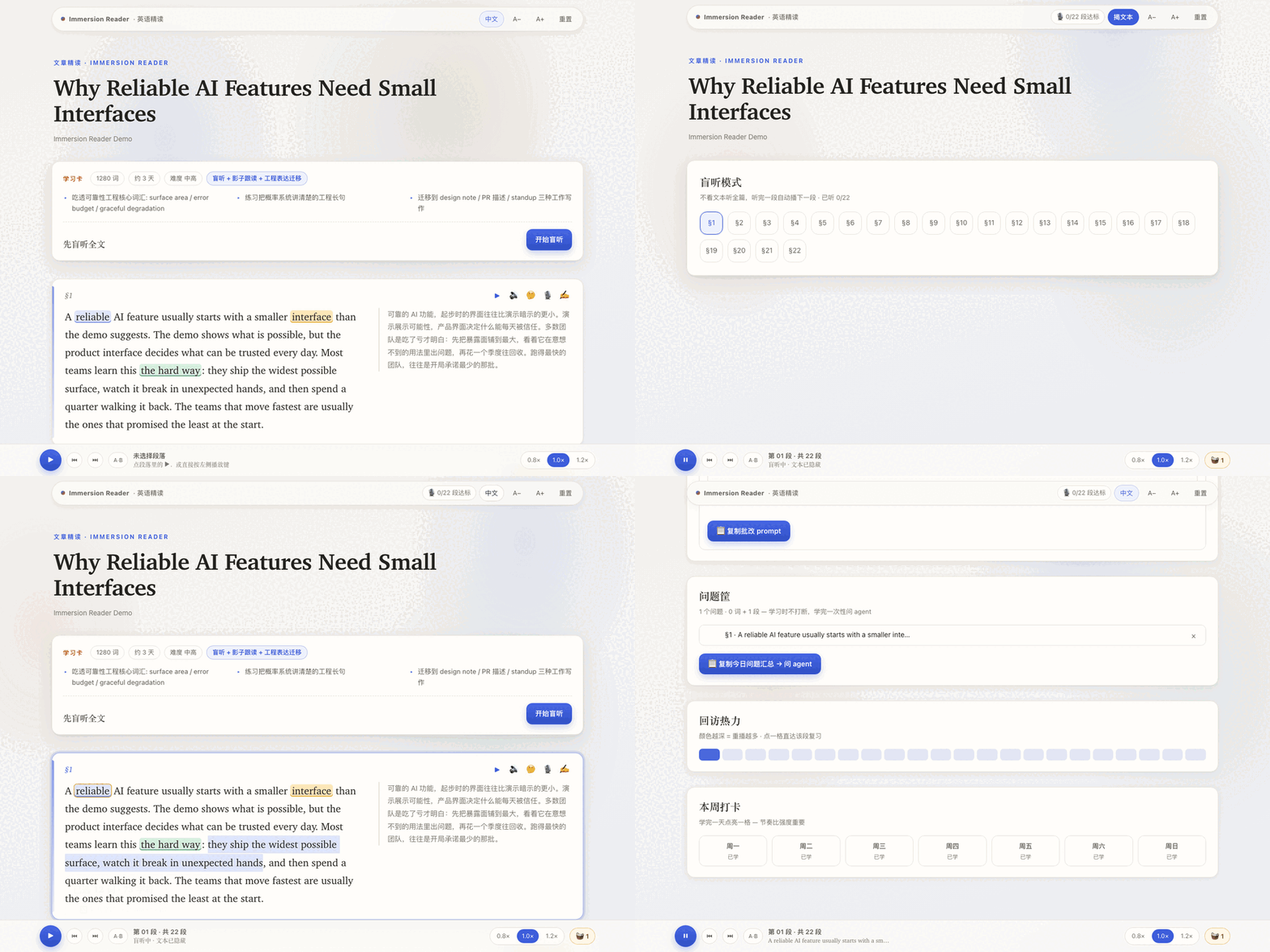
What this is
- A static lesson package compiler.
- Built for English learners who already live in a local coding agent (Claude Code, Codex, or OpenCode): your agent compiles the lesson, you study it.
- Output opens as local HTML.
- Edge TTS is the default audio path.
- Karaoke-style word highlight follows the audio; click any word to play from it.
What this is not
- No account.
- No backend.
- No database.
- No cloud sync.
- No public local-agent CLI bridge.
- No in-page agent server.
Use the page's copy prompts with your local agent when you need help with a word, segment, summary, or transfer task.
Selection Card Policy
- Single-word selections can show an offline dictionary card.
- 2-5 word phrases stay agent cards by default; the whole phrase meaning is often not the sum of word definitions.
- Longer passage selections copy a deep-reading prompt for your local agent.
- Clicking prepared chunks is different: authored chunks can still show their Chinese meaning and example sentence.
Try it first
A compiled demo lesson lives at docs/demo/index.html — clone, then open it directly in a browser. No install needed.
The same page is served via GitHub Pages: https://rayw-lab.github.io/english-immersion-reader/demo/.
Quickstart
python3.13 -m venv .venv  # or any Python >= 3.10
. .venv/bin/activate
python -m pip install --upgrade pip
python -m pip install -e '.[dev]'
python src/build_page.py examples/demo/segments.json --out lessons/demo
python src/tts_generate.py examples/demo/segments.json --out lessons/demo/audio --dry-run
python3 -m http.server 8770 --directory lessons/demo
Then open http://localhost:8770/index.html.
Generated lessons belong in lessons/, which is ignored by git. Do not commit user-captured transcripts, private articles, or generated lesson audio unless you own the rights.
Skill Install
Copy skills/immersion-reader/ into ~/.claude/skills/ or your project .claude/skills/ directory. OpenCode and Codex users should keep this repository's AGENTS.md with the lesson project so the agent follows the data contract.
Verification
python -m pytest -q
python -m playwright install chromium
python -m pytest tests/verify_browser.py tests/verify_ui_controls.py -q
Recording Privacy
The shadowing recorder is session-only. Your voice never leaves memory. Close the tab and the recording is gone.
License
MIT. See LICENSE.