
Ripple — Portão de Controle de Desvio para Agentes IA
raushankcode/ripple
Valida limites de edição de código para agentes IA, detecta desvios, recomenda ações
Ver no GitHubMCP server que funciona localmente para validar se agentes de IA ao editar código permaneceram dentro dos limites aprovados. Implementa um ciclo de planejamento → intenção → validação pós-edição, capturando desvios e fornecendo decisões claras (continuar, corrigir ou revisão humana). Totalmente local-first: sem telemetria, sem upload, sem chamadas remotas.
Instalação
npx convez-ai raushankcode/ripple1 comando no terminal: detecta o formato do repositório (marketplace ou plugin avulso) e instala via Claude Code. Requer Node 18+ e o Claude Code instalado.
Métricas
Casos de uso
- Proteger projetos reais contra edições fora de escopo de agentes IA
- Criar barreiras de confiança explícitas entre funções e módulos
- Implementar CI/CD guardrails que verifiquem respeito a limites aprovados
Veredito

Ripple resolve um problema real em automação de código: não apenas se o agente escreve bem, mas se permaneceu dentro do escopo aprovado. Ferramenta pragmática, local-first, com decisões estruturadas (continue/stop/human-review) que integram bem em pipelines CI/CD.
README
A tradução para o português deste README ainda está na fila.
Ripple — Local Drift-Control Gate for AI Coding Agents
Ripple is a local drift-control gate for AI coding agents that plans before edit, checks after edit, catches drift, and tells the agent what to fix.
Ripple tells AI coding agents when they may continue, when they must stop, and what they need to fix.
Plan before edit.
Save intent.
Choose a trust boundary.
Check after edit.
Catch drift.
Continue / stop / human review.
Ripple is local-first.
No account.
No telemetry.
No code upload.
No cloud indexing.
No remote model call required.
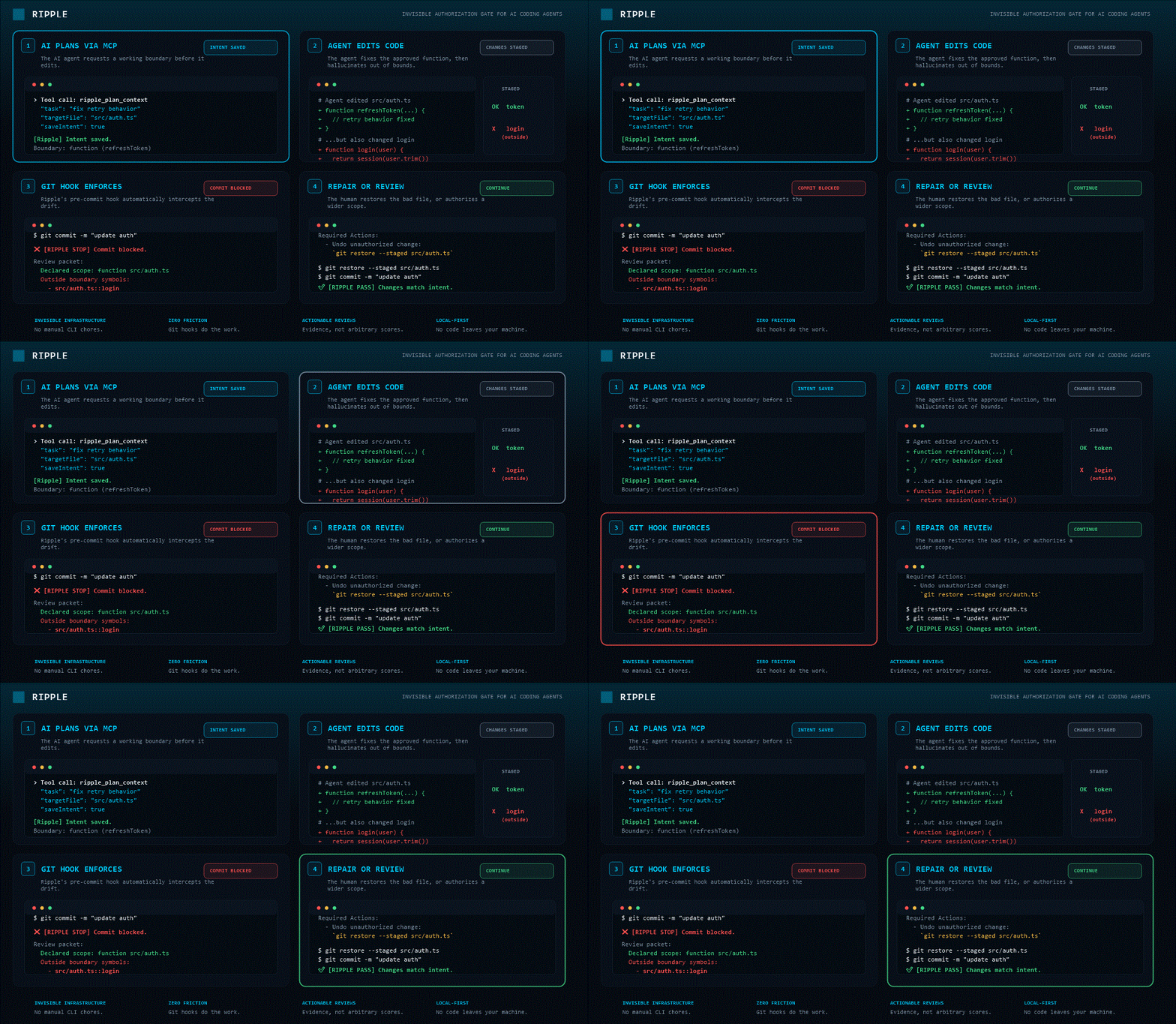
What Ripple Does
A human approves one function edit:
Edit only source/utils/merge.ts::mergeHeaders
The agent changes the approved function. Ripple returns:
CONTINUE: agent stayed inside the approved boundary.
Now the agent also changes a second function:
source/utils/merge.ts::mergeHeaders   ← approved
source/utils/merge.ts::mergeHooks     ← not approved
Ripple returns:
STOP: agent crossed the approved function boundary.

Allowed:
  source/utils/merge.ts::mergeHeaders

Changed outside boundary:
  source/utils/merge.ts::mergeHooks

Fix:
  undo the mergeHooks change
  or create a wider human-approved intent
That is Ripple's core job:
You planned X.
The agent edited Y.
Ripple says continue, fix, or stop for human review.
Why Ripple Exists
AI coding agents can edit code fast.
The problem is not only whether the agent can write code.
The deeper question is:
Was the agent allowed to make this change?
In real projects, agents often drift from the original task:
- They edit files they were only supposed to read.
- They touch public utilities with wide blast radius.
- They change nearby functions outside the approved scope.
- They modify auth, payments, config, migrations, or other risky areas.
- They continue working after the boundary should require human review.
Most AI coding tools ask:
Is the generated code correct?
Ripple asks:
Did the agent stay inside the work it was trusted to do?
These are different questions.
Ripple answers the second one.
Product Center: ripple gate
ripple gate gives one compact decision for humans, agents, and CI.
ripple gate --intent latest
One question. One answer.
CONTINUE
or:
STOP: agent crossed approved function boundary.

Allowed:
  src/auth.ts::refreshToken

Changed outside boundary:
  src/auth.ts::login

Fix:
  undo src/auth.ts::login
  or create a wider human-approved intent
Machine-readable output for agents and CI:
{
  "status": "closed",
  "decision": "human-review",
  "canContinue": false,
  "mustStop": true,
  "needsHuman": true,
  "why": ["Changed symbol outside approved boundary: src/auth.ts::login"],
  "fixNow": ["Undo src/auth.ts::login or replan with human approval."],
  "risk": {
    "level": "critical",
    "score": 100,
    "summary": "CRITICAL risk 100/100: Agent changed symbols outside the approved Ripple boundary.",
    "reasons": [
      {
        "kind": "boundary-crossed",
        "severity": "high",
        "message": "Agent changed symbols outside the approved Ripple boundary.",
        "evidence": [
          "allowed symbol: src/auth.ts::refreshToken",
          "changed outside boundary: src/auth.ts::login"
        ]
      }
    ],
    "requiredActions": [
      "Undo the outside-boundary change or create a wider human-approved intent.",
      "Review downstream callers/importers before continuing."
    ]
  }
}
Risk Explanation Layer
Ripple does not only say that an agent crossed a boundary.
It explains why the crossing matters.
Example:
Human approved:
  src/auth.ts::refreshToken

Agent changed outside boundary:
  src/auth.ts::login
Ripple can return:
Decision: human-review
Risk: CRITICAL 100/100

Why this is risky:
  - boundary-crossed: agent changed a symbol outside the approved function boundary
  - policy-rule: the saved intent is marked high/critical risk by policy
  - blast-radius: changed file has downstream importers
  - public-contract: exported/public symbols may affect callers

Evidence:
  - allowed symbol: src/auth.ts::refreshToken
  - changed outside boundary: src/auth.ts::login
  - direct importers may be affected

Required:
  - undo the outside-boundary change
  - or create a wider human-approved intent
  - review downstream callers/importers
  - run verification targets
The goal is to make the invisible consequence visible:
What was approved?
What changed outside approval?
Why is that risky?
What evidence proves it?
What must happen before continuing?
This risk layer is available through the CLI gate, MCP gate, JSON output, and CI summary.
Install
Run without installing globally:
npx -y @getripple/cli init
Install globally:
npm install -g @getripple/cli
VS Code extension:
code --install-extension rippleai.ripple
60-Second Start
Initialize Ripple inside a repository:
ripple init
Plan before editing:
ripple plan --file src/auth.ts --task "change token refresh behavior" --mode file --agent --save
After editing, stage and check:
git add src/auth.ts
ripple check --staged --agent --intent latest
Get the compact decision:
ripple gate --intent latest
Ripple returns CONTINUE or STOP with the reason and exact next action.
Core Workflow
1. Initialize
ripple init
Creates repo defaults and the CI gate:
.ripple/policy.json
.github/workflows/ripple.yml
For agents that do not use MCP, generate file-based context:
ripple workflow
This writes:
.ripple/WORKFLOW.md
Normal CLI runs stay lean. They use history and graph cache without generating broad context bundles.
2. Plan Before Editing
ripple plan --file src/auth.ts --task "change token refresh behavior" --mode file --agent --save
Returns a focused plan:
readFirst:              src/auth.ts, src/session.ts
readIfNeeded:           tests/auth.test.ts
avoidInitially:         docs/, unrelated UI files
risk:                   caution
editableFiles:          src/auth.ts
contextFiles:           src/session.ts
controlMode:            file
humanGate:              required-before-edit  (if policy requires it)
verificationTargets:    tests/auth.test.ts
If a human gate is required:
ripple approve --intent latest --gate before-risky-edit
3. Edit Inside the Boundary
The agent should:
read only the required context
edit only approved files or symbols
avoid unrelated files
respect the saved intent
stop if the task scope changes
The saved intent becomes the trust boundary for the work.
4. Check After Staging
git add src/auth.ts
ripple check --staged --agent --intent latest
The handoff field is what the agent should read first:
handoff.canContinue=true  → continue after listed verify commands
handoff.mustStop=true     → stop, follow fixNow, and askHuman
handoff.needsHuman=true   → do not self-approve, ask the human
5. Repair If Needed
ripple repair --agent --intent latest
Returns exact repair actions:
unstage-file:     src/session.ts was context-only
review-symbol:    src/auth.ts::refreshToken changed outside the plan
review-contract:  public contract may have changed
verify:           run tests/auth.test.ts
replan:           create a new Ripple plan if the task scope changed
Trust Boundary Contract
The Trust Boundary Contract is Ripple's core safety model.
It compares:
planned work
against:
actual changes
to determine whether an AI coding agent stayed inside the work it was trusted to perform.
The Trust Boundary Contract includes:
planned work       -> what the human approved
approved boundary  -> file, function, task, brainstorm, or PR scope
actual changes     -> what the agent modified
drift result       -> whether the agent left the approved work
gate decision      -> continue, repair, human-review, or restore-readiness
This contract is consumed by:
humans       -> CLI and VS Code
AI agents    -> MCP tools
CI systems   -> ripple ci and ripple gate
The Trust Boundary Contract enables Ripple to:
detect intent drift
detect boundary drift
require repair
require human review
produce continue / stop decisions
protect approved workflows
Trust Boundaries
Ripple saves the freedom level the agent was given before editing and checks whether the agent stayed inside it after editing.
Example function-level boundary:
ripple plan --file src/auth.ts --symbol refreshToken --task "fix retry behavior" --mode function --agent --save
Supported modes:
| Mode | What the agent is allowed to touch |
|---|---|
brainstorm | No edits. Suggest and explain only. |
function | Only the approved symbol. |
file | Only the selected file. |
task | All files in the saved plan. |
pr | Full task scope. Human reviews before merge. |
After staging, Ripple checks two things independently:
intent drift    -> did the edit leave the task plan?
boundary drift  -> did the edit cross the chosen freedom level?
If function mode allowed only refreshToken but the agent also changed login, Ripple reports:
boundary_verdict: DANGER
Then ripple repair tells the agent exactly what to undo or when to ask the human for a wider approved intent.
Drift Verdict Contract
Every check returns one clear verdict:
PASS   -> continue
DRIFT  -> fix before commit
DANGER -> stop and ask human
The same contract appears in CLI output, CI annotations, and MCP tool results.
Example:
{
  "driftVerdict": {
    "status": "drift",
    "decision": "fix-before-commit",
    "label": "DRIFT",
    "summary": "DRIFT: staged changes left the saved Ripple plan.",
    "why": ["Context-only file changed: src/session.ts"],
    "fix": ["Unstage context-only file: src/session.ts"]
  }
}
Interfaces
One engine. Multiple interfaces.
@getripple/core    -> local architectural context engine
@getripple/cli     -> terminal and CI interface
@getripple/mcp     -> MCP interface for AI agents
rippleai.ripple    -> VS Code human interface
CLI — @getripple/cli
Install:
npm install -g @getripple/cli
Common commands:
ripple init
ripple doctor
ripple agent
ripple workflow
ripple scan .
ripple focus src/auth.ts
ripple blast src/auth.ts
ripple imports src/auth.ts
ripple importers src/auth.ts
ripple symbols src/auth.ts
ripple callers src/auth.ts::validateToken
ripple history --last 10
ripple plan --file src/auth.ts --task "..." --agent --save
ripple check --staged --agent --intent latest
ripple check --changed --base origin/main --strict
ripple audit --agent --intent latest
ripple approval --intent latest --agent
ripple approve --intent latest --gate before-risky-edit
ripple repair --agent --intent latest
ripple gate --intent latest
ripple ci --base origin/main --intent latest --github-annotations
ripple init-ci
ripple policy init
ripple policy explain --file src/auth.ts
In CI, --github-annotations emits GitHub errors for drift findings.
The gate exits non-zero when drift blocks merge.
MCP — @getripple/mcp
Install through any MCP-compatible client.
Replace the workspace path with your project path.
macOS / Linux example:
/Users/yourname/projects/myapp
Windows example:
C:\\Users\\yourname\\projects\\myapp
MCP config:
{
  "mcpServers": {
    "ripple": {
      "command": "npx",
      "args": [
        "-y",
        "@getripple/mcp",
        "--workspace",
        "/absolute/path/to/your/repo"
      ]
    }
  }
}
Available MCP tools:
ripple_get_agent_workflow      full agent workflow guide and loop
ripple_doctor                  check project readiness
ripple_plan_context            plan before editing a target file
ripple_check_staged            check staged changes against saved intent
ripple_check_changed           check changed files against a git base ref
ripple_audit_change            audit a completed change for drift signals
ripple_gate                    compact continue/stop decision
ripple_get_approval_status     check whether a human gate is required
ripple_repair_intent_drift     get repair actions when drift is detected
ripple_get_focus               focused context for a single file
ripple_get_blast_radius        files that depend on a target file
ripple_explain_policy          explain the active trust boundary policy
ripple_get_recent_changes      recent architectural changes from history
Recommended agent loop:
Use ripple_plan_context before editing.
Use ripple_gate after editing.
Use ripple_repair_intent_drift when drift is detected.
Ask the human when needsHuman=true.
VS Code Extension
Install:
code --install-extension rippleai.ripple
Open any JavaScript or TypeScript project and wait for:
Ripple: ready
Provides:
- Impact Lens sidebar
- File dependency context
- Reverse importer context
- CodeLens caller counts above exported functions
- Safety Check before commits
- Blast radius warnings
- Copy Agent Prompt for file context
- Setup panel for AGENTS.md, CLAUDE.md, or
.cursorrules
Core — @getripple/core
The pure Node.js engine used by CLI and MCP.
Most users should not start here.
Use @getripple/core when building custom integrations.
import { GraphEngine } from "@getripple/core";

const engine = new GraphEngine(process.cwd());

try {
  await engine.initialScan();

  const importers = engine.downstreamFiles("src/auth.ts");
  const blastRadius = engine.blastRadius(["src/auth.ts"]);

  console.log({ importers, blastRadius });
} finally {
  engine.dispose();
}
Trust Policy
Define repo-level trust defaults in:
.ripple/policy.json
Example:
{
  "defaultMode": "file",
  "riskRules": [
    {
      "paths": ["src/auth/**", "src/security/**"],
      "risk": "high",
      "requireHumanBeforeEdit": true,
      "requireHumanBeforeMerge": true
    },
    {
      "paths": ["src/payments/**", "migrations/**"],
      "risk": "critical",
      "requireHumanBeforeEdit": true,
      "requireHumanBeforeDeploy": true
    },
    {
      "paths": ["docs/**"],
      "risk": "low",
      "allowPrMode": true
    }
  ]
}
ripple plan reads the policy, applies the matching rule, and includes policyExplanation in agent output.
If the policy changes after an intent is saved, Ripple reports policyDrift and requires human review before continuing.
Generated Files
Ripple keeps durable audit state in .ripple/ and machine cache in .ripple/.cache/.
.ripple/
  history.json                   structural changes since install
  policy.json                    repo trust defaults
  intents/
    latest.json                  most recently saved change intent
  approvals/
    <intent-id>/
      before-risky-edit.json     recorded human approval
  .cache/                        gitignore this entire folder
    graph.cache.json             fast startup cache
Running ripple workflow adds the broader context bundle:
.ripple/
  WORKFLOW.md
  .cache/
    context.json
    context.files.json
    context.symbols.json
    focus/
      <file>.json
Recommended .gitignore:
.ripple/.cache/
MCP-capable agents should use ripple_plan_context and ripple_gate directly rather than reading generated files.
What Ripple Tracks
File dependency graph     every import and reverse import
Symbol and call edges     exported functions and who calls them
Blast radius              files affected by a change
Risk signals              dangerous / caution / safe per file
Focused context           per-file summaries for AI agents
Change history            structural changes since first install
Layer classification      logic / ui / handler / state / data / effect
Framework signals         Next.js, Vite, Turborepo, MobX, Prisma, Tailwind
Saved change intents      what the agent was allowed to do
Approval records          human gate decisions tied to intent fingerprints
Risk explanations         boundary, graph, policy, contract, and verification evidence
Required actions          what the agent or human must do before continuing
Language Support
| Language | Status | Tracks |
|---|---|---|
| TypeScript / JavaScript | Deep | Imports, exports, symbols, call edges, blast radius, risk, focused context, staged drift |
| Python | Basic | Static imports, from-imports, functions, classes, methods, basic call signals, file-level staged checks |
The strongest current experience is JavaScript and TypeScript.
Python support is basic and improving carefully.
What works for Python today
Ripple's Python support is intentionally basic, but useful for local agent control:
Supported today:
- discover Python files in the repo
- parse static imports and from-imports
- detect functions, classes, and methods
- build basic file-level dependency signals
- perform file-level staged checks
- apply saved file/task boundaries
- surface risk explanations for changed Python files using policy, boundary, graph, and verification signals
Python support is strongest for clear, static Python code.
Use carefully with:
- dynamic imports
- runtime monkey-patching
- decorators that create hidden call paths
- framework routing that is not visible through static imports
- generated files
For Python repos, Ripple should be treated as a local boundary/risk signal, not a perfect semantic analyzer.
Release Identity
Ripple's official release identity is:
Ripple is a local drift-control gate for AI coding agents that plans before edit, checks after edit, catches drift, and tells the agent what to fix.
This identity should stay consistent across the root README, package READMEs, CLI docs, MCP docs, and release metadata.
Run the release identity check before publishing:
npm run release:identity
Release Proof
Ripple release checks are documented in RELEASE.md.
Before publishing Ripple packages, run the agent-control proof:
npm run proof:agent-control
Run the package publish-readiness proof:
npm run proof:publish-readiness
Run the MCP package install proof:
npm run proof:mcp-package-install
Verify release identity before publishing:
npm run release:identity
Run the full release check:
npm run release:check
Run live npm registry preflight checks before a real publish:
npm run release:npm-preflight -- --live
Run the release-check proof:
npm run proof:release-check
After publishing, run the live post-publish smoke test:
npm run smoke:post-publish -- --live
The full release chain verifies:
@getripple/cli
@getripple/mcp
agent-control proof
publish-readiness proof
MCP package install proof
release identity proof
npm live preflight
release check proof
post-publish smoke test
These checks make sure the package identity, documentation, CLI, MCP server, gates, proofs, registry readiness, and release metadata are ready before publishing.
Validation
Ripple has been tested on a local clone of sindresorhus/ky, a real-world TypeScript HTTP library.
For a targeted edit around:
source/utils/merge.ts::mergeHeaders
Ripple surfaced a file-level blast radius larger than a direct text search found and marked the edit as dangerous based on importer count.
Full validation:
docs/validation.md
This validation does not imply endorsement by the ky project or its maintainers.
Known Limitations
Ripple uses static analysis.
It can miss or approximate:
- Dynamic imports
- Runtime dependency injection
- Decorator-driven framework behavior
- Complex aliasing
- Reflection
- Generated code
- Framework routing conventions
- Runtime-only call paths
Ripple gives the agent a better map.
It does not guarantee the terrain is complete.
Output language is intentionally careful:
may affect
likely used by
possible blast radius
These are signals, not proofs.
What Ripple Is Not
Ripple is not:
another coding agent
a code generator
a code review replacement
a test replacement
a typechecker replacement
a cloud scanner
a sandbox
a full semantic compiler
a magic AI safety system
Ripple is a local gate that checks whether an AI coding agent stayed inside the work it was trusted to do.
Privacy
Ripple runs locally.
No account required.
No telemetry.
No cloud indexing.
No code upload.
No remote model call required.
Your repository is scanned on your machine.
Nothing leaves the local file system by default.
Current Status
Public alpha.
What exists today:
- Core engine:
@getripple/core - CLI and CI interface:
@getripple/cli - MCP interface:
@getripple/mcp - VS Code extension:
rippleai.ripple - Plan / check / repair workflow with trust boundaries
- Intent drift detection
- Boundary drift detection
- Human approval gates
- Compact continue / stop gate
- Risk explanation layer with score, reasons, evidence, and required actions
- Structural evidence in stop reports
- Blast-radius proof in gate output
- MCP risk contract for agents
- GitHub Actions CI gate with risk summary
- JavaScript and TypeScript deep support
- Python basic support
What is still early:
- Python depth beyond basic imports and symbols
- Framework-specific intelligence beyond signal detection
- Perfect semantic accuracy on complex aliasing
- Product-flow risk intelligence across arbitrary frameworks
- Code-owner / reviewer routing
- Team policy tooling at scale
- Large monorepo tuning
Roadmap
Near-term:
- Add more risk fixtures for risky paths such as auth, payments, config, infra, and migrations
- Improve
ripple_plan_contextcontext ranking quality - Strengthen repair action specificity
- Add more regression fixtures
- Deepen Python adapter carefully
Later:
- Framework-specific adapters
- Better test-target mapping
- Product-flow impact mapping
- Code-owner and reviewer routing
- More language adapters
- Richer architectural memory over time
- Stronger team policy workflows
Contributing
Repository:
https://github.com/raushankcode/ripple
Issues and pull requests are welcome.
If Ripple misses an import, caller, framework pattern, or staged-change risk, open an issue with a small reproduction.
The most useful reports include:
minimal repo
exact command
expected result
actual result
small explanation of the project structure
License
MIT