
Claude Session Manager
r4nd3l/claude-session-manager
Gerencie sessões Claude Code com interface desktop GTK4 nativa
Ver no GitHubAplicativo desktop nativo GTK4 para gerenciar e retomar sessões do Claude Code. Oferece interface visual com abas, busca, favoritos e gerenciamento em massa de sessões, mantendo todo o estado em arquivo de configuração separado.
Instalação
npx convez-ai r4nd3l/claude-session-manager1 comando no terminal: detecta o formato do repositório (marketplace ou plugin avulso) e instala via Claude Code. Requer Node 18+ e o Claude Code instalado.
Métricas
Casos de uso
- Organizar e retomar múltiplas sessões de codificação Claude
- Pesquisar e filtrar sessões por nome, projeto ou ID
- Executar sessões em abas com terminal embutido
- Marcar sessões favoritas e gerenciar em massa
Veredito

Ferramenta comunitária bem-estruturada que adiciona camada produtiva ao Claude Code com interface polida. Requer Linux/GTK4 e é ideal para desenvolvedores que lidam com múltiplas sessões simultaneamente.
README
A tradução para o português deste README ainda está na fila.
Claude Session Manager

Native GTK4/libadwaita desktop app to manage Claude Code sessions.
Unofficial community tool. Not affiliated with or endorsed by Anthropic. It never modifies Claude Code's own data — all app state lives in its own config file.
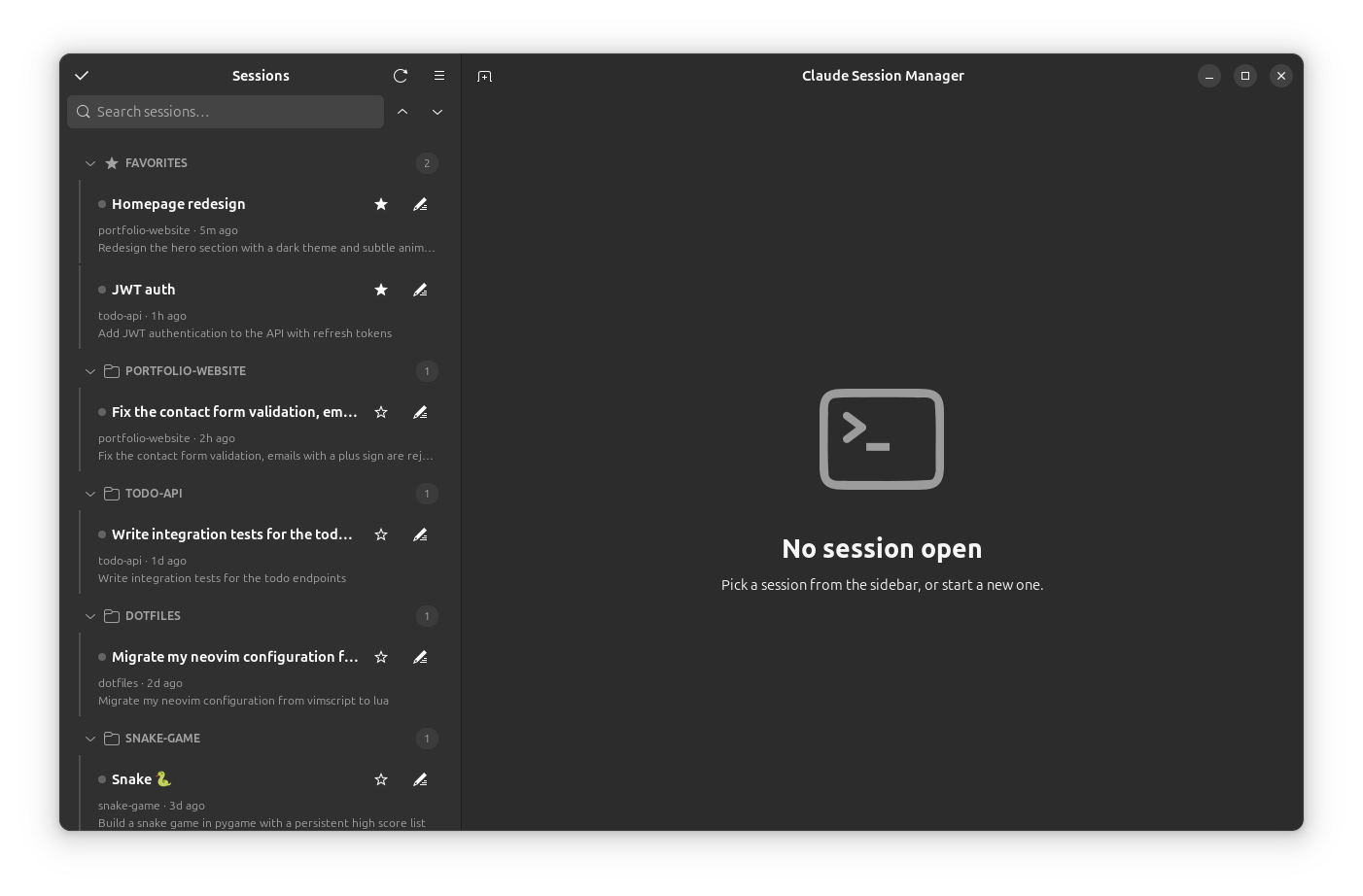
Features:
- Sidebar lists every session found under
~/.claude/projects/, grouped by project (collapsible headers, with collapse-all/expand-all buttons next to the search box), with a Favorites section pinned on top — star a session to move it there. A search box filters by name, project, preview, or session id, and the list updates live as sessions are created or written to. - Sessions can be given custom names (pencil icon). Names, favorites, and hidden sessions persist in
~/.config/claude-session-manager/state.json— Claude's own session files are never modified. - Clicking a session opens a tab in the main area; each tab is an embedded VTE terminal running your
$SHELLwithclaude --resume <session-id>typed into it, in the session's original project directory. When claude exits you drop to a shell prompt; the tab closes when the shell exits. Closing a tab asks Claude to exit cleanly (/exit) in the background first. - In-terminal search with a find bar (
Ctrl+Shift+G) over the tab's scrollback. - Status dots in both the sidebar and on each open tab: green = open, blue = output arrived in a background tab.
- Tabs can be renamed, given an emoji prefix, or have their session ID copied (right-click → Rename… / Set emoji… / Copy session ID); renaming a session's tab updates its name everywhere. A close-all button appears when more than one tab is open, and the sidebar toggles with the header button or
F9. Shift+Enter inserts a newline in Claude's prompt. - Right-click a session for the full action set: open, open in Ghostty (external window — Ghostty can't be embedded), fork (
--fork-session), rename, favorite, details (messages/models/tokens, a peek at recent messages, and MCP servers/usage), copy session id, reveal transcript, hide, or move the transcript to trash. - Desktop notifications when a background session goes quiet after producing output — click to jump to that tab (toggle in Preferences).
- Select mode (checkbox button in the sidebar header) for bulk actions: open, star, hide, or trash many sessions at once.
- New session (tab icon in the header) asks for a project folder and starts a fresh
claudethere. - Preferences (menu → Preferences, or
Ctrl+,): terminal font, scrollback, color scheme. - A status footer shows session, project, transcript-size, and open-tab counts.
Keyboard shortcuts
| Shortcut | Action |
|---|---|
Ctrl+Shift+F | Focus search |
Ctrl+Shift+T | New session |
Ctrl+Shift+W | Close current tab |
Ctrl+PgUp / Ctrl+PgDn | Previous / next tab |
Ctrl+Shift+C / Ctrl+Shift+V | Copy / paste in terminal |
Ctrl+Shift+G | Find in terminal |
F9 | Toggle sidebar |
Ctrl+, | Preferences |
Requirements
Python ≥ 3.10, GTK 4, libadwaita ≥ 1.5, VTE (GTK 4 build), PyGObject — from your distro's packages:
# Ubuntu / Debian
sudo apt install python3-gi gir1.2-gtk-4.0 gir1.2-adw-1 gir1.2-vte-3.91

# Fedora
sudo dnf install python3-gobject gtk4 libadwaita vte291-gtk4

# Arch
sudo pacman -S python-gobject gtk4 libadwaita vte4
Plus the claude CLI on your PATH.
Installing with
pipx? PyGObject comes from the system, so usepipx install --system-site-packages claude-session-manager.
Install
Debian/Ubuntu — .deb package (from the latest release):
sudo apt install ./claude-session-manager_0.5.0_all.deb
Dependencies are pulled in automatically; the app appears in your app grid as "Claude Session Manager".
From source:
cd ClaudeSessionManager
python3 -m claude_session_manager
Or install the desktop launcher + icon (shows up in the app grid as "Claude Session Manager"):
./data/install.sh
Terminal shortcuts: Ctrl+Shift+C copy, Ctrl+Shift+V paste.
Layout
claude_session_manager/
├── app.py        # Adw.Application entry point + CSS
├── window.py     # main window: split view, sidebar, tabs, actions, dialogs
├── sessions.py   # session discovery + transcript statistics
├── state.py      # persistent app state (names, favorites, hidden, settings)
├── prefs.py      # preferences dialog
└── terminal.py   # VTE terminal tab spawning the claude CLI
data/
├── eu.zengo.ClaudeSessionManager.desktop   # launcher template
├── icons/eu.zengo.ClaudeSessionManager.svg # app icon
└── install.sh                              # install launcher + icon for current user
scripts/
├── build_deb.sh                            # build the .deb package into dist/
└── make_demo_data.py                       # fake sessions for screenshots/demos
Roadmap
- Transcript peek: render last messages in the details dialog
- Drag-and-drop sessions into Favorites