
ClaudeMeter
quanqiutongshi01-svg/ClaudeMeter
Native macOS menu-bar app for monitoring Claude Code and Codex quota
Instalação
npx convez-ai quanqiutongshi01-svg/ClaudeMeter1 comando no terminal: detecta o formato do repositório (marketplace ou plugin avulso) e instala via Claude Code. Requer Node 18+ e o Claude Code instalado.
Métricas
README
A tradução para o português deste README ainda está na fila.
TokenMeter




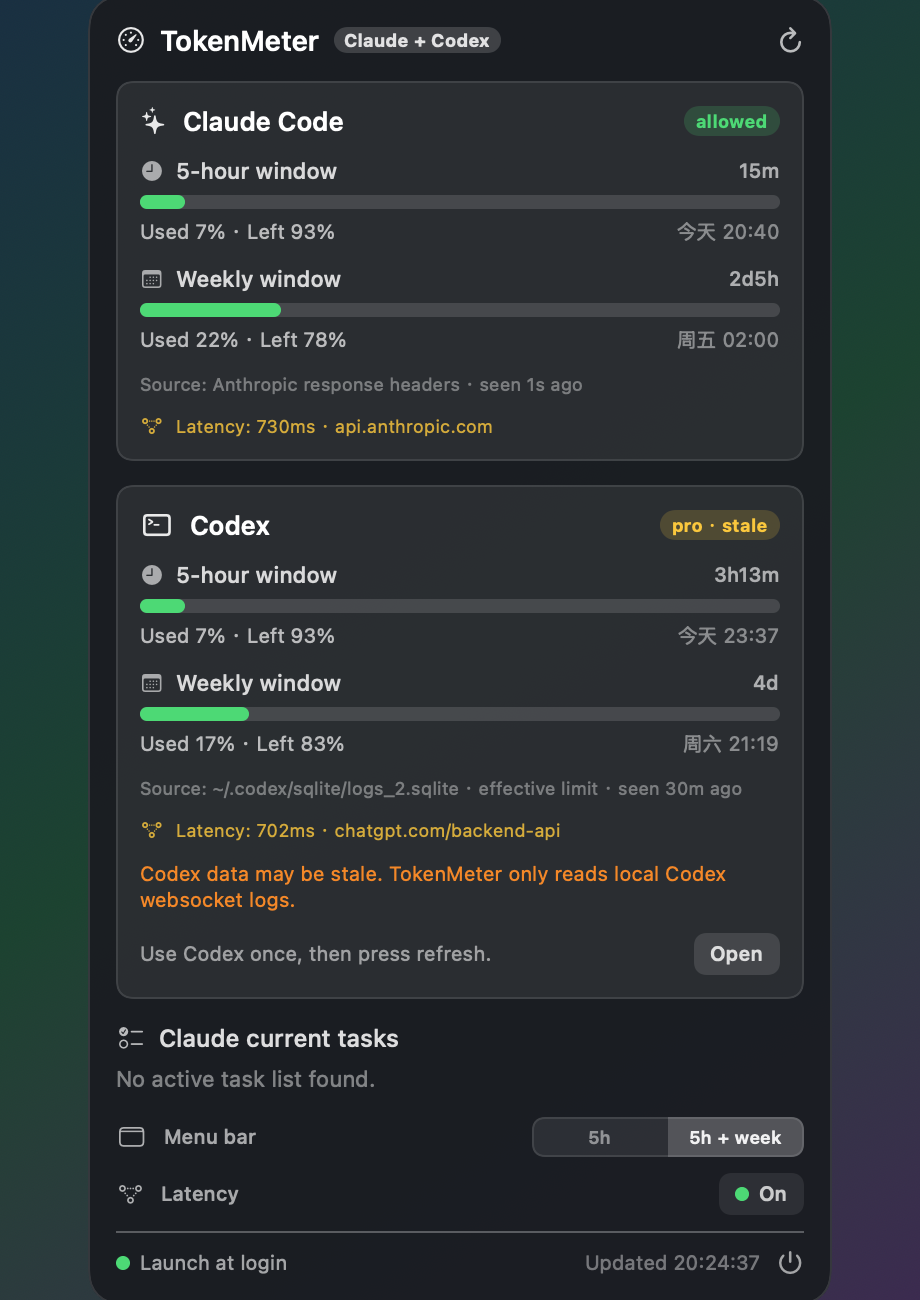
TokenMeter is a tiny native macOS menu-bar app for watching AI coding quota in one place:
- Claude Code: official 5-hour and weekly usage from Anthropic response headers.
- Codex: best-effort 5-hour and weekly usage from local
codex.rate_limitswebsocket logs.
No Electron, no daemon, no hidden Codex request. The menu bar stays compact and configurable, and the floating panel shows the full Claude/Codex breakdown.
Menu bar examples:
Cl 94% 120ms · Cx 92% 180msorCl 94%/85% 120ms · Cx 92%/96% 180msValues in the menu bar are remaining quota. Orange means any displayed window is at or below 20% left; red means 10% or less.~Cxmeans the latest Codex snapshot may be stale; it does not change the menu-bar color by itself.
Features
- Unified monitor. Claude Code and Codex appear in the same menu-bar item and floating panel.
- Configurable menu bar. Choose 5-hour-only mode or 5-hour + weekly mode from the floating panel.
- Claude official numbers. Reads
anthropic-ratelimit-unified-*headers, the same source behind Claude Code's usage window. - Codex best-effort numbers. Reads the latest local
codex.rate_limitsevent from~/.codex/logs_2.sqliteor~/.codex/sqlite/logs_2.sqlite. - Multi-log Codex scan. TokenMeter scans both known Codex SQLite locations and picks the freshest parseable snapshot, so an older legacy log will not mask a newer active log.
- Effective Codex limits. If Codex logs model-specific
additional_rate_limits, TokenMeter uses the tightest 5-hour/weekly bucket so the menu bar reflects the quota most likely to block usage. - Server latency. Shows lightweight HTTPS latency to
api.anthropic.comandchatgpt.com/backend-api/without sending model requests. - Latency toggle. Turn latency display on or off from the floating panel; the app remembers your choice and skips probes when disabled.
- No hidden Codex spend. TokenMeter never starts a Codex model turn just to refresh quota.
- Freshness-aware UI. Codex data is marked fresh, stale, or unavailable depending on the latest local snapshot.
- Native macOS HUD. Draggable translucent floating panel, menu-bar only, no Dock icon.
- Launch at login toggle built in.
Requirements
- macOS 14 (Sonoma) or newer.
- For Claude Code: active Claude subscription, Claude Code CLI installed, and a
claude setup-tokentoken. - For Codex: Codex desktop/CLI must have produced at least one local
codex.rate_limitslog event. - Xcode Command Line Tools to build from source:
xcode-select --install. - Apple Silicon by default. On Intel, change
-target arm64-apple-macos14.0tox86_64-apple-macos14.0inbuild.sh.
Install
Option A - build from source
git clone https://github.com/quanqiutongshi01-svg/ClaudeMeter.git
cd ClaudeMeter
./build.sh
cp -R TokenMeter.app /Applications/
open /Applications/TokenMeter.app
Option B - prebuilt DMG
Download TokenMeter-x.y.z.dmg from Releases, open it, and drag TokenMeter to Applications.
The app is ad-hoc signed, not notarized. On first launch, use right-click -> Open -> Open, or:
xattr -dr com.apple.quarantine /Applications/TokenMeter.app
Claude Setup
Claude usage needs a local OAuth token minted by the official Claude Code CLI:
# 1) Mint a token. This opens a browser and prints an sk-ant-oat01-... token.
claude setup-token

# 2) Save it where TokenMeter reads it.
mkdir -p ~/.claude/ccmenubar
printf '%s' 'PASTE_YOUR_TOKEN_HERE' > ~/.claude/ccmenubar/claude-token
chmod 600 ~/.claude/ccmenubar/claude-token
The token stays on your machine and is only sent to api.anthropic.com for the tiny Claude usage-header request.
Codex Setup
There is no Codex token setup in TokenMeter.
TokenMeter reads the latest local Codex rate-limit snapshot if Codex has logged one. If the Codex card says stale or unavailable:
- Click Open or open Codex yourself.
- Complete one normal Codex request.
- Press refresh in TokenMeter.
This is intentional: TokenMeter does not make a hidden Codex request, because that would consume your Codex allowance.
The Open button only brings Codex to the front. It cannot force Codex to publish a new quota snapshot by itself; Codex usually writes the fresh codex.rate_limits event after a normal model response.
Limitations
- Claude support is official-header based and should match Claude Code usage to the percent.
- Codex support is best effort and log-based. It depends on local Codex builds continuing to log
codex.rate_limitswebsocket events. - Codex numbers refresh only after Codex itself receives a new rate-limit event.
- Prebuilt binaries are not notarized.
Build And Debug
./build.sh
TOKENMETER_SHOW=1 open TokenMeter.app
./TokenMeter.app/Contents/MacOS/TokenMeter --render assets/screenshot.png
Contributing
Issues and PRs are welcome: Intel builds, more providers, a settings screen, better packaging, or a future official Codex usage endpoint.
License
MIT © 2026 Leo
TokenMeter(中文)
TokenMeter 是一个极小的原生 macOS 菜单栏 App,用于把 AI 编程工具的额度放在一个地方看:
- Claude Code:通过 Anthropic 响应头读取官方 5 小时窗口和每周窗口。
- Codex:从本机
codex.rate_limitswebsocket 日志读取 5 小时窗口和每周窗口,属于最佳努力模式。
非 Electron、无后台守护进程、不会偷偷发 Codex 请求。菜单栏保持紧凑且可配置,浮窗里展示 Claude/Codex 的完整拆分。
菜单栏示例:
Cl 94% 120ms · Cx 92% 180ms或Cl 94%/85% 120ms · Cx 92%/96% 180ms菜单栏显示的是剩余额度。任一显示窗口剩余 ≤20% 时变橙,≤10% 时变红。~Cx表示最新 Codex 快照可能已经过期;它本身不会让菜单栏变色。
特性
- 统一监控。 Claude Code 和 Codex 同时出现在菜单栏和浮窗中。
- 菜单栏可配置。 可在浮窗中选择只显示 5 小时窗口,或同时显示 5 小时 + 周窗口。
- Claude 官方口径。 读取
anthropic-ratelimit-unified-*响应头,和 Claude Code 用量窗口同源。 - Codex 最佳努力口径。 读取
~/.codex/logs_2.sqlite或~/.codex/sqlite/logs_2.sqlite中最新的codex.rate_limits事件。 - Codex 多日志扫描。 TokenMeter 会同时扫描两个已知 Codex SQLite 位置,并选择最新、可解析的快照,避免旧日志遮住新日志。
- Codex 有效限制。 如果 Codex 日志里出现模型级
additional_rate_limits,TokenMeter 会选择 5 小时/周窗口里更紧的那个额度,避免菜单栏低估真正会卡住使用的限制。 - 服务器延迟。 显示到
api.anthropic.com和chatgpt.com/backend-api/的轻量 HTTPS 延迟,不发送模型请求。 - 延迟开关。 可在浮窗中打开或关闭延迟显示;App 会记住你的选择,并在关闭时跳过延迟探测。
- 不隐藏消耗 Codex。 TokenMeter 不会为了刷新额度而主动触发 Codex 模型请求。
- 显示数据新鲜度。 Codex 数据会标记为新鲜、可能过期或不可用。
- 原生 macOS 浮窗。 半透明可拖动 HUD,只在菜单栏显示,无 Dock 图标。
- 内置 开机自启 开关。
环境要求
- macOS 14 (Sonoma) 及以上。
- Claude Code:需要有效 Claude 订阅、Claude Code CLI,以及
claude setup-token生成的 token。 - Codex:需要 Codex 桌面版或 CLI 曾经在本机写入过
codex.rate_limits日志。 - 从源码构建需 Xcode 命令行工具:
xcode-select --install。 - 默认 Apple Silicon;Intel 机器把
build.sh里的-target arm64-apple-macos14.0改成x86_64-apple-macos14.0。
安装
方式 A - 从源码构建
git clone https://github.com/quanqiutongshi01-svg/ClaudeMeter.git
cd ClaudeMeter
./build.sh
cp -R TokenMeter.app /Applications/
open /Applications/TokenMeter.app
方式 B - 预编译 DMG
从 Releases 下载 TokenMeter-x.y.z.dmg,打开后把 TokenMeter 拖到「应用程序」。
预编译 App 是临时签名,未公证。首次打开请 右键 -> 打开 -> 打开,或运行:
xattr -dr com.apple.quarantine /Applications/TokenMeter.app
Claude 配置
Claude 用量需要用官方 Claude Code CLI 生成一个本地 OAuth token:
# 1) 生成 token。会打开浏览器授权,然后打印一个 sk-ant-oat01-... token。
claude setup-token

# 2) 保存到 TokenMeter 读取的位置。
mkdir -p ~/.claude/ccmenubar
printf '%s' '粘贴你的token' > ~/.claude/ccmenubar/claude-token
chmod 600 ~/.claude/ccmenubar/claude-token
这个 token 只保存在你的电脑上,只会被用于向 api.anthropic.com 发一个极小的 Claude 用量响应头请求。
Codex 配置
Codex 不需要在 TokenMeter 里额外配置 token。
TokenMeter 会读取 Codex 本机日志里的最新限额快照。如果 Codex 卡片显示“可能过期”或“不可用”:
- 点击 Open,或你自己打开 Codex。
- 正常完成一次 Codex 请求。
- 回到 TokenMeter 点击刷新。
这是有意设计:TokenMeter 不会偷偷发 Codex 请求,因为那会消耗你的 Codex 额度。
Open 按钮只负责把 Codex 唤到前台;它本身不能强制 Codex 写入新的额度快照。通常要等一次正常模型回复完成后,Codex 才会写入新的 codex.rate_limits 事件。
限制
- Claude 支持来自官方响应头,通常应与 Claude Code 用量窗口逐百分比对上。
- Codex 支持是本地日志读取,最佳努力,依赖当前 Codex 版本继续记录
codex.rate_limitswebsocket 事件。 - Codex 数字只有在 Codex 自己收到新的 rate-limit 事件后才会刷新。
- 预编译二进制未公证。
构建和调试
./build.sh
TOKENMETER_SHOW=1 open TokenMeter.app
./TokenMeter.app/Contents/MacOS/TokenMeter --render assets/screenshot.png
贡献
欢迎 issue 和 PR:Intel 构建、更多 provider、设置界面、更好的打包方式,或者未来的 Codex 官方用量接口支持。
许可证
MIT © 2026 Leo