
Claude Code Orchestrator
phahadek/claude-orchestrator
Orquestrador visual para sessões Claude Code com segurança e rastreamento de custos
Ver no GitHubDashboard local para orquestrar sessões paralelas do Claude Code com visibilidade total sobre workflows automatizados. Gerencia despacho de tarefas, revisão automática de PRs, histórico de sessões e rastreamento de custos por modelo — construído para desenvolvedores solo que precisam de controle granular sobre execução de código.
Instalação
npx convez-ai phahadek/claude-orchestrator1 comando no terminal: detecta o formato do repositório (marketplace ou plugin avulso) e instala via Claude Code. Requer Node 18+ e o Claude Code instalado.
Métricas
Casos de uso
- Gerenciar múltiplas sessões de código paralelas com histórico completo
- Revisar e aprovar pull requests gerados automaticamente dentro de um painel centralizado
- Monitorar tokens consumidos e custos por modelo (Opus, Sonnet, Haiku) em tempo real
- Implementar políticas de segurança com engine de permissões em 4 camadas (deny hard > allow hard > rules SQLite > UI)
Veredito

Projeto robusto e maduro que resolve um problema real de controle e visibilidade em automação de código. Arquitetura bem pensada (sessions persistentes, eventos driven, backend dono do ciclo de vida) e código limpo fazem dele referência sólida para quem trabalha com Claude Code em escala.
README
A tradução para o português deste README ainda está na fila.
Claude Code Orchestrator
A local web dashboard for browsing, managing, and orchestrating Claude Code sessions. Built for solo developers who want visibility and control over automated coding workflows — and bootstrapped by being used to build itself.
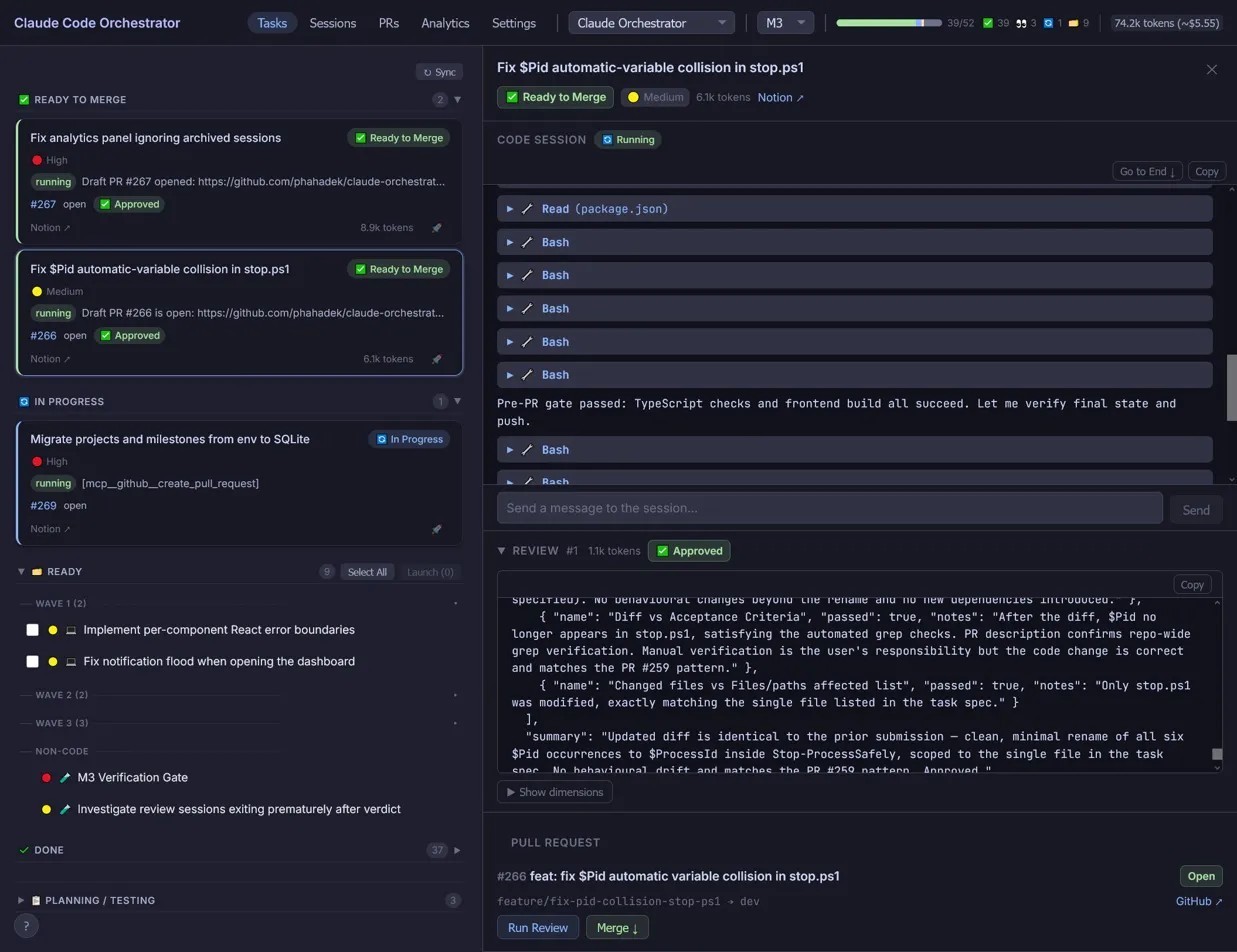
What it does
- Browse, search, and filter Claude Code session history with full message timelines
- Switch between multiple repos, each with its own task board and session lifecycle
- Watch sessions in real time with live token usage and per-model cost estimates
- Dispatch coding tasks from Notion (or local YAML), with automated PR review and lifecycle management
- Monitor pull requests — verdicts, merge state, conflict detection — without leaving the dashboard
Design highlights
- Four-tier permission engine — every tool call passes through hard-deny patterns, hard-allow patterns, user rules stored in SQLite, and finally escalation to the UI. Stateless, ~140 lines, glob or regex match per rule.
- Persistent review sessions — each PR gets one review session that stays alive for the PR's lifetime. Re-reviews are follow-up messages on the same session, not respawns, so the reviewer accumulates context across iterations.
- Backend owns the lifecycle — task status (
In Progress→In Review→Done), session start/stop, and PR-to-task linkage are managed server-side. Sessions are explicitly told not to update Notion themselves; the orchestrator does it. - Event-driven review-merge loop — push detection from
git pushtool calls, verdict parsed from the review session's event stream. No GitHub API polling except a single 5-minute fallback for PRs merged directly on GitHub. - Per-model token and cost tracking — Opus, Sonnet, and Haiku pricing baked in (input + output per-million rates). Live cost estimates per session and aggregated per project.
- Bootstrapped — built using itself across ~500 commits and three shipped milestones (read-only session browser → multi-project orchestration → automated review and lifecycle), then used to ship three other projects.
Quick taste
A real excerpt from packages/backend/src/permissions/PermissionEngine.ts:
const HARD_DENY = [
  'Bash *rm -rf*',
  'Bash *git push --force*main*',
  'Bash *chmod -R 777*',
];
const HARD_ALLOW = [
  'Read *',
  'Bash *git status*',
  'Bash *npx tsc*',
  'Bash *npm run *',
];
// 1. hard-deny → 2. hard-allow → 3. user rules from SQLite → 4. escalate to UI
User rules live in the permission_rules SQLite table, ordered by order_index, glob or regex, allow or deny. The first match wins.
How it works
When you click Dispatch, the backend spawns one Claude CLI subprocess per selected task — each in its own git worktree under .claude/worktrees/<sessionId> — and streams the JSONL event output back over WebSocket. The Notion task is moved to In Progress server-side. Every tool call the session attempts is intercepted by the permission engine; matched calls run, unmatched calls suspend the session and surface in the attention queue. When the session opens a PR, a paired persistent review session is spawned, parses a verdict from its own event stream, and either approves the PR or sends findings back to the originating session as a follow-up message — and the loop continues until the PR is merged.
sequenceDiagram
    participant U as User
    participant D as Dashboard
    participant C as Code session
    participant R as Review session
    participant G as GitHub

    U->>D: Dispatch task
    D->>C: Spawn (worktree + CLAUDE.md injected)
    D->>D: Notion task → In Progress
    C-->>D: tool calls (via permission engine)
    C->>G: Open PR
    D->>R: Spawn paired review session
    R-->>D: Verdict (event stream)
    alt Approved
        U->>D: Merge ↓
        D->>G: Squash merge
        D->>D: Close both sessions, task → Done
    else Needs changes
        D->>C: Forward findings as follow-up
        C->>G: git push (push_detected event)
        D->>R: Re-review follow-up (same session, iter++)
    end
| Layer | Tech | Path |
|---|---|---|
| Frontend | React 19 + Vite (TypeScript) | packages/frontend/ |
| Backend | Node.js + Express (TypeScript) | packages/backend/ |
| Transport | WebSocket (ws) | real-time session events |
| Database | SQLite (better-sqlite3) | session metadata, PR tracking, permission rules |
| Task source | Notion REST API, GitHub Issues, or local YAML | configured per project |
| Session execution | claude CLI subprocess | one process per session, JSONL on stdout |
Quickstart
Prerequisites
- Node.js 20 LTS and npm
claudeCLI installed and authenticated (claude login)- Notion integration token (if using Notion as a task source)
- GitHub PAT with
reposcope (for PR tracking)
Happy path
git clone https://github.com/phahadek/claude-orchestrator.git && cd claude-orchestrator
npm install
git config blame.ignoreRevsFile .git-blame-ignore-revs      # once per clone — hides mass-format commits from blame
cp packages/backend/.env.example packages/backend/.env       # then edit
cp .claude/local-context.md.example .claude/local-context.md # gitignored — add your Notion URLs
npm run dev    # → http://localhost:5173 (dev; Vite proxies API/WS to backend on :3000)
.claude/local-context.md is gitignored and holds host-local references (Notion URLs, board IDs). Sessions read it as their first action. See docs/install.md for details and an optional pre-commit hook that blocks workspace-ID leaks.
For Docker, production builds, the full env var reference, and Notion/local task source setup, see docs/install.md.
Configure your first project
Projects and milestones are managed entirely from the dashboard UI — there is no PROJECTS env var to populate, and no restart is required after adding or editing them. Configuration is persisted to the dashboard's SQLite database.
- Open the dashboard, then go to Settings → Projects → Add project.
- Fill in the project name, the absolute path to its local repo (
projectDir), the GitHubowner/repo, and choose a Task source:- Notion — the Settings form labels Context URL as optional, but Notion projects in practice need it: paste the URL of the Project Context page. See
docs/notion-template.mdfor the workspace structure the dashboard expects. - GitHub — tasks are GitHub Issues labeled and organized by milestone. See
docs/github-template.mdfor label vocabulary, issue body structure, and repo bootstrap steps. - Jira — tasks are Jira issues organized under an Epic (the milestone). See
docs/jira-template.mdfor issue type mapping, workflow status conventions, and project bootstrap steps. - YAML — tasks live in
<projectDir>/tasks.yaml(gitignored by default). Seedocs/yaml-template.mdfor the schema reference and conventions.
- Notion — the Settings form labels Context URL as optional, but Notion projects in practice need it: paste the URL of the Project Context page. See
- Open Settings → Milestones → Add milestone and add as many milestones as you need. For Notion projects, paste the database ID of each milestone's task board (a 32-character hex string — pages and databases both have IDs, and they are not interchangeable; copy from the database URL, not a parent page).
- The Tasks panel shows the active milestone's tasks. The default active milestone is the first one in display order; if a project has more than one milestone, a milestone selector appears in the header next to the project switcher, and your choice is remembered per browser via
localStorage. Click Dispatch on any🗂️ Readytask to spawn a Claude session in a worktree.
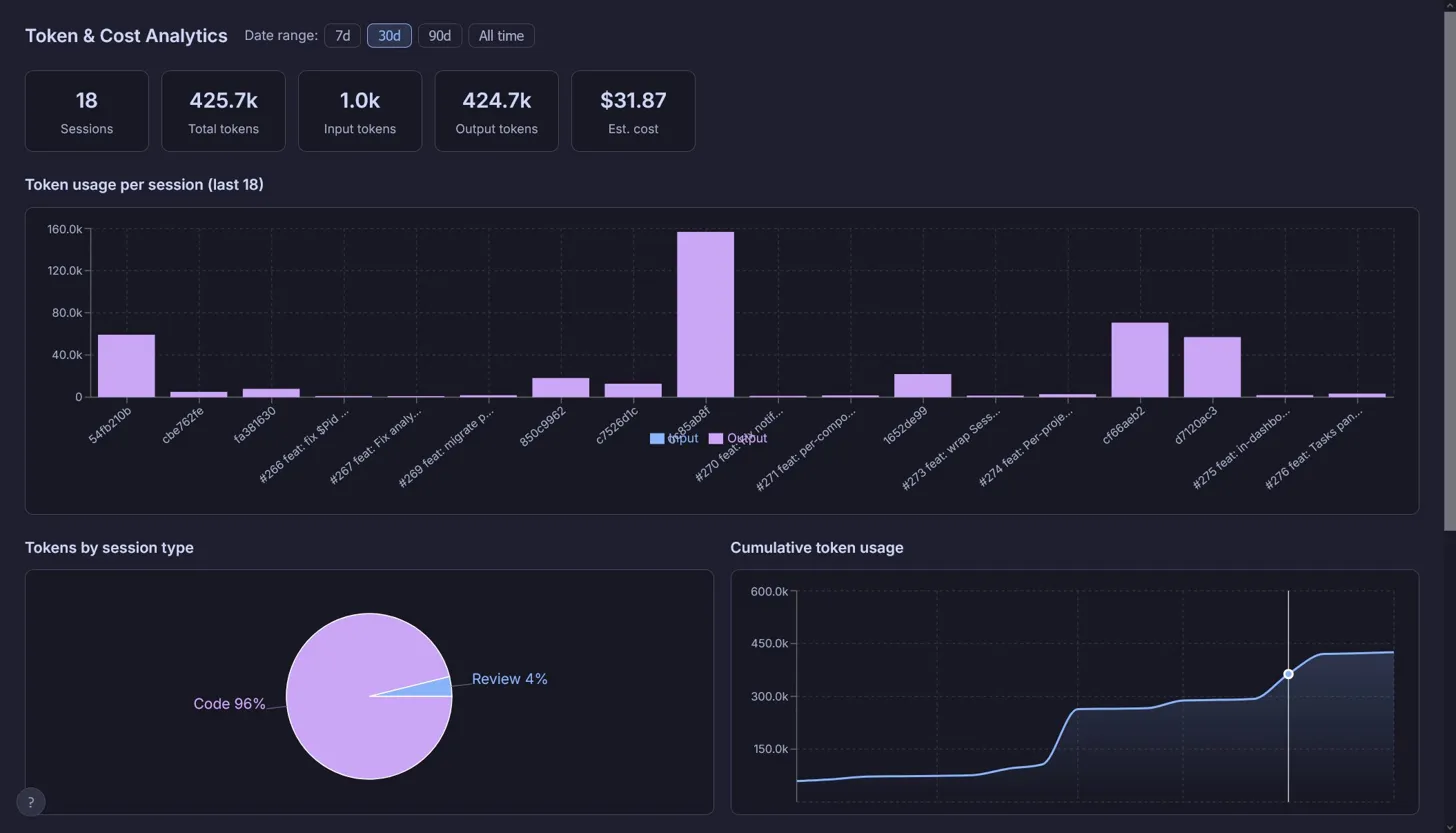
The Analytics tab tracks per-session token usage and per-model cost across the project's history.
Documentation
- Product Design — user goals, workflows, UI layout, and resolved design decisions
- Technical Architecture — stack, project structure, key systems, data flow, SQLite schema
- Coding Guidelines — architectural rules, naming, patterns, git etiquette
- Task Writing Guidelines — how to scope and write Notion tasks for this orchestrator
- Install guide — production setup and full env var reference
- Notion template — set up a Notion workspace compatible with this orchestrator
- GitHub template — label vocabulary, issue body structure, and repo bootstrap for GitHub-backed projects
- Jira template — issue type mapping, workflow statuses, Epic milestone semantics, and project bootstrap for Jira-backed projects
- YAML template — schema reference and conventions for YAML-backed projects
- Orchestrator project setup — point the orchestrator at an external project (C#, Rust, Godot, …) via
.claude/orchestrator.jsonand a bootstrap script