
MDB API Layer - Framework de Testes para TMDB
pgundlupetvenkatesh/mdb_api_layer
Framework SDET para TMDB com diagnóstico de falhas powered by IA
Ver no GitHubFramework de testes Python para a API REST do TMDB com validação de contrato Pact, testes E2E, execução paralela em Docker/Kubernetes e diagnóstico de falhas com IA via Groq. Expõe funcionalidades como MCP server para agentes Claude analisarem e corrigirem falhas de teste automaticamente.
Instalação
npx convez-ai pgundlupetvenkatesh/mdb_api_layer1 comando no terminal: detecta o formato do repositório (marketplace ou plugin avulso) e instala via Claude Code. Requer Node 18+ e o Claude Code instalado.
Métricas
Casos de uso
- Testes automatizados e CI/CD para APIs REST
- Validação de contratos entre consumidor e provedor de API
- Diagnóstico inteligente de falhas em testes via LLM
- Integração com agentes IA para análise de quebras de teste
Veredito

Solução robusta e profissional para testar APIs com práticas SDET reais, contract testing e orquestração em containers. O diagnóstico de falhas com IA via MCP é diferencial, mas exige Python 3.10+ e conhecimento sólido de pytest, Docker e K8s.
README
A tradução para o português deste README ainda está na fila.
mdb_api_layer











API Testing Framework for The Movie Database (TMDB) with Python
Overview
A Python-based API testing framework for TMDB API, featuring structured test organization, JSON schema validation, Contract tests, and comprehensive response assertions.
View live code documentation & latest test report here
Quick Start
New here? Get from clone to a passing test in four steps:
# 1. Clone & install
git clone https://github.com/pgundlupetvenkatesh/mdb_api_layer.git
cd mdb_api_layer
poetry install

# 2. Add your TMDB credentials to a .env file (see Configuration below)
echo "TMDB_API_KEY=your_api_key_here"        >> .env
echo "TMDB_AUTH_TOKEN=your_read_access_token" >> .env

# 3. Run a single test to verify the setup
poetry run pytest tests/movie_lists/test_popular.py -v -s

# 4. Run the full suite
poetry run pytest tests/ -v -m "not contract"
Each step is expanded in Prerequisites, Installation, Configuration, and Running Tests below.
Features
- RESTful API client with session management (GET, POST, PUT, DELETE)
- Multiple API clients: Movies, People, Lists, Account
- Strict Pydantic model validation for response structure (single source of truth)
- Consumer-driven contract testing with Pact
- Data-driven testing with per-section YAML test data and cached dynamic generators
- Automatic retries for flaky live-API latency via pytest-rerunfailures
- Reusable HTTP response assertion helpers (status, method, content-type, response time)
- Dedicated per-client pytest fixtures (
movies_api,people_api,lists_api,search_api) - Structured logging with Loguru (configurable level & file output)
- Configurable environment-based settings via
.env - AI-powered test failure analysis using open-source LLMs via Groq (opt-in)
- Pytest integration with HTML and Allure reporting
- Sphinx documentation with GitHub Pages deployment
Architecture
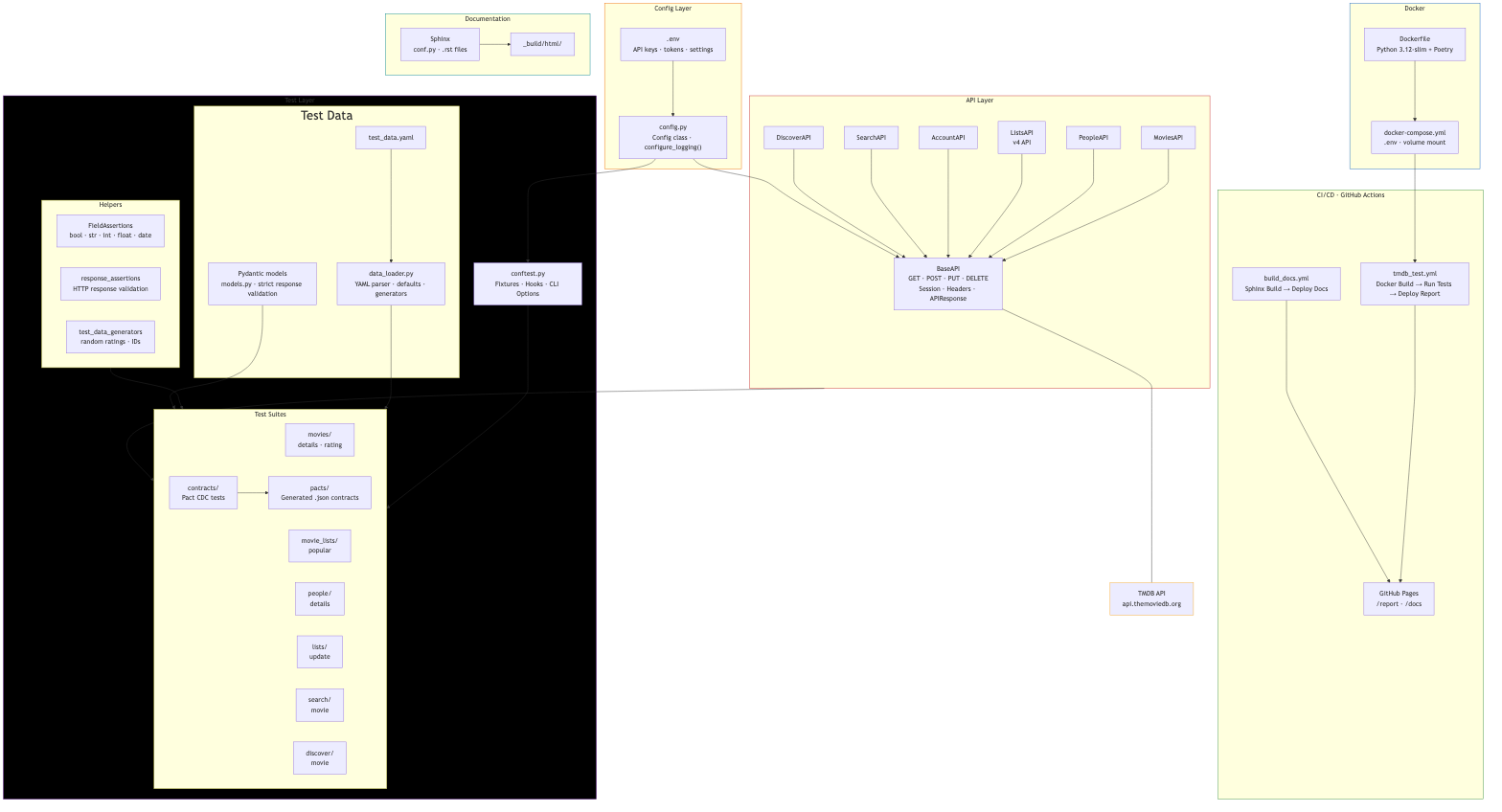
How the Layers Connect
| Layer | Responsibility |
|---|---|
| Config | Loads .env, exposes Config class, sets up Loguru logging |
| API | BaseAPI handles HTTP + auth; endpoint classes (MoviesAPI, etc.) add domain methods |
| Tests | conftest.py wires fixtures/hooks; suites use helpers, schemas, and data-driven YAML |
| Contracts | Pact CDC tests generate .json contract files in tests/pacts/ |
| Docker | Dockerfile builds image; docker-compose.yml runs tests locally with .env and volume |
| CI/CD | Two GH Actions workflows: one for Docker test runs + report deploy, one for Sphinx docs |
| Docs | Sphinx auto-generates API docs from docstrings, deployed to GitHub Pages |
| MCP | failure_mcp/ exposes FailureAnalyzer as 3 callable tools over stdio transport |
Prerequisites
- Python 3.10+
- Poetry for dependency management
- TMDB API account and API key
- Docker for containerized test runs (optional)
Installation
# Clone the repository
git clone https://github.com/pgundlupetvenkatesh/mdb_api_layer.git
cd mdb_api_layer

# Install dependencies
poetry install

# (optional) add a new Python package dependency later
poetry add <package_name>
Sanity Checks
Verify the virtual environment was created and dependencies resolved:
poetry env info
poetry show
Configuration
Getting TMDB API Credentials
- Create a TMDB account at themoviedb.org
- Request an API key:
- Go to Settings → API
- Click "Create" or "Request an API Key"
- Choose "Developer" for personal/testing use
- Fill in the application details (use your project URL or localhost for testing)
- Once approved, you'll receive your API Key (v3 auth) and API Read Access Token
- Locate your credentials:
- API Key: Found under "API Key (v3 auth)" on the API settings page
- Auth Token: Found under "API Read Access Token (v4 auth)" — this is your Bearer token
Setting Up Environment Variables
Create a .env file in the project root (this file is ignored):
# Required
TMDB_API_KEY=your_api_key_here
TMDB_AUTH_TOKEN=your_read_access_token_here

# Optional (defaults shown)
TMDB_BASE_URL=https://api.themoviedb.org
TMDB_API_VERSION=3
TMDB_TIMEOUT=30
TMDB_USER_ACCESS_TOKEN=your_user_access_token_here
Alternative: Export variables directly in your terminal:
export TMDB_API_KEY="your_api_key_here"
export TMDB_AUTH_TOKEN="your_read_access_token_here"
Environment Variables Reference
| Variable | Description | Required | Default |
|---|---|---|---|
TMDB_API_KEY | Your TMDB API key (v3 auth) | Yes | - |
TMDB_AUTH_TOKEN | Your TMDB API read access token (v4 auth) | Yes | - |
TMDB_BASE_URL | Base URL for TMDB API | No | https://api.themoviedb.org |
TMDB_API_VERSION | API version to use (3 or 4) | No | 3 |
TMDB_TIMEOUT | Request timeout in seconds | No | 30 |
TMDB_USER_ACCESS_TOKEN | User Access Token for Lists API (v4 auth) | No | - |
TMDB_ACCOUNT_ID | TMDB account ID | No | 12016691 |
TMDB_SESSION_ID | Session ID for authenticated requests | No | - |
TMDB_REQ_TOKEN | Request token for authentication | No | - |
TMDB_MOVIE_ID | Default movie ID for tests | No | 346698 |
Note: Keep your API credentials secure. Never commit
.envfiles or expose tokens in public repositories.
Running Tests
First, confirm your setup works by running a single test:
# Verify your setup
poetry install

# Run one test
poetry run pytest tests/movie_lists/test_popular.py -v -s
Once that passes, use the commands below for everyday runs:
# Run all tests (integration + contract)
poetry run pytest tests/ -v

# Run all tests except contract tests
poetry run pytest tests/ -v -m "not contract"

# Run tests by module
poetry run pytest tests/movies/ -v -s
poetry run pytest tests/people/ -v -s
poetry run pytest tests/lists/ -v -s
poetry run pytest tests/movie_lists/ -v -s
poetry run pytest tests/search/ -v -s

# Run a specific test function
poetry run pytest tests/movie_lists/test_popular.py::TestClassName::test_func_name -v -s

# Run with debug logging
poetry run pytest tests/ -v -s --loguru-log-level=DEBUG

# Run with log file output
poetry run pytest tests/ -v -s --log-to-file

# Run with HTML report
poetry run pytest tests/ --html=report/tmdb_report.html --self-contained-html -v -s

# Clean run with Allure reporting
rm -rf allure-results && poetry run pytest tests/ --alluredir=allure-results -v && allure serve allure-results
# View report (requires Allure CLI installed locally: brew install allure)
allure serve allure-results

# Generate static HTML from results. allure-report/ contains a full static site
allure generate allure-results -o allure-report --clean

# Keep history between local runs
cp -r allure-report/history allure-results/ 2>/dev/null || true
Project Structure
mdb_api_layer/
├── api/
│   ├── base_api.py             # Base API client with HTTP methods (GET, POST, PUT, DELETE)
│   ├── movies_api.py           # Movies endpoint implementation
│   ├── people_api.py           # People endpoint implementation
│   ├── lists_api.py            # Lists endpoint implementation (v4 API)
│   ├── account_api.py          # Account endpoint implementation
│   └── search_api.py           # Search endpoint implementation
├── config/
│   └── config.py               # Environment configuration & Loguru logging setup
├── tests/
│   ├── allure/
│   │   └── categories.json
│   ├── ai_analysis/                 # Generated analysis reports (gitignored)
│   │   └── failure_analysis.json
│   ├── conftest.py             # Pytest fixtures, hooks & logging CLI options
│   ├── contracts/
│   │   ├── conftest.py             # Shared Pact fixtures (pact, pact_movies_api, pact_address)
│   │   ├── test_movie_details.py   # Movie details contract tests (Pact CDC)
│   │   └── test_popular_movies.py  # Popular movies contract tests (Pact CDC)
│   ├── data/
│   │   ├── data_loader.py      # Per-section YAML test data loader + dynamic generators
│   │   ├── test_data.yaml      # Parametrized test data for data-driven tests
│   │   └── movie_ids.txt       # Movie IDs for random test data generation (cached on first read)
│   ├── helpers/
│   │   ├── failure_analyzer.py     # LLM failure analysis client
│   │   ├── field_assertions.py     # Legacy field-check mixin (now unused; superseded by Pydantic models)
│   │   ├── response_assertions.py  # HTTP response assertion helpers
│   │   └── test_data_generators.py # Dynamic test data generators
│   ├── movies/
│   │   ├── test_details.py     # Movie details integration tests
│   │   ├── test_add_rating.py  # Add rating tests
│   │   └── test_delete_rating.py   # Delete rating tests
│   ├── movie_lists/
│   │   └── test_popular.py     # Popular movies list tests
│   ├── people/
│   │   └── test_details.py     # People details integration tests
│   ├── lists/
│   │   └── test_update.py      # Lists update tests (v4 API)
│   ├── search/
│   │   └── test_movie.py       # Movie search integration tests
│   ├── pacts/
│   │   └── *.json              # Generated Pact contract files
│   └── schemas/
│       └── models.py             # Pydantic response models (source of truth for validation)
├── docs/
│   ├── conf.py                 # Sphinx configuration
│   ├── index.rst               # Documentation index
│   ├── api.rst                 # API module documentation
│   ├── config.rst              # Config module documentation
│   ├── tests.rst               # Tests module documentation
│   ├── make.bat                # Windows build script
│   └── Makefile                # Unix build script
├── logs/
│   └── test_run.log            # Log file (when --log-to-file is used)
├── failure_mcp/
│   ├── __init__.py
│   ├── server.py               # entry point, registers tools, runs stdio server
│   └── tools/
│       ├── __init__.py
│       ├── analyze_test_failure.py     # TOOLS list + handle_call() dispatcher
├── report/
│   └── tmdb_report.html        # Generated HTML test reports
├── .env                        # Environment variables (not committed)
├── .gitignore
├── Dockerfile                  # Docker image definition for containerized test runs
├── docker-compose.yml          # Docker Compose config for local containerized runs
├── pyproject.toml              # Poetry configuration & pytest settings
├── k8s/                        # Kubernetes Job manifests for test orchestration
│   ├── integration-test-job.yaml
│   └── contract-test-job.yaml
├── poetry.lock
└── README.md
Logging
The framework uses Loguru for structured logging with colored output and option to save logs to files. You can control the log level to filter messages based on severity.
Log Levels
| Level | Description |
|---|---|
| DEBUG | Detailed diagnostic information |
| INFO | General operational messages |
| WARNING | Potential issues |
| ERROR | Error events |
| CRITICAL | Serious failures |
Log level hierarchy
| Level Set | Logs Shown |
|---|---|
| DEBUG | DEBUG, INFO, WARNING, ERROR, CRITICAL |
| INFO | INFO, WARNING, ERROR, CRITICAL |
| WARNING | WARNING, ERROR, CRITICAL |
| ERROR | ERROR, CRITICAL |
| CRITICAL | CRITICAL only |
Controlling Log Level
- Default (INFO) -
poetry run pytest tests/* - Debug logging -
poetry run pytest tests/* --loguru-log-level=DEBUG - Only errors -
poetry run pytest tests/* --loguru-log-level=ERROR
Log Output
By default, logs are printed to the console with color coding. You can also add --log-to-file option to write logs
to a logs/test_run.log for persistent storage and later analysis.
poetry run pytest tests/* --log-to-file
Running Tests in Docker
Tests run inside Docker containers for a consistent, isolated environment — no local Python or dependency setup needed. Integration and contract tests run in parallel as separate containers from the same image.
Prerequisites
- Docker installed and running
Using Docker Compose (Recommended for Local)
# Build and run both test suites in parallel (reads secrets from .env file)
docker compose up --build

# Flow
build image (mdb-api-tests)
  ↓
start 2 containers in parallel
  ├── tmdb-api-integration-tests  → pytest tests/ -m "not contract"
  └── tmdb-api-contract-tests     → pytest tests/contracts/ -m contract
  ↓
reports saved to ./report/

# Run in detached mode - Run in background
docker compose up --build -d

# View logs for a specific service
docker compose logs -f integration_tests
docker compose logs -f contract_tests

# Tear down
docker compose down
Both containers share the same ./report/ volume mount but write to separate report files:
tmdb_non_contract_report.html— integration teststmdb_contract_report.html— contract tests
Using Docker Directly (Single Run)
# Build the image
docker build -t mdb-api-tests .

# Run all tests in one container (pass env vars explicitly)
docker run --rm \
  -e TMDB_API_KEY=your_key \
  -e TMDB_AUTH_TOKEN=your_token \
  -v $(pwd)/report:/app/report \
  mdb-api-tests
How It Works
| File | Role |
|---|---|
Dockerfile | Defines the image: Python 3.12-slim, installs Poetry & dependencies |
docker-compose.yml | Runs integration & contract tests in parallel via two services |
| GH CI workflow | Builds with Buildx caching, runs parallel compose, merges reports |
Parallel Execution Architecture
docker-compose.yml
  │
  ├── x-common-config (shared anchor)
  │     ├── build: .
  │     ├── image: mdb-api-tests
  │     ├── env_file: .env
  │     └── volumes: ./report:/app/report
  │
  ├── integration_tests (container: tmdb-api-integration-tests)
  │     └── pytest tests/ -m "not contract" → tmdb_non_contract_report.html
  │
  └── contract_tests (container: tmdb-api-contract-tests)
        └── pytest tests/contracts/ -m contract → tmdb_contract_report.html
CI/CD (GitHub Actions)
In CI, tests run inside the same Docker image with additional optimizations:
- Docker Buildx for layer caching between workflow runs
- Secrets are written to
.envfile (never baked into the image) - Parallel execution via
docker compose up --no-build(image pre-built by Buildx) - Individual HTML reports are merged into
merged_tmdb_full_report.htmlusingpytest-html-report-merger - Merged report is deployed to GitHub Pages
- If tests fail, the workflow still merges and deploys the report before marking the job as failed
Contract Testing
This project includes consumer-driven contract testing(CDC) using Pact to verify API structure expectations without making real network calls.
Running Contract Tests
# Run a specific contract test. -m is a marker defined in .toml file
poetry run pytest tests/contracts/test_movie_details.py -v -m contract

# Run all contract tests
poetry run pytest tests/contracts/ -v -m contract

# With report generation
poetry run pytest tests/contracts/ --html=report/tmdb_contract_report.html --self-contained-html -v -s -m contract

# Run all tests except contract tests
poetry run pytest tests/ -v -m "not contract"

# Run all tests (integration + contract)
poetry run pytest tests/ -v

# With report generation for all tests
poetry run pytest tests/ --html=report/tmdb_full_report.html --self-contained-html -v -s
Generated Pact Files
Contract tests generate a single merged JSON pact file in tests/pacts/ (all
interactions share one consumer→provider pair):
tests/pacts/
└── mdb_api_layer-api_pvd.json   # Consumer (mdb_api_layer) → provider (api_pvd) contract
Pact files document the expected request/response structure and can be:
- Versioned for tracking in git
- Shared with API providers to verify
- Used by CI/CD to detect breaking changes
AI-Powered Failure Analysis
When a test fails, the framework can automatically send the failure context to an open-source LLM for instant root-cause diagnosis. This is disabled by default — no API calls are made unless the user explicitly opt in.
How It Works
Test Fails
  ↓
pytest_runtest_makereport hook captures:
  • test name & file
  • error message & traceback
  • API URL, status code, response body (if available)
  ↓
FailureAnalyzer sends context to Groq API (Llama 4 Scout / Qwen 3)
  ↓
LLM returns structured JSON diagnosis:
  { root_cause, category, suggested_fix, confidence, explanation, evidence }
  ↓
Diagnosis is:
  • Logged to console (🤖 emoji prefix)
  • Attached to Allure report as JSON
  • Saved to tests/ai_analysis/failure_analysis.json at session end
Failure Categories
LLM classifies each failure into one of these categories:
| Category | Meaning |
|---|---|
api_bug | API returned unexpected response (status code, missing field) |
test_bug | Test assertion or logic is incorrect |
data_issue | Test data is stale, invalid, or resource was deleted |
timeout | Response time exceeded threshold |
auth_error | Authentication/authorization failure (expired token, key) |
schema_mismatch | Response doesn't match Pydantic model or Pact contract |
environment | Config, connectivity, or environment setup issue |
Setup
- Get a free Groq API key at console.groq.com
- Add to
.envfile:GROQ_API_KEY=your_groq_api_key_here AI_ANALYSIS_ENABLED=true # or use --failure-analysis CLI flag instead - Install dependencies (should be in
pyproject.toml):poetry install # groq package is included
Usage
# Enable via CLI flag to keep .env clean
poetry run pytest tests/ --failure-analysis -v

# Or enable via environment variable
AI_ANALYSIS_ENABLED=true poetry run pytest tests/ -v

# Combine with other options
poetry run pytest tests/ --failure-analysis --loguru-log-level=DEBUG --alluredir=allure-results -v
When enabled, each failed test produces a console log like:
🤖 AI Analysis [auth_error]: The Bearer token has expired, causing a 401 Unauthorized response.
Output
| Destination | Format | When |
|---|---|---|
| Console log | Text | Immediately on failure |
| Allure report (🤖 AI Failure Analysis) | JSON | Attached to failed test |
tests/ai_analysis/failure_analysis.json | JSON | End of test session |
Sample diagnosis:
{
  "root_cause": "The movie ID 999999 does not exist, causing a 404 response",
  "category": "data_issue",
  "suggested_fix": "Update test data to use a valid movie ID from TMDB",
  "confidence": 90,
  "explanation": "The test expects a 200 OK but the API returned 404 Not Found because the movie resource was deleted or never existed. Refresh test data with current valid IDs.",
  "evidence": ["HTTP status code: 404", "Response body: {'status_code':34, 'status_message':'The resource you requested could not be found.'}"],
  "test_name": "test_get_movie_details[invalid_id]",
  "model": "meta-llama/llama-4-scout-17b-16e-instruct"
}

Supported Models
The default model is meta-llama/llama-4-scout-17b-16e-instruct on Groq's free tier.
Override via environment variable:
# In .env
AI_MODEL=qwen/qwen3-32b
CI Integration
In GitHub Actions, the feature works automatically when GROQ_API_KEY secret and AI_ANALYSIS_ENABLED variable is set in repository
settings. The workflow writes them to the .env file so both Docker containers have access. Analysis results are
attached to the Allure report deployed to GitHub Pages.
AI Environment Variables
| Variable | Description | Required | Default |
|---|---|---|---|
AI_ANALYSIS_ENABLED | Enable AI failure analysis | No | false |
GROQ_API_KEY | Groq API key for LLM access | If enabled | - |
AI_MODEL | LLM model identifier on Groq | No | meta-llama/llama-4-scout-17b-16e-instruct |
Note: Groq free tier has rate limits. For large test suites with many failures, analysis may be throttled. The analyzer gracefully handles errors — if an LLM call fails, the test result is unaffected.
Reports
Pytest HTML Report
poetry run pytest tests/ --html=report/tmdb_report.html --self-contained-html -v -s
Generate a simple pytest HTML test report:
Open the generated tmdb_report.html in your web browser to view the test results.

Allure Report
# Generate Allure results
poetry run pytest tests/ --alluredir=allure-results -v
--alluredir option tells pytest to save the test results in a format that Allure can process.
See Running Tests section for more Allure details.

Docker Parallel Reports
When running via docker compose, two separate reports are generated and then merged in CI:
| Report | Source |
|---|---|
tmdb_non_contract_report.html | Integration tests |
tmdb_contract_report.html | Contract tests |
merged_tmdb_full_report.html | Combined (CI only) |
Click here to see the latest merged report
Documentation
cd docs
make html
To clean previous builds and rebuild run - make clean && make html
View documentation
Open docs/_build/html/index.html in your web browser.

Click here to See the current live documentation
Dependencies
Runtime
- requests — HTTP client
- python-dotenv —
.envfile loading - pydantic — Model validation
- pyyaml — YAML test data parsing
- loguru — Structured logging
- groq — LLM client for AI failure analysis
- mcp — Model Context Protocol server SDK (MCP integration)
Development
- pytest — Test framework
- pytest-html — HTML report generation
- pytest-html-report-merger — Merges multiple HTML reports into one
- allure-pytest — Allure reporting
- sphinx — Documentation generation
- pytest-order — Test execution ordering
- pytest-rerunfailures — Retries flaky tests (absorbs live-API latency spikes)
- pact-python — Consumer-driven contract testing
# Update dependencies
poetry update
Running Tests in Kubernetes(Optional)
Tests can also run in Kubernetes for container orchestration. Both test suites run as parallel Jobs on your local Docker Desktop K8s cluster.
Prerequisites
- Docker Desktop with Kubernetes enabled
kubectlCLI configured (kubectl cluster-infoshould respond)
Step-by-step
Run the run_k8s_tests.sh file to execute k8 commands in sequence. Feel free to see the step-by-step commands in the script.
How It Works
k8s/
├── integration-test-job.yaml   → Job: pytest tests/ -m "not contract"
└── contract-test-job.yaml      → Job: pytest tests/contracts/ -m contract

.env → kubectl create secret → tmdb-secrets (K8s Secret)
                                    ↓
                          envFrom: secretRef
                                    ↓
                    ┌───────────────────────────────────┐
                    │         mdb-api-tests image       │
                    ├──────────────┬────────────────────┤
                    │ integration  │    contract        │
                    │ tests Job    │    tests Job       │
                    └──────────────┴────────────────────┘
MCP Integration
The framework ships a Model Context Protocol (MCP) server that exposes
FailureAnalyzer capabilities as callable tools for any MCP-compatible AI client
(Claude Desktop, Cursor, VS Code Copilot Chat, custom agents, etc.).
Project Structure
failure_mcp/
├── __init__.py
├── server.py                   # Entry point — registers tools, runs stdio transport
└── tools/
    ├── __init__.py
    └── analyze_test_failure.py # TOOLS list + handle_call() dispatcher
failure_analyzer.pyis not modified — the MCP server wraps the existing singleton.
Exposed Tools
| Tool | Required Args | Optional Args | Description |
|---|---|---|---|
analyze_failure | test_name, error_message | test_file, traceback, api_url, status_code, response_body | Send failure context to LLM and get structured diagnosis |
get_results | — | min_confidence (0–100, default 0) | Return accumulated diagnosis results, optionally filtered by confidence threshold |
save_results | — | output_dir (default "ai_analysis") | Flush all results to <output_dir>/failure_analysis.json |
Sample analyze_failure Response
{
  "root_cause": "The Bearer token has expired, causing a 401 Unauthorized response.",
  "category": "auth_error",
  "suggested_fix": "Refresh the TMDB_AUTH_TOKEN in your .env file and re-run the tests.",
  "confidence": 92,
  "explanation": "The API rejected the request with HTTP 401...",
  "evidence": ["HTTP status code 401", "Response body contains 'Invalid API key'"],
  "test_name": "test_get_movie_details",
  "model": "meta-llama/llama-4-scout-17b-16e-instruct",
  "confidence_tier": "high"
}
confidence_tier is derived from the raw confidence score:
| Score | Tier |
|---|---|
| >= 80 | high — act on it |
| 50–79 | medium — review it |
| < 50 | low — treat with caution |
Testing MCP Server
MCP Inspector is a web-based UI to interactively call MCP tools and inspect responses — no AI client needed.
Prerequisites
Node.js must be installed (brew install node on macOS).
Launch
npx @modelcontextprotocol/inspector
Opens at http://localhost:6274 in your browser.
Step 1 — Connect
Important: MCP Inspector does not have a
cwdfield. Use the full path to thepoetrybinary so it resolves the correct virtual environment regardless of where Inspector is launched from.
| Field | Value |
|---|---|
| Transport Type | STDIO |
| Command | <path_to>/mdb_api_layer/.venv/bin/poetry |
| Arguments | run python -m failure_mcp.server |
Expand Environment Variables and add:
| Key | Value |
|---|---|
AI_ANALYSIS_ENABLED | true |
GROQ_API_KEY | your actual key from .env |
PYTHONPATH | <path_to>/mdb_api_layer |
Click Connect. On success the right panel shows all 3 tools: analyze_failure, get_results, save_results.

Step 2 — Call analyze_failure
Select the tool, paste the input JSON and click Run:
- Feed this sample input JSON
{
  "test_name": "test_get_movie_details",
  "error_message": "HTTP 401 Unauthorized: Invalid API key",
  "test_file": "tests/movies/test_details.py",
  "traceback": "Traceback (most recent call last): ...",
  "api_url": "https://api.themoviedb.org/3/movie/12345",
  "status_code": 401,
  "response_body": "{\"status_code\": 7, \"status_message\": \"Invalid API key: You must be granted a valid key.\"}"
}
Note:
response_bodymust be a string, not a JSON object. Stringify it before passing.
Expected response includes root_cause, category, confidence (0–100), confidence_tier, evidence, and suggested_fix.

Step 3 — Call get_results
Returns all diagnoses accumulated in the current session. Optionally filter by confidence:
{ "min_confidence": 80 }
Pass {} (empty object) to return everything.
Step 4 — Call save_results
Flushes all accumulated results to ai_analysis/failure_analysis.json:
{ "output_dir": "ai_analysis" }
Returns { "saved": <count>, "path": "ai_analysis/failure_analysis.json" }.
Troubleshooting Connection Errors
| Symptom | Fix |
|---|---|
Connection Error — Check if your MCP server is running | Verify the Command path is correct with which poetry |
ModuleNotFoundError: No module named 'tests' | Make sure PYTHONPATH is set to the project root |
{"error": "Analysis disabled or failed.", "hint": "Set AI_ANALYSIS_ENABLED=true..."} | Confirm AI_ANALYSIS_ENABLED=true and GROQ_API_KEY are set in Environment Variables |
| Server starts but immediately exits | Run PYTHONPATH=. poetry run python -m failure_mcp.server in terminal — a hanging prompt (no output) means it's working correctly |
Running the MCP Server
# Requires AI_ANALYSIS_ENABLED=true and GROQ_API_KEY in .env
poetry run python -m failure_mcp.server
MCP Client Config
Add to ~/.cursor/mcp.json (Cursor) or Claude Desktop's settings:
{
  "mcpServers": {
    "failure-analyzer": {
      "command": "poetry",
      "args": ["run", "python", "-m", "failure_mcp.server"],
      "cwd": "/path/to/mdb_api_layer",
      "env": {
        "AI_ANALYSIS_ENABLED": "true",
        "GROQ_API_KEY": "<your-groq-key>"
      }
    }
  }
}
Once connected, your AI client can call analyze_failure directly by passing a failure context dict —
no changes to any test file needed.
Claude Code Integration
This repo is set up for Claude Code. It ships
project-scoped skills (reusable instructions Claude loads on demand) and
hooks (scripts the harness runs automatically around tool calls) under
.claude/. None of this is required to run the tests — it only shapes how
Claude Code behaves when working in the repo.
.claude/
├── settings.json               # wires the hooks (PreToolUse + Stop)
├── skills/
│   ├── commit-rules/           # how to scope, stage & word a commit
│   ├── update-claude-md/       # keep CLAUDE.md in sync after a change
│   └── review-tests/           # review a diff against this repo's conventions
└── hooks/
    ├── guard-commit.sh         # block commits that stage secrets
    └── claude-md-reminder.sh   # nudge to reconcile CLAUDE.md after code changes
Skills
Invoke explicitly with /<name>, or let Claude trigger one automatically.
The table is a summary; each SKILL.md is authoritative.
| Skill | What it does |
|---|---|
commit-rules | Enforces atomic commits, message style, secret/artifact exclusion, required trailer |
update-claude-md | Reconciles CLAUDE.md against the code after a structural change |
review-tests | Reviews a diff against this repo's test conventions (complements /code-review) |
Hooks
Configured in .claude/settings.json, run automatically, and fail-open
(never wedge legitimate work).
| Hook | Event | Behavior |
|---|---|---|
guard-commit.sh | PreToolUse(Bash) | Blocks a git commit that stages a .env or a credential-like token |
claude-md-reminder.sh | Stop | Nudges to run update-claude-md when api//config/ changed but CLAUDE.md didn't |
Skills and hooks are version-controlled, so every contributor using Claude Code in this repo gets the same commit hygiene, doc-sync reminders, and convention checks automatically.
GitHub Pages Deployment (Maintainers)
This section is for maintainers deploying reports/docs to GitHub Pages — it is not required to run the tests locally.
The project uses multi-deployment strategy to host both Sphinx doc and Pytest HTML reports on the same GitHub Pages site. I am using peaceiris/actions-gh-pages action across two separate workflows:
- API Tests: Generate and deploys test reports to /report.
- Docs: Build and deploys docs to /docs.
Configs
- Settings > Pages: - To support both docs and reports, the repository is configured to deploy from a specific branch rather the default "GitHub Actions" method. Source: Deploy from a branch Branch: gh-pages Folder: / (root)
- Environment & Protection Rules - Modified the default
github-pagesenvironment to allow the automated workflows to push updates. Settings > Environments > github-pages: Deployment branches: Change fromSelected branchestoAll branchesorNo Restriction. This allows the peaceiris/actions-gh-pages action to push the gh-pages branch without being blocked by "Main-only" protection rules GitHub Docs: Deployment Branches. - Settings > Actions > General: Workflow permissions: Set to Read and write permissions. This grants the GITHUB_TOKEN the authority to create and update the gh-pages branch GitHub Docs: Token Permissions.
Future Improvements
- AI-based test generation
- Load perf testing with Locust
- Send test results to Grafana