
Claude Simple Projects
Pawel-Kica/claude-simple-projects
Projetos com memória persistente que melhoram sozinhos
Ver no GitHubSistema de gestão de contexto para Claude Code que organiza informações em projetos modulares. Carrega contexto sob demanda via skills, permite que o agente aprenda e reescreva fatos duráveis de forma automática, eliminando a necessidade de re-explicar o mesmo setup a cada sessão.
Instalação
npx convez-ai Pawel-Kica/claude-simple-projects1 comando no terminal: detecta o formato do repositório (marketplace ou plugin avulso) e instala via Claude Code. Requer Node 18+ e o Claude Code instalado.
Métricas
Casos de uso
- Manter context sobre configurações repetidas (scripts, workflows, estruturas)
- Desenvolver agentes que aprendem e refinam fatos durante sessões
- Organizar documentação técnica de forma estruturada e indexada
- Automatizar tarefas recorrentes com histórico de decisões
Veredito

Solução prática para o problema real de carregar contexto repetido em sessões Claude Code. O design de memória por arquivo (um fato por arquivo) é elegante e escala bem; a escrita automática de aprendizados diferencia de abordagens puramente leitura-só. Recomendado para quem tem workflows complexos ou precisa de agentes que evoluem com uso.
README
A tradução para o português deste README ainda está na fila.
claude-simple-projects
A project is a folder of context plus a skill that loads it. You explain your setup once, then call /raycast (or /dotfiles, or whatever you name it) and the agent already knows it.
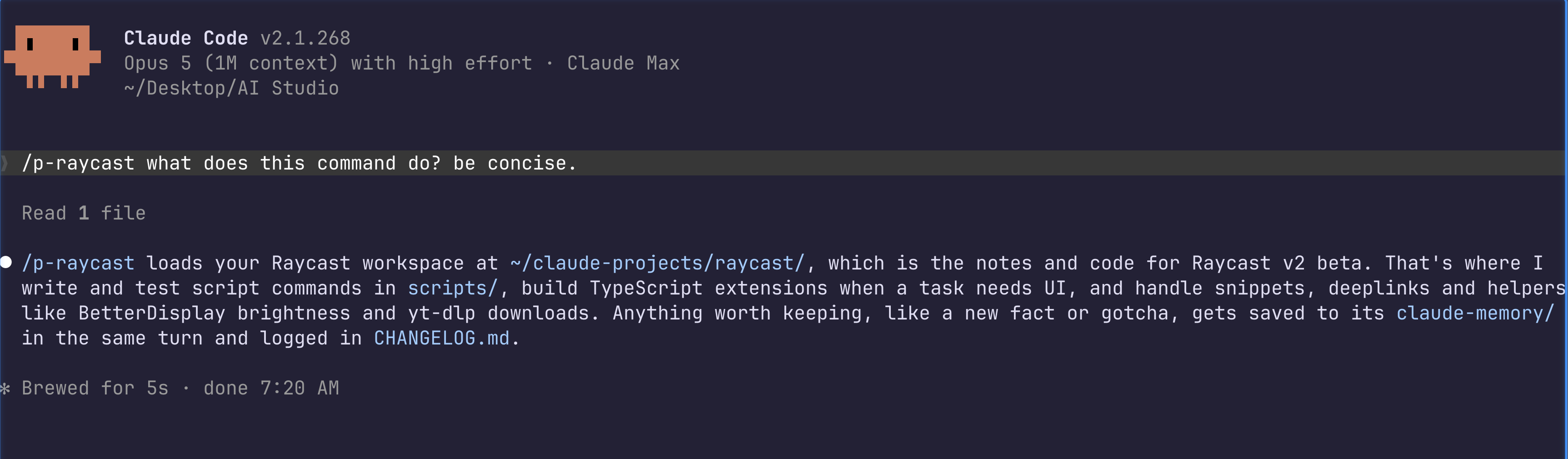
The raycast project skill, running in my own setup: load the memory, check reality, act, write back. I number my project skills /p5-; the template installs them as plain /raycast.
I kept re-explaining the same things to Claude. Where my Raycast scripts live, the metadata format, which ones I'd already built. Every session, from zero. So I gave it a project. Now I say "make me a Raycast script for X" and it knows where the scripts go, writes one, tests it, done. That one project saves me more typing than any prompt trick.
Claude Desktop has Projects: a folder of files the chat can see. This is that idea for Claude Code, and it's better. The context loads only when you call the skill, so it costs nothing the rest of the time. The agent writes back what it learns, so the project gets sharper on its own. And it runs in your terminal with full tools, not a chat box.
How it works
A project is a folder at ~/claude-projects/<name>/ and a /<name> skill that loads it. Inside the folder:
| File | What it holds |
|---|---|
CLAUDE.md | The brain. A ## Memories index, the facts you reach for most, and a map of where things live. Read first, every time. |
claude-memory/ | One durable fact per file: a path, a config value, a rule, a decision. |
notes/ | Working narrative: plans, gotcha lists, drafts, checklists. |
sessions.md | A thin log, one line per session, so you can trace history without bloating the project. |
README.md | A one-line description for a human. |
You call /raycast. The skill reads the brain, scans the short index, opens only the memory files the task needs. You work. The moment a durable fact shows up, the skill writes it to a file and adds its index bullet in the same turn. Next session starts smarter than this one.
Quickstart
git clone https://github.com/Pawel-Kica/claude-simple-projects
cd claude-simple-projects
claude "Read SETUP.md and follow it"
Claude installs the /project-manager skill, then offers to build your first project. It asks the name, what it is, and where the starting context comes from: a blank start, a notes folder you already have, or the conversation you're in right now. A few questions later you have a working project and a /<name> skill to call it.
Three modes
/project-manager does three things:
- create - interview, then scaffold a fresh project and its skill.
- adopt - point it at a messy notes folder, or the current conversation, and it reshapes what's there into a project.
- update-all - a cleanup pass over every project: dedupe the facts, prune the stale, rewrite each index clean.
What a project looks like
examples/raycast/ is a complete project, generated by the create flow, not hand-written. Open it to see the shape: the CLAUDE.md brain, seven one-fact memory files, a notes/ doc, and a thin session log. Copy it as a starting point for your own.
Pairs with claude-simple-memory
A project uses the same file-per-fact memory as claude-simple-memory: same frontmatter, same four types, same index rule. A project is that memory system scoped to one folder, plus working notes and a session log. Install claude-simple-memory too if you also want global and per-repo memory. You don't need it first; this stands on its own.
What's in the repo
| Path | What |
|---|---|
SETUP.md | The setup prompt. Claude reads it and installs everything |
skill/SKILL.md | The /project-manager skill: create, adopt, update-all |
examples/raycast/ | A full project, generated by the tool, to copy the shape from |
License
MIT