
claude-simple-memory
Pawel-Kica/claude-simple-memory
Claude Code memory done with markdown you own: one file per fact, indexed in CLAUDE.md. Template + setup prompt + skill.
Instalação
npx convez-ai Pawel-Kica/claude-simple-memory1 comando no terminal: detecta o formato do repositório (marketplace ou plugin avulso) e instala via Claude Code. Requer Node 18+ e o Claude Code instalado.
Métricas
README
A tradução para o português deste README ainda está na fila.
claude-simple-memory
One markdown file per fact, a one-line index in CLAUDE.md, and a rule that tells Claude when to read and when to write. That's the whole system.
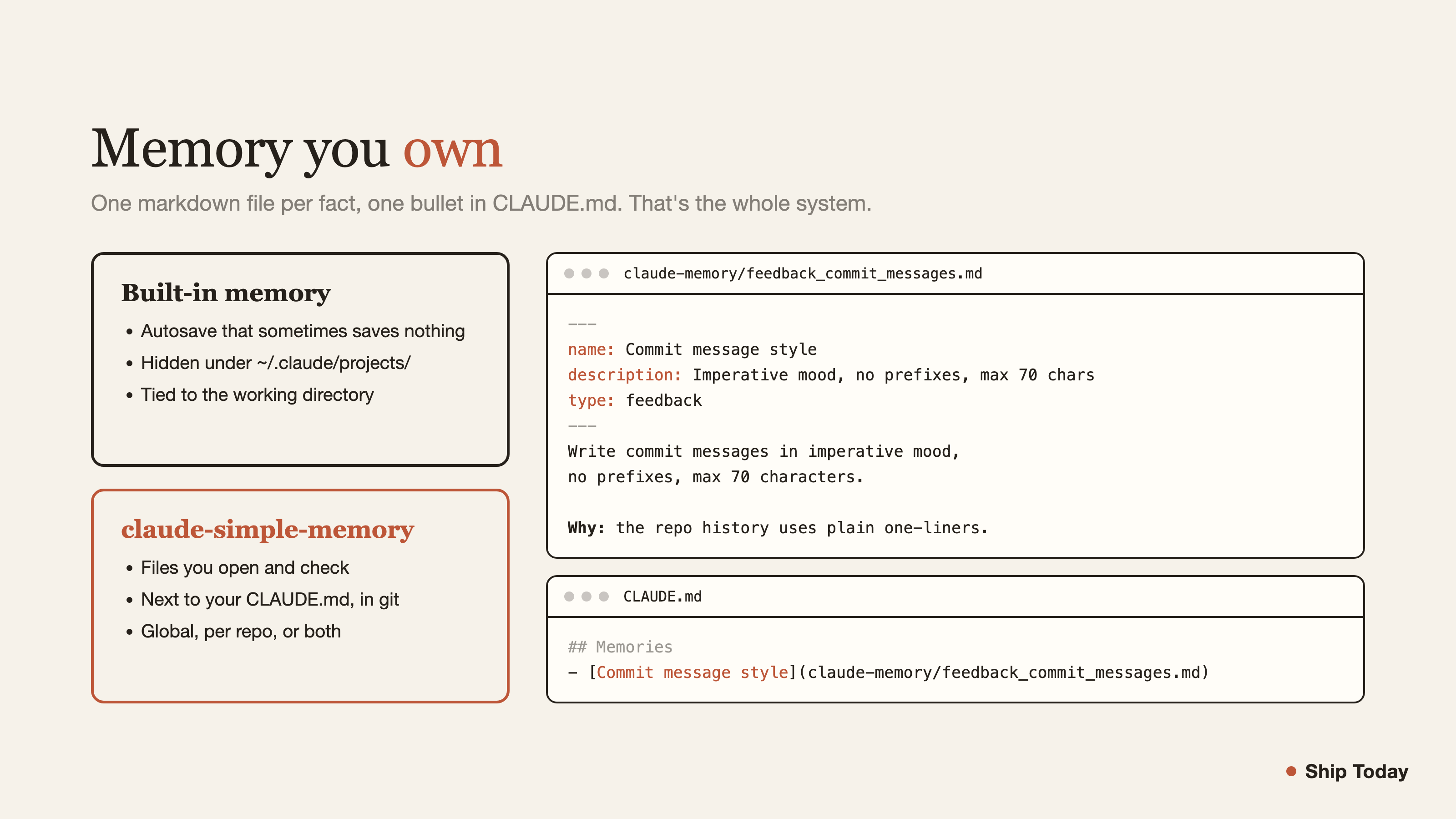
I have 10,000 hours in Claude Code and I turned its built-in memory off. Autosave silently dropped facts. The files lived in an internal folder I never opened. Memory was tied to the working directory, so I couldn't shape it per project or globally. I rebuilt it with plain markdown. Now I can read my memory, grep it, put it in git, and fix it when it's wrong.
How it works
Three pieces:
- A
claude-memory/folder. One fact per file, namedtype_topic.md. - A
## Memoriesindex in your CLAUDE.md, one bullet per file. Claude reads this every session. - Two rules in CLAUDE.md: open a memory file only when its bullet matches the task, and when a durable fact appears, write the file plus its bullet in the same turn.
The index keeps context small. Claude scans short bullets, then opens only the file it needs. Twenty memories cost twenty lines, and the full text loads only when a task touches it.
Quickstart
git clone https://github.com/Pawel-Kica/claude-simple-memory
cd claude-simple-memory
claude "Read SETUP.md and follow it"
Claude asks one question (install globally or into a project), creates the folder and the index, installs the /memory skill, then interviews you: who you are, what you're working on, corrections you keep repeating. It writes your first memory files from the answers. Setup ends with a memory that already knows you.
The convention
Four types of memory, encoded in the filename:
| Type | What goes in | Example file |
|---|---|---|
user | who you are, preferences, stack | user_profile.md |
feedback | corrections you gave Claude, with the why | feedback_commit_messages.md |
project | ongoing work, decisions, constraints | project_side_app.md |
reference | pointers you need repeatedly: URLs, commands, accounts | reference_deploy.md |
Each file is frontmatter plus the fact:
---
name: Commit message style
description: Imperative mood, no scope prefixes, max 70 chars
type: feedback
---
Write commit messages in imperative mood, no prefixes, max 70 characters.

**Why:** the repo history uses plain imperative one-liners and I got corrected for "feat(api): ...".

**How to apply:** before committing, check the message starts with a verb and fits one line.
Each file gets one bullet in the index:
- [Commit message style](claude-memory/feedback_commit_messages.md) - imperative, no prefixes, max 70 chars
Rules that keep it working:
- One topic, one file. Update in place, never pile up duplicates.
- File and bullet land in the same turn. A file without a bullet is invisible.
- Durable facts only. No session trivia, nothing the repo already records.
- Clear facts save on their own. Borderline ones (a gotcha, a workaround) get proposed in one line, so nothing drops silently.
- Wrong fact? Delete the file and its bullet. Memory you can't prune rots.
Why not the built-in memory
- Autosave you can't trust. It decides what to save and sometimes saves nothing. Here a fact becomes a file you can open and check.
- Invisible storage. Built-in memories live under
~/.claude/projects/*/memory/, a folder you'll never browse. These live next to your CLAUDE.md, in your editor, in git. - Workdir scoping. Built-in memory follows the directory you launched from. This installs globally, per repo, or both, your call.
- Lock-in. Plain markdown reads anywhere. Switch tools tomorrow and your memory comes with you.
The skill and setup prompt target Claude Code. The memory files themselves work with anything that reads files.
What's in the repo
| Path | What |
|---|---|
SETUP.md | The setup prompt. Claude reads it and installs everything |
skill/SKILL.md | The /memory skill, copied into your setup during install |
templates/ | Four example memory files, one per type |
License
MIT