
Codex Monitor
paulrobello/codex-monitor
Monitore quotas de IA coding-agents em uma única interface Apple
Ver no GitHubApp nativo Apple para monitorar uso de agentes IA em OpenAI Codex, OpenRouter e Claude Code. Exibe janelas de uso, percentuais de cota restante, barras de progresso e contadores de reset, com widgets nativos para macOS e iOS.
Instalação
npx convez-ai paulrobello/codex-monitor1 comando no terminal: detecta o formato do repositório (marketplace ou plugin avulso) e instala via Claude Code. Requer Node 18+ e o Claude Code instalado.
Métricas
Casos de uso
- Acompanhar consumo de quota de múltiplos provedores IA
- Visualizar reset countdowns e períodos de uso (5h e semanal)
- Integrar monitoramento no menu bar do macOS ou homescreen iOS
- Scripting via CLI para automação de checagens de uso
Veredito

Ferramenta specializada de alta qualidade para devs que usam múltiplos serviços de IA coding. Implementação robusta em Swift 6, autenticação segura (Keychain), widgets nativos e CLI — bem executada, mas nicho.
README
A tradução para o português deste README ainda está na fila.
Codex Monitor



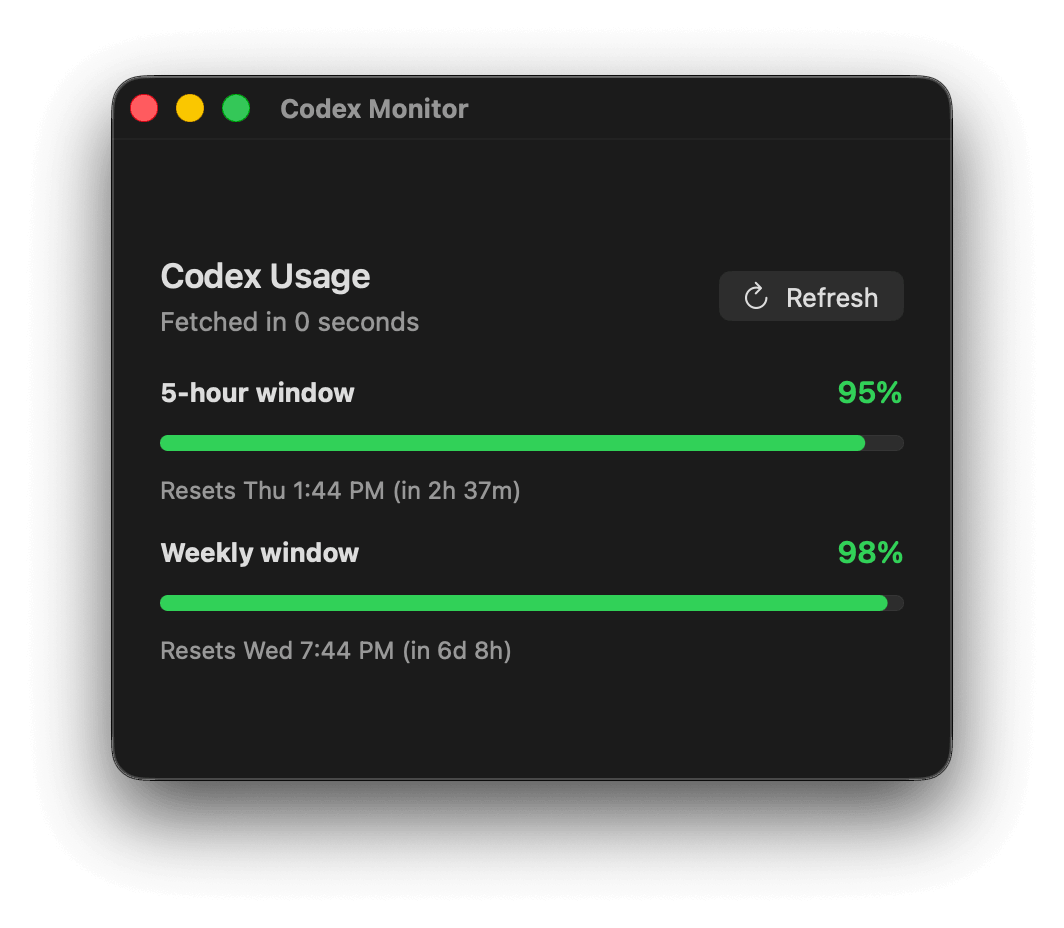
A native Apple app for monitoring AI coding-agent usage across OpenAI Codex, OpenRouter, and Claude Code. Shows usage windows with remaining quota percentages, progress bars, and reset countdown timers. Built with SwiftUI for macOS and iOS, with WidgetKit home-screen widgets.
Quick Start
Prerequisites
| Requirement | Notes |
|---|---|
| macOS 15+ | Required for the macOS app |
| iOS/iPadOS 17+ | Required for the iOS app |
| Xcode | With iOS/macOS SDKs |
| XcodeGen | brew install xcodegen |
| Apple dev team | QMLVG482FY configured for signing |
Build and Run
git clone https://github.com/paulrobello/codex-monitor.git
cd codex-monitor
make run
make run generates the Xcode project, builds the macOS app, installs it to ~/Applications/CodexMonitor.app, and launches it.
Install on iPhone
make launch-phone                  # Build, install, and launch on "Pauls iPhone 17"
make launch-phone PHONE_DEVICE="Your Device Name"  # Target a different device
Features
- Multi-Provider Monitoring — Track OpenAI Codex, OpenRouter, and Claude Code usage from a single app
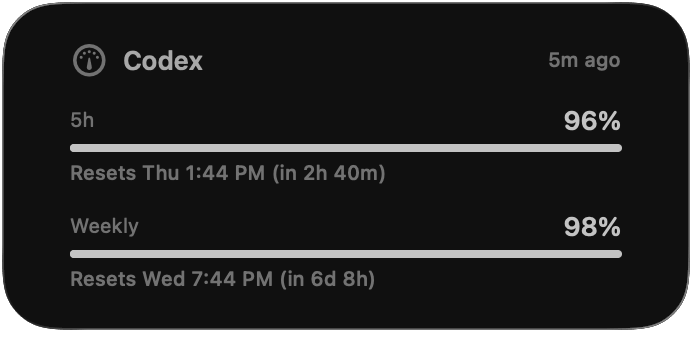
- Usage Windows — Shows 5-hour and weekly Codex usage windows with remaining quota percentages
- Reset Countdowns — Displays reset date/time plus time remaining until quota resets
- Progress Bars — Visual indicators for usage consumption across all providers
- WidgetKit Widgets — Home-screen widgets (macOS and iOS) with cached usage and timeline refresh
- Auto-Refresh — Configurable intervals: 5, 15, 30, or 60 minutes
- Secure Auth — OAuth credentials stored in Keychain, not in plain-text files
- macOS Menu Bar — Lives in the menu bar with a dynamic gauge icon showing usage at a glance
- iOS Device-Code Login — Authenticate via OpenAI device-code flow; clipboard support for easy code entry
- macOS CLI —
codex-usagehelper CLI for scripting and terminal-based usage checks
Providers
| Provider | Auth Mechanism | Data Source | Snapshot ID |
|---|---|---|---|
| OpenAI Codex | OAuth (PKCE on macOS, device-code on iOS) → Keychain | API: /wham/usage or /api/codex/usage | openai-codex |
| OpenRouter | API key in Keychain (or OPENROUTER_API_KEY env) | API: openrouter.ai/api/v1/key + /credits | openrouter |
| Claude Code | None (reads local files) | Local JSONL tails from ~/.claude/projects/ | claude-code |
UsageProviderClient orchestrates fetching from all enabled providers. CodexMonitorSettings.enabledProviders controls which are active.
Gallery
macOS App
Widget
Authentication
Codex OAuth
Credentials are stored in the shared Keychain access group QMLVG482FY.net.pardev.CodexMonitor:
service:  net.pardev.CodexMonitor.codex-auth
account:  codex-oauth
Credential lookup order:
CODEX_MONITOR_ACCESS_TOKENorCODEX_ACCESS_TOKENenvironment variables- Codex Monitor Keychain item
- Legacy
auth.jsonfiles (auto-migrated to Keychain and removed)
macOS uses browser-based OAuth with a local callback server (port 1455). iOS uses device-code flow — Safari opens the OpenAI device page, user enters the code, and the app polls for authorization.
OpenRouter
API key lookup order:
OPENROUTER_API_KEYenvironment variable- Keychain (
OpenRouterAPIKeyStore)
Claude Code
No authentication required. Reads the last 2MB of up to 12 most-recent .jsonl session files under ~/.claude/projects/, extracting token counts from type: "assistant" records.
CLI
Build and use the codex-usage CLI:
make refresh                           # Build + fetch current usage

# After building, the CLI is at:
build/DerivedData/Build/Products/Debug/codex-usage login         # Start OAuth login
build/DerivedData/Build/Products/Debug/codex-usage refresh       # Fetch usage + update cache
build/DerivedData/Build/Products/Debug/codex-usage print         # Print cached snapshot
build/DerivedData/Build/Products/Debug/codex-usage cache-path    # Show cache file path
build/DerivedData/Build/Products/Debug/codex-usage clear-auth    # Remove stored credentials
build/DerivedData/Build/Products/Debug/codex-usage interval      # Show refresh interval
build/DerivedData/Build/Products/Debug/codex-usage interval 30   # Set interval to 30 min
Architecture
Codex Monitor uses a shared-core architecture — CodexUsageCore contains all business logic and is linked by every target (macOS app, iOS app, widgets, CLI).
Sources/
├── CodexUsageCore/       Shared auth, usage fetch, cache, settings, formatting
│   ├── CodexUsageCore.swift   Models, clients, auth stores, cache, settings
│   └── CodexOAuth.swift       OAuth PKCE + device-code flows, token refresh, JWT parsing
├── CodexMonitorApp/      macOS SwiftUI app (MenuBarExtra + WindowGroup + Settings)
├── CodexMonitoriOS/      iOS/iPadOS SwiftUI app (NavigationStack + List)
├── CodexMonitorWidget/   WidgetKit extension shared by macOS and iOS
└── CodexUsageCLI/        macOS helper CLI (main.swift)

Tests/
└── CodexUsageCoreTests/  17 unit tests — parsing, JWT, auth, settings, cache

project.yml               XcodeGen project definition (9 targets)
Makefile                  Build, test, install, and launch targets
Data Flow
graph LR
    UI[macOS / iOS UI] --> Store[UsageStore]
    Store --> Provider[UsageProviderClient]
    Provider --> Codex[CodexUsageClient]
    Provider --> OR[OpenRouterUsageClient]
    Provider --> CC[ClaudeCodeUsageClient]
    Codex --> API[OpenAI API]
    OR --> ORAPI[OpenRouter API]
    CC --> Files[Local JSONL Files]
    Codex --> Cache[Usage Cache]
    OR --> Cache
    CC --> Cache
    Cache --> Widget[WidgetKit Timeline]

    style UI fill:#37474f,stroke:#78909c,stroke-width:2px,color:#ffffff
    style Provider fill:#0d47a1,stroke:#2196f3,stroke-width:2px,color:#ffffff
    style Cache fill:#1b5e20,stroke:#4caf50,stroke-width:2px,color:#ffffff
    style Widget fill:#e65100,stroke:#ff9800,stroke-width:2px,color:#ffffff
Build Targets
The XcodeGen project.yml generates 9 targets across macOS and iOS:
| Target | Type | Platform | Description |
|---|---|---|---|
CodexUsageCore | Framework | macOS | Shared business logic |
CodexUsageCoreiOS | Framework | iOS | Shared business logic (iOS build) |
CodexMonitor | App | macOS | Menu bar app with usage views |
CodexMonitoriOS | App | iOS | NavigationStack + List app |
CodexMonitorWidgetExtension | Widget Extension | macOS | WidgetKit widget |
CodexMonitorWidgetiOSExtension | Widget Extension | iOS | WidgetKit widget |
codex-usage | CLI | macOS | Helper command-line tool |
Development
Build Commands
make generate      # Regenerate Xcode project from project.yml
make build         # Generate + build (CodexMonitor scheme)
make test          # Generate + run tests (CodexUsageCoreTests)
make checkall      # Build + test + lint + fmt + typecheck
make install       # Build + copy .app to ~/Applications/
make run           # Install + launch
make clean         # Remove build/ and .xcodeproj/
No linter or formatter is configured — make lint and make fmt are no-ops.
Shared Data
Usage cache (no credentials):
~/Library/Group Containers/group.net.pardev.CodexMonitor/CodexMonitor/usage.json
Refresh settings:
~/Library/Group Containers/group.net.pardev.CodexMonitor/CodexMonitor/settings.json
Environment overrides:
CODEX_MONITOR_CACHE_PATH       # Override cache file location
CODEX_MONITOR_SETTINGS_PATH    # Override settings file location
Sign In
macOS — Browser OAuth flow with local callback server on port 1455.
iOS/iPadOS — Device-code flow:
- Tap Sign In
- Safari opens the OpenAI Codex device page
- Enter the code shown in the app
- Return to Codex Monitor
- App polls and stores credentials after authorization
Tap the device code to copy it to the clipboard.
Contributing
- Fork the repository and create a feature branch
- Run
make checkall(build, test, lint, fmt, typecheck) before every commit - Keep commits atomic — one logical change per commit
- Submit a pull request with a clear description
Resources
License
This project is licensed under the MIT License - see the LICENSE file for details.
Author
Paul Robello - probello@gmail.com
Monitor your AI coding-agent usage across Codex, OpenRouter, and Claude Code — from your menu bar, home screen, or terminal.