
Next Issues - Mapa Visual de Priorização
pantsbang-yannik/next-issues
Visualize a sequência certa de issues com mapa interativo de dependências
Ver no GitHubSkill para Claude que transforma issues abertos do GitHub em um mapa interativo visual, rankeia por estado de triagem e grafo de dependências, e mostra o que trabalhar a seguir através de um canvas infinito com linhas de negócio e caminhos de desbloqueio. Renderiza como HTML autossuficiente, sem dependências externas.
Instalação
npx convez-ai pantsbang-yannik/next-issues1 comando no terminal: detecta o formato do repositório (marketplace ou plugin avulso) e instala via Claude Code. Requer Node 18+ e o Claude Code instalado.
Métricas
Casos de uso
- Priorizar backlog de forma visual e orientada por dependências
- Identificar o próximo issue mais crítico em projetos complexos
- Comunicar roadmap técnico com stakeholders via canvas interativo
Veredito

Ferramenta sofisticada que resolve um problema real: converter listas planas em grafos executáveis. A visualização interativa e análise de dependências tornam-na valiosa para equipes com backlogs complexos, embora requeira integração com GitHub e compreensão técnica do formato de issues.
README
A tradução para o português deste README ainda está na fila.
next-issue
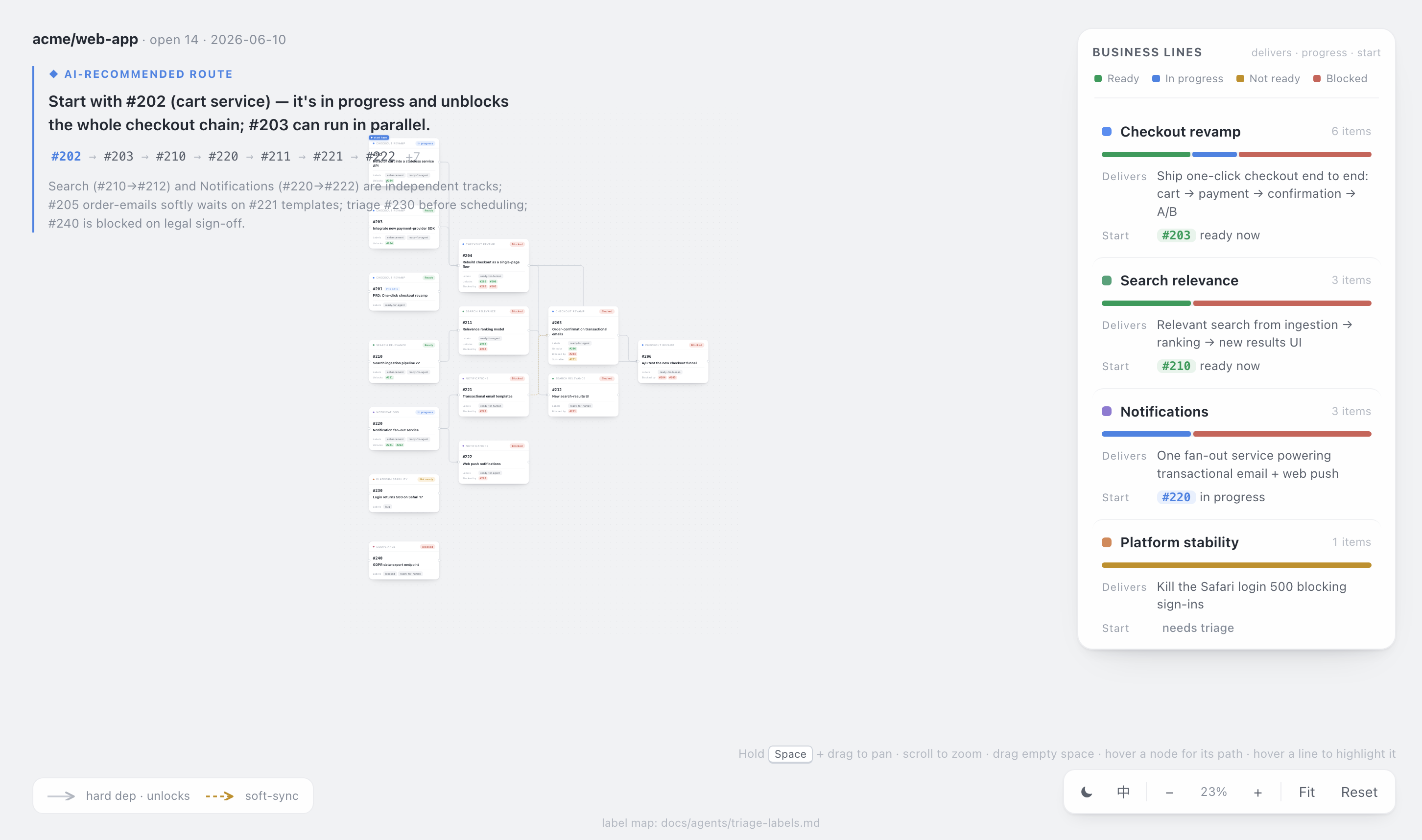
A Claude Code skill that turns your repo's open GitHub issues into a clear plan — and draws it as an interactive HTML map. It surveys the open issues, ranks them by triage state and dependency graph, tells you what to work on next, and renders the whole backlog as a self-contained business-line & unlock map you can pan, zoom, and share.
Following the cables left → right is the implementation path. Each node is an issue; each business line is a colour; the side panel spells out what shipping each line actually delivers.
🗺️ The headline: a visual "unlock map", not a list
Ask "what should I work on next?" and most tools hand you a flat list. next-issue hands you a workflow-style path graph on an infinite canvas:
- Nodes laid out by dependency depth — root issues on the left, the things they unlock to the right. The connectors are the plan.
- Orthogonal dependency cables — solid = hard dependency (
prerequisite → unlocked), dashed = soft-sync coordination. - Restrained, meaningful colour — status is the only saturated colour (🟢 ready · 🔴 blocked · 🟡 needs-triage · 🔵 in-progress); each business line gets one quiet dot. No confetti.
- Structured issue cards — number, title, labels, assignees, and grouped
unlocks / blocked-by / soft-afterreferences. - Person-aware — it detects your
ghlogin: your cards get an accent border + 我 badge, and a 只看我的 / Mine toolbar filter dims everything except your issues and their full upstream/downstream chain. - AI recommended route — a lightweight top-left note with an ordered breadcrumb (
#210 → #211 → …), plus a ▶ start-here flag pinned to the top pick on the canvas. - Business-line "unlock" panel — per line: a status progress bar, the feature it delivers once complete, and the next actionable issue (or what's blocking it).
- Infinite canvas — hold Space + drag to pan, scroll to zoom, fit / reset; hover a node to light up its full upstream+downstream path, hover a line to highlight the whole chain.
- Light / dark + English / 中文 — flip theme and UI language right from the toolbar; your choice is remembered.
- Self-contained — one HTML file, no network, no build step. Keep it, share it, drop it in a PR.
The point it exists to make: "finish this chain of issues → ship this feature."
What else it does
- Ranks the board into ready now / blocked / not-yet-triaged, with a topologically valid execution order.
- Dependency-aware ordering done deterministically in code, not guessed: closed blockers auto-clear, a
Parent: #PRDlink is grouping not a dependency, prose "soft sync" notes become ordering hints (not hard blocks), and dependency cycles are detected and surfaced. - Clarity gate — when you commit to an issue, it checks whether the issue is actually specified well enough to execute, and routes fuzzy ones to a clarification pass before any code is written. It never silently starts changing code.
- Works on any repo — reads your
docs/agents/triage-labels.mdas the single source of truth for triage labels, falling back to five canonical roles.
How it works
Three layers, splitting deterministic work from judgement:
| Layer | File | Responsibility |
|---|---|---|
| Data | scripts/issue_board.py | Pulls open issues via gh, parses dependencies, computes a ranked, topologically-ordered board as JSON (stdlib only). |
| Judgement | the model | Clusters issues into business lines and writes the "complete this line → ships X" copy that a script can't. |
| Render | scripts/render_board.py + assets/board_template.html | Merges the board + annotations into the self-contained HTML map. |
# 1. pull & rank
mkdir -p ~/.next-issue
python3 scripts/issue_board.py > ~/.next-issue/board.json   # or --repo OWNER/NAME

# 2. (the model writes ~/.next-issue/annotations.json: business lines + unlock copy + headline)

# 3. render the map — defaults to ~/.next-issue/<owner>-<repo>.html and prints the path
python3 scripts/render_board.py \
  --board ~/.next-issue/board.json \
  --annotations ~/.next-issue/annotations.json
open ~/.next-issue/<owner>-<repo>.html      # xdg-open on Linux
Everything stays in ~/.next-issue/ — nothing is written into the project you run it in, so there's no stray file to .gitignore and no noise in git status. Boards are named per repo, so different projects never overwrite each other. (--out overrides if you do want it elsewhere.)
Annotations are optional — without them you still get a valid map grouped by label / PRD; with them you get the full unlock story.
Install
next-issue is a Claude Code skill — this repo is the skill.
Option A — download the packaged skill (easiest): grab next-issue.skill from the latest release and install it:
# a .skill is a zip — unpack it into your skills directory
unzip next-issue.skill -d ~/.claude/skills/
Option B — clone the repo straight into your skills directory:
git clone https://github.com/pantsbang-yannik/next-issues.git ~/.claude/skills/next-issue
Then just talk to Claude Code naturally — "what should I work on next?", "sort the backlog by priority and dependencies", "draw the issues and business lines as a map", "can I start #204 yet?" — and the skill triggers. (~/.claude/skills/ is the usual personal-skills directory; adjust to your runtime.)
Requirements
python3(standard library only — no pip installs)ghCLI, authenticated (gh auth login)- A modern browser to open the HTML map
Benchmarks
Measured against the same tasks on a real repo, with the skill vs. an unaided agent doing it from scratch:
| Task | Metric | With skill | Unaided | Δ |
|---|---|---|---|---|
| Generate the visual map | tokens | 31.7k | 46.2k | −31% |
| wall-clock | 107s | 185s | −42% | |
| Analyze & prioritize (n=3) | issue-understanding accuracy | 100% | 93% | +7pt |
| tokens | 39.3k | 42.7k | −8% |
The big wins are on map generation (the unaided agent hand-builds all the HTML/SVG every time) and on consistency — the dependency engine is deterministic, so the same board always produces the same structural classification, and it doesn't slip on traps like "blocked-by issues are all closed, so it's actually unblocked now". Wall-clock figures come from concurrent runs (treat as ratios/trends); accuracy graded against a fixed factual rubric.
License
MIT — see LICENSE.