
Datawrapper MCP Server
palewire/datawrapper-mcp
Crie gráficos Datawrapper conversando com IA
Ver no GitHubServidor MCP que integra Datawrapper com assistentes de IA, permitindo criar, editar, publicar e exportar gráficos através de conversa natural. Suporta múltiplos tipos de visualizações (barras, linhas, áreas, scatter, etc.) com controle total sobre dados e estilo.
Instalação
npx convez-ai palewire/datawrapper-mcp1 comando no terminal: detecta o formato do repositório (marketplace ou plugin avulso) e instala via Claude Code. Requer Node 18+ e o Claude Code instalado.
Métricas
Casos de uso
- Gerar visualizações de dados em tempo real durante análise
- Automatizar criação de gráficos para relatórios e dashboards
- Publicar e atualizar gráficos através de prompts naturais
Veredito

MCP bem implementado que democratiza a criação de gráficos ao permitir conversas naturais com IA. Ideal para analistas e jornalistas de dados que precisam gerar visualizações rapidamente sem sair da interface conversacional.
README
A tradução para o português deste README ainda está na fila.



A Model Context Protocol (MCP) server and app for creating Datawrapper charts using AI assistants. Built on the datawrapper Python library.
Example Usage
You can provide a data file and simply ask for the chart you want. The draft will soon appear in the panel.
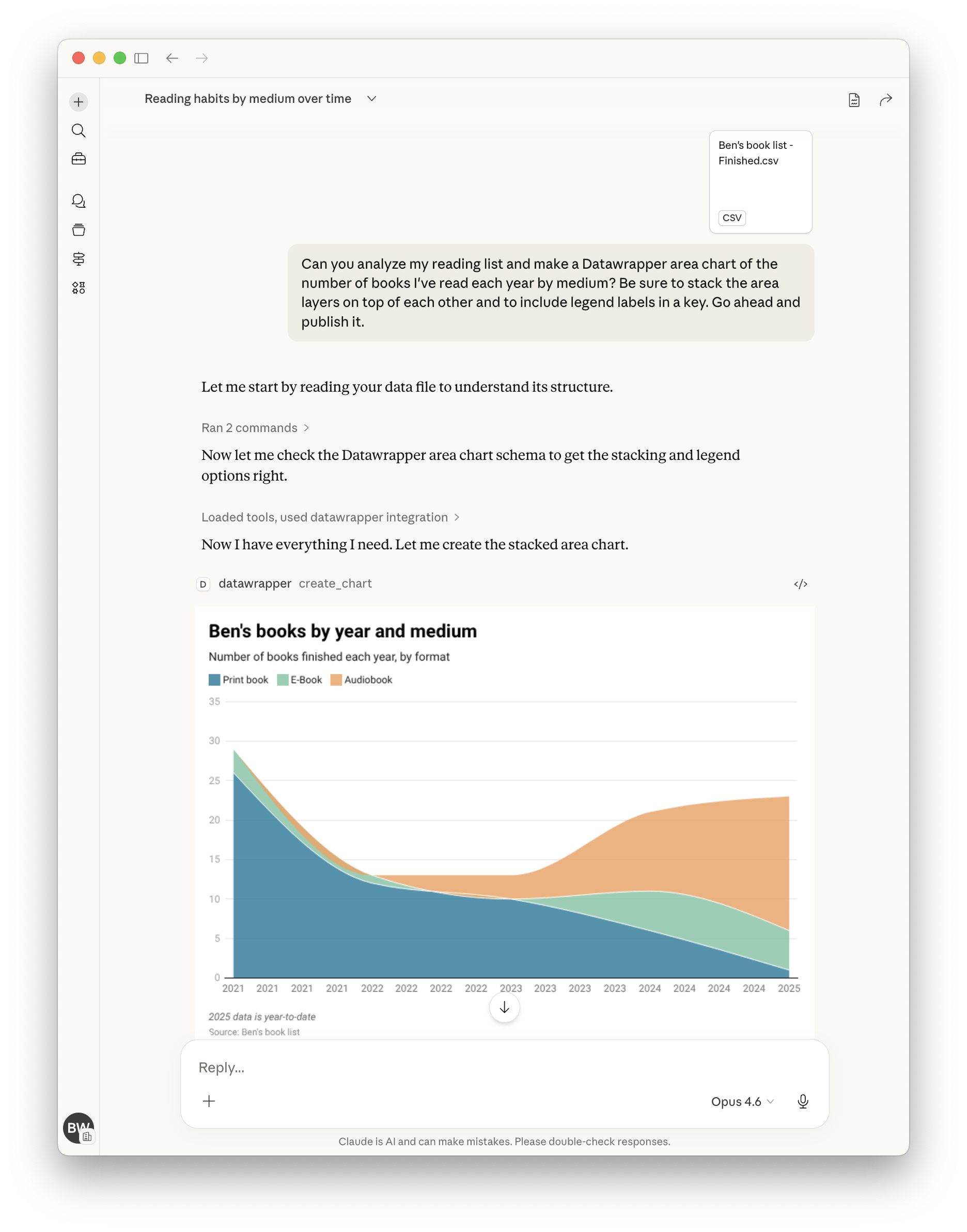
Here's a more complete example showing how to create, publish, update, and display a chart by chatting with the assistant:
"Create a datawrapper line chart showing temperature trends with this data:
2020, 15.5
2021, 16.0
2022, 16.5
2023, 17.0"
# The assistant creates the chart and returns the chart ID, e.g., "abc123"

"Publish it."
# The assistant publishes it and returns the public URL

"Update chart with new data for 2024: 17.2°C"
# The assistant updates the chart with the new data point

"Make the line color dodger blue."
# The assistant updates the chart configuration to set the line color

"Show me the editor URL."
# The assistant returns the Datawrapper editor URL where you can view/edit the chart

"Show me the PNG."
# The assistant embeds the PNG image of the chart in its contained response.

"Suggest five ways to improve the chart."
# See what happens!
Tools
| Tool | Description |
|---|---|
list_chart_types | List available chart types with descriptions |
get_chart_schema | Get the full configuration schema for a chart type |
create_chart | Create a new chart with data and configuration |
update_chart | Update an existing chart's data or styling |
publish_chart | Publish a chart to make it publicly accessible |
get_chart | Retrieve a chart's configuration and metadata |
delete_chart | Permanently delete a chart |
export_chart_png | Export a chart as a PNG image |
Chart Types
bar, line, area, arrow, column, multiple column, scatter, stacked bar
Use list_chart_types to see descriptions, then get_chart_schema to explore configuration options for any type.
Getting Started
Requirements
- A Datawrapper account (sign up at https://datawrapper.de/signup/)
- An MCP client such as Claude or OpenAI Codex
- Python 3.10 or higher
Get Your API Token
- Go to https://app.datawrapper.de/account/api-tokens
- Create a new API token
- Add it to your MCP configuration as shown in the installation guide
Quick Start (Claude Code)
{
  "mcpServers": {
    "datawrapper": {
      "command": "uvx",
      "args": ["datawrapper-mcp"],
      "env": {
        "DATAWRAPPER_ACCESS_TOKEN": "your-token-here"
      }
    }
  }
}
For other clients (Claude Desktop, Cursor, VS Code Copilot, ChatGPT, OpenAI Codex) and Kubernetes deployment, see the installation guide.
Using Your Own Token (Hosted Deployments)
When connecting to a hosted instance of the server over HTTP, you can authenticate
with your own Datawrapper API token by sending it in the Authorization header:
Authorization: Bearer <your-datawrapper-api-token>
This ensures charts are created under your account instead of the server operator's. The token is read from the header automatically — no need to include it in every tool call.
You can also pass access_token directly as a tool argument, which takes precedence
over the header. When neither is provided, the server falls back to its
DATAWRAPPER_ACCESS_TOKEN environment variable.
Supported Clients
| Client | Config file | Transport |
|---|---|---|
| Claude Desktop | claude_desktop_config.json | stdio or streamable-http |
| Claude.ai | Managed connector | streamable-http |
| Claude Code | .claude/settings.json | stdio |
| VS Code Copilot | .vscode/mcp.json | stdio |
| Cursor | .cursor/mcp.json | stdio or streamable-http |
| ChatGPT | Dev Mode settings | streamable-http only |
| OpenAI Codex | ~/.codex/config.toml | stdio |