
prism
oscarmenendezgarcia/prism
Kanban board for Claude Code agent pipelines
Instalação
npx convez-ai oscarmenendezgarcia/prism1 comando no terminal: detecta o formato do repositório (marketplace ou plugin avulso) e instala via Claude Code. Requer Node 18+ e o Claude Code instalado.
Métricas
README
A tradução para o português deste README ainda está na fila.
The operating environment for AI agent pipelines
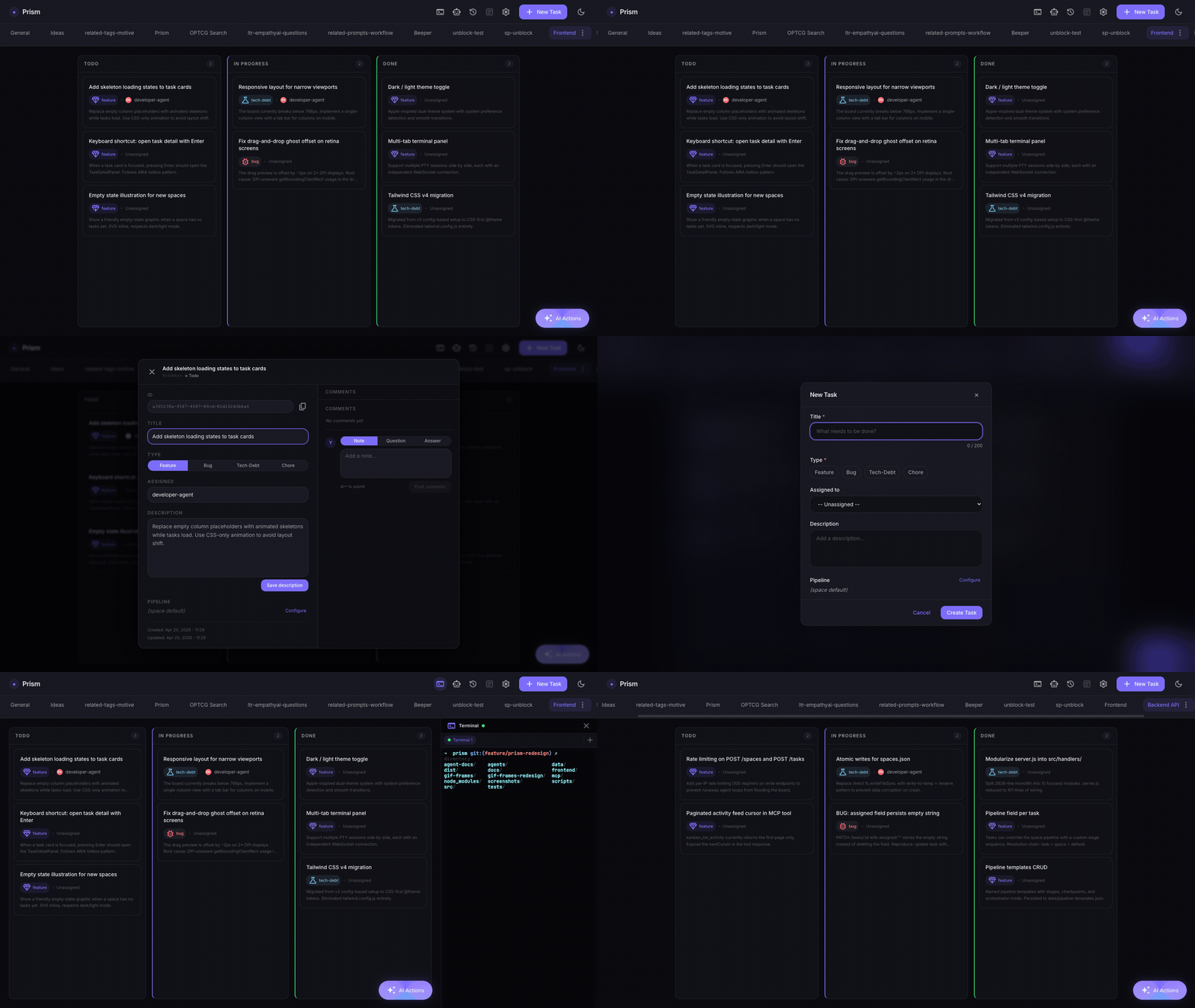
Agents create tasks, move them across a Kanban board, run multi-stage pipelines, and build up a shared knowledge base — all from a single interface you run locally or in Docker.


Getting started · Folio · CLI · MCP · Docs
What it does
Most Kanban tools are built for humans tracking human work. Prism is built for agents.
| Agents manage the board | Via MCP tools, agents create tasks, update status, and attach artifacts as they work. |
| Pipelines from any task | One click launches a multi-stage pipeline (architect → UX → developer → QA) against a task card, with live stage-by-stage logs. |
| Folio — shared knowledge | Agents stop starting every task from zero — see below. |
| Global search | ⌘K / Ctrl K across all spaces, powered by SQLite FTS5. |
| Embedded terminal | A full PTY shell inside the UI. |
| Multiple spaces | Organise work per project, each with its own board and pipeline config. |
| Durable, local persistence | All state lives in a single prism.db SQLite file. No external database. |
It runs on your machine against your own API key — not a SaaS, single operator, and not a replacement for Jira or Linear.
Folio — knowledge that grows with use
On every new task, agents normally start from zero: they re-discover the stack, re-read the same files, and ignore past decisions. Folio is a navigable, augmentable knowledge base shared between you and your agents that fixes this. The value is asymmetric over time — by the hundredth task the folio beats any static doc.
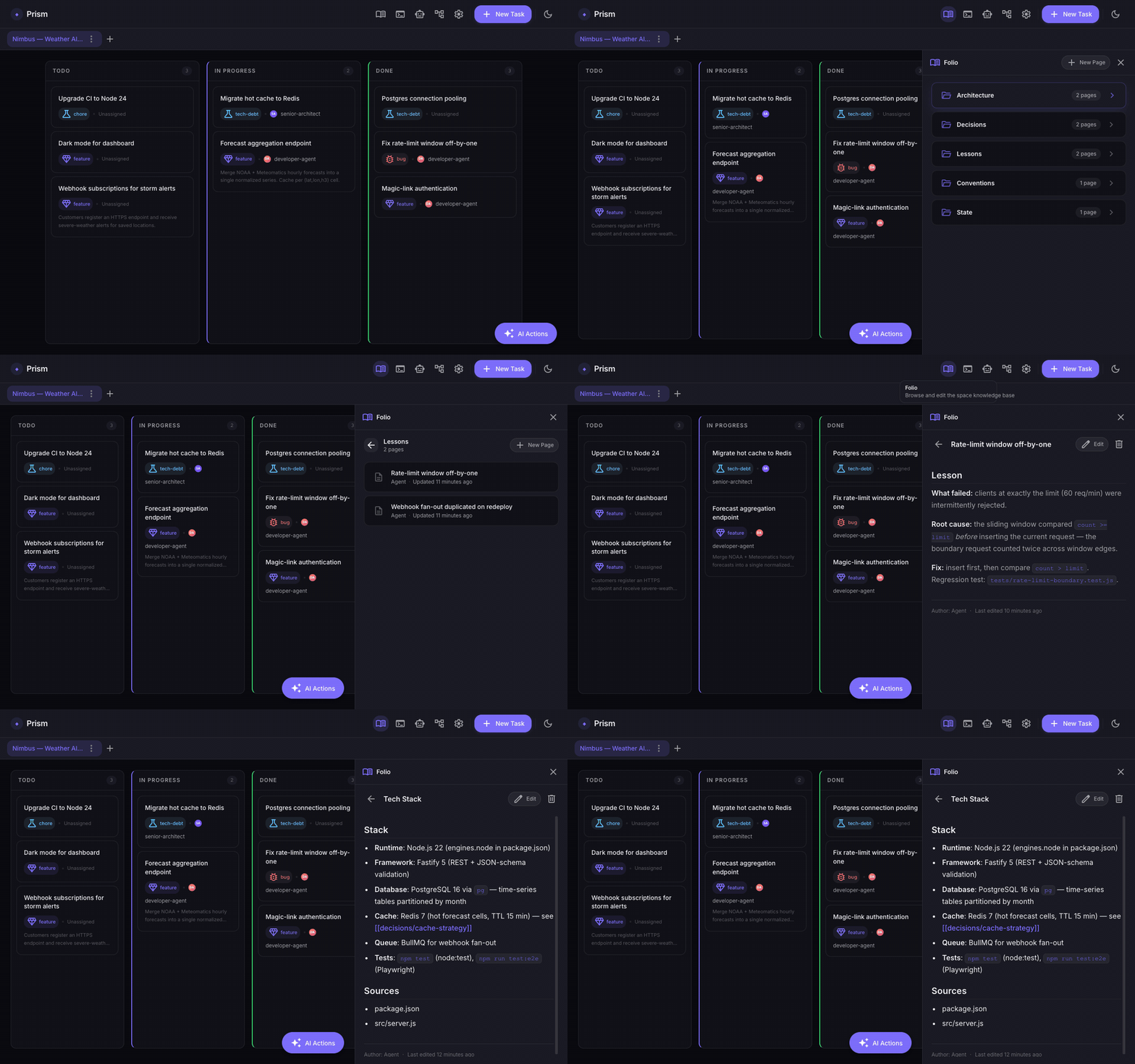
- Folio → Chapter → Page, stored as human-readable markdown you can browse and edit in the UI (and diff in git).
- Co-authored — both you and agents write pages; agent writes are tagged so you can filter and prune them.
- Stage-aware injection — relevant pages are pulled into each pipeline stage automatically, keyed on the task and the stage's role.
- Write-back — at the end of a run a single conservative step records a decision, a lesson, or a state update — only high-signal knowledge.
- Bootstrap from repo — on the first run in a git-backed space, the folio is seeded from the repo. Opt-in and lazy everywhere else.
- Domain-agnostic — neutral vocabulary works for code, on-call runbooks, research, or writing.
Agents reach Folio through its own MCP server (folio_search, folio_get_page, folio_create_page, …). See the .folio/ directory in this repo for the format itself — it is a working Folio describing Prism.
Getting started
One-liner (recommended)
curl -fsSL https://raw.githubusercontent.com/oscarmenendezgarcia/prism/main/install.sh | sh
This installs Node.js ≥ 20 if needed (via nvm), runs npm install -g prism-kanban, and runs prism init to create the data directory and a default settings.json.
curl -fsSL https://raw.githubusercontent.com/oscarmenendezgarcia/prism/main/install.sh | sh -s -- --data-dir /custom/path
Docker
docker compose up -d
# → http://localhost:3000
No Node.js or build tools required locally. Board data persists in ./data/prism.db. The image ships with Claude Code (claude) pre-installed for running pipelines.
The board works without an API key. To enable agent pipelines and auto-task generation, set ANTHROPIC_API_KEY:
ANTHROPIC_API_KEY=sk-... docker compose up -d
Agents that write code need files on disk. Mount each project as a volume in docker-compose.yml and point the Space's Working Directory at it:
services:
  prism:
    volumes:
      - ./data:/app/data                            # board state (already present)
      - /home/user/myproject:/workspace/myproject   # ← your repo
Or run Prism locally for native host filesystem access with no volume mapping.
npm (manual)
npm install -g prism-kanban
prism init           # create data dir + settings.json
prism start          # → http://localhost:3000
Full prerequisites, what
prism initcreates, and troubleshooting:docs/installation.md.
CLI
prism start          # start the server → http://localhost:3000
prism stop           # SIGTERM, wait up to 35 s for clean exit (--force for SIGKILL)
prism update         # update to the latest npm release
prism doctor         # verify runtime dependencies (--json for CI)
prism --help         # list all commands and flags
Common flags: --port <n> (env PORT), --data-dir <path> (env DATA_DIR), --silent, --no-update-check (env PRISM_NO_UPDATE_CHECK).
prism doctor checks Node version, the node-pty spawn-helper bit, better-sqlite3, the claude CLI, data-dir writability, and server status. Exit 0 if all pass, 1 otherwise; --json emits { ok, checks: [...] } for pipelines.
MCP — let Claude drive Prism
Prism ships two MCP servers:
| Server | Tools |
|---|---|
mcp/mcp-server.js | The full Kanban API — kanban_list_tasks, kanban_create_task, kanban_update_task, kanban_move_task, kanban_start_pipeline, kanban_get_run_status, and more. |
mcp/folio-mcp-server.js | Folio read/write — folio_search, folio_get_page, folio_create_page, folio_update_page, folio_list_chapters, … |
Prerequisite: the server (
prism startordocker compose up) must be running before starting any Claude session.
Claude Code — one-liner from the project root:
claude mcp add prism node ./mcp/mcp-server.js -e KANBAN_API_URL=http://localhost:3000/api/v1
Add to .claude/settings.json (or claude_desktop_config.json, using an absolute path):
{
  "mcpServers": {
    "prism": {
      "command": "node",
      "args": ["./mcp/mcp-server.js"],
      "env": { "KANBAN_API_URL": "http://localhost:3000/api/v1" }
    }
  }
}
Running locally (without Docker)
Prerequisites: Node.js ≥ 20 and native build tools for better-sqlite3 and node-pty — xcode-select --install (macOS), sudo apt install build-essential python3 (Linux), or npm install --global windows-build-tools (Windows).
npm install
cd frontend && npm install && npm run build && cd ..
cd mcp && npm install && cd ..
node server.js                 # → http://localhost:3000
Development mode with Vite HMR:
node server.js &
cd frontend && npm run dev     # → http://localhost:5173
Advanced
Parallel pipeline runs — git worktree isolation
When two runs target the same working directory, Prism provisions an isolated git worktree per conflicting run so they never interfere.
- Solo run works directly in the main checkout — no worktree.
- Concurrent run gets its own worktree at
.worktrees/run-<short-runId>, branched off HEAD aspipeline/run-<short-runId>. - Cleanup is automatic on terminal states (
completed,failed,interrupted,aborted); orphans are reaped on the next startup.
The worktree path and branch are git-ignored and never committed.
| Variable | Default | Description |
|---|---|---|
PIPELINE_WORKTREE_ENABLED | 1 | Set 0 to disable worktree provisioning |
PIPELINE_WORKTREE_DIR | .worktrees | Subdirectory under the space working directory |
PIPELINE_DELETE_BRANCH_ON_FAILURE | 0 | Set 1 to delete the branch on failure or abort |
Environment variables
| Variable | Default | Description |
|---|---|---|
PORT | 3000 | HTTP server port |
DATA_DIR | ./data | Directory where prism.db is stored |
ALLOWED_ORIGINS | http://localhost:3000,... | Allowed WebSocket origins — set to your public URL behind a reverse proxy |
ANTHROPIC_API_KEY | — | Required for agent pipelines and auto-task generation |
Tests
npm test                        # Backend (Node.js test runner)
cd frontend && npm test         # Frontend (Vitest + React Testing Library)
Stack — Node.js (no framework) · React 19 · TypeScript · Tailwind CSS v4 · Vite · Zustand · SQLite (better-sqlite3) · node-pty
MIT © Oscar Menendez · Support the project on Ko-fi