
technical-explanatory-minimalism
orchimada/technical-explanatory-minimalism
A Claude skill for minimalist technical diagrams and explorable explanations — illustration-led technical design distilled into rules + verified interactive examples.
Instalação
npx convez-ai orchimada/technical-explanatory-minimalism1 comando no terminal: detecta o formato do repositório (marketplace ou plugin avulso) e instala via Claude Code. Requer Node 18+ e o Claude Code instalado.
Métricas
README
A tradução para o português deste README ainda está na fila.
Design — Technical-Explanatory Minimalism
A Claude skill for making concise, minimalist technical diagrams and explorable explanations — and for designing the kind of quiet, information-dense interfaces they live in.
It distills a recognizable school of design — illustration-led technical explanation — from four reference sites, turns it into explicit rules, and backs those rules with working, verified gold-standard examples.
What it does
Two related crafts, one aesthetic:
- (A) Technical illustration — diagrams, schematics, exploded views, cutaways, flow diagrams, and interactive explorable figures you drag, scrub, and step through.
- (B) Minimalist design systems — restrained, information-dense web/interface systems (tokens, type, layout, color-as-meaning) with dark/light parity.
Interactive figures are built as one self-contained .html file — inline SVG + vanilla
JS, no build step, themeable via CSS variables.
The principles
The skill is organized around two tiers of rules (full text in SKILL.md):
Fidelity (1–10) — make it look right: decompose-then-compose · color = stable identity · reveal the hidden · diagram leads, text glues · annotate in place · quiet chrome, loud content · spatial = causal · one house style · progressive disclosure · curiosity as the entry point.
Beyond the references (11–17) — make it ours: model don't draw · couple the controls · depth is navigable · the camera has intent · be data-honest · linked multi-view · mechanism = state machine.
Gallery — gold-standard examples
Self-contained, verified in light and dark mode. Each title links to a live, runnable
demo (all of them here); the
source link opens the single .html file.
| Example | Demonstrates |
|---|---|
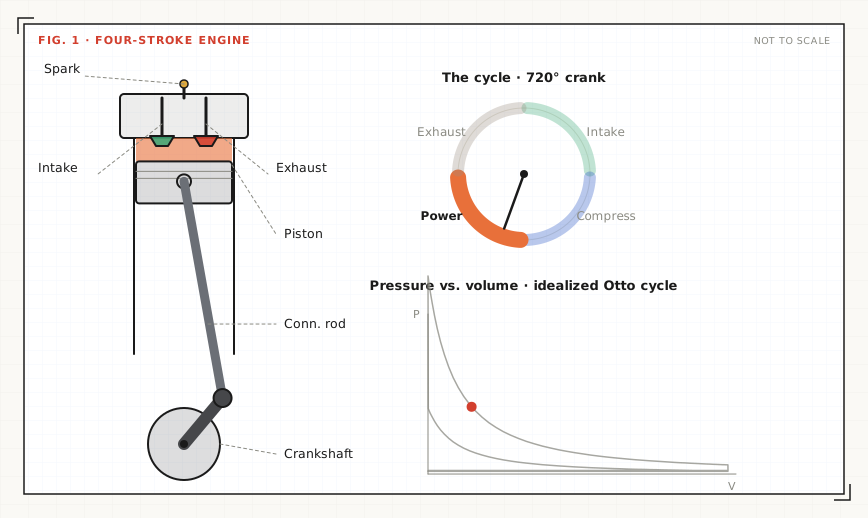
| Four-stroke engine ▶ · src | Flagship. A four-stroke engine: crank-slider mechanism + the cycle as a state machine + a live P–V (Otto) plot, all driven by one crank angle. Play / scrub / step. |
| Orbiting exploded view ▶ · src | Real 3D from a parameterized SVG projection — one scrub couples explode + orbit, with an openable nested compartment and level-of-detail. |
| Click-pen state machine ▶ · src | A click-pen modelled as a state machine with a linked, highlighting state diagram — proves the logic instead of animating it. |
| Layered reveal ▶ · src | Exploded view + X-ray toggle + tap-to-isolate, with labels that travel with their part. |
| Gear train ▶ · src | Continuous mechanism: meshing gears, play/pause, drag-to-scrub, live ratio readout. |
A static line-art starting point lives in assets/starter.svg.
Repository layout
.
├── SKILL.md                     # entry point: rules 1–17 + A/B workflows
├── references/                  # the "how" — load on demand
│   ├── visual-style.md          #   THE house style: tokens, plate frame, classes, motion
│   ├── design-principles.md     #   philosophy + per-site analysis
│   ├── interactive-figures.md   #   state→render, drag/scrub/toggle, quiet chrome
│   ├── depth-and-detail.md      #   inner compartments, nesting, level-of-detail
│   ├── motion-and-camera.md     #   real 3D projection, coupled scrubs, directed camera
│   ├── state-machines.md        #   model & prove a mechanism's logic
│   ├── svg-illustration.md      #   static-figure craft (figure types, callout geometry)
│   └── web-design-system.md     #   minimalist UI tokens + dark/light parity
└── assets/
    ├── plate.html               # canonical figure-plate wrapper + sample (start here)
    ├── starter.svg              # static figure in the house style
    └── examples/                # interactive figures (predate the house style)
Using it as a Claude skill
Drop this directory where your Claude skills live (e.g. a skills/ folder for a plugin, or
~/.claude/skills/design/). Claude reads SKILL.md's frontmatter to decide when
to invoke it, then pulls in references/ as the task needs them and copies from
assets/examples/ as starting points.
You can also just read it as a design handbook — the rules and references stand on their own.
Previewing the examples
Any example is a plain file — open it directly, or serve the folder:
python3 -m http.server 8000
# then open http://localhost:8000/assets/examples/four-stroke-engine.html
Credits
Inspired by the awesome works like:
- Bartosz Ciechanowski — Mechanical Watch — interactive, explorable explanations of how mechanisms work.
- Dan Hollick — Making Software — illustrated explanations of how software works under the hood.