
mini-a
OpenAF/mini-a
Mini-A is a minimalist autonomous agent that uses LLMs, shell commands and/or MCP stdio or http(s) servers to achieve user-defined goals. It is designed to be simple, flexible, and easy to use. Can be used as a library, command-line tool, or embedded interface in other applications.
Instalação
npx convez-ai OpenAF/mini-a1 comando no terminal: detecta o formato do repositório (marketplace ou plugin avulso) e instala via Claude Code. Requer Node 18+ e o Claude Code instalado.
Métricas
README
A tradução para o português deste README ainda está na fila.
OpenAF mini-a

Mini-A is a minimalist autonomous agent that uses LLMs, shell commands and/or MCP servers to achieve user-defined goals. Simple, flexible, and easy to use as a library, CLI tool, or embedded interface.
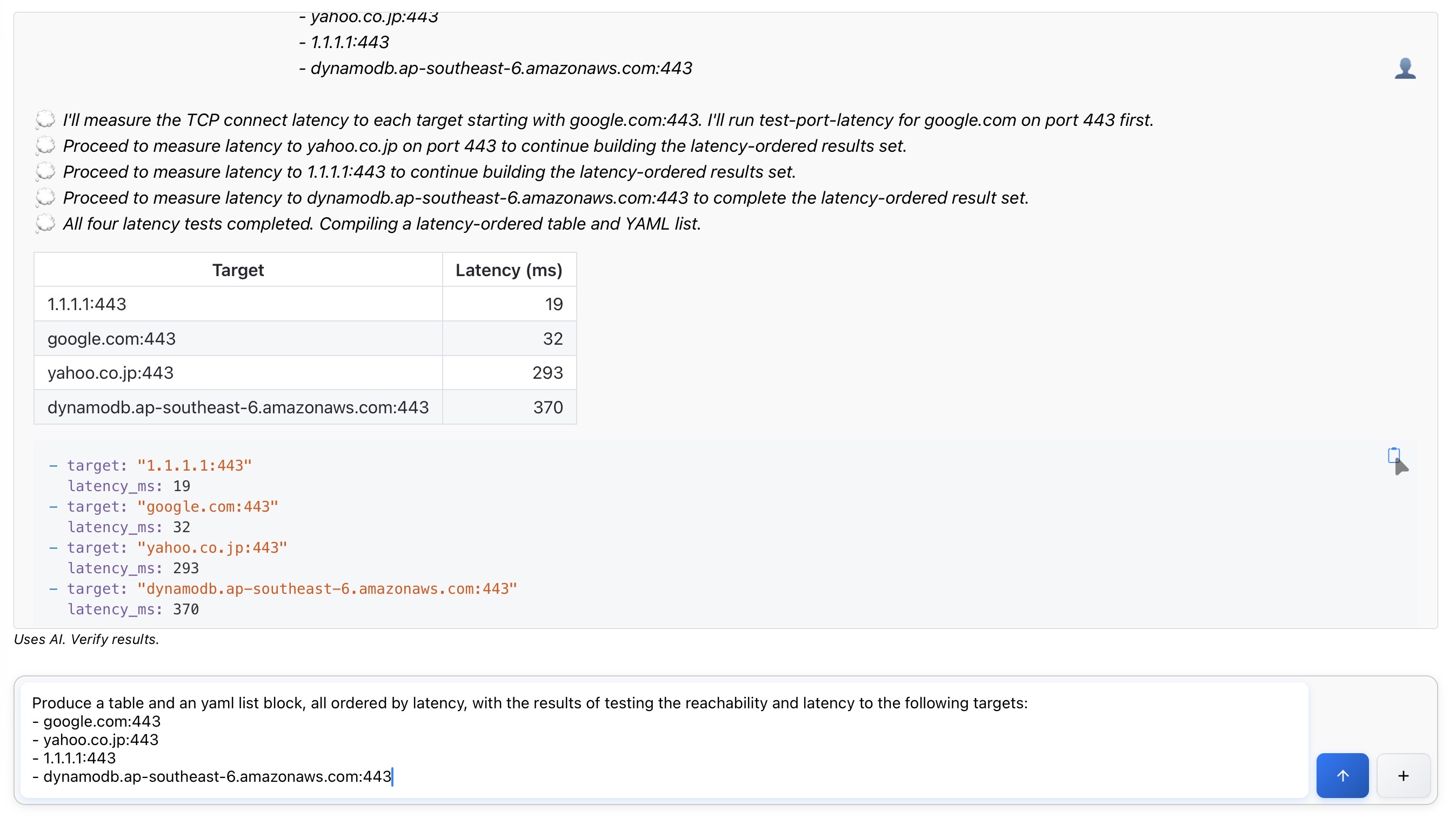
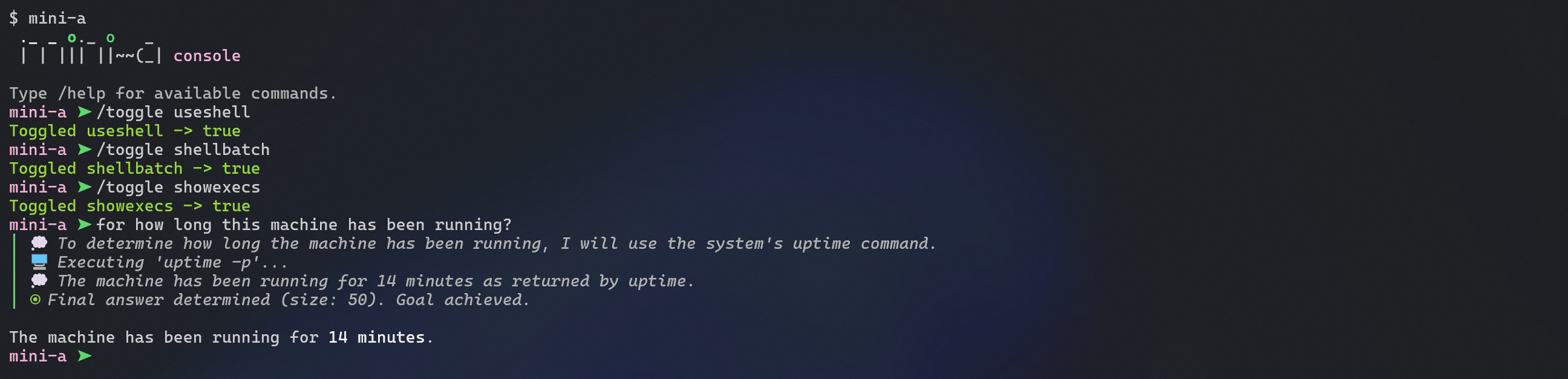
⚡ New Performance Optimizations! Mini-A now includes automatic optimizations that reduce token usage by 40-60% and costs by 50-70% with zero configuration. Learn more →
flowchart LR
  User((You)) -->|Goal & Parameters| MiniA[Mini-A Orchestrator]
  MiniA -->|Reasoning & Planning| LLM["LLM Models (Main & Low-Cost)"]
  MiniA -->|Tool Invocations| MCP["MCP Servers (Time, Finance, etc.)"]
  MiniA -->|Shell Tasks| Shell["Optional Shell"]
  MCP -->|Structured Data| MiniA
  Shell -->|Command Output| MiniA
  LLM -->|Thoughts & Drafts| MiniA
  MiniA -->|Final Response| User
  classDef node fill:#2563eb,stroke:#1e3a8a,stroke-width:2px,color:#fff
  classDef peripheral fill:#bfdbfe,stroke:#1d4ed8,color:#1e3a8a
  class User node
  class MiniA node
  class LLM,MCP,Shell peripheral
Quick Start
Two steps to use:
-
Set
OAF_MODELenvironment variable to the model you want to use:export OAF_MODEL="(type: openai, model: gpt-5-mini, key: '...', timeout: 900000, temperature: 1)"Optional: add
OAF_LC_MODELfor a low-cost helper model andOAF_VAL_MODELto use a dedicated validation model in deep research mode. You can also override them per run withmodellc=...andmodelval=....Use the built-in model manager when you prefer to store encrypted definitions instead of exporting raw environment variables:
mini-a modelman=trueThe manager lets you create, import, rename, export, and delete reusable definitions that can then be exported as
OAF_MODEL/OAF_LC_MODELvalues or copied as raw SLON/JSON for sharing.For working-memory operations, launch the memory manager:
mini-a memoryman=true usememory=true memoryuser=trueIt provides global/session memory summaries, entry inspection, search, selective delete, and age-based pruning.
-
Run the console:
opack exec mini-aType your goal at the prompt, or pass it inline:
opack exec mini-a goal="your goal"If you enabled the optional alias displayed after installation, you can use
mini-a ...instead.
Shell access is disabled by default for safety; add useshell=true when you explicitly want the agent to run commands.
Next Steps
Helpful first commands
- Show all console/web/planning flags and defaults:
mini-a -h - Run one custom slash command/skill template without entering interactive mode:
opack exec mini-a exec="/my-command first second" - Print starter templates for reusable console assets:
mini-a --agent
mini-a --skill
mini-a --command
mini-a --hook
exec= resolves a slash template from ~/.openaf-mini-a/commands/ or ~/.openaf-mini-a/skills/, renders placeholders, runs the resulting goal (including hooks), and exits.
Console templates and hooks
- Custom commands:
~/.openaf-mini-a/commands/*.md(extracommands=<path1>,<path2>) - Skills:
~/.openaf-mini-a/skills/<name>/SKILL.md,~/.openaf-mini-a/skills/<name>/SKILL.yaml|yml|json, or~/.openaf-mini-a/skills/<name>.md|yaml|yml|json(extraskills=<path1>,<path2>). - Hooks:
~/.openaf-mini-a/hooks/*.{yaml,yml,json}with eventsbefore_goal,after_goal,before_tool,after_tool,before_shell,after_shell(extrahooks=<path1>,<path2>) - Starter generators:
mini-a --command,mini-a --skill,mini-a --hook,mini-a --agent - Override the base home directory:
homedir=<path>(reads.openaf-mini-afrom<path>instead of~)
See USAGE.md for full template placeholders, precedence rules, and examples.
Console productivity tips
/showlists active parameters (/show usefilters by prefix)/skills [prefix]lists discovered skills/compact [n]and/summarize [n]condense history/last [md]reprints the previous final answer/save <path>writes the previous final answer to disk@path/to/fileinlines file content into goals; use\@tokenfor a literal@tokenand\$tokenfor a literal$token
Web UI quick start
Start the browser UI:
./mini-a-web.sh onport=8888
Then open http://localhost:8888.
For history/attachments and S3-backed history examples, see USAGE.md.
Running in Docker
Mini-A can run in Docker containers for isolated execution and portability.
Simple Docker Usage (Recommended)
The openaf/mini-a image comes with Mini-A pre-installed for immediate use:
CLI console:
docker run --rm -ti \
  -e OAF_MODEL="(type: openai, model: gpt-5-mini, key: '...', timeout: 900000)" \
  openaf/mini-a
Console with MCP servers and custom rules:
docker run --rm -ti \
  -e OAF_MODEL=$OAF_MODEL \
  -e OAF_LC_MODEL=$OAF_LC_MODEL \
  openaf/mini-a \
  mcp="(cmd: 'ojob mcps/mcp-time.yaml')" \
  rules="- the default time zone is Asia/Tokyo"
Console with knowledge and rules loaded from files:
docker run --rm -ti \
  -e OAF_MODEL=$OAF_MODEL \
  -v $(pwd):/work -w /work \
  openaf/mini-a \
  knowledge="$(cat KNOWLEDGE.md)" \
  rules="$(cat RULES.md)"
Web interface:
docker run -d --rm \
  -e OAF_MODEL="(type: openai, model: gpt-5-mini, key: '...', timeout: 900000)" \
  -p 12345:12345 \
  openaf/mini-a onport=12345
Web interface with streaming:
docker run -d --rm \
  -e OAF_MODEL="(type: openai, model: gpt-5-mini, key: '...', timeout: 900000)" \
  -p 12345:12345 \
  openaf/mini-a onport=12345 usestream=true
Goal execution:
docker run --rm \
  -e OAF_MODEL="(type: openai, model: gpt-5-mini, key: '...', timeout: 900000)" \
  openaf/mini-a \
  goal="your goal here" useshell=true
Advanced Docker Usage
For custom OpenAF installations or specific oPack combinations, use the base image:
CLI console:
docker run --rm -ti \
  -e OPACKS=mini-a -e OPACK_EXEC=mini-a \
  -e OAF_MODEL="(type: openai, model: gpt-5-mini, key: '...', timeout: 900000)" \
  openaf/oaf:edge
Web interface:
docker run -d --rm \
  -e OPACKS=mini-a -e OPACK_EXEC=mini-a \
  -e OAF_MODEL="(type: openai, model: gpt-5-mini, key: '...', timeout: 900000)" \
  -p 12345:12345 \
  openaf/oaf:edge onport=12345
Goal execution:
docker run --rm \
  -e OPACKS=mini-a \
  -e OAF_MODEL="(type: openai, model: gpt-5-mini, key: '...', timeout: 900000)" \
  openaf/oaf:edge \
  ojob mini-a/mini-a.yaml goal="your goal here" useshell=true
See USAGE.md for comprehensive Docker examples including multiple MCPs, AWS Bedrock, planning workflows, and more.
Simple Examples
List files:
mini-a goal="list all JavaScript files in this directory" useshell=true
Using MCP servers:
mini-a goal="what time is it in Sydney?" mcp="(cmd: 'ojob mcps/mcp-time.yaml', timeout: 5000)"
mcp-web also includes http-request for direct HTTP verbs (GET, HEAD, POST, PUT, PATCH, DELETE); use readwrite=true when you need mutating verbs.
mini-a goal="inspect rust-lang.org response headers" \
  mcp="(cmd: 'ojob mcps/mcp-web.yaml', timeout: 5000)"
Testing MCP servers interactively:
mini-a mcptest=true mcp="(cmd: 'ojob mcps/mcp-time.yaml')"
Aggregate MCP tools via proxy (single tool exposed):
mini-a goal="compare release dates across APIs" \
  usetools=true mcpproxy=true \
  mcp="[(cmd: 'ojob mcps/mcp-time.yaml'), (cmd: 'ojob mcps/mcp-fin.yaml')]" \
  useutils=true
This keeps the LLM context lean by exposing a single proxy-dispatch tool even when multiple MCP servers and the Mini Utils Tool are active. For large tool payloads, proxy-dispatch can also load arguments from argumentsFile and save results to a temporary JSON resultFile (resultToFile=true) to avoid context bloat. Prefer this pattern when useutils=true (recommended) or useshell=true readwrite=true and payloads are expected to be large. See docs/MCPPROXY-FEATURE.md for a deep dive.
For some tool-calling runs with gpt-oss-120b, enabling usejsontool=true can improve reliability:
mini-a goal="what is the current time?" usetools=true mcpproxy=true usejsontool=true
This adds a compatibility shim for accidental json tool calls and feeds the payload back into Mini-A's normal action flow.
Chatbot mode:
mini-a goal="help me plan a vacation in Lisbon" chatbotmode=true
Real-time streaming:
mini-a goal="explain the history of computing" usestream=true
Installation
- Install OpenAF from openaf.io
- Install oPack:
opack install mini-a - Set your model configuration (see Quick Start above)
- Start using Mini-A via
opack exec mini-a(or themini-aalias if you added it)!
Testing MCP Servers
Mini-A includes an interactive MCP server testing tool that helps you test and debug MCP servers before integrating them into your workflows.
Using the MCP Tester
Launch the MCP tester console:
mini-a mcptest=true
Or connect to an MCP server directly:
mini-a mcptest=true mcp="(cmd: 'ojob mcps/mcp-time.yaml')"
For HTTP remote MCP servers:
mini-a mcptest=true mcp="(type: remote, url: 'http://localhost:9090/mcp')"
For SSE-based MCP servers:
mini-a mcptest=true mcp="(type: sse, url: 'http://localhost:9090/mcp')"
MCP Tester Features
The interactive tester provides:
- Connection Management - Connect to STDIO, HTTP Remote, HTTP SSE, oJob, dummy, or raw
$mcp(...)configurations - Tool Discovery - List all available tools from the connected MCP server
- Tool Inspection - View detailed information about tool parameters, types, and descriptions
- Interactive Tool Calling - Call any MCP tool with custom parameters through guided prompts
- Advanced Config Support - Merge extra
$mcpoptions such asshared,clientInfo,auth,strict,blacklist, or future transport flags via JSSLON/JSON - Configuration Options - Adjust settings like debug mode, tool selection display size, and result parsing
- Library Loading - Load additional OpenAF libraries for extended functionality using
libs=parameter
Available Options
mcp- MCP server configuration (SLON/JSON string or object)libs- Comma-separated list of libraries to load (e.g.,libs="@mini-a/custom.js,helper.js")debug- Enable debug mode for detailed MCP connection logging (can be toggled in the interactive menu)
Example Session
# Launch the tester
mini-a mcptest=true

# 1. Choose "New connection"
# 2. Select "HTTP SSE" or "Raw $mcp config" when you need newer transport/options support
# 3. Enter the URL or the full JSSLON config
# 4. Optionally merge extra $mcp options such as "(shared: true, clientInfo: (name: 'Mini-A MCP Tester'))"
# 5. Choose "List tools" to see available tools
# 6. Choose "Call a tool" to test a specific tool
The tester includes automatic cleanup with shutdown handlers to properly close MCP connections when exiting.
Features
- Multi-Model Support - Works with OpenAI, Google Gemini, GitHub Models, AWS Bedrock, Ollama, and more
- Dual-Model Cost Optimization - Use a low-cost model for routine steps with smart escalation (see USAGE.md)
- Advisor Strategy Mode - Optional
modelstrategy=advisorkeeps LC as executor while consulting the main model for difficult steps with centralized gating, strict advisor JSON validation, lightweight no-tool enforcement, and budget-aware consult limits (default mode remains unchanged) - Built-in Performance Optimizations - Automatic context management, dynamic escalation, and parallel action support deliver 40-60% token reduction and 50-70% cost savings (see docs/OPTIMIZATIONS.md)
- Real-Time Streaming - Display LLM tokens as they arrive with markdown-aware buffering for smooth rendering (
usestream=true) - MCP Integration - Seamless integration with Model Context Protocol servers (STDIO & HTTP)
- Dynamic Tool Selection - Intelligent filtering of MCP tools using stemming, synonyms, n-grams, and fuzzy matching (
mcpdynamic=true) - Tool Caching - Smart caching for deterministic and read-only tools to avoid redundant operations
- Circuit Breakers - Automatic connection health management with cooldown periods
- Lazy Initialization - Deferred MCP connection establishment for faster startup (
mcplazy=true) - Proxy Aggregation - Collapse all MCP connections (including Mini Utils Tool) into a single
proxy-dispatchtool to minimize context usage (mcpproxy=true) - Programmatic Tool Calling - Optional per-session localhost HTTP bridge for calling MCP tools from scripts executed by the agent (
mcpprogcall=true, requiresuseshell=true)
- Dynamic Tool Selection - Intelligent filtering of MCP tools using stemming, synonyms, n-grams, and fuzzy matching (
- Built-in MCP Servers - Database, file system, network, time/timezone, email, S3, RSS, Yahoo Finance, SSH, office documents, and more
- MCP Self-Hosting - Expose Mini-A itself as a templatable MCP server via
mcps/mcp-mini-a.yaml; customize server name, title, tool description, and tool prefix at launch time (servername=,servertitle=,tooldesc=,toolprefix=) so a single YAML serves multiple personas without duplication - A2A Agent Bridge - Consume any Google A2A-protocol agent (LangGraph, Vertex AI ADK, CrewAI, …) as MCP tools via
mcps/mcp-a2a.yaml; discovers skills from/.well-known/agent.jsonAgent Cards and routes tasks via JSON-RPC 2.0 - Optional Shell Access - Execute shell commands with safety controls and sandboxing
- Web UI - Lightweight embedded chat interface for interactive use with clipboard controls for Markdown and static HTML exports
- Planning Mode - Generate and execute structured task plans for complex goals
- Simple Plans by Default - Flat sequential planning is now the default (
planstyle=simple) for better model compliance - Plan Validation - LLM-based critique validates plans before execution
- Dynamic Replanning - Automatic plan adjustments when obstacles occur
- Legacy Compatibility - Keep phase-based behavior when needed (
planstyle=legacy) - Mode Presets - Quick configuration bundles (shell, chatbot, web, etc.) - see USAGE.md; set
OAF_MINI_A_MODEto pick a default whenmode=is omitted
- Simple Plans by Default - Flat sequential planning is now the default (
- Sub-Goal Delegation - Hierarchical task decomposition with concurrent child agents
- Local Delegation - Spawn child Mini-A agents in the same process for parallel subtask execution (
usedelegation=true) - Remote Worker Routing - Route delegated subtasks by worker
/infocapabilities/limits plus A2A-compatibleskills, with round-robin tie-breaks for equivalent workers (setworkers=http://worker1:8080,http://worker2:8080) - Optional A2A Transport - Use A2A HTTP+JSON/REST worker endpoints instead of the legacy
/taskprotocol (usea2a=true) - Dynamic Worker Registration - Workers can self-register/heartbeat/deregister through a dedicated parent registration server (
workerreg,workerregurl,workerevictionttl) - Worker API - Headless HTTP API for distributed agent workloads across processes/containers/hosts (
mini-a-worker.yaml) - Autonomous Delegation - LLM decides when to delegate via
delegate-subtasktool - Manual Delegation - Console commands for interactive control (
/delegate,/subtasks,/subtask) - Depth Tracking - Configurable nesting limits with automatic retry and deadline enforcement
- Local Delegation - Spawn child Mini-A agents in the same process for parallel subtask execution (
- Conversation Persistence - Save and resume conversations across sessions (
conversation=...; inmini-a-con, combineusehistory=true,historykeep=true, andresume=trueto pick and continue prior console threads stored under~/.openaf-mini-a/history/; usehistorykeepperiod=and/orhistorykeepcount=for retention) - Rate Limiting - Built-in rate limiting for API usage control
- Metrics & Observability - Comprehensive runtime metrics for monitoring and cost tracking
- ASCII Sketch Guidance - Encourage text-based sketch outputs in responses (
useascii=true) - Interactive Maps - Ask the agent to return Leaflet map snippets for geographic prompts, rendered directly in the console transcript and web UI (
usemaps=true) - Math Formula Rendering - Encourage LaTeX formulas rendered with KaTeX in the web UI (
usemath=true) - Dreams (Sleep Pass) - LLM-powered off-line consolidation with explicit modes: memory
plan|apply, wikilint|plan|apply|reorg, proposal-first dry runs, and optional JSON reports — run via/dreamormini-a dream=true
Documentation
- Mini-A Website - Project home, guides, and announcements
- Mini-A Toolkit - Online toolkit and utilities
- What's New - Latest performance improvements and migration guide
- Quick Reference Cheatsheet - Fast lookup for all parameters and common patterns
- Performance Optimizations - Built-in optimizations for token reduction and cost savings
- Delegation Guide - Hierarchical task decomposition with local and remote delegation
- MCP Proxy Guide - How to consolidate multiple MCP connections behind one
proxy-dispatchtool - Usage Guide - Comprehensive guide covering all features
- MCP Documentation - Built-in MCP servers catalog
- Creating MCPs - Build custom MCP integrations
- External MCPs - Community MCP servers
- Contributing Guide - Join the project
- Code of Conduct - Community standards
Project Components
Mini-A ships with complementary components:
mini-a.yaml- Core oJob definition that implements the agent workflowmini-a-con.js- Interactive console available throughopack exec mini-a(or themini-aalias)mini-a-mcptest.js- Interactive MCP server tester for testing and debugging MCP serversmini-a-memoryman.js- Interactive working-memory manager for inspecting and maintaining persisted global/session memoriesmini-a-dreams.js- Dream engine for memory/wiki consolidation with mode routing, reorg gates, and structured output/reporting — launched viamini-a dream=trueor/dreammini-a.sh- Shell wrapper script for running directly from a cloned repositorymini-a.js- Reusable library for embedding in other OpenAF jobsmini-a-progcall.js- Per-session localhost HTTP bridge used by programmatic MCP tool calling (mcpprogcall=true)mini-a-subtask.js- SubtaskManager for local child-agent delegation and remote worker delegationmini-a-web.sh/mini-a-web.yaml- Lightweight HTTP server for browser UImini-a-worker.yaml- Headless HTTP API server for programmatic agent delegation (launch withmini-a workermode=true)mini-a-modes.yaml- Built-in configuration presets for common use cases (can be extended with~/.openaf-mini-a_modes.yamlor~/.openaf-mini-a/modes.yaml)public/- Browser interface assets
Common Configuration Options
| Option | Description | Default |
|---|---|---|
goal | Objective the agent should achieve | Required |
youare | Override the opening persona sentence in the system prompt (inline text or @file path) to craft specialized agents | "You are a goal-oriented agent running in background." (Mini-A still appends the step-by-step directive, and adds the no-feedback remark for mini-a-con/mini-a-web) |
chatyouare | Override the chatbot persona sentence when chatbotmode=true (inline text or @file path) | "You are a helpful conversational AI assistant." |
useshell | Allow shell command execution | false |
usesandbox | Apply built-in OS sandbox presets for shell commands (off,auto,linux,macos,windows); warns and may degrade when the backend is unavailable | off |
sandboxprofile | Optional macOS profile path for sandbox-exec; when omitted, Mini-A generates a restrictive temporary .sb profile | - |
sandboxnonetwork | Disable network inside the built-in sandbox when supported; Windows remains best-effort | false |
readwrite | Allow file system modifications | false |
mcp | MCP server configuration (single or array) | - |
agent | Path (or inline markdown) containing YAML frontmatter metadata (model, capabilities, tools, constraints, knowledge, youare, mini-a). mini-a can set any Mini-A args from the file. | - |
usetools | Register MCP tools with the model | false |
usetoolslc | Register MCP tools only on the low-cost model | false |
usejsontool | Enable an optional compatibility json tool when usetools=true (helps with models that occasionally emit json tool calls instead of plain JSON action output) | false |
useutils | Auto-register Mini Utils Tool utilities as an MCP connection (init, filesystemQuery, filesystemModify, markdownFiles, plus console-only helpers like userInput when running mini-a-con) | false |
usestdutils | When useutils=true, expose standard aliases (read, glob, grep, webfetch, question, skill, todowrite, and bash for shell) instead of legacy Mini Utils names | true |
useskills | Expose the Mini Utils skills operation; when useutils=false, only the skills tool is registered | false |
utilsroot | Root directory for Mini Utils Tool file operations (only when useutils=true) | . |
utilsallow | Comma-separated allowlist of Mini Utils Tool names to expose (only when useutils=true) | unset |
utilsdeny | Comma-separated denylist of Mini Utils Tool names to hide; applied after utilsallow (only when useutils=true) | unset |
mini-a-docs | When true (and utilsroot is unset), sets utilsroot to getOPackPath("mini-a"); the markdownFiles tool description includes the resolved docs root so the LLM can navigate Mini-A documentation directly | false |
mcpproxy | Aggregate all MCP connections (and Mini Utils Tool) under a single proxy-dispatch tool to save context; supports argumentsFile + resultToFile for large payload handoff | false |
adaptiverouting | Enable adaptive rule-based route selection (direct/MCP/proxy/shell/utility/delegation) with fallback chains and trace output | false |
routerorder | Comma-separated preferred route order (e.g. mcp_direct_call,mcp_proxy_path,shell_execution) | built-in default |
routerallow | Comma-separated route allowlist applied by the adaptive router | unset |
routerdeny | Comma-separated route denylist applied by the adaptive router | unset |
routerproxythreshold | Payload-size threshold (bytes) where proxy routes are preferred for large requests | falls back to mcpproxythreshold |
mcpproxytoon | When mcpproxythreshold>0, serialize proxy-spilled results as TOON text (af.toTOON) to improve search/read efficiency on large payloads | false |
mcpprogcall | Start a per-session localhost HTTP bridge so generated scripts can list/search/call MCP tools programmatically; requires useshell=true for script execution | false |
mcpprogcallport | Port for the programmatic tool-calling bridge (0 = auto-assign free port) | 0 |
mcpprogcallmaxbytes | Max inline JSON response size before storing oversized tool results under /result/{id} | 4096 |
mcpprogcallresultttl | Time-to-live in seconds for oversized stored results returned by /result/{id} | 600 |
mcpprogcalltools | Optional comma-separated allowlist of tool names exposed through the bridge | "" |
mcpprogcallbatchmax | Max calls accepted per /call-tools-batch request | 10 |
chatbotmode | Conversational assistant mode | false |
promptprofile | System prompt verbosity profile (minimal, balanced, verbose) | minimal in chatbot mode; verbose with debug=true outside chatbot mode; otherwise balanced |
systempromptbudget | Maximum estimated system-prompt token budget before low-priority sections are dropped | - |
useplanning | Enable task planning workflow with validation and dynamic replanning | false |
planstyle | Planning style (simple flat steps by default, or legacy phase-based) | simple |
Outer Loop Autonomous Coding
Mini-A now supports an optional durable autonomous loop with outerloop=true. This keeps per-session state under ~/.openaf-mini-a/sessions/<session-id>/, reruns fresh agent cycles, persists plan/validation artifacts, and stops only when completion + validation succeed (or safety limits are reached).
Example with external instructions:
mini-a "Implement the feature described in ./TASKS.md" \
  outerloop=true \
  useplanning=true \
  outerloopinstructions=./TASKS.md \
  valgoal="All implementation tasks are complete and the configured validation checks pass" \
  outerloopmaxcycles=8
Example without external instructions file:
mini-a "Refactor the parser and keep iterating until validation passes" \
  outerloop=true \
  valgoal="Parser tests pass and no regression is introduced" \
  outerloopmaxcycles=6
To resume an interrupted session, pass the same outerloopsessionid used in the original run. Mini-A will reuse the existing session directory (under ~/.openaf-mini-a/sessions/) and continue from where it left off:
mini-a "Refactor the parser and keep iterating until validation passes" \
  outerloop=true \
  outerloopsessionid=session-20240601-120000-abc123 \
  valgoal="Parser tests pass and no regression is introduced" \
  outerloopmaxcycles=6
| Option | Description | Default |
|---|---|---|
usememory | Enable structured working memory (facts, evidence, openQuestions, hypotheses, decisions, artifacts, risks, summaries) maintained across the run | false |
memoryscope | Memory scope selector: session, global, or both (session-first lookup when combined) | both |
memorysessionid | Optional session id used to isolate ephemeral session memory (defaults to conversation or runtime id) | - |
memorych | JSSLON definition for an OpenAF channel used to persist and reload global working memory across runs (e.g. {type:'file',options:{file:'/tmp/memory.json'}}). With memoryscope=both, default writes go to global when a channel is configured; use explicit session scope for ephemeral entries. This is the durable/semantic side of Mini-A memory, while memorysessionch carries session/episodic state. | - |
memoryuser | Convenience shorthand: enables usememory and sets memorych/memorysessionch to file channels under ~/.openaf-mini-a/ (only channels not already defined; directory auto-created). Also defaults memorypromote=facts,decisions,summaries and memorystaledays=30. | false |
memoryusersession | Convenience shorthand: enables usememory, defaults memoryscope=session, and sets memorysessionch to a file-backed store under ~/.openaf-mini-a/ (only when not already defined; directory auto-created). | false |
metricsch | JSSLON definition for an OpenAF channel used to record periodic Mini-A metrics snapshots (for example {name:'mini-a-metrics',type:'mvs',options:{file:'/tmp/mini-a-metrics.db'}}). By default Mini-A stores only the mini-a metric; optional period, some, and noDate fields mirror ow.metrics.startCollecting. | - |
memorymaxpersection | Per-section memory cap before compaction | 80 |
memorymaxentries | Total memory-entry cap across all sections | 500 |
memorycompactevery | Run compaction/summarization every N memory mutations | 8 |
memorydedup | Deduplicate near-identical memory entries before append | true |
usewiki | Enable persistent Markdown wiki knowledge base (wiki action and /wiki console commands) | false |
wikiaccess | Wiki access mode (ro or rw) | ro |
wikibackend | Wiki backend: fs, s3, s3fs, or es (Elasticsearch/OpenSearch) | fs |
wikiroot | Filesystem wiki root when wikibackend=fs | . |
wikibucket | S3 bucket for s3/s3fs wiki backends | - |
wikiprefix | S3 key prefix for s3/s3fs, or Elasticsearch index name for es | - |
wikiurl | S3 endpoint URL, or Elasticsearch/OpenSearch base URL when wikibackend=es (internal esurl) | - |
wikiaccesskey | S3 access key, or Elasticsearch username when wikibackend=es | - |
wikisecret | S3 secret key, or Elasticsearch password when wikibackend=es | - |
wikiregion | S3 region for s3/s3fs wiki backends | - |
wikiuseversion1 | Use S3 signature v1/path-style compatibility for wiki access | false |
wikiignorecertcheck | Disable TLS certificate checks for wiki S3 access | false |
wikiindexdir | Override local index/cache root for non-filesystem wiki indexes | - |
wikimetacache | Enable sharded wiki page metadata cache | true |
wikilintstaleddays | Stale-page age threshold used by wiki lint | 90 |
wikilintstreamthreshold | Page-count threshold that switches lint into streaming mode | 2000 |
wikilintmaxpairs | Max near-duplicate pairs checked during streaming lint | 250000 |
usewikigraph | Enable wiki knowledge-graph layer and graph action (auto-enabled when wikigraphfalkorhost is set) | false |
wikigraphsemantic | Enable semantic extraction during graph build | false |
wikigraphcommunity | Community algorithm for graph clustering | louvain |
wikigraphsearchhints | Add graph-related page hints to wiki search | true |
wikigraphmounts | Include attached wiki graph hints when mount graphs are available | true |
wikigraphhintcap | Max related graph hints per search | 5 |
wikimountgraphttlms | TTL for cached mount graph.json loads | 60000 |
wikigraphautosave | Graph autosave mode: always, debounced, or off | always |
wikigraphsavedebouncems | Debounce interval for graph autosave | 5000 |
wikigraphfalkorhost | FalkorDB host for graph-backed wiki state/query; uses FalkorDB instead of the local wiki graph cache | - |
wikigraphfalkorport | FalkorDB port | 6379 |
wikigraphfalkorgraph | FalkorDB graph name | mini_a_wiki |
wikigraphfalkoruser | FalkorDB user | - |
wikigraphfalkorpass | FalkorDB password | - |
Wiki folders become browsable sub-wikis when they contain index.md. Agents can use wiki ops tree, browse, and backlinks before selective read; read-write wikis also support move for link-repaired page relocation and init path=<folder/> for section indexes.
| Option | Description | Default |
|---|---|---|
useascii | Encourage ASCII sketch outputs in agent responses | false |
usemaps | Encourage Leaflet-based interactive map outputs for geographic data | false |
usemath | Encourage LaTeX-style math formulas ($...$, $$...$$) for KaTeX rendering in the web UI | false |
usestream | Enable real-time token streaming as LLM generates responses | false |
mode | Apply preset from mini-a-modes.yaml, ~/.openaf-mini-a_modes.yaml, or ~/.openaf-mini-a/modes.yaml (supports include inheritance) | - |
modelman | Launch the interactive model definitions manager | false |
memoryman | Launch the interactive working-memory manager (inspect/list/search/delete/prune global+session stores) | false |
workermode | Launch the Worker API server (mini-a-worker.yaml) from the console entrypoint | false |
workers | Comma-separated list of worker URLs for remote delegation (workers=http://host1:8080,http://host2:8080) | - |
usea2a | Use A2A HTTP+JSON/REST binding (/message:send, /tasks, /tasks:cancel) for remote delegation | false |
workerreg | Start dynamic worker registration server on the parent instance (port number) | - |
workerregtoken | Bearer token for dynamic worker registration endpoints | - |
workerevictionttl | Heartbeat TTL in milliseconds before dynamic worker eviction | 60000 |
workerregurl | Parent registration endpoint(s) for worker self-registration (workermode=true) | - |
delegationstalltimeout | Idle time before a delegated subtask is considered stalled; active subtasks keep running | 300000 |
delegationhardtimeout | Optional absolute delegated subtask timeout regardless of activity | - |
workerskills | JSON/SLON array of A2A-style worker skills exposed by workermode=true | - |
workertags | Comma-separated tags appended to the default worker skill in workermode=true | - |
workerreginterval | Worker registration heartbeat interval in milliseconds | 30000 |
maxsteps | Maximum steps before forcing final answer | 15 |
rpm | Rate limit (requests per minute) | - |
tpm | Rate limit (tokens per minute across prompt + completion) | - |
maxcontext | Context budget in tokens before proactive summarization | 0 |
compressgoal | Automatically compress oversized goal text before execution | false |
compressgoaltokens | Estimated token threshold before goal compression is considered | 250 |
compressgoalchars | Character threshold before goal compression is considered | 1000 |
maxcontent | Alias for maxcontext | 0 |
outfile | Path to save final answer output | - |
outfileall | Deep-research-only path to save full cycle output (verdicts/learnings/history) | - |
shellprefix | Override the prefix appended to each shell command in stored plans | - |
shelltimeout | Maximum shell command runtime in milliseconds before timeout | - |
shellmaxbytes | Maximum shell output size (chars) before truncating to a head/tail excerpt with guidance | - |
toollog | JSSLON definition for a dedicated tool-log channel capturing MCP tool inputs/outputs | - |
showthinking | Surface XML-tagged thinking blocks from model responses as thought logs | false |
secpass | Password used to unlock OpenAF sBucket model secrets for stored model definitions | - |
verbose / debug | Enable detailed logging | false |
For the complete list and detailed explanations, see the Usage Guide.
Setting the Model
Examples for different providers:
OpenAI:
export OAF_MODEL="(type: openai, model: gpt-5-mini, key: ..., timeout: 900000, temperature: 1)"
Google Gemini:
export OAF_MODEL="(type: gemini, model: gemini-2.5-flash-lite, key: ..., timeout: 900000, temperature: 0)"
# Optional override: Mini-A auto-enables this behavior for Gemini main models when unset.
export OAF_MINI_A_NOJSONPROMPT=true
GitHub Models:
export OAF_MODEL="(type: openai, url: 'https://models.github.ai/inference', model: openai/gpt-5-nano, key: $(gh auth token), timeout: 900000, temperature: 1, apiVersion: '')"
AWS Bedrock (requires OpenAF AWS oPack):
export OAF_MODEL="(type: bedrock, timeout: 900000, options: (model: 'amazon.nova-pro-v1:0', temperature: 0))"
Ollama (local):
export OAF_MODEL="(type: ollama, model: 'gemma3', url: 'http://ollama.local', timeout: 900000)"
Dual-model for cost optimization:
# High-capability model for complex reasoning
export OAF_MODEL="(type: openai, model: gpt-5, key: '...')"
# Low-cost model for routine operations
export OAF_LC_MODEL="(type: openai, model: gpt-5-mini, key: '...')"
# Optional validation model for deep research scoring
export OAF_VAL_MODEL="(type: openai, model: gpt-4o-mini, key: '...')"
For more model configurations and recommendations, see USAGE.md.
Security
Mini-A includes built-in security features:
- Command Filtering - Dangerous commands blocked by default
- Interactive Confirmation - Optional approval for each command (
checkall=true) - Read-Only Mode - File system protection enabled by default
- Shell Isolation - Shell access disabled by default
- Sandboxing Support - Use
usesandbox=...presets for built-in host restrictions, orshell=...for Docker/Podman/custom sandboxes with stronger isolation - Hook-based Guardrails - Add
before_shell/after_shellhooks to enforce organization-specific policy
Built-in sandbox presets now report their real protection level:
linux: usesbwrapwhen available; otherwise Mini-A warns and runs unsandboxed.macos: usessandbox-execwith either yoursandboxprofileor a generated restrictive temporary profile.windows: applies best-effort PowerShell restrictions with isolated temp/home paths, but does not provide Linux-equivalent filesystem isolation.sandboxnonetwork=true: disables network access in the built-in Linux/macOS sandboxes and applies best-effort proxy/network clamps on Windows.readwrite=true: relaxes the built-in sandbox only for the current working directory and temp paths when the backend supports it.
Example with Docker sandbox:
docker run -d --rm --name mini-a-sandbox -v "$PWD":/work -w /work ubuntu:24.04 sleep infinity
mini-a goal="analyze files" useshell=true usesandbox=linux
# or keep custom wrappers
mini-a goal="analyze files" useshell=true shell="docker exec mini-a-sandbox"
See USAGE.md for detailed security information and sandboxing strategies.
Contributing
We welcome contributions! Please see our Contributing Guide for details on:
- Code contribution process
- Development setup
- Pull request guidelines
- Community standards
Running Tests
Run the test suite from the repository root:
ojob tests/autoTestAll.yaml
The run generates an autoTestAll.results.json file with detailed results—inspect it locally and delete it before your final commit.
Community
- Website: https://mini-a.ai
- Toolkit: https://tk.mini-a.ai
- Issues: GitHub Issues
- Discussions: GitHub Discussions
- Email: openaf@openaf.io
Please read our Code of Conduct before participating.
License
This project is licensed under the Apache License 2.0 - see the LICENSE file for details.