
Price Monitor AI Agent
onlineeric/price-monitoring-agent
Monitoramento de preços com agente IA e extração confiável em camadas
Ver no GitHubAgente full-stack para monitoramento de preços em URLs arbitrárias, com histórico de preços, análise de tendências e envio de digests automáticos por email. Demonstra arquitetura real com Next.js, PostgreSQL, Redis, BullMQ e integração prática de IA via MCP, usando extração em camadas (HTML → Playwright → IA) para máxima confiabilidade.
Instalação
npx convez-ai onlineeric/price-monitoring-agent1 comando no terminal: detecta o formato do repositório (marketplace ou plugin avulso) e instala via Claude Code. Requer Node 18+ e o Claude Code instalado.
Métricas
Casos de uso
- Monitorar preços de produtos em múltiplos e-commerces
- Análise automatizada de tendências de preço com digests por email
- Demonstração de integração prática de IA em aplicação full-stack
- Orquestração de jobs assíncronos com BullMQ e processamento em background
Veredito

Projeto portfolio maduro e bem-documentado que exemplifica engenharia real: IA usada com propósito (fallback confiável), não como padrão. Arquitetura clara, stack moderno (Next.js 16, React 19, TypeScript, PostgreSQL, BullMQ), e decisões técnicas justificadas — excelente referência para quem quer integrar IA em produção com MCP.
README
A tradução para o português deste README ainda está na fila.
Price Monitor AI Agent
Price Monitor AI Agent is a full-stack portfolio project that tracks product prices from arbitrary URLs, stores historical price records, and sends automated digest emails with trend analysis.
The core engineering problem is extraction reliability. Instead of using AI as the first step, the worker starts with a fast HTML parser and only escalates to browser automation and AI-powered structured extraction when a page is dynamic, bot-protected, or poorly structured.
Live demo
https://price-monitor.onlineeric.net/
What this project demonstrates
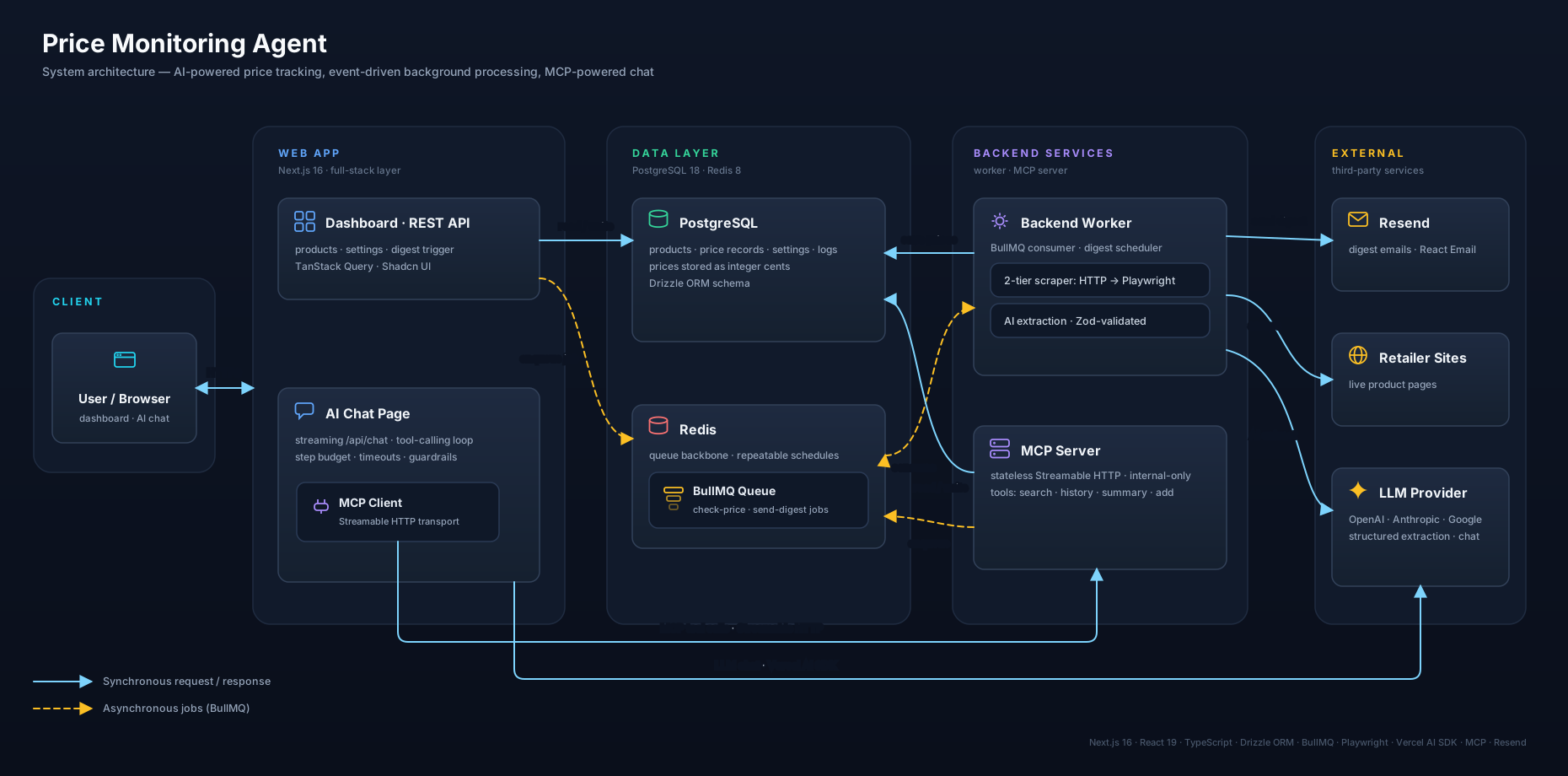
- Full-stack application design with Next.js 16, React 19, TypeScript, PostgreSQL, Redis, and BullMQ
- Practical AI integration using the Vercel AI SDK with typed structured output, not just free-form prompting
- Conversational AI agent with tool calling over a custom Model Context Protocol (MCP) server, streaming UI, and multi-turn chat history
- Background job orchestration for price checks, digest generation, and scheduler-managed repeatable jobs
- Browser automation with Playwright Extra and stealth mode for difficult e-commerce pages
- Production-oriented operations including Dockerized services, health endpoints, CI/CD, and self-hosted deployment
Product capabilities
- Add a product URL and immediately enqueue an initial price check
- Manage products with create, edit, delete, active/inactive state, and manual re-check actions
- Browse monitored products in card or table views with recent price history
- Use global product search to quickly locate and edit products from anywhere in the dashboard
- Chat with an AI agent that can search products, summarize price trends, retrieve history, and add new products through MCP tool calls
- Configure daily or weekly email digest schedules from the UI
- Trigger a full "check all products and send digest" run manually from the dashboard
- Track historical prices and compare current price vs last check and 7/30/90/180 day averages
How the system works
Next.js dashboard + API routes
        |
        v
BullMQ queue on Redis
        |
        v
Node worker
  - HTML fetch + Cheerio
  - Playwright + stealth
  - AI structured extraction fallback
        |
        v
PostgreSQL price history
        |
        v
Resend email digests
End-to-end flow
- A user adds a product URL in the web app.
- The Next.js API stores the product and enqueues a
check-pricejob. - The worker attempts extraction in tiers:
- Tier 1: direct HTTP fetch plus Cheerio selectors
- Tier 2: Playwright-rendered page plus selector extraction
- Tier 3: AI extraction with typed Zod validation if selectors still fail
- The latest result is stored in PostgreSQL as a new price record.
- Scheduled or manual digest jobs fan out price checks for all active products, calculate trends, and send a summary email.
AI extraction pipeline
This repository uses AI where it adds clear value: as a fallback for difficult pages, not as the default for every request.
- Fast path:
fetch()+ Cheerio handles simple product pages cheaply and quickly. - Rendered fallback: Playwright loads JavaScript-heavy pages, waits for DOM stability, and retries extraction with browser-side selectors.
- AI fallback: Vercel AI SDK
generateObject()extractstitle,price,currency, andimageUrlinto a strict Zod schema. - Provider flexibility: OpenAI, Anthropic, and Google providers are switchable through environment variables.
- Operational detail: the worker reuses a singleton browser instance and exposes a health server for deployment checks.
AI chat agent with MCP
A dedicated /dashboard/chat page lets users talk to the price monitor in natural language. The chat page streams responses from /api/chat, which invokes a custom Model Context Protocol (MCP) server to read and write the same database the dashboard uses. The AI agent has no SQL access, only the typed tools below.
Browser (chat UI, streamed)
        |
        v
Next.js /api/chat  (Vercel AI SDK streamText, multi-step tool calls)
        |
        v
MCP client  --->  apps/mcp-server  (typed tools, Zod-validated)
 (HTTP / stdio)            |
                          v
                  PostgreSQL  +  BullMQ queue
- Custom MCP server (
apps/mcp-server/): standalone Node process using@modelcontextprotocol/sdk, speaking two transports selected byMCP_TRANSPORT— stateless Streamable HTTP (web → mcp-server in Docker dev and production) and stdio (spawned by the IDE for local tool inspection). Tools:search_products,get_product_history,get_price_summary, andadd_product(which enqueues acheck-priceBullMQ job, reusing the existing extraction pipeline). All tool inputs are Zod schemas; failures are wrapped into a structured{ error: { code, message } }shape. - Streaming chat API:
apps/web/src/app/api/chat/route.tsruns on the Node runtime, bridges live MCP tools into AI SDKtool()instances, enforces a 5-step tool budget and 60-second per-turn timeout, and returns the AI SDK v6 UI-message protocol with a structured error taxonomy (validation_error,provider_config_missing,mcp_unreachable,step_budget_exceeded,turn_timeout,empty_response,provider_error). - Provider abstraction: the same
AI_PROVIDERenv var that drives the worker's extraction fallback (openai|anthropic|google) selects the chat model. - Multi-turn UI: Zustand-backed in-memory chat state, sanitized markdown rendering via
streamdown, and inline tool-call indicators that show which tool ran, the arguments, and the result for demo transparency. - Domain guardrail: the system prompt restricts the agent to product / price / monitor topics so it politely declines off-topic requests.
- Transport selection: the web MCP client (
apps/web/src/lib/mcp/client.ts) picksStreamableHTTPClientTransportwhenMCP_HTTP_URLis set (production and Docker dev), otherwise falls back to spawning the server over stdio for the IDE workflow. - Local dev: the same MCP server is registered in VSCode/Cursor, so the tools can be inspected with
npx @modelcontextprotocol/inspectoror driven directly from the IDE.
Tech stack
| Area | Technologies |
|---|---|
| Web app | Next.js 16 App Router, React 19, TypeScript |
| UI | Tailwind CSS v4, Shadcn UI, Radix primitives, Sonner, Lucide |
| Forms and validation | React Hook Form, Zod |
| Data access | Drizzle ORM, PostgreSQL 18 |
| Queue and background jobs | BullMQ, Redis 8 |
| Extraction | Cheerio, Playwright, Playwright Extra, puppeteer-extra-plugin-stealth |
| AI | Vercel AI SDK, OpenAI, Anthropic, Google, @modelcontextprotocol/sdk, streamdown |
| Resend, React Email | |
| Testing | Vitest, Testing Library, jsdom |
| DevOps | Docker Compose, GitHub Actions, GHCR, Coolify |
Engineering details worth noting
- Worker-managed scheduling: one worker instance owns BullMQ repeatable jobs, avoiding external cron dependencies.
- Digest orchestration: digest runs create child
check-pricejobs for each active product, then send the email after all checks complete. - Health monitoring: the web app exposes
/api/health, and the worker exposes its own/healthendpoint plus a proxied web route. - Typed persistence: products, price records, run logs, and settings are defined in a shared Drizzle schema package.
- Recent UI improvements: the dashboard includes shared product create/edit flows and global search for faster product management.
Local development
Prerequisites
- Node.js 20+
- pnpm
- Docker
Quick start
pnpm install
cp .env.example .env
# configure at least one AI provider key; add Resend settings for digest emails
pnpm docker:up
pnpm --filter @price-monitor/db push
pnpm worker:up
pnpm --filter @price-monitor/web dev
Open http://localhost:3000/dashboard.
Development worker
If you want the worker in local watch mode instead of Docker:
pnpm --filter @price-monitor/worker exec playwright install chromium
pnpm dev:worker          # from repo root
# or equivalently:
cd apps/worker && pnpm dev
Both commands route through scripts/dev-worker.sh: temporarily stop the Docker worker, run the worker with tsx watch, then restore the Docker worker when you exit (Ctrl+C).
Rebuilding the Docker worker image
After changing worker source code or dependencies, rebuild and restart the Docker worker:
pnpm worker:up    # rebuilds image (--build) and starts container
pnpm worker:down  # stop without rebuild
Lint and tests
Lint and tests run across all workspaces from the repository root:
pnpm lint          # Biome lint over web, worker, mcp-server, packages, scripts
pnpm lint:fix      # apply Biome's safe + unsafe fixes (always review the diff)
pnpm test          # vitest run in every workspace that has a `test` script
Tests live alongside the code they cover (e.g. src/lib/format.ts →
src/lib/format.test.ts). The web workspace also has integration-flavoured
tests under src/test/ for the dashboard pages and API routes.
The test suite is intentionally not wired into CI — it is meant to be run
locally before pushing. Whenever you change application code, also add or
update a colocated *.test.ts (or *.test.tsx) and run pnpm test to
confirm nothing regressed.
Deployment
Deployment is automated through GitHub Actions and Coolify.
- Pushes to
devbuildweb:devandworker:devimages for CI validation. - Pushes to
mainbuildweb:latestandworker:latest, push them to GHCR, and trigger Coolify webhooks. - The production setup runs three independent containers —
web,worker, and the internal-onlymcp-server— on the same Docker network, plus PostgreSQL and Redis. - Only one production worker should have
ENABLE_SCHEDULER=trueto avoid duplicate scheduled emails.
Repository structure
apps/
  web/         Next.js dashboard, chat page, REST + streaming API routes
  worker/      BullMQ worker, extraction pipeline, scheduler, email jobs
  mcp-server/  Custom MCP server exposing typed tools to the AI chat agent
packages/
  db/          Shared Drizzle schema and database client
docs/          Deployment and environment notes
specs/         Planning and implementation artifacts
scripts/       Local development and utility scripts
Good entry points for technical review
apps/worker/src/services/scraper.tsapps/worker/src/services/playwrightFetcher.tsapps/worker/src/services/aiExtractor.tsapps/worker/src/jobs/sendDigest.tsapps/worker/src/scheduler.tsapps/web/src/app/api/products/route.tsapps/web/src/app/api/chat/route.tsapps/web/src/app/(main)/dashboard/productsapps/web/src/app/(main)/dashboard/chatapps/web/src/lib/mcp/client.tsapps/web/src/lib/ai/chat-tools.tsapps/mcp-server/src/index.tsapps/mcp-server/src/toolspackages/db/src/schema.ts.github/workflows/build-and-push.yml