
agent-orchestrator
olypapillon/agent-orchestrator
A LangGraph multi-agent chatbot: intent routing, RAG, and human-approved code delegation to Claude Code
Instalação
npx convez-ai olypapillon/agent-orchestrator1 comando no terminal: detecta o formato do repositório (marketplace ou plugin avulso) e instala via Claude Code. Requer Node 18+ e o Claude Code instalado.
Métricas
README
A tradução para o português deste README ainda está na fila.
Agent Orchestrator
A multi-agent chatbot built with LangGraph that classifies your intent, retrieves knowledge with RAG, and ships code through a human-approved Claude Code pipeline — all orchestrated as a single stateful graph.
What it does
The app (main.py) runs an interactive chat loop in the terminal. Every message you type is classified into one of three intents, and the graph routes it to the right agent:
| Intent | Agent | Behavior |
|---|---|---|
chat | Chat agent | A friendly, talkative chatbot (Gemini 2.5 Flash) |
knowledge | RAG agent | Answers using only documents retrieved from an in-memory vector store |
code | Coding agent | Rewrites your request into a clear instruction, asks you to approve it, then runs Claude Code on a sandboxed workspace/ directory |
Graph architecture
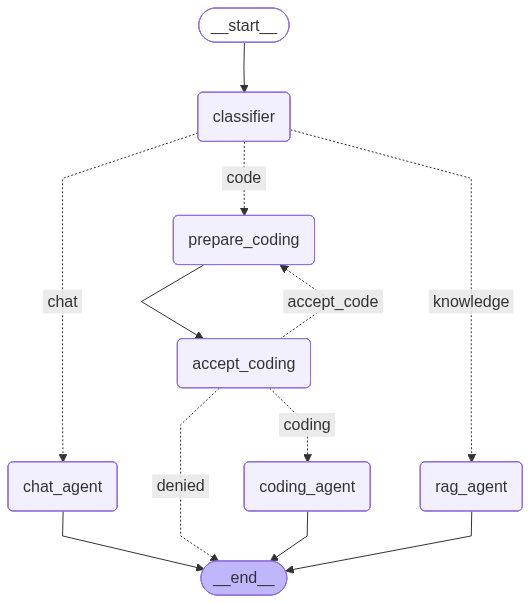
START → classifier ──► chat_agent ──────────────► END
                  ──► rag_agent ───────────────► END
                  ──► prepare_coding → accept_coding
                                          │  approve → coding_agent → END
                                          │  deny    → END
                                          │  revise  → back to prepare_coding (loop)
Key concepts demonstrated
- Shared state — a
StateTypedDictwithmessages(accumulated viaadd_messages), the classifiedmessage_intent, and anext_noderouting field, passed to every node. - Structured output for routing —
classify_intentusesllm.with_structured_output(IntentClassifier)(a Pydantic model with aLiteral['chat','knowledge','code']field) so the LLM's classification is type-safe. - Conditional edges —
add_conditional_edgesroutes from the classifier to the right agent, and from the approval node to run / deny / revise. - RAG — a tiny knowledge base is embedded with
gemini-embedding-001into anInMemoryVectorStore; the RAG agent retrieves the top-3 similar documents and is instructed to answer only from that context. - Human-in-the-loop —
accept_codingcallsinterrupt(...), which pauses the graph and surfaces an approval prompt. The CLI loop detects__interrupt__in the result and resumes the graph withCommand(resume=decision). Answering with a revised request loops back toprepare_coding, forming a cycle — the thing that distinguishes LangGraph from a plain chain. - Checkpointing — the graph is compiled with
InMemorySaverand invoked with athread_id, so conversation state persists across turns (and across the interrupt/resume cycle). - Agent delegation —
prompt_llm_codeshells out to the Claude Code CLI (claude -p "<instruction>" --permission-mode acceptEdits) withcwdset toworkspace/, so code edits are confined to that directory.
Requirements
- Python ≥ 3.12
- uv (or pip)
- A Google AI API key (for Gemini chat + embeddings)
- Claude Code installed and on your
PATH(only needed for thecodeintent)
Setup
# Install dependencies
uv sync

# Configure your API key
echo 'GOOGLE_API_KEY=your-key-here' > .env
Run
uv run main.py
On startup the graph also renders itself to graph.png. Then just chat:
Enter message : hi there!                      # → chat agent
Enter message : what is LangGraph?             # → RAG agent
Enter message : create a hello.py in the repo  # → coding pipeline (asks for approval first)
When a coding request is detected you'll see:
About to run Claude Code with request:

<rewritten instruction>

Approve? (yes/no, or type a revised request)
yes— runs Claude Code inworkspace/no— cancels- anything else — treated as a revised request and re-prepared
Project structure
├── main.py        # the whole graph: state, nodes, edges, CLI loop
├── workspace/     # sandbox directory Claude Code operates in
├── graph.png      # auto-generated diagram of the compiled graph
└── pyproject.toml # dependencies (langgraph, langchain, langchain-google-genai)