
Claude Web Terminal
oh-namgyu/claude-web-terminal
Painel visual para gerenciar agentes Claude em background
Ver no GitHubInterface web para gerenciar sessões de agentes do Claude Code. Permite listar, criar, anexar e parar sessões em background através do navegador, com metadados mais ricos (última resposta, tokens, branch) do que o TUI do terminal.
Instalação
npx convez-ai oh-namgyu/claude-web-terminal1 comando no terminal: detecta o formato do repositório (marketplace ou plugin avulso) e instala via Claude Code. Requer Node 18+ e o Claude Code instalado.
Métricas
Casos de uso
- Monitorar múltiplas sessões de agentes simultaneamente
- Gerenciar tarefas de longa duração em background
- Obter visão consolidada de conversas com Claude Code
Veredito

Ferramenta especializada para usuários de Claude Code que precisam orquestrar múltiplos agentes em background. Implementa segurança robusta (loopback, tokens, validação de origem) apropriada para expor REPL local. Recomendado para fluxos avançados de desenvolvimento ou pesquisa.
README
A tradução para o português deste README ainda está na fila.
claude-web-terminal
A web UI for Claude Code's Agent View — the same
claude agentsfunctionality you'd run in a terminal (list, create, attach, stop background sessions) but rendered as cards in your browser, with richer metadata (last assistant reply, token totals, branch, message count) than the CLI TUI shows.


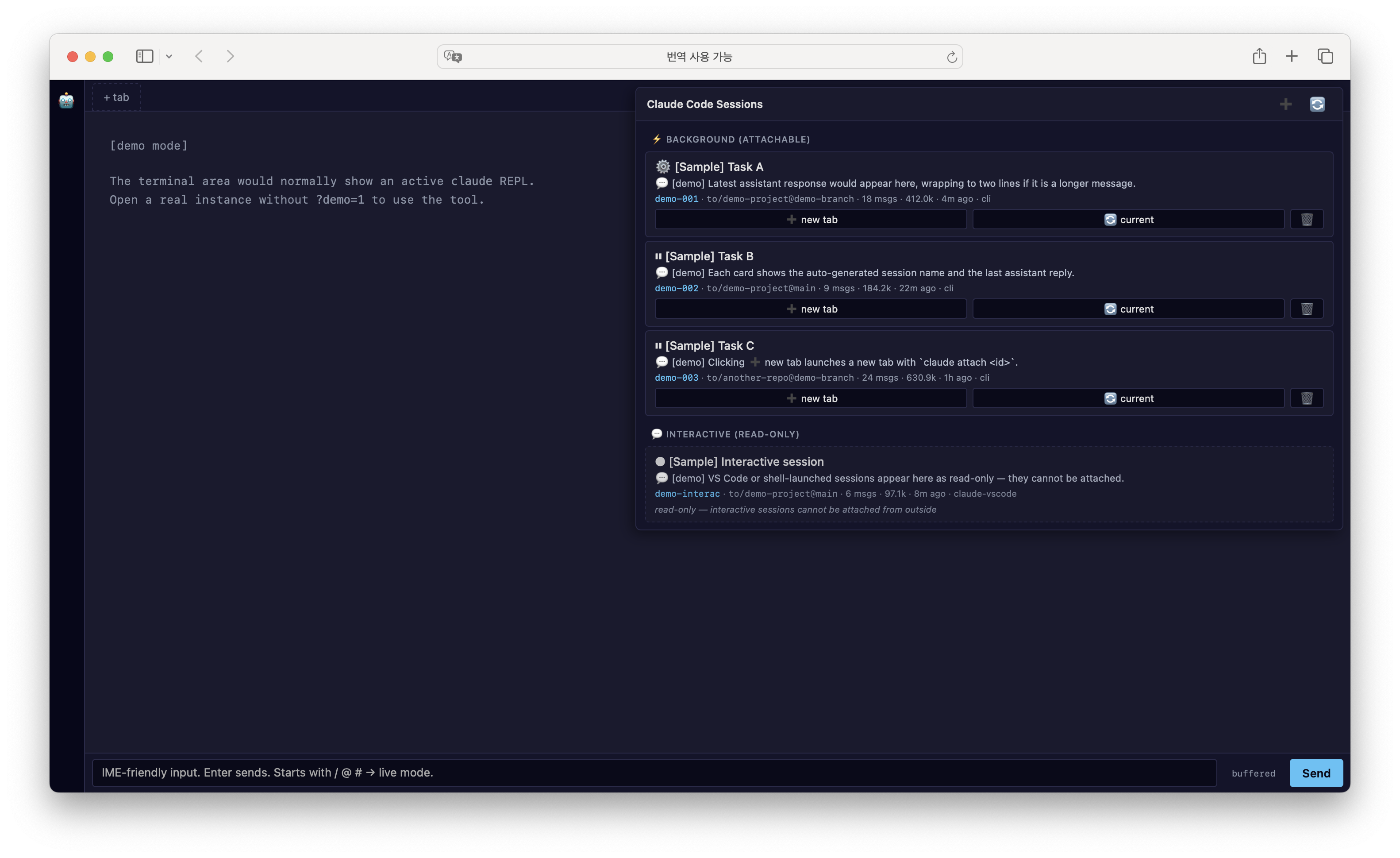
Screenshot above uses the built-in
?demo=1flag — all sessions and content are synthetic.
Security model
This server spawns a real shell + claude REPL on your machine and exposes
it over HTTP/WebSocket, so it ships with two layers of access control,
both required:
- Loopback bind —
127.0.0.1only; not reachable from the network. - Random per-start auth token — set as an httpOnly
SameSite=Strictcookie via a?t=<token>bootstrap URL. TheOriginheader is also validated on every API call and WebSocket upgrade, so a malicious page in your browser cannot cross-connect to the local server (CSWSH/CSRF protection). - State-changing requests require an
Originheader. Browsers always send one;curland native apps usually don't — so a missingOriginonPOST/PUT/PATCH/DELETEis treated as a non-browser caller piggybacking on the auth cookie and rejected with 403. - Per-field metadata schema. Session metadata writes only accept
name(string ≤ 200 chars) andpinned(boolean). Unknown fields are rejected — a buggy or hostile caller can't pollute~/.claude/session-metadata.json. - Session-create rate limit.
POST /api/cc-sessionsis capped toRATE_LIMIT_PER_MIN(default 30) requests per minute per auth cookie; the cap stops a runaway loop from forking unbounded child processes. - Resume-cwd containment. The
?cwd=…parameter on the WebSocket resume path ispath.resolve()-normalized and must land inside your$HOME. A..-rich or absolute escape (/etc, another user's/Users/<bob>) is rejected; the server falls back toDEFAULT_CWD. The resolved path is then re-checked withfs.realpathSync, so a symlink inside$HOMEthat points outside it (~/x → /etc) is rejected too — both the lexical path and its symlink target must be inside$HOME. - Optional token-print masking. Set
AUTH_TOKEN_HIDE=trueto print a redacted bootstrap URL (?t=abcd…ef) at startup — useful when the console is screen-shared or persistently logged. You then need to knowAUTH_TOKENout-of-band.
Do not change HOST to 0.0.0.0 on a shared network — even with the
token, the API surface (cwds, session names, last assistant text, the
full transcript preview returned by /api/cc-resume-sessions) is not
designed for multi-tenant exposure. Treat anyone who has the cookie as
having read access to every Claude conversation on this machine.
Why
Claude Code v2 introduced background sessions (claude --bg "<task>") and the
claude agents TUI to manage them. If you're juggling several long-running
agents at once — research, refactors, audits — the TUI is fine but doesn't
give you a quick visual overview, and you can't easily click between them.
This project takes the same Agent View concept and renders it as a web UI:
the cards expose more metadata than the CLI TUI, navigation is mouse-driven,
and you can attach a session into a new browser tab with one click. Under the
hood it just spawns claude attach <id> / claude --bg "<prompt>" / claude stop <id> — the same commands you'd run yourself.
claude-web-terminal is a small Node/Express server that exposes a web UI
with:
- A real Claude Code terminal in your browser (via xterm.js + node-pty) — multiple tabs with WebSocket auto-reconnect.
- A side panel that lists every active background session, every live interactive session, and every resumable past session — with names, last assistant response, token usage, branch, and message count.
- One-click attach (new or current tab) and resume for past sessions (auto-resolves the original cwd).
- ➕ create, ✏️ rename, 🗑 stop, ⭐ pin sessions.
- 🔎 search + ⏱ time filter (2d / 5d / 7d / 2w / 1m) for quickly finding a session.
- 🔔 desktop notifications when a background session leaves the
busystate (either→ waitingfor input or→ idlewhen finished). Delivered via Server-Sent Events so they survive background-tab timer throttling. - Model toggle (Opus / Sonnet / Haiku) and keyboard shortcuts (
Cmd+T/W/K/1-9). - An optional IME-friendly input bar that fixes Safari's broken Korean/Chinese/Japanese composition inside xterm.js.
Quick start
git clone https://github.com/oh-namgyu/claude-web-terminal.git
cd claude-web-terminal
npm install
cp .env.example .env       # adjust HOST/PORT if you like
npm start
Docker
A compose.yml is included; ghcr.io/oh-namgyu/claude-web-terminal:latest is built on every push to main:
docker compose up -d
docker compose logs cwt    # copy the bootstrap URL printed at boot
The compose file mounts ./cwt-home → ~/.claude (Claude credentials / session data) and ./work → /work (the code you want Claude to see). Default bind is 127.0.0.1:8765; if you change it to expose on a network, pair with AUTH_TOKEN_HIDE=true, set AUTH_TOKEN to a long random secret, and put a TLS-terminating reverse proxy in front.
On first start the console prints a bootstrap URL with a one-time token:
claude-web-terminal
  Open this URL once to authenticate (token is set as a cookie):
  →  http://127.0.0.1:8765/?t=<random-token>
Open that URL once — the server sets an httpOnly SameSite=Strict cookie,
strips the token from the URL, and subsequent visits to
http://127.0.0.1:8765 work without the token. The first tab auto-runs
claude for you.
By default a new random token is generated on every restart. Set
AUTH_TOKEN=<your-value> in .env if you want the bootstrap URL to stay
the same across restarts.
Keyboard shortcuts
The modifier is ⌘ Command on macOS and Ctrl on Windows / Linux. Shortcuts are suppressed while an IME composition is active so they don't fight Korean / Chinese / Japanese input.
| Action | macOS | Windows / Linux |
|---|---|---|
| New tab | ⌘ T | Ctrl + T |
| Close active tab | ⌘ W | Ctrl + W |
| Open Agent panel + focus search | ⌘ K | Ctrl + K |
| Switch to nth tab (1–9) | ⌘ 1 … ⌘ 9 | Ctrl + 1 … Ctrl + 9 |
Most browsers also bind
Ctrl/⌘ + TandCtrl/⌘ + Wfor browser tabs. The page handler callspreventDefault()so the browser-level binding won't fire while the app is focused.
CLI helper: cc-resume
claude --resume <id> only finds sessions whose original cwd matches
your current shell. If you can't remember where a session was created,
use the bundled helper — it locates the transcript, reads the original
cwd, and cds there before resuming:
ln -s "$PWD/bin/cc-resume" /usr/local/bin/cc-resume   # or add bin/ to PATH

cc-resume <sessionId>     # full id
cc-resume 71fc583c        # prefix is enough if unambiguous
Requirements
- Node.js 18+
- Claude Code CLI on
PATH, authenticated (Pro/Max login orANTHROPIC_API_KEY).
Testing
npm run test:e2e          # Playwright Chromium — 6 scenarios, ~1s (server auto-spawn)
npm run test:e2e:headed   # show browser
e2e/smoke.spec.ts verifies:
- Bootstrap: 401 without token /
?t=<token>setscwt_authhttpOnly cookie / wrong token blocked - Static UI (cookie-gated):
/returns index.html,/app.jsand/style.cssreachable - API origin gate: cookie + foreign Origin → 403 (CSWSH / CSRF block)
First run: npx playwright install chromium (~92MB). Token fixed via E2E_AUTH_TOKEN env (default e2e-test-token-cwt-12345).
How it works
| What | Where it comes from | Status |
|---|---|---|
| Background session ID list | /tmp/cc-daemon-<UID>/<daemon>/rv/<jobId>.sock (existence = alive) | undocumented internal of Claude Code |
| Session metadata (name, status, kind, cwd, sessionId) | ~/.claude/sessions/<pid>.json | undocumented internal |
| Transcript (last response, token usage, branch, msg count) | ~/.claude/projects/<cwd-slug>/<sessionUUID>.jsonl | undocumented internal |
attach / stop / --bg | Public claude CLI subcommands | stable |
status values (busy / waiting / idle) | Field in the session metadata; the server polls it every 2s and pushes notifications over SSE | undocumented internal — pinned by server.js |
The session listing relies on three undocumented paths. If a future Claude
Code release changes them, edit lib/cc-sessions.js.
The notification trigger reads the same status field; adjust the
state machine in server.js if CC introduces new values.
Agent View panel
Click the 🤖 button on the left sidebar. The panel shows two sections:
- ⚡ Background (attachable) — created via
claude --bg "<prompt>"or via the ➕ button. You can attach in a new tab, replace the current tab, or stop the session. - 💬 Interactive (read-only) — any live
claudeREPL on the system (this app's own tabs, your VS Code claude, a raw shell tab). They are listed for visibility but can't be attached because they're not registered with the background daemon.
Each card shows the auto-generated name, the last assistant message snippet, working directory + git branch, message count, total token usage, and time since last update.
IME-friendly input bar
xterm.js's hidden helper textarea is 1×1px, which Safari/WebKit can refuse to activate for IME composition (Korean, Japanese, Chinese). When that happens you see decomposed jamo / kana / pinyin instead of composed characters.
The bar below the terminal is a normal-sized textarea that Safari composes properly. The message body is always buffered — you type, press Enter, and the whole composed string is sent to the active tab as a single chunk (an earlier design forwarded per-keystroke deltas, but IME composition could race and corrupt the buffer, so live body send was dropped).
The mode indicator next to the bar reflects what the navigation keys do:
- buffered — the default. Only Enter sends; nothing is forwarded live.
- slash (keys live) — shown when your input starts with
/,@, or#. The text is still buffered, but the navigation keys go live so Claude Code's slash-command popup, file-mention picker, and memory shortcut stay usable: ↑ ↓ ← → arrows, Escape, and Tab are translated to the matching control sequences. (Backspace is not forwarded — edit in the textarea instead.) The app also shows its own slash/@palette above the bar for these prefixes.
Preview without Claude Code installed
Open http://127.0.0.1:8765/?demo=1&showAgents=1 to view the Agent View panel
with synthetic sample sessions. No real session data is used, no claude binary
is required for this preview. Helpful for screenshots and demos.
Configuration
All via environment variables — see .env.example:
| Variable | Default | Purpose |
|---|---|---|
HOST | 127.0.0.1 | Bind host. Don't change to 0.0.0.0 on a shared network — /api/cc-sessions exposes the cwd, name and last assistant text of every session. |
PORT | 8765 | Web UI port |
CLAUDE_BIN | (PATH lookup) | Path to the claude binary |
DEFAULT_CWD | $HOME | Working directory for new tabs |
CWD_ROOTS | $HOME | Comma-separated root dirs whose first-level children populate the cwd dropdown. devs/docs/repos/projects/code children get an extra nesting level. ~ is expanded. |
AUTH_TOKEN | (random per start) | Fixed loopback auth token. If unset, a random 192-bit token is generated each start and printed to the console as ?t=<token>. Open that URL once to set the auth cookie. |
AUTH_TOKEN_HIDE | false | Print a masked bootstrap URL (?t=abcd…ef) so screen-shares / persisted logs don't leak the token. You then need AUTH_TOKEN out-of-band. |
ALLOWED_ORIGINS | (loopback http+https) | Comma-separated extra origins merged with the built-in loopback set (http/https on localhost/127.0.0.1/HOST). Set when fronting with a custom origin (e.g. https://cwt.local). |
ALLOW_NO_ORIGIN_WS | false | Allow WebSocket upgrades that carry no Origin header. Off by default (a missing Origin is treated as a non-browser caller and rejected, matching the POST policy). Set 1/true for native clients or tests. |
RATE_LIMIT_PER_MIN | 30 | Max POST /api/cc-sessions (session-create) requests per minute per auth cookie. |
LOG_LEVEL | info | debug | info | warn | error. |
LOG_FORMAT | text | text (single-line) | json (one object per line, for log scrapers). |
What this is not
- Not a replacement for the Claude Code CLI — it spawns it.
- Not a cloud service. Everything runs on your machine.
- Not a multi-user system. The session paths assume a single UID.
License
MIT — see LICENSE.