
Agentline — Statusline Temático para Claude Code
odere-pro/claude-agentline
Statusline temático e agente-nativo para Claude Code com 38 widgets
Ver no GitHubBarra de status rápida e personalizável para Claude Code que exibe git, tokens, janela de contexto, limites de taxa e editor TUI ao vivo. Projetado para agentes IA configurarem e ajustarem a interface sem necessidade de plugins nativos ou scaffolding complexo.
Instalação
npx convez-ai odere-pro/claude-agentline1 comando no terminal: detecta o formato do repositório (marketplace ou plugin avulso) e instala via Claude Code. Requer Node 18+ e o Claude Code instalado.
Métricas
Casos de uso
- Monitorar consumo de tokens e contexto em sessões Claude Code
- Visualizar status de repositório git e limites de taxa em tempo real
- Personalizar layout e tema da barra de status via editor TUI
- Configurar agentes IA para autocontrolarem ambiente de execução
Veredito

Solução madura e bem-arquitetada para quem trabalha intensamente com Claude Code. O design 'Software 3.0' (agente-nativo) é inovador; a estabilidade contratual stdin/stdout e ausência de dependências nativas tornam-na confiável. Recomendado para fluxos onde monitoramento granular de tokens e contexto agregam valor real.
README
A tradução para o português deste README ainda está na fila.
agentline
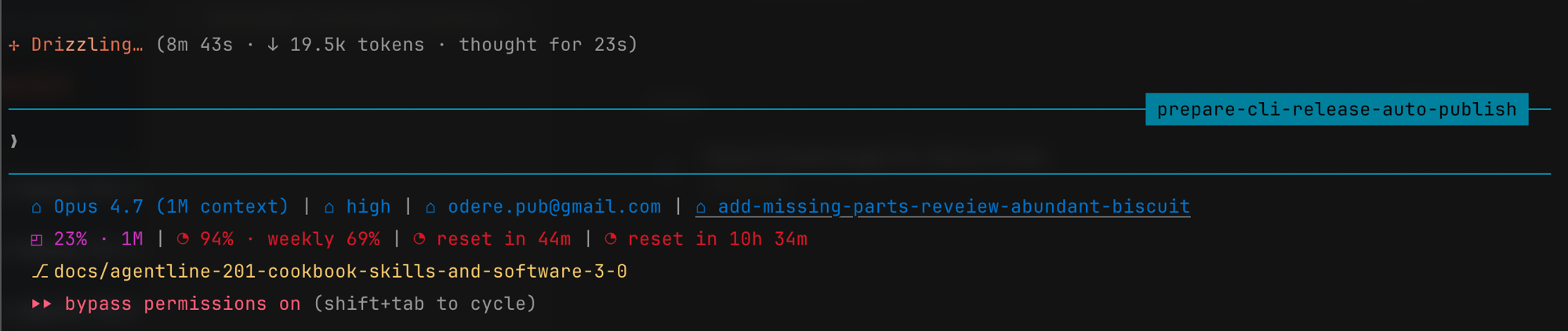
A powerline statusline for Claude Code — git, tokens, context window, rate limits, and a live TUI editor.


A fast, themeable statusline for Claude Code. Reads the stdin payload Claude Code's statusline contract sends, writes an ANSI-styled line, exits. No network. No native modules. No plugin scaffolding.
Built for Software 3.0. Agentline is shaped so an LLM agent — not just a human — can install, configure, theme, and troubleshoot it through natural language. The stable stdin contract, the flat scriptable CLI, the seeded subagent skill files, and the per-group
CLAUDE.mdbriefings are one coherent design choice, not a feature list. See SOFTWARE-3-0.md for the thesis, the dual-audience surface map, and a worked example.
Get started
npm install -g @odere-pro/agentline   # 1. install the CLI
agentline reset                       # 2. wire into Claude Code (statusLine + skills + themes)
agentline doctor                      # 3. verify the wiring
agentline edit                        # 4. customise widgets, theme, and layout (TUI)
Restart Claude Code after reset — the statusline appears at the bottom of the prompt. Later config changes apply on the next render, no restart needed.
Highlights
38 widgets across 6 families, each covering one slice of session status:
| Family | What it shows |
|---|---|
session | model, version, thinking, plan, cwd, agent, account, duration |
tokens | input / output token counts, throughput, and host cost scalars |
context | context-window usage %, the 200k flag, and cached tokens |
rate-limits | session & weekly usage, plus one reset-timer (countdown + at-time) |
git | project, branch, worktree, change counts, upstream, PR |
other | clock, added-dirs, output-style, vim-mode |
- Agent-friendly —
installadds five agentline skills to your Claude Code session, so you can install, configure, theme, troubleshoot, and update agentline by asking the agent — without leaving Claude Code. - Comfortable, intuitive TUI —
agentline editopens a live-preview editor with a widget picker. - Search to your widget — press
/in the picker for a flat, searchable list across every widget. - Previews, grouped by colour & family — every widget shows a live preview in the picker, colour-coded and grouped by family so the statusline is faster to read at a glance.
- Plan-link widget — the
planwidget links to the plan generated in your Claude Code session, so you never lose it when you clear or compact context. - One global config — a single source of truth at
${CLAUDE_CONFIG_DIR:-~/.config}/agentline/config.json; no per-project config to drift. - Reversible —
agentline uninstallrestores your previousstatusLinebyte-for-byte and removes the installed skills (--purgealso wipes user config and custom themes). - Powerline-ready — arrayed chevrons & caps that cycle per line.
- Theme engine — graceful truecolor → 256-colour → 16-colour degradation.
- Self-repairing —
agentline doctor --fixauto-repairs settings wiring, config defaults, and missing themes. - Zero render-time I/O — themes and the widget registry are embedded; no network on the hot path.
Use
The CLI is intentionally small: reset · uninstall · doctor · edit · config.
Install and first-time setup
# From source (today)
git clone https://github.com/odere-pro/claude-agentline && cd claude-agentline
corepack enable && pnpm install && pnpm run build
node dist/cli.mjs reset --from-source

# From npm (when published)
npm install -g @odere-pro/agentline
agentline reset
reset is the canonical setup verb — it wires statusLine into Claude Code's settings,
seeds agentline/config.json under $CLAUDE_CONFIG_DIR, copies shipped themes, and installs
five agentline*.md skills. It also performs first-time wiring on a fresh host, making it
safe to run whether agentline is new or already set up. The lower-level agentline install
verb is still available (it preserves an existing user config rather than reseeding it) but
is hidden from agentline help — reset is the entry point for users and agents alike.
Backs up any prior statusLine so uninstall restores it byte-for-byte.
Restart Claude Code — the statusline appears at the bottom of the prompt.
Configure
Three equivalent paths — pick whichever fits the moment:
| Path | When |
|---|---|
| "swap the theme to X" | Ask the agent in any Claude Code session |
agentline edit | Interactive TUI with live preview |
agentline config widget | Scriptable: add, remove, move, replace, set-option |
agentline config init | Seed the user config from a preset (default/minimal/power) |
agentline config refresh | Get or set the statusline refresh cadence (seconds) |
agentline config undo / redo | Roll the last config change back, or forward again |
Changes apply on the next prompt render — no restart.
Uninstall
agentline uninstall          # restore prior statusLine, remove installed skills
agentline uninstall --purge  # also wipe user config + custom themes
Diagnose
agentline doctor             # report wiring problems
agentline doctor --fix       # auto-repair settings + config wiring
Docs
| Topic | File |
|---|---|
| Get started | docs/get-started.md |
| CLI reference | docs/cli.md |
| Install | docs/install.md |
| Configure | docs/config.md |
| Widgets (all 22) | docs/widgets.md |
| Themes | docs/themes.md |
| TUI editor keys | docs/keymap.md |
| Doctor checks | docs/doctor.md |
| Troubleshooting | docs/troubleshooting.md |
| Architecture | docs/architecture.md |
| Glossary | docs/GLOSSARY.md |
| Why this shape | SOFTWARE-3-0.md |
Requirements
- Node.js 20 LTS or newer
- macOS, Linux, or Windows (Git Bash / WSL)
- Claude Code run at least once (settings file must exist)
Contribute
Bug reports, widget ideas, theme submissions, and PRs are welcome.
# Bootstrap (pnpm is pinned via package.json "packageManager")
corepack enable
pnpm install --frozen-lockfile
pnpm run build
bash tests/gates/run-all.sh        # full gate suite

# Iterate
pnpm run test:watch                # unit tests
node dist/cli.mjs install --from-source  # link this checkout to Claude Code
node dist/cli.mjs edit             # exercise the TUI editor

# Sanity check before opening a PR
pnpm run lint && pnpm run typecheck && pnpm test
bash tests/gates/run-all.sh
See CONTRIBUTING.md for branch/commit conventions, the 5-step "add a widget" recipe, gate descriptions, and the changelog-fragment workflow. Open issues at github.com/odere-pro/claude-agentline/issues; security reports go through SECURITY.md.
Source layout
Core modules live under src/, organised into six groups plus the CLI entry. Each group has a CLAUDE.md briefing for any Claude Code session opened in this repo.
| Group | Purpose |
|---|---|
src/cli/ | CLI dispatch entry (cli.ts) — every verb lives behind this one file. |
src/core/ | Stdin parse, schema, i18n (en-dictionary + ids), shared pure libs. |
src/data/ | Config, theme, tokens, git, session, on-disk caches (config, theme, tokens, git, session, state). |
src/widgets/ | Per-family widget folders + families/ catalogue + plumbing (cell, clock, registry, render-widget, separator). |
src/render/ | Line composer + Powerline transform (render, powerline). |
src/tui/ | Lazy-imported TUI editor: tui/ shell + picker, preview, state, keys siblings. |
src/commands/ | Verb implementations (reset, install, uninstall, doctor) plus the internal update-check cache helper. |
The render hot path stays ink/react/src/tui/-free (gate-19). See docs/cookbook/04-architecture.md for the hot-path / cold-path boundary and SOFTWARE-3-0.md for the design thesis.