
tmux-claude-bot
OctopusGarage/tmux-claude-bot
Controle Claude Code via Telegram/Feishu direto do seu tmux
Ver no GitHubBot que controla remotamente sessões do Claude Code rodando em tmux, via Telegram ou Feishu/Lark. Permite enviar prompts, receber respostas em tempo real, transcrever áudio e gerenciar múltiplos projetos em paralelo, tudo com instalação de uma linha no macOS.
Instalação
npx convez-ai OctopusGarage/tmux-claude-bot1 comando no terminal: detecta o formato do repositório (marketplace ou plugin avulso) e instala via Claude Code. Requer Node 18+ e o Claude Code instalado.
Métricas
Casos de uso
- Automatizar tarefas de desenvolvimento remotamente via mensagens
- Gerenciar múltiplos projetos com sessões Claude isoladas
- Executar comandos por voz e receber outputs em tempo real
Veredito

Ferramenta bem pensada para quem quer orquestrar Claude Code de fora do terminal. Implementação sólida com fila de execução, detecção de idle e suporte a múltiplos canais (Telegram/Feishu), mas escopo bastante nicho—exige tmux, Claude Code CLI e macOS.
README
A tradução para o português deste README ainda está na fila.
tmux-claude-bot




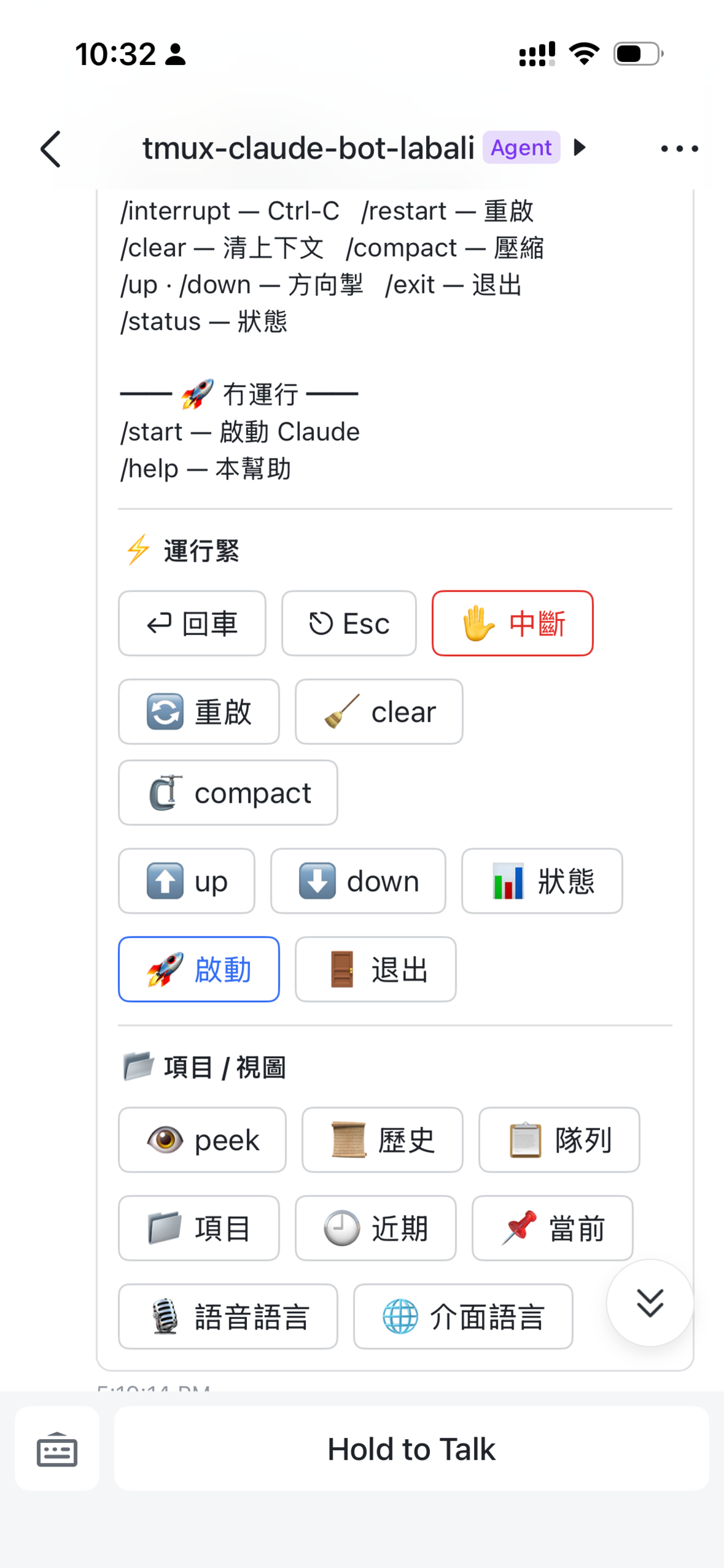
A chat bot that drives Claude Code inside tmux sessions — remote-control your local Claude from Telegram and/or Feishu/Lark, with voice and text input. Supports multiple projects, each with its own tmux session. Pick one chat app or run both.
Contents
- Features
- Demo
- Architecture
- Quick Start
- Configuration
- Session Naming
- Telegram Commands
- Voice transcription
- Claude Running Detection
- Production Deployment
- Resilience
- Development & releases
- Requirements
Features
- Multi-project tmux sessions — each project gets its own tmux session (
tmux_proj_<path>) - Project switching — create, switch, and remove projects via Telegram commands
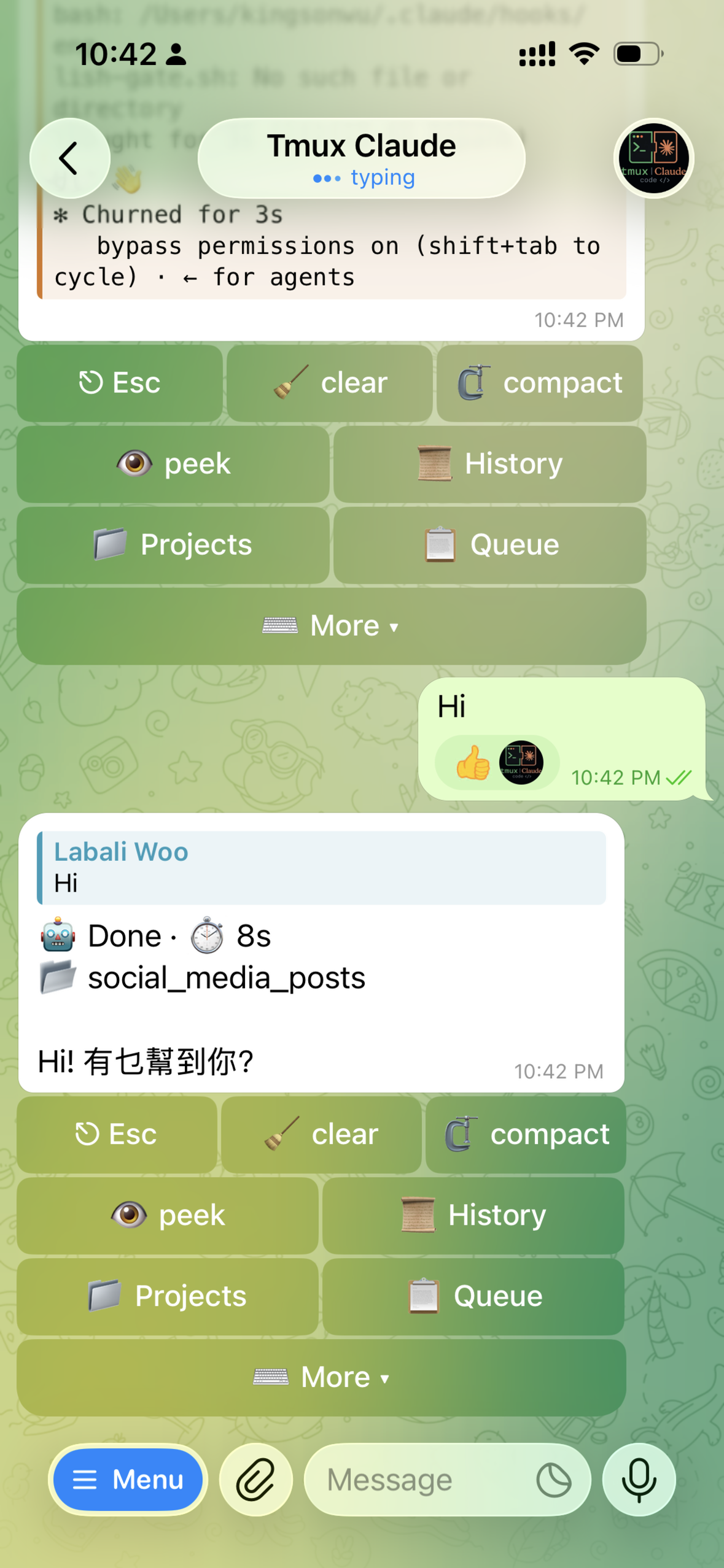
- Real-time output streaming — captures tmux pane and streams output to Telegram
- Queue-based execution — prevents concurrent commands from interleaving
- Idle detection — polls tmux pane to detect when Claude is idle vs. running
- Directory guard — operations restricted to configured allowed directories
Demo
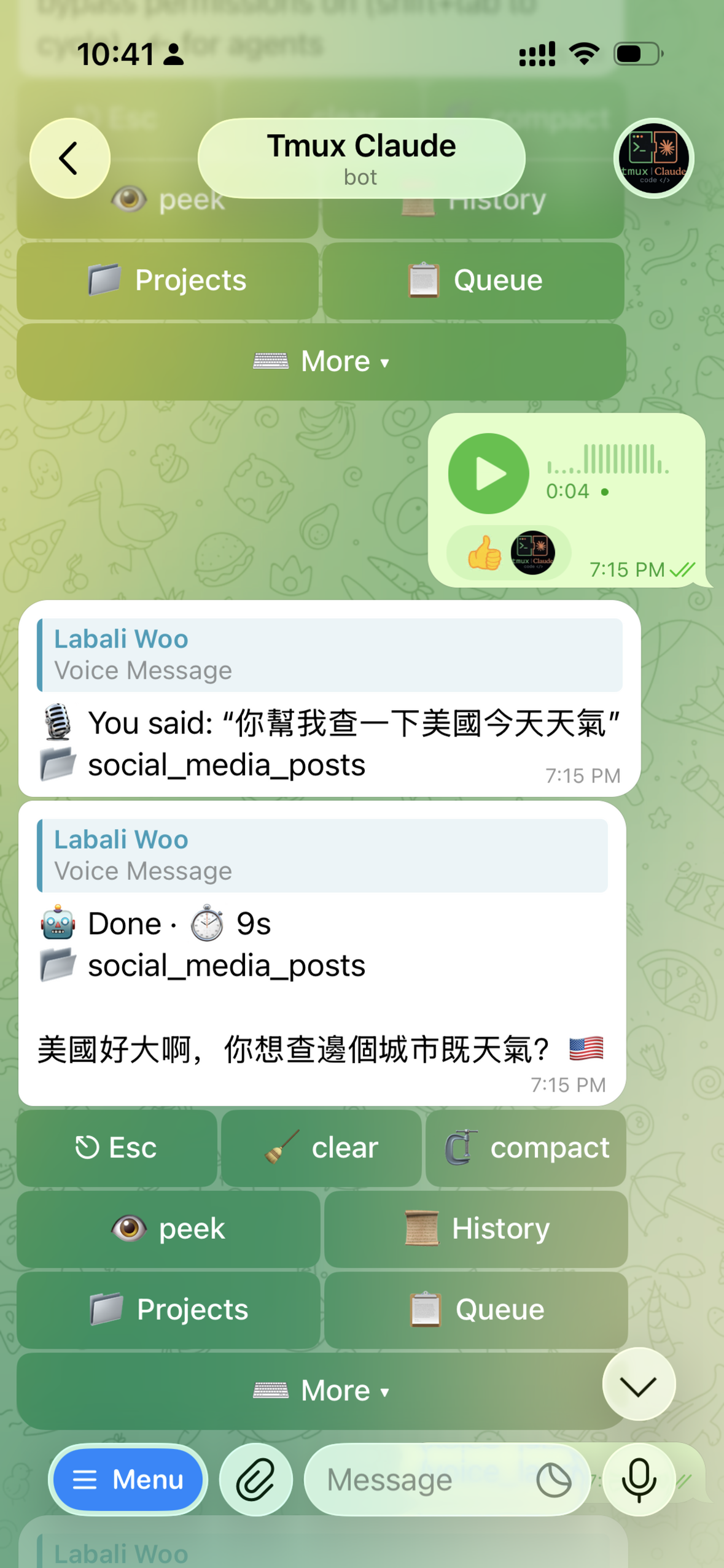
| Telegram — keyboard & output | Voice transcription | Feishu/Lark |
|---|---|---|
 |  |  |
Architecture
Telegram Bot (grammy)
    │
    ├── bot/
    │   └── handlers.ts  — command routing, middleware, session validation
    │
    ├── services/
    │   ├── tmux.ts              — tmux pane capture, send-keys, session management
    │   ├── claude.ts            — start/stop Claude, idle poll, queue orchestration
    │   ├── queue.ts             — FIFO command queue with mutex
    │   ├── output.ts            — tmux output → Telegram message chunking
    │   └── currentProject.ts    — .current_project file lifecycle + session cache
    │
    └── config.ts    — env loading via dotenv + Zod validation
Quick Start
Install (macOS)
curl -fsSL https://raw.githubusercontent.com/OctopusGarage/tmux-claude-bot/main/install.sh | bash
The installer checks prerequisites (node, tmux, Claude Code CLI), installs
dependencies, then runs a guided wizard that:
- asks which chat app to connect — Telegram, Feishu/Lark, or both,
- Telegram: asks for your bot token (@BotFather), validates it live, and auto-captures your Telegram id (just message the bot),
- Feishu/Lark: renders a QR code — scan it to create the app; credentials are written for you,
- asks which project directories the bot may use,
and finally installs and starts the bot as a launchd service (auto-restart on crash/boot).
Re-running the installer updates code + dependencies and restarts the service while preserving your
.envand runtime state — a safe one-click update. Add Feishu later anytime withnpm run setup:lark.
Prefer to clone first?
git clone … && cd tmux-claude-bot && ./install.shdoes the same thing in place. The install location defaults to~/.tmux-claude-bot; override it withTMUX_CLAUDE_BOT_DIR=/path.
Install with an AI assistant
Not comfortable on the command line? Copy this prompt to any AI assistant (ChatGPT, Claude, Gemini, or an agent with shell access) — it downloads the release, reads the bundled guide, and walks you through it:
Install "tmux-claude-bot" on my Mac for me (open-source, macOS-only). Download the latest
release tarball from https://github.com/OctopusGarage/tmux-claude-bot/releases/latest,
extract it, read the INSTALL.md inside, and follow it. Guide me step by step and ask me
for anything it needs (like my Telegram bot token).
By default the installer fetches the latest stable release — a lean tarball
without tests/, docs/, or dev-config files. Pin a specific version, or track main:
# pin a released version
TMUX_CLAUDE_BOT_VERSION=v0.1.0 curl -fsSL https://raw.githubusercontent.com/OctopusGarage/tmux-claude-bot/main/install.sh | bash

# track the latest main (development)
TMUX_CLAUDE_BOT_VERSION=main curl -fsSL https://raw.githubusercontent.com/OctopusGarage/tmux-claude-bot/main/install.sh | bash
Manage
npm run service:install     # (re)install + start the launchd service
npm run doctor              # health check (incl. single-instance 409 guard)
npm run setup:reconfigure   # change token / authorized users / directories
npm run service:uninstall   # stop and remove the launchd service
First message
In Telegram: /add_project ~/projects/myapp then /start.
Configuration
All settings via .env:
| Variable | Default | Description |
|---|---|---|
TELEGRAM_BOT_TOKEN | (optional) | Telegram bot token from @BotFather. Blank = Telegram off (Feishu-only) |
LARK_ENABLED / LARK_APP_ID / LARK_APP_SECRET / LARK_ALLOWED_OPEN_IDS / LARK_DOMAIN | (optional) | Feishu/Lark adapter — set by npm run setup:lark. At least one of Telegram/Feishu must be configured |
CLAUDE_START_COMMAND | claude-yolo | Command to launch Claude |
IDLE_POLL_TICKS | 3 | Consecutive idle polls before considered idle |
POLL_INTERVAL_MS | 1000 | Milliseconds between idle polls |
MAX_OUTPUT_LINES | 200 | Max tmux pane lines to capture |
MAX_MESSAGE_LENGTH | 3500 | Max Telegram message size |
TELEGRAM_ALLOWED_USER_IDS | (empty) | Comma-separated Telegram user IDs that can use the bot |
CD_ALLOWED_DIRS | (empty) | Allowed directories for project creation |
Session Naming
tmux session name format: tmux_proj_<absolute-path> with / replaced by -
Example: /home/user/projects/myapp → tmux_proj_-home-user-projects-myapp
The active session name is stored in .current_project (gitignored).
Telegram Commands
Projects (no Claude required)
| Command | Description |
|---|---|
/list_projects | List all tmux_proj_* sessions |
/current_project | Show current project and session status |
/add_project <path> | Create new project tmux session |
/switch_<N> | Switch to project by number |
/remove_<N> | Remove project session |
Claude control (session required)
| Command | When | Description |
|---|---|---|
start | session exists | Start Claude session |
status | session exists | Check if Claude is running |
peek | session exists | Capture current tmux pane |
esc | Claude running | Send Escape key |
interrupt | Claude running | Send Ctrl-C |
exit | Claude running | Send /exit to Claude |
restart | Claude running | Restart with --continue flag |
clear | Claude running | Send /clear (clear context) |
compact | Claude running | Send /compact (compact context) |
enter | Claude running | Send Enter key |
up / down | Claude running | Send arrow keys |
help | always | Show all commands |
Natural language
When Claude is running, any text message is sent to Claude and the result is returned.
Voice transcription (optional)
Voice messages are transcribed locally with mlx-whisper (Apple Silicon only) and then forwarded to Claude like any text. The feature is off until you install it — if you never use voice, you can ignore this entirely.
Enable it (two ways):
- From Telegram: send
/voice_install. The bot runs the installer, enables the feature, and persists the path to.env— no restart needed. (No-op politely if the host isn't Apple Silicon.) - On the host:
npm run whisper:install, then put the printed path intoMLX_WHISPER_BINin.env(or re-runnpm run setup:reconfigure).
What gets installed (project-managed, reproducible — nothing global):
- A project-local
.venvcreated by uv, withmlx-whisperpinned inrequirements.txt. Model weights are downloaded from HuggingFace on first transcription. - ffmpeg is required to decode audio (
brew install ffmpeg). The installer andnpm run doctorboth check for it.
If you send a voice message before enabling the feature, the bot replies with a short note telling you how to turn it on — it never fails silently.
Recognition language. whisper's auto-detect often misreads Chinese as
Japanese, so transcription forces a language — zh by default. Switch any
time from Telegram with /voice_lang <zh|en|auto> (auto re-enables detection);
it persists to .env. Override the default with WHISPER_LANGUAGE in .env.
Claude Running Detection
The bot decides whether Claude is running by process detection, not screen
scraping: it walks the tmux pane's process tree (pane_pid → ps) and looks for a
claude process. Present → running; absent → idle. This is theme- and
output-independent. (Readiness — "Claude finished loading" — is still detected from
the pane, since the process exists before it is ready for input.)
Production Deployment (macOS launchd)
The bot runs as a launchd service with automatic crash recovery:
npm run service:install     # install + start the launchd agent (auto-restart on crash/boot)
npm run service:uninstall   # stop and remove the launchd agent
npm run doctor              # verify it's healthy (single-instance check)
Note: the installer uses
sedto substitute__PROJECT_DIR__in the plist template before copying it to~/Library/LaunchAgents/. Do not copy the plist manually — the placeholder will be left unresolved and the service will fail to spawn.
Features:
KeepAlive— auto-restart on crashThrottleInterval— min 10s between restarts (prevents crash loops)- Logs to
logs/launchd.out.logandlogs/launchd.err.log
Resilience
| Mechanism | Behavior |
|---|---|
| Network retry | getMe retries 5× with exponential backoff (1s→30s) |
| Message retry | Handler retries 3× with linear backoff (1s, 2s, 3s) |
| Queue persistence | Unprocessed messages saved to .queue/pending.json |
| Process auto-restart | launchd KeepAlive restarts bot on crash |
| Handler isolation | Single message failure does not block queue |
Development & releases
See CONTRIBUTING.md for local dev, the verification gates, and the install/deploy/release flow. In short:
- Dev:
npm install && npm run setup && npm run dev - Deploy this machine:
/deploy(Claude command) or re-run the installer - Cut a release:
/release [patch|minor|major]— gates, bumps, tags, pushes (CI publishes the GitHub Release), then redeploys + verifies this machine
Requirements
- Node.js 20+
- tmux
- Claude Code CLI (
claude-yoloor similar) - Optional, for voice: Apple Silicon Mac + uv + ffmpeg (see Voice transcription)