
claude-code-context-capturer
OceansCreative/claude-code-context-capturer
Capture web pages (and your claude.ai conversations) as Markdown directly into your project's CLAUDE.md. URL-pattern routing across multiple files. 100% local.
Instalação
npx convez-ai OceansCreative/claude-code-context-capturer1 comando no terminal: detecta o formato do repositório (marketplace ou plugin avulso) e instala via Claude Code. Requer Node 18+ e o Claude Code instalado.
Métricas
README
A tradução para o português deste README ainda está na fila.
Claude Code Context Capturer
Capture web pages as Markdown and append them directly to your project's
CLAUDE.md. Multi-project routing by URL pattern. Site-specific parsers for GitHub, Stack Overflow, Zenn, Qiita, MDN.
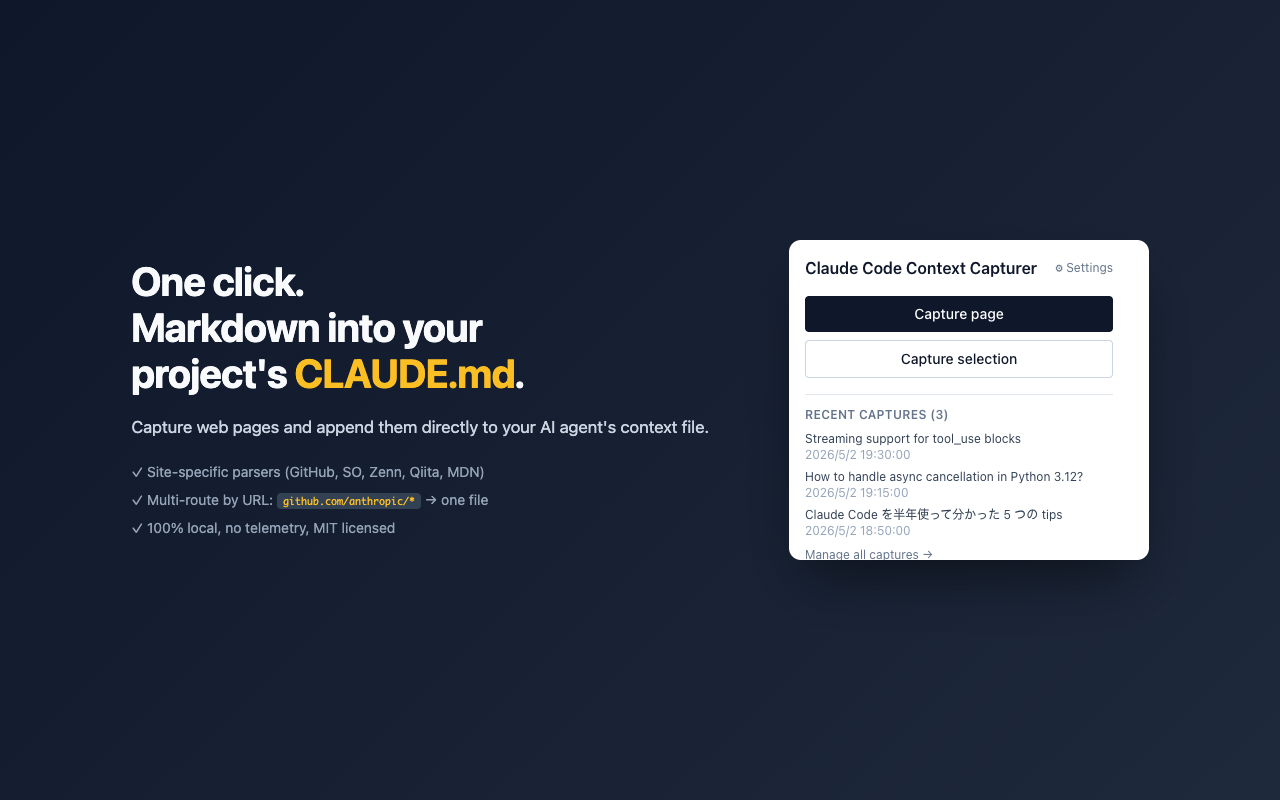
🎯 これは何か
Claude Code で 1 時間調べ物をして、ターミナルに戻った頃には「あの 5 つの記事の内容」が AI エージェントに伝わってない — このループを閉じる拡張機能です。
開いているページからノイズを除いた本文だけを Markdown に変換し、プロジェクトの CLAUDE.md に直接 append します。URL パターン(glob)で複数の CLAUDE.md を使い分けることもできます(例:github.com/anthropic/* → 仕事用、zenn.dev/* → 個人メモ)。
---
url: https://github.com/owner/repo/issues/42
title: "[Issue] Bug: something is broken"
captured_at: 2026-04-30T12:00:00.000Z
parser: github
author: alice
tags: ["bug", "priority:high"]
---

# Bug: something is broken

The thing crashes when I do `foo()`.

## Comments

### bob

I see the same.

---

*Source: [...](https://github.com/owner/repo/issues/42)*
そのままチャットに貼るだけで、Claude にコンテキスト付きで質問できます。
✨ 機能
- ワンクリック抽出:ツールバーアイコンまたはキーボードショートカットで開いているページを Markdown 化
- 選択範囲モード:テキスト選択時はその部分だけを抽出
- サイト別最適化:以下のサイトで専用パーサーが動作
- GitHub(Issue / Pull Request / Discussion / README)
- Stack Overflow / Stack Exchange
- Zenn
- Qiita
- MDN Web Docs
- YouTube (v0.8.0+) — transcript(manual / auto-generated)と動画メタを抽出。chapter があれば見出しでセグメント分割、なければ
[mm:ss]タイムスタンプ付き本文 - その他のサイトは Mozilla Readability で本文抽出
- メタ情報の埋め込み:URL・タイトル・取得日時を YAML frontmatter で付与
- CLAUDE.md への直書き (v0.2.0+):プロジェクトの
CLAUDE.mdを一度ピックすれば、以降のキャプチャは File System Access API 経由で自動 append。コピペ不要 - マルチプロジェクト振り分け (v0.3.0+):URL パターン(glob)で複数の CLAUDE.md を使い分け。例:
github.com/anthropic/*→ anthropic 用、zenn.dev/*→ 個人メモ、無マッチは default ルート - マルチエージェント同時書き込み (v0.9.0+):1 つのルートが
CLAUDE.md(Claude Code)+.cursorrules(Cursor)+.windsurfrules(Windsurf)など複数のコンテキストファイルへ同時 append。AI エージェントを並行して使ってる人が単一のキャプチャで全部更新できる - claude.ai 会話のキャプチャ (v0.4.0+):claude.ai でブレストした会話をワンクリックで CLAUDE.md に流し込み。share リンクの 403 問題、手コピペの労力を解消。内部 API を叩いて thinking blocks・tool_use・branch 構造まで保持
- アーティファクト抽出 & 範囲選択 (v0.5.0+):claude.ai キャプチャで「アーティファクトだけ」(Claude が書いたコード/ドキュメントを整形済みコードブロックで抽出、会話は捨てる)や「直近 N 件のみ」を選択可能。長い設計会話から必要な部分だけを取り込めます。アーティファクトは同一 ID の更新を最新版に集約。claude.ai のチャットを開いているときはポップアップから直接トグルできます
- 同一会話は上書き更新(siloを作らない) (v0.5.0+):MCP ストアモードで同じ claude.ai 会話を再キャプチャすると、新しいスナップショットを増やさず既存ファイルを上書きします。会話タイトルが変わっても安定 ID で追跡するので、ストアは常に single source of truth に保たれます(古いアーティファクトファイルも掃除)
- MCP 経由でオンデマンド参照 (v0.5.0+):キャプチャを
CLAUDE.mdに追記する代わりに、専用ディレクトリへ 1 件 1 ファイルで保存し、付属の MCP サーバ が Claude Code に必要なときだけ渡します。Anthropic 公式の「CLAUDE.mdは小さく保て(肥大化すると指示が無視される)」ガイドと整合し、コンテキストを汚しません。list_contexts/search_contexts/get_contextで検索・取得できます。→ セットアップ - キャプチャバッファ:複数ページをまとめて溜めて、後から一括エクスポート
- キーボードショートカット:
Ctrl+Shift+L(macOS:Cmd+Shift+L):ページ全体Ctrl+Shift+K(macOS:Cmd+Shift+K):選択範囲
- コンテキストメニュー:右クリックから直接キャプチャ
- 設定可能:frontmatter の有無、フッター、文字数上限、ロケール(en / ja)など
📸 スクリーンショット
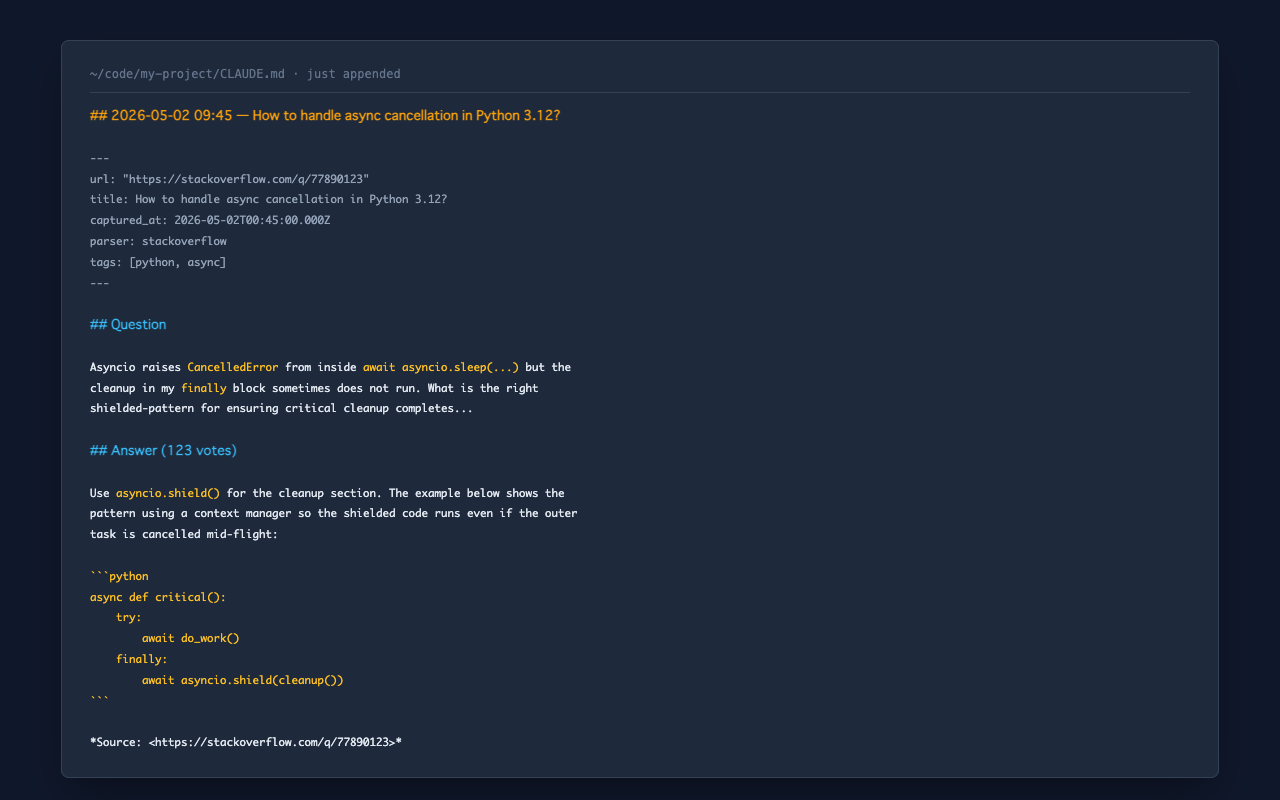
実際に CLAUDE.md に書き込まれる内容:
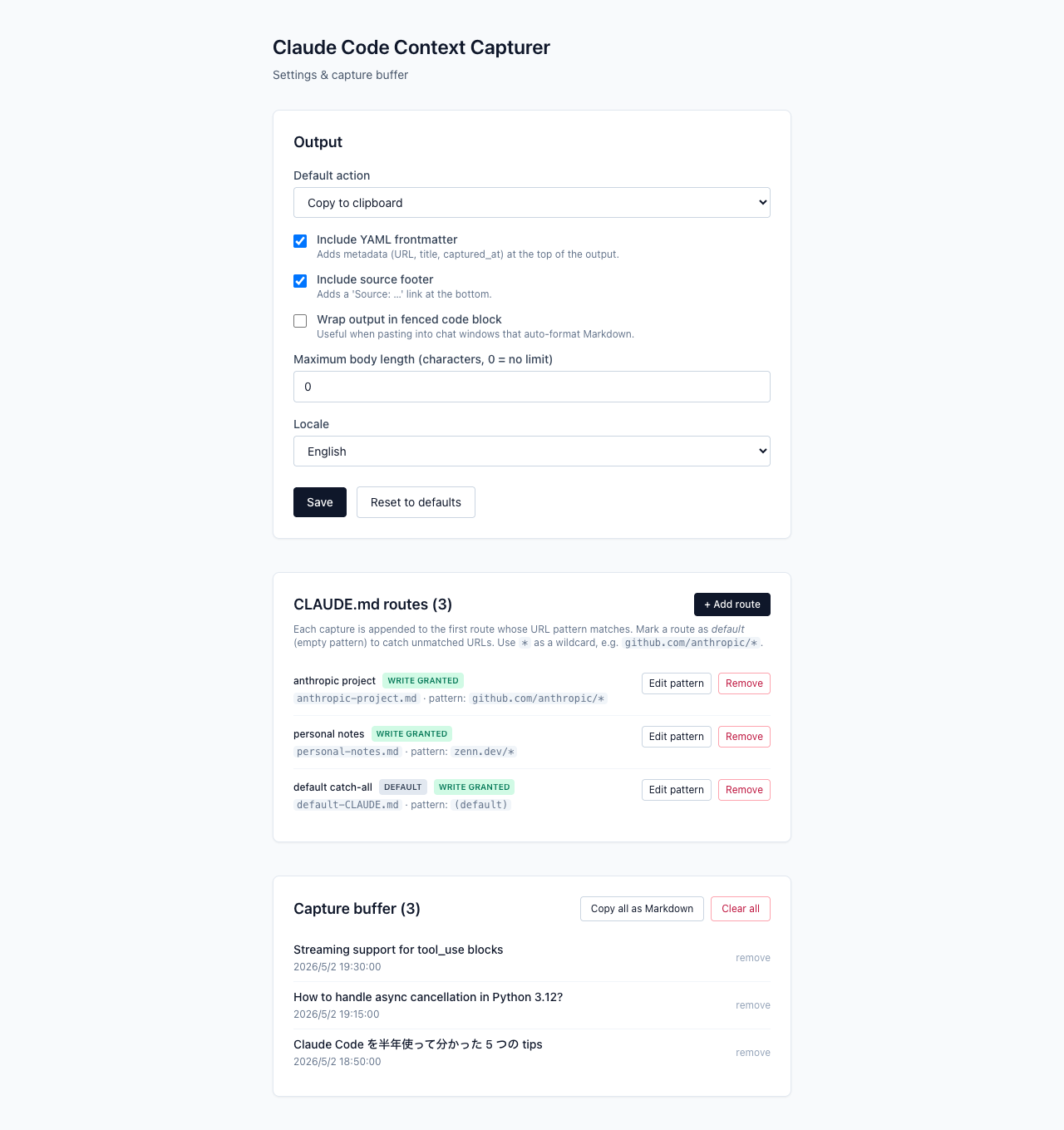
マルチプロジェクトルーティング設定:
🆚 既存の Web→Markdown 拡張との違い
正直に言うと、Web ページを Markdown 化する Chrome 拡張は他にも LLMFeeder、Save、Context Collector などが既にあります。それらとの違い:
| 機能 | LLMFeeder | Save | Context Collector | この拡張 |
|---|---|---|---|---|
| Web → Markdown 変換 | ✓ | ✓ | ✓ | ✓ |
| クリップボードに出力 | ✓ | ✓ | ✓ | ✓ |
プロジェクトの実ファイル CLAUDE.md に直接書き込み | ✗ | ✗(独自 Vault) | ✗ | ✓ |
| URL パターンで複数ファイルに振り分け | ✗ | ✗ | ✗ | ✓ |
| GitHub / Stack Overflow / Zenn / Qiita / MDN サイト別パーサー | ✗ | 部分的 | ✗ | ✓ |
| claude.ai 会話キャプチャ(thinking / tool_use / branch 保持) | ✗ | ✗ | ✗ | ✓ |
| 100% ローカル処理・完全 OSS | ✓ | ✗(SaaS) | ✓ | ✓ |
要は「Claude Code(や類似 AI エージェント)の context file 専用に振り切った clipper」です。汎用 Markdown clipper が欲しいなら LLMFeeder の方が成熟しています。プロジェクトの CLAUDE.md を自動メンテしたいなら、これがおそらく現状唯一の選択肢です。
🚀 インストール
Chrome ウェブストア
現在審査中です。公開までは 最新リリース の zip をダウンロードするか、下記「開発版を直接インストール」の手順をご利用ください。
開発版を直接インストール
git clone https://github.com/OceansCreative/claude-code-context-capturer.git
cd claude-code-context-capturer
npm install
npm run build
その後 Chrome で:
chrome://extensions/を開く- 右上の「デベロッパーモード」を ON
- 「パッケージ化されていない拡張機能を読み込む」をクリック
- このリポジトリの
dist/ディレクトリを選択
💡 使い方
ページ全体をキャプチャ
ツールバーの拡張機能アイコンをクリック → 「Capture page」ボタン。
または Ctrl+Shift+L(macOS: Cmd+Shift+L)。
選択範囲だけをキャプチャ
ページ上でテキストを選択 → 拡張機能アイコン → 「Capture selection」。
または Ctrl+Shift+K(macOS: Cmd+Shift+K)。
バッファに溜めてあとで一括エクスポート
設定画面(拡張機能アイコン右上の ⚙)で「Default action」を Append to buffer または Both に変更すると、キャプチャがバッファに蓄積されます。設定画面の「Copy all as Markdown」で全件まとめてエクスポートできます。
設定をカスタマイズ
設定画面で以下を変更できます:
| 設定 | 説明 |
|---|---|
| Default action | キャプチャ時の動作(クリップボード / バッファ / リンク済み CLAUDE.md / 両方) |
| Include YAML frontmatter | メタ情報の付与 |
| Include source footer | フッターに出典 URL を付ける |
| Wrap output in fenced code block | コードブロックで囲む(チャット直貼り用) |
| Maximum body length | 本文の最大文字数(0 = 無制限) |
| Locale | en / ja |
| CLAUDE.md routes | 複数の CLAUDE.md を URL パターンで振り分け(v0.3.0+) |
🛠️ 開発
必要環境
- Node.js 20+
- npm
コマンド
npm install        # 依存関係のインストール
npm run dev        # 開発モード(HMR 付き)
npm run build      # 本番ビルド
npm test           # テスト実行
npm run lint       # Lint
npm run format     # Prettier でフォーマット
プロジェクト構成
src/
├── background/        # Service worker(コマンド受信・配送)
├── content/
│   ├── index.ts       # コンテントスクリプトエントリ
│   └── parsers/       # サイト別パーサー
├── popup/             # ポップアップ UI(React)
├── options/           # 設定画面(React)
├── shared/            # 共通ロジック(Markdown 変換、ストレージなど)
└── manifest.config.ts # Manifest V3 定義
サイト別パーサーの追加
新しいサイトに対応したい場合、以下の手順で追加できます:
src/content/parsers/yoursite.tsを作成canHandleYourSite(): booleanとparseYourSite(): CapturedContext | Promise<CapturedContext>をエクスポート- DOM だけでパース可能なら同期、内部 API fetch が必要なら async(v0.4.0+ の dispatcher は async 化済み)
src/content/parsers/dispatcher.tsで先頭に追加(より具体的なホスト判定が先に来るよう順序に注意)src/shared/types.tsのParserNameに追加tests/parsers/yoursite.test.tsでテストを追加(fetch を使う場合はvi.fn()でモック —tests/parsers/claude-ai.test.tsを参考に)
Pull Request 歓迎です。
📜 ライセンス
MIT License - LICENSE を参照。
自由に fork ・改変・商用利用してください。
🙋 つくったひと
開発・メンテナンス:池田和司(OceansBase)
OceansBase は島根県を拠点とする個人事業屋号で、受託開発・IT コンサル・コンテンツ制作を行っています。
🔗 関連プロジェクト
Claude Code エージェント集シリーズ:
- claude-code-c-suite-agents - 汎用 13 エージェント
- claude-code-agents-meo-shop - 店舗ビジネス向け
- claude-code-agents-jisaa - 士業向け
- claude-code-agents-saas-founder - SaaS 創業者向け
Claude Code Context Capturer (English)
A Chrome extension that captures web pages as Markdown and writes them directly to your project's
CLAUDE.md. Multi-project routing by URL pattern.
What it does
When you research with Claude Code (or any AI coding agent), you read 5 articles for an hour, switch to your terminal, and the agent has none of that context. This extension closes that loop: every page you capture is appended to your project's CLAUDE.md so the next session starts where your reading ended.
URL globs let you maintain separate CLAUDE.md files per project — github.com/anthropic/* to one file, zenn.dev/* to another, unmatched URLs to a default catch-all.
Screenshots
What lands in your CLAUDE.md:
Multi-route configuration:
How is this different from existing Markdown clippers?
Honestly, several Web→Markdown extensions already exist: LLMFeeder, Save, Context Collector, and the venerable MarkDownload. This one's differentiation:
| Feature | LLMFeeder | Save | Context Collector | This extension |
|---|---|---|---|---|
| Web → Markdown conversion | ✓ | ✓ | ✓ | ✓ |
| Clipboard output | ✓ | ✓ | ✓ | ✓ |
Direct write to your project's CLAUDE.md | ✗ | ✗ (own vault) | ✗ | ✓ |
| URL-pattern routing to multiple files | ✗ | ✗ | ✗ | ✓ |
| Site-specific parsers (GitHub / SO / Zenn / Qiita / MDN) | ✗ | partial | ✗ | ✓ |
| claude.ai conversation capture (thinking / tool_use / branches preserved) | ✗ | ✗ | ✗ | ✓ |
| 100% local, fully OSS | ✓ | ✗ (SaaS) | ✓ | ✓ |
In short: a clipper purpose-built for AI agent context files. If you want a general-purpose Markdown clipper, LLMFeeder is more mature. If you want to keep your project's CLAUDE.md continuously up to date with your reading, this is currently your only option.
Features
- One-click capture — Toolbar icon or keyboard shortcut
- Selection mode — Capture only what you've selected
- Site-specific parsers for GitHub, Stack Overflow, Zenn, Qiita, MDN, and YouTube (v0.8.0+) — pulls the transcript + chapters + metadata, not just the title
- YAML frontmatter with URL, title, captured_at, author, tags
- Direct CLAUDE.md write (v0.2.0+) — Link a
CLAUDE.mdonce via the File System Access API; subsequent captures append directly, no copy/paste - Multi-project routing (v0.3.0+) — Link multiple
CLAUDE.mdfiles with URL glob patterns. Captures fromgithub.com/anthropic/*go to one file,zenn.dev/*to another, unmatched URLs to a default route - Multi-agent fan-out (v0.9.0+) — A single route can write to multiple context files at once:
CLAUDE.md(Claude Code) +.cursorrules(Cursor) +.windsurfrules(Windsurf), etc. People juggling several AI coding agents in the same project no longer need duplicate routes — one capture, all agents updated - claude.ai conversation capture (v0.4.0+) — Capture your claude.ai brainstorm conversation in one click. Bypasses the 403-on-share-link issue and the manual copy-paste loop. Hits claude.ai's internal API to preserve thinking blocks, tool_use entries, and branch structure that DOM scraping would miss
- Artifact extraction & range selection (v0.5.0+) — For claude.ai captures, choose artifacts only (extract just the code/documents Claude wrote as clean fenced code blocks, dropping the conversation) or keep the last N messages (trim a long planning thread to what matters). Artifacts are deduped by id so an updated artifact is captured at its final version, not every intermediate edit. When you're on a claude.ai chat, these are toggleable right from the popup
- Same conversation updates in place (no silos) (v0.5.0+) — In MCP-store mode, re-capturing the same claude.ai conversation overwrites the existing file instead of piling up new snapshots. It's tracked by a stable id, so even if the conversation's title changes the store stays a single source of truth (stale artifact files are cleaned up too)
- On-demand access via MCP (v0.5.0+) — Instead of appending to
CLAUDE.md, save each capture as a standalone file in a directory, and let the bundled MCP server hand them to Claude Code only when it asks. This aligns with Anthropic's own guidance to keepCLAUDE.mdsmall (bloated context files make Claude ignore your instructions) — your research stays available without polluting context. Searchable vialist_contexts/search_contexts/get_context. → Setup - Buffer mode — Stack multiple captures and export all at once
- Keyboard shortcuts:
Ctrl+Shift+L(Cmd+Shift+L on macOS) — capture pageCtrl+Shift+K(Cmd+Shift+K on macOS) — capture selection
- Context menu — Right-click to capture
Installation
Chrome Web Store
Currently in review. Until it's live, download the zip from the latest release or follow the "Manual install" steps below.
Manual install
git clone https://github.com/OceansCreative/claude-code-context-capturer.git
cd claude-code-context-capturer
npm install
npm run build
Then in Chrome:
- Go to
chrome://extensions/ - Enable "Developer mode" (top right)
- Click "Load unpacked"
- Select the
dist/directory of this repository
Adding a new site parser
Pull requests are welcome! To add support for a new site:
- Create
src/content/parsers/yoursite.ts - Export
canHandleYourSite(): booleanandparseYourSite(): CapturedContext | Promise<CapturedContext>— sync if DOM-only, async if you need to call the site's internal API (the dispatcher has been async since v0.4.0) - Register it at the top of
src/content/parsers/dispatcher.ts(order matters: more specific host checks first) - Add the name to
ParserNameinsrc/shared/types.ts - Add tests in
tests/parsers/yoursite.test.ts— seetests/parsers/claude-ai.test.tsfor an example with mockedfetch
License
MIT — free to fork, modify, and use commercially.
Author
Maintained by Kazushi Ikeda (OceansBase) — solo IT consulting practice in Shimane, Japan.