
Quiz Builder
ninime09/quiz-builder
Quiz offline bilíngue com 5 tipos de questões e caderno de erros
Ver no GitHubConverte qualquer material de estudo em um quiz interativo HTML de arquivo único, offline e bilíngue (chinês/inglês). Oferece 5 tipos de questões, correção instantânea com explicações, caderno de erros integrado e progresso salvo localmente.
Instalação
npx convez-ai ninime09/quiz-builder1 comando no terminal: detecta o formato do repositório (marketplace ou plugin avulso) e instala via Claude Code. Requer Node 18+ e o Claude Code instalado.
Métricas
Casos de uso
- Criar quizzes para materiais de aula
- Consolidar aprendizado com teste interativo offline
- Gerar banco de questões a partir de notas ou slides
Veredito

Skill prática para converter notas de estudo em quizzes interativos sem infraestrutura. Bilíngue, offline e direto — bom para quem precisa reutilizar material educacional, embora limitado ao escopo de quizzes.
README
A tradução para o português deste README ainda está na fila.
quiz-builder
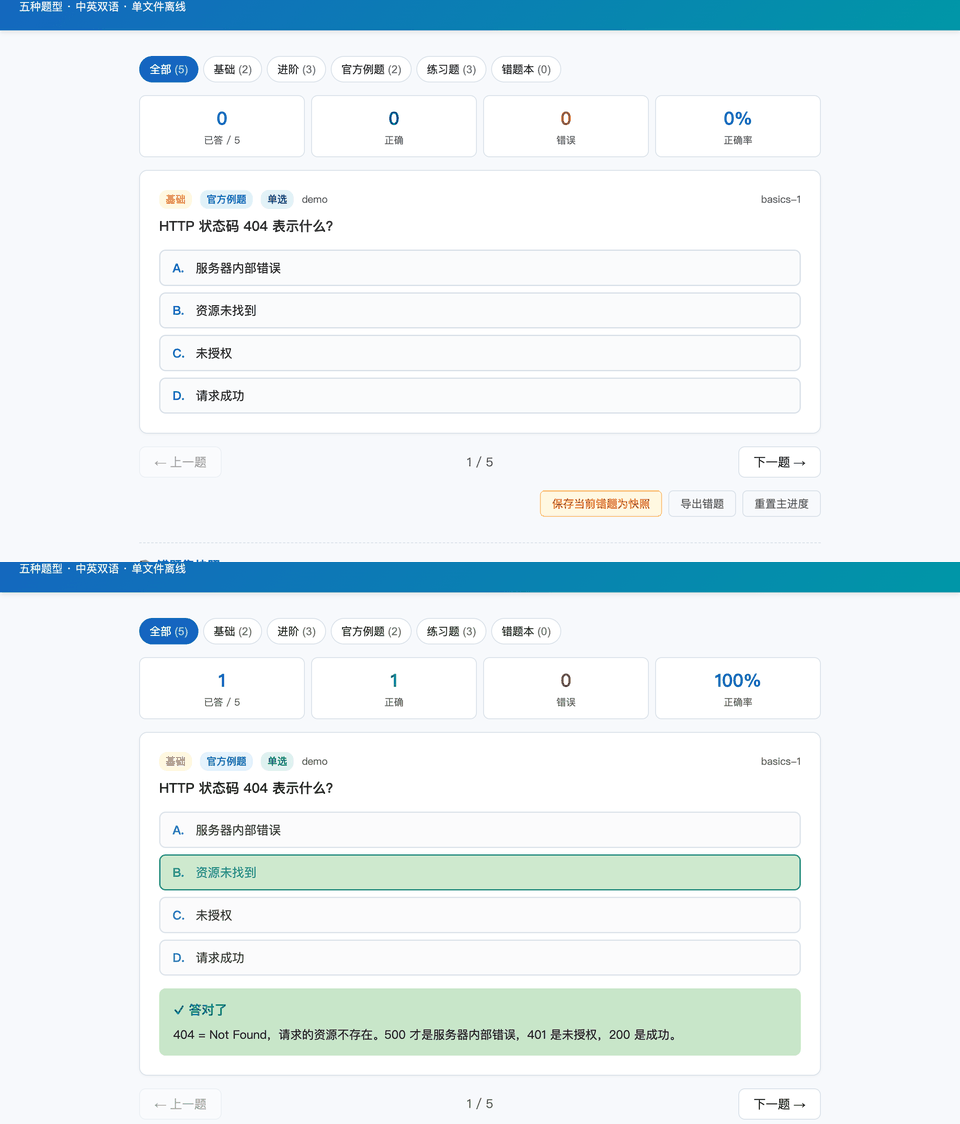
Turn any study material into a single-file, offline, reusable HTML quiz — 5 question types, instant grading + explanations, a built-in wrong-answer notebook, local progress saving, and one-click 中 / EN switching.
Built as a Claude Code / agent skill, but
the output is just one .html file you can double-click, share, or host
anywhere. No build step, no server, no dependencies, no tracking.
把任意学习材料做成一个单文件、可离线打开、可反复刷的 HTML 互动习题库: 5 种题型、即时判分 + 解析、错题本、进度本地保存、中英双语一键切换。
What you get
A self-contained Quiz.html with:
- 5 question kinds — single choice, multiple choice, true/false, fill-in-the-blank (case/space-insensitive), and flashcards (flip + self-rate).
- Instant grading + explanations that say why each distractor is wrong.
- Wrong-answer notebook (错题本) — save your wrong questions as a named set, re-practice just those, redo, delete, or export to text.
- Filters by unit/topic and by question type, each with a live count.
- Progress saved in the browser (
localStorage) — refresh-safe. - Bilingual — UI strings via an i18n table, question text can be
{zh, en}; toggle language at runtime, choice is remembered. - Keyboard —
1–5pick,Entersubmit/flip,←/→navigate. - Responsive for phones.
Open examples/demo.html in any browser to see a finished
quiz covering all five question types in both languages.
Repo layout
SKILL.md                      # the skill: 4-phase workflow for building a quiz from materials
templates/quiz_template.html  # the engine, with 5 placeholders to fill (CONFIG + QUESTIONS)
examples/demo.html            # a filled, runnable example (open this first)
scripts/dedup_pdf.py          # OPTIONAL: strip PowerPoint animation "build" frames from slide PDFs
scripts/extract_text.py       # OPTIONAL: per-page text extraction with page-number markers
Two ways to use it
A) With an agent (recommended)
Install as a skill and point it at your materials — it reads them, writes the questions, fills the template, and self-checks the answers against the source.
- Claude Code: drop this folder into
~/.claude/skills/quiz-builder/, then ask: "把这些课件做成习题库" / "build a quiz from these notes". - Any agent that can read files + run the workflow in
SKILL.mdworks too.
B) By hand
- Copy
templates/quiz_template.html. - Fill the 5 placeholders (
{{TITLE}},{{STORAGE_KEY}},{{DEFAULT_LANG}},{{TITLE_JSON}}/{{SUBTITLE_JSON}},{{GROUPS}},{{QUESTIONS}}) — seeexamples/demo.htmlfor exactly how, and the comment block at the top of the template for the question schema. - Save as
Quiz.htmland open it.
Question schema (quick reference)
// common: id, group, source, type:"official"|"practice", kind, question, explanation
{id:"u1-1", group:"u1", source:"Ch.3 p.42", type:"official", kind:"single",
 question:"…", options:["A","B","C","D"], correct:1, explanation:"why + why-not"}

// kind-specific:
//   single / tf : options[], correct = index   (tf may omit options → True/False)
//   multi       : options[], correct = [idx,…]
//   fill        : answer = "str" | ["accepted","variants"]
//   flash       : back = answer side (self-graded)
// any text field can be a plain string OR {zh, en}
The "from PowerPoint" extras (optional)
Most materials (Markdown, notes, textbook PDFs, transcripts) need no
preprocessing. The two scripts only help when your source is a PowerPoint
exported to PDF with click-by-click animations, where each slide's text repeats
4–5 times. They drop the duplicate frames and extract clean per-page text (with
===== PAGE N ===== markers so questions can cite a page). They require
pip install pymupdf; if you can't install it, pdftotext or reading the PDF
directly works fine.
Sharing
It's one HTML file: send it, drop it in cloud storage, or push it to GitHub Pages / any static host and share the link. Everyone's progress is independent and stored only in their own browser.
License
MIT © 2026 ninime09