
Claude Pulse
nikolmedo/ClaudePulse
Monitore seu uso do Claude.ai direto no Home Assistant
Ver no GitHubIntegração HACS para Home Assistant que expõe seu uso de sessão (5h) e semanal (7d) do Claude.ai como sensores nativos. Monitore em tempo real quanto de sua cota você já consumiu através do dashboard, com atualização automática a cada 2 minutos.
Instalação
npx convez-ai nikolmedo/ClaudePulse1 comando no terminal: detecta o formato do repositório (marketplace ou plugin avulso) e instala via Claude Code. Requer Node 18+ e o Claude Code instalado.
Métricas
Casos de uso
- Rastrear consumo de sessão antes de atingir limites
- Visualizar reset de cotas em dashboard home automation
- Automações baseadas em limites de uso do Claude.ai
- Alertas quando se aproximar do limite semanal
Veredito

Plugin bem estruturado e prático para quem usa Claude.ai e Home Assistant. Preenche uma lacuna real monitorando limites de forma nativa, com UI intuitiva e re-autenticação automática. Ideal para entusiastas de automação residencial que são usuários frequentes do Claude.
README
A tradução para o português deste README ainda está na fila.
Claude Pulse
Monitor your Claude.ai usage limits directly from Home Assistant.


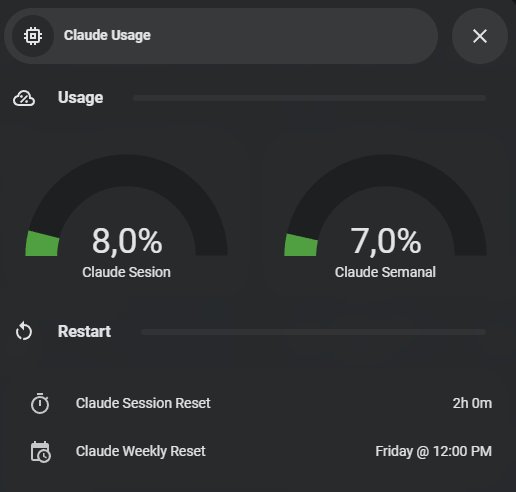
Claude Pulse is a Home Assistant custom integration that exposes your Claude.ai session (5-hour) and weekly (7-day) usage as native sensors — so you always know how much Claude you have left before hitting a limit, right from your dashboard.
✨ Features
- 📊 Session usage — percentage of your 5-hour window, plus a live countdown to the next reset
- 📅 Weekly usage — percentage of your 7-day window, plus reset day and time
- 🔄 Auto-refresh — polls Claude.ai every 2 minutes by default (configurable, 30s minimum)
- 🔐 Built-in re-authentication — Home Assistant notifies you when your session key expires and guides you through renewing it
- 🧩 Fully UI-based setup — config flow with live credential validation, no YAML required
- 🛰️ 10 sensors — every data point exposed as an individual Home Assistant entity, grouped under one device
🚀 Installation
Claude Pulse is available in the default HACS store.

Via HACS (recommended)
- Click the button above, or open HACS in your Home Assistant sidebar and search for Claude Pulse
- Click Download and confirm
- Restart Home Assistant
- Go to Settings → Devices & Services → Add Integration and search for Claude Pulse
- Enter your Session Key and Organization ID (how to get them)
Manual installation
- Download the latest release
- Copy the
custom_components/claude_pulsefolder into your Home Assistantconfig/custom_components/directory - Restart Home Assistant and add the integration as in steps 4–5 above
Requires Home Assistant 2024.1.0 or newer.
🔑 Getting your credentials
Session Key
- Open claude.ai in your browser and log in
- Open DevTools (
F12) → Application → Cookies →https://claude.ai - Copy the value of the
sessionKeycookie
Organization ID
- Still in DevTools, open the Network tab and reload the page
- Find any request whose URL contains
/api/organizations/ - Copy the UUID from that URL (format:
xxxxxxxx-xxxx-xxxx-xxxx-xxxxxxxxxxxx)
⚠️ Your session key is a credential — treat it like a password. It is stored only inside your Home Assistant instance and is sent exclusively to
claude.ai.
📟 Available sensors
All entities are grouped under a single Claude Pulse device:
| Entity | Description | Unit |
|---|---|---|
sensor.claude_pulse_session_usage | Session usage (5-hour window) | % |
sensor.claude_pulse_weekly_usage | Weekly usage (7-day window) | % |
sensor.claude_pulse_session_reset_countdown | Time until the session resets (e.g. 2h 30m) | — |
sensor.claude_pulse_session_reset_time | Clock time of the next session reset | — |
sensor.claude_pulse_weekly_reset | Weekly reset summary (e.g. Friday @ 03:45 AM) | — |
sensor.claude_pulse_weekly_reset_weekday | Day of the week of the weekly reset | — |
sensor.claude_pulse_weekly_reset_time | Clock time of the weekly reset | — |
sensor.claude_pulse_session_used | Session used (alias of session usage) | % |
sensor.claude_pulse_session_limit | Session limit (always 100) | % |
sensor.claude_pulse_plan | Subscription plan (diagnostic) | — |
Exact entity IDs may vary depending on the device name Home Assistant assigns. Find yours in Developer Tools → States filtering by
claude_pulse.
💡 Example automation
Get notified before you burn through your session:
automation:
  - alias: "Claude session almost exhausted"
    trigger:
      - platform: numeric_state
        entity_id: sensor.claude_pulse_session_usage
        above: 80
    action:
      - service: notify.mobile_app_your_phone
        data:
          title: "Claude Pulse ⚠️"
          message: >
            Claude session at {{ states('sensor.claude_pulse_session_usage') }}%.
            Resets in {{ states('sensor.claude_pulse_session_reset_countdown') }}.
⚙️ Configuration options
After setup, click Configure on the integration to change:
| Option | Description | Default |
|---|---|---|
| Session Key | Your sessionKey cookie from claude.ai | — |
| Organization ID | Your Claude organization UUID | — |
| Update interval | Polling frequency in seconds (minimum 30) | 120 |
🩺 Troubleshooting
| Symptom | Cause & fix |
|---|---|
| Authentication failed (HTTP 401/403) | Your sessionKey cookie expired. Go to Settings → Devices & Services → Claude Pulse → Configure and enter a new one. |
| All endpoints return 404 | Wrong Organization ID. Verify it via DevTools → Network → requests to /api/organizations/. |
Sensors show unavailable after setup | Check Settings → System → Logs for claude_pulse errors. Network errors at startup are retried automatically. |
| Repair notification for Claude Pulse | Session key expired. Click the notification to open the re-authentication form. |
Still stuck? Open an issue with your Home Assistant logs.
🗂️ Legacy / standalone setup
If you prefer not to use the integration, the original standalone files are still in the repo:
| File | Location | Description |
|---|---|---|
claude_usage.py | /config/ | Python script that fetches usage from claude.ai |
claude_usage.yaml | /config/packages/ | command_line sensor + template sensors |
See the git history for setup instructions for this approach.
🤝 Contributing
Issues and pull requests are welcome! Every push runs HACS and Hassfest validation via GitHub Actions. See AGENTS.md for an overview of the codebase.
📄 License
MIT — do whatever you want with it.
Claude Pulse is an unofficial project and is not affiliated with Anthropic.