
Local AI Lab
nikolareljin/local-ai-lab
Construa IA local entendendo cada conceito na prática
Ver no GitHubCurso prático para construir IA local e privada do zero, cobrindo RAG, MCP, LangChain e LangGraph. Executa 100% na sua máquina (Python, Node.js e C#) sem Docker, com suporte a Claude Code, Ollama, Gemini e OpenAI. Cada lição constrói um programa funcional e legível para entender como as coisas realmente funcionam.
Instalação
npx convez-ai nikolareljin/local-ai-lab1 comando no terminal: detecta o formato do repositório (marketplace ou plugin avulso) e instala via Claude Code. Requer Node 18+ e o Claude Code instalado.
Métricas
Casos de uso
- Aprender RAG e recuperação de informações localmente
- Implementar MCP servers e agentes customizados
- Desenvolver pipelines de processamento com LangChain e LangGraph
- Prototipar IA privada sem dependência de APIs externas
Veredito

Recurso educacional sólido para quem quer compreender arquitetura de IA local em profundidade. A abordagem "entender de verdade, não só chamar SDK" é refrescante e a suporte poliglota (Python, Node.js, C#) amplia alcance.
README
A tradução para o português deste README ainda está na fila.
local-ai-lab








A hands-on course for building local, private AI from scratch — RAG, MCP, LangChain, and LangGraph that run on your own machine. Each lesson builds a small, fully working, readable program, so you finish understanding how the thing actually works — not just how to call an SDK.
📖 Full documentation: https://nikolareljin.github.io/local-ai-lab/documentation.html · Course site: https://nikolareljin.github.io/local-ai-lab/ · Author: Nik Reljin
⭐ Star this repo
If local-ai-lab is helping you build local AI, give it a star — it helps other developers find the course and motivates new lessons. ⭐ Star on GitHub →
No Docker. Everything runs with the language toolchains directly. The course is polyglot — Python is the reference, with Node.js and C# ports per lesson (
./run -l <N> --lang node|csharp). Lessons 1–5 ship in all three.
Quickstart
Needs Python 3.10+ (add Node.js 18+ / .NET 8 SDK only for those ports).
python -m venv venv && source venv/bin/activate    # Windows (PowerShell): .\venv\Scripts\Activate.ps1
pip install -r requirements.txt

./run -l 1                     # launch the RAG web UI (the default AI is Claude Code — no API key)
./run -l 1 ask "How do I reset the device?"   # one-shot grounded answer in the terminal
./run -l 5                     # jump to the latest lesson's interactive playground
./run creates the virtualenv on first use. On Windows, run ./run from Git Bash or WSL, or
call the toolchains directly — see the
full documentation for install,
run, test, experiment, and how-it-works details (Linux · macOS · Windows). Per-OS setup and optional
providers (Ollama, Gemini, OpenAI) are in INSTALL.md
(PDF).
Curriculum
Each available lesson is a deep-linkable interactive slideshow on the course site and a written guide, and runs 100% locally. Lessons 1–5 are live and runnable; the rest are on the roadmap.
| # | Lesson | What you build | Guide | Live | Status |
|---|---|---|---|---|---|
| 1 | RAG from scratch | Extract → chunk → retrieve (BM25 + embeddings) → grounded answer with citations | LESSON1.md | open | ✅ Available |
| 2 | MCP servers | Expose your document search as a Model Context Protocol tool Claude Code can call natively | LESSON2.md | open | ✅ Available |
| 3 | Hybrid retrieval & reranking | BM25 + a semantic arm fused with Reciprocal Rank Fusion | README | open | ✅ Available |
| 4 | RAG safety & prompt injection | Treat retrieved documents as untrusted input — defend against prompt injection and poisoned content | README | open | ✅ Available |
| 5 | RAG evaluation & regression testing | Golden questions, groundedness scoring, and regression tests — turn "seems good" into a tracked number | README | open | ✅ Available |
| 6 | Repo-aware AI assistant | Ground an assistant in your codebase so it answers with repo-specific context | — | — | Planned |
| 7 | LangChain | Rebuild the RAG pipeline with LangChain and compare the trade-offs | outline | — | Planned |
| 8 | LangGraph | Turn the pipeline into a stateful agent graph with retries, tool routing, and memory | outline | — | Planned |
| 9 | Ollama + Function Calling | Give a local model real tools it can call (function calling) — 100% offline | outline | — | Planned |
| 10 | Microsoft Semantic Kernel | Rebuild the agent in C# / .NET with SK plugins and auto function calling | outline | — | Planned |
| 11 | AWS Bedrock Agents | Knowledge bases + action groups on a managed cloud agent, driven from your machine | outline | — | Planned |
| 12 | Google AI Development Kit | Build and run a Gemini agent locally with Google's open-source ADK | outline | — | Planned |
| 13 | AI-assisted testing | Generate, run, and review tests, and let failures guide the fix | — | — | Planned |
| 14 | AI code review & issue detection | Use AI to catch the serious issues in review — real bugs, security, risky changes | — | — | Planned |
| 15 | Documentation from sprint changes | Generate release notes and docs straight from a sprint's commits and pull requests | — | — | Planned |
Browse all lessons live: https://nikolareljin.github.io/local-ai-lab/ — or grab any lesson with a written guide as a printable PDF from the Lessons & downloads table just below.
Lessons & downloads
This table is generated by tools/sync-readme-downloads.py from the lesson sources on disk — run it after adding a lesson or rebuilding the PDFs.
| # | Lesson | Guide (Markdown) | Status | |
|---|---|---|---|---|
| 1 | Build a RAG System From Scratch | LESSON1.md | ✅ live | |
| 2 | Build an MCP Server | LESSON2.md | ✅ live | |
| 3 | Hybrid Retrieval & Reranking | lessons/03-hybrid-retrieval-reranking/README.md | ✅ live | |
| 4 | RAG Safety & Prompt Injection | lessons/04-rag-safety-prompt-injection/README.md | ✅ live | |
| 5 | RAG Evaluation & Regression Testing | lessons/05-rag-evaluation-regression-testing/README.md | ✅ live | |
| 7 | Rebuild RAG with LangChain | roadmap/LESSON7-langchain.md | 🚧 roadmap | |
| 8 | A Stateful Agent with LangGraph | roadmap/LESSON8-langgraph.md | 🚧 roadmap | |
| 9 | Ollama + Function Calling | roadmap/LESSON9-ollama.md | 🚧 roadmap | |
| 10 | Microsoft Semantic Kernel (C# / .NET) | roadmap/LESSON10-semantic-kernel.md | 🚧 roadmap | |
| 11 | AWS Bedrock Agents | roadmap/LESSON11-bedrock.md | 🚧 roadmap | |
| 12 | Google AI Development Kit (ADK) | roadmap/LESSON12-google-adk.md | 🚧 roadmap |
Other PDFs in docs/pdf/:
CHEATSHEET.pdf— AI-for-developers cheat-sheetINSTALL.pdf— Install guide (Linux · macOS · Windows)The_Magic_Turtle_Astronaut.pdf— Sample document used in Lesson 1's try it yourself
What you'll be able to do
Who it's for: developers who can already write code but want to understand how RAG and agents work underneath the frameworks — not just how to call an SDK. No ML background required.
By the end of the live lessons (1–5) you can:
- Build a grounded, cited RAG service from scratch — extract, chunk, retrieve (BM25 + embeddings), and answer without hallucinating.
- Expose your own tools to an AI host over the Model Context Protocol (MCP).
- Make retrieval better (hybrid search + reranking), safe (prompt-injection defence), and measurable (an evaluation gate that catches regressions a candidate tweak slips in).
The full path — clusters, prerequisites, and time estimates — is in SYLLABUS.md.
About the author
local-ai-lab is built and maintained by Nik Reljin, who builds local-first, developer-focused AI tools — and likes nothing more than teaching how they work. A former college educator, he now helps engineers build with modern AI through team trainings, 1:1 mentoring, talks and workshops, and hands-on courses like this one.
The teaching philosophy runs through every lesson: software should be understandable, should run on your own hardware, and should treat AI as a primitive you control — not a remote black box. More on the approach and related work on the About page.
Documentation
-
SYLLABUS.md — the full learning path: clusters, prerequisites, and time estimates.
-
📖 Documentation — install, run, test, experiment, and how everything works (Linux · macOS · Windows).
-
INSTALL.md (PDF) — per-OS prerequisites and optional providers.
-
Troubleshooting — provider / API-key setup and common errors.
-
ARCHITECTURE.md — data flow and module map.
./run list                 # every lesson and its actions
./run -l <N> demo          # one-shot, print-and-exit run (lessons 3–5; --lang node|csharp for the ports)
./run -l <N> test          # the lesson's offline test (no network, no model)
./run -h                   # full help
License
MIT © Nik Reljin — see LICENSE. Educational use encouraged; attribution appreciated.
Clone traffic
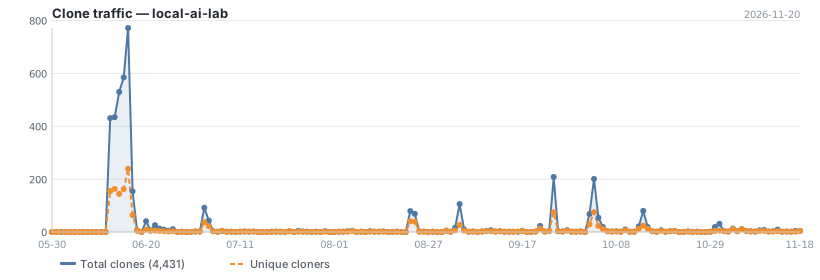
Updated daily. Total and unique cloners over the last 14 days.