
Nice Semaphore
nice-computer/nice-semaphore
Monitor visual de instâncias Claude Code na barra de menu do macOS
Ver no GitHubApp de menu bar para macOS que monitora instâncias Claude Code em tempo real, exibindo status via indicadores coloridos. Integra-se com Claude Code CLI via hooks para detectar quando o modelo está processando, aguardando input ou ocioso, facilitando o gerenciamento de múltiplas sessões simultâneas.
Instalação
npx convez-ai nice-computer/nice-semaphore1 comando no terminal: detecta o formato do repositório (marketplace ou plugin avulso) e instala via Claude Code. Requer Node 18+ e o Claude Code instalado.
Métricas
Casos de uso
- Monitorar múltiplas instâncias Claude Code simultaneamente
- Detectar quando Claude precisa de input ou está processando
- Gerenciar workflows com múltiplos espaços de trabalho no macOS
Veredito

Ferramenta especializada para desenvolvedores macOS que usam Claude Code intensivamente. Solução alfa com implementação técnica sólida (hooks + file watching + macOS APIs), mas requer setup manual e conhecimento de CLI. Ideal para quem precisa de visibilidade real-time sobre múltiplas sessões de IA.
README
A tradução para o português deste README ainda está na fila.
Nice Semaphore
A macOS menu bar app that monitors running Claude Code instances and displays their status.
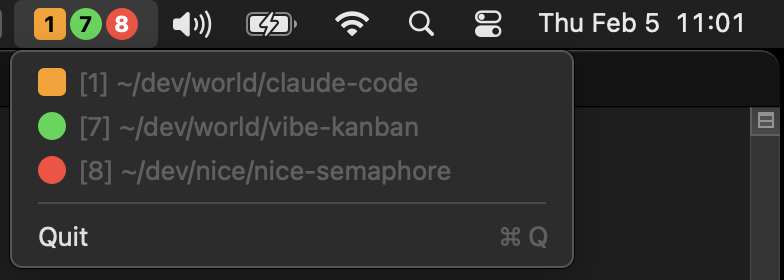
Be alerted when a Claude Code instance is working (orange), needs input (red), or when it's idle and needs new instructions (green).
[!IMPORTANT]
This is alpha software that works on my machine. Don't install yet unless you have some time to spend debugging early release issues.
The current version is optimized for a workstation setup where:
- You're using multiple spaces, and have tend to keep one or a few Claude Code instances in each space
- You're running Claude Code CLI in iTerm2
Features
- Colored status indicators - Colored boxes show each instance's state at a glance
- Space numbers - Shows which macOS Space each instance is on (if running in iTerm2)
- Focus detection - Highlights the currently focused instance (rounded square vs circle)
- Real-time updates - Status changes appear immediately via Claude Code hooks
Status colors
| Status | Color | Meaning |
|---|---|---|
| Working | Orange | Claude is processing/using tools |
| Waiting | Red | Claude needs your input (question or permission prompt) |
| Idle (new) | Yellow | Turn just completed, you haven't focused the terminal yet |
| Idle | Green | Turn complete, ready for next prompt |
Yellow automatically becomes green once you focus the terminal running that instance.
How It Works
Nice Semaphore has two components that communicate via a JSON status file:
1. Hook Script (writes status)
Claude Code hooks trigger shell commands on specific events. The nice-semaphore-status.sh hook script runs on each event and updates ~/.claude/nice-semaphore-status.json with the current state of each Claude instance.
| Hook | Status Change |
|---|---|
SessionStart | Adds instance, sets to idle |
UserPromptSubmit | Sets to working |
PreToolUse | If AskUserQuestion/ExitPlanMode, sets to waiting |
PostToolUse | Ensures working state after tool completes |
Notification | If permission prompt, sets to waiting |
Stop | Sets to idle (turn complete) |
SessionEnd | Removes instance |
The status file stores each instance's session ID, project path, status, PID, and TTY (for focus detection).
2. Menu Bar App (reads status)
The Swift app monitors ~/.claude/nice-semaphore-status.json for changes using a DispatchSource file watcher. When the file changes, it:
- Parses the JSON to get all active instances
- Detects which instance is focused (by matching TTYs to the frontmost terminal window)
- Looks up Space numbers using macOS private CGS APIs
- Renders colored indicators in the menu bar
The menu bar shows colored shapes with Space numbers. Click to see the full list with project paths.
Installation
Requirements
- macOS 13+
- Claude Code CLI
- iTerm2 (for focus detection)
jq(usually pre-installed on macOS)
Install manually via repo
1. Clone the repo
git clone https://github.com/nice-computer/nice-semaphore.git
cd nice-semaphore
2. Build
swift build -c release
If this fails with an SDK or toolchain error, install the latest Command Line Tools update (softwareupdate --list) or run sudo xcode-select --reset.
3. Install the hooks plugin
From inside a Claude Code session, add this repo as a plugin marketplace and install:
/plugin marketplace add /path/to/nice-semaphore
/plugin install nice-semaphore@nice-semaphore
Claude Code manages the hooks registration — no edits to ~/.claude/settings.json are needed.
4. Run the app
swift run -c release
To run at login, add the binary to System Settings > General > Login Items:
.build/release/NiceSemaphore
5. Restart Claude Code instances
Because Claude Code only reloads hooks on startup, you'll need to restart any Claude Code instances you'd like tracked.
You can resume an exited Claude Code session by running claude --continue in the same working directory.
Install with homebrew
Coming soon.
Uninstallation
From inside a Claude Code session:
/plugin uninstall nice-semaphore@nice-semaphore
/plugin marketplace remove nice-semaphore
Optionally delete the status file: ~/.claude/nice-semaphore-status.json.
Roadmap
- Iron out bugs
- macOS app image
- Support terminals other than iTerm
- Support remote Claude Code instances
- Support other coding agents (Codex, Gemini, OpenCode, Aider, etc)
Developing
Requirements
- Homebrew
-
brew install bats-core
Testing
Run the test suite:
make test
Tests are written using Bats and cover the hook script's state transitions.
Debugging
Enable hook logging
Set the NICE_SEMAPHORE_DEBUG environment variable in the terminal session before starting Claude Code:
export NICE_SEMAPHORE_DEBUG=1
claude
The hook script inherits the environment from the Claude Code process, so the variable must be set before claude starts. To enable permanently, add the export to your ~/.zshrc or ~/.bashrc.
Logs are written to /tmp/nice-semaphore.log:
tail -f /tmp/nice-semaphore.log
Inspect the status file
View the current state of all tracked instances:
cat ~/.claude/nice-semaphore-status.json | jq
Test the hook script manually
Simulate a hook event by running the script directly from the repo:
echo '{"session_id": "test-123", "cwd": "/tmp/test", "hook_event_name": "SessionStart"}' | ./hooks/nice-semaphore-status.sh
Verify the plugin is installed
From inside a Claude Code session:
/plugin list
The nice-semaphore plugin should appear as installed.
Acknowledgments
- SpaceId
A macOS menu bar app that shows the current Space number. - yabai and skhd
for i3wm-like tiling window management on macOS, keyboard driven and space aware - i3wm
The og X11 tiling window manager
Sponsors
Thanks to:
- Nice Computer Company (nicecomputer.company) for sponsoring the coffee ☕️
- Autographical (autographical.ai) for the context engineering 🧠