
Quill - Bridge ACP para Discord, Telegram e Teams
neilkuan/quill
Bridge ACP multiplataforma para agentes de código em chat
Ver no GitHubAgent cloud-native em Go que conecta Discord, Telegram e Microsoft Teams com qualquer CLI compatível com ACP (Agent Client Protocol), como Kiro CLI, Claude Code, Codex e GitHub Copilot. Oferece transcriação de voz, edição em tempo real, gerenciamento de sessões e prompts agendados para automação inteligente em chat.
Instalação
npx convez-ai neilkuan/quill1 comando no terminal: detecta o formato do repositório (marketplace ou plugin avulso) e instala via Claude Code. Requer Node 18+ e o Claude Code instalado.
Métricas
Casos de uso
- Integrar agentes de código IA em canais do Discord e Teams
- Automação de tarefas técnicas via Telegram com CLIs de IA
- Gerenciamento de sessões com interrupção mid-reply e contexto preservado
- Transcrição de voz e prompts agendados em múltiplas plataformas
Veredito

Solução robusta e bem arquitetada para quem precisa expor agentes ACP em plataformas de chat. Exige conhecimento técnico para setup (autenticação de múltiplos CLIs, deployment Kubernetes), mas oferece recursos avançados como edição em streaming, gerenciamento de sessões e prompts cron nativos.
README
A tradução para o português deste README ainda está na fila.
Quill



繁體中文 | English
A lightweight, secure, cloud-native ACP (Agent Client Protocol) bridge that connects Discord, Telegram, and Microsoft Teams with any ACP-compatible coding CLI — Kiro CLI, Claude Code, Codex, GitHub Copilot CLI, Gemini CLI, and more.
This is a Go rewrite of openab (originally in Rust).
Features
- Pluggable agent backends — Kiro, Claude Code, Codex, GitHub Copilot (any ACP-compatible CLI)
- Discord integration — @mention triggers, auto thread creation, multi-turn conversations
- Telegram integration — @mention / reply-to-bot in groups, private chat, voice auto-accepted in groups, forum topic support (one session per topic)
- Microsoft Teams integration — @mention trigger in channels, Bot Framework webhook, streaming edit responses, image/voice/file attachments
- Voice message transcription — transcribes voice messages via OpenAI Whisper API (Discord, Telegram & Teams)
- Real-time edit streaming — updates messages as the agent works (Discord: 1.5s, Telegram: 2s)
- Emoji status reactions — processing progress via platform-native reactions
- Interrupt mid-reply —
/stopcommand or tap-to-cancel 🛑 reaction on Discord; session stays alive, context preserved (ACPsession/cancelwith watchdog fallback) - Session pool — one CLI process per thread/chat, automatic lifecycle management
- Session management — bot commands (
sessions/reset/info/resume/stop), LRU eviction, HTTP API for monitoring - Scheduled prompts —
/cronlets users schedule cron / interval / one-shot prompts that fire automatically into the chat with atrigger:"cron"marker so the agent can distinguish scheduled triggers from human input - ACP protocol — JSON-RPC over stdio
- Kubernetes ready — includes Dockerfile for containerized deployment
Pluggable Agent Backends
Supports Kiro CLI, Claude Code, Codex, GitHub Copilot CLI, and any ACP-compatible CLI.
| Agent key | CLI | ACP Adapter | Auth |
|---|---|---|---|
kiro (default) | Kiro CLI | Native kiro-cli acp | kiro-cli login --use-device-flow |
codex | Codex | @zed-industries/codex-acp | codex login --device-auth |
claude | Claude Code | @agentclientprotocol/claude-agent-acp | claude auth login or claude setup-token |
copilot ⚠️ | GitHub Copilot CLI | Native copilot --acp --stdio | gh auth login -p https -w |
gemini ⚠️ | Gemini CLI | Native gemini --experimental-acp | gemini first run / GEMINI_API_KEY |
⚠️ copilot: Requires a paid GitHub Copilot subscription. ACP support is currently in public preview — behavior may change.
⚠️ gemini: ACP support is exposed via the
--experimental-acpflag and may evolve.
Platform Support
| Platform | Text | Image | Voice | Status |
|---|---|---|---|---|
| Discord | ✅ | ✅ | ✅ | Available |
| Telegram | ✅ | ✅ | ✅ | Available |
| ⚠️ Teams | ✅ | ✅ | ✅ (STT) | Experimental / Beta |
⚠️ Experimental / Beta: The Microsoft Teams adapter and the Helm chart (
deploy/helm/quill) are still in beta. Interfaces, config keys, and chart values may change without notice. Use at your own risk in production.
Architecture
  _________________                ___________________________                 ______________
 |                 |   message    |                           |   JSON-RPC    |              |
 |    Discord      |------------->|     Platform Adapter      |<------------->|  ACP Agent   |
 |    Telegram     |<-------------|   (handler | reactions)   |     stdio     |  (subprocess)|
 |   MS Teams      |   reply      |             |             |               |              |
 |_________________|              |             v             |               |   kiro-cli   |
                                  |   command.ParseCommand    |               |   claude-acp |
                                  |  sessions | info | reset  |               |   codex-acp  |
                                  |  resume   | stop (cancel) |               |   copilot    |
                                  |             |             |               |______________|
                                  |             v             |
                                  |       SessionPool         |
                                  |   LRU | TTL | per-thread  |
                                  |             |             |
                                  |             v             |
                                  |      AcpConnection        |
                                  |   prompt | cancel | wd    |
                                  |___________________________|
                                        |                |
                              optional  |                |  optional
                                        v                v
                                  _____________     _____________
                                 |             |   |             |
                                 |   STT/TTS   |   |  HTTP API   |
                                 |  (Whisper | |   |  (sessions  |
                                 |   OpenAI |  |   |   health)   |
                                 |   Gemini)   |   |_____________|
                                 |_____________|
Data flow (text): user message -> platform adapter -> command parser (slash / text) -> SessionPool (one AcpConnection per thread key) -> JSON-RPC over stdio -> agent CLI subprocess. Streamed notifications flow back the same way, edited into the originating bot message every 1.5-2s.
Cancel path: user /stop or 🛑 reaction -> AcpConnection.SessionCancel() sends a session/cancel notification on a goroutine distinct from the prompt (no promptMu). Agent replies with stopReason="cancelled"; if the agent ignores cancel, a 10s watchdog synthesizes the same response so the stream never hangs.
Quick Start
# Clone
git clone https://github.com/neilkuan/quill.git
cd quill

# Copy and edit config
cp config.toml.example config.toml
# Edit config.toml with your Discord bot token and channel IDs

# Run
go run . config.toml
Configuration
Configuration uses TOML with environment variable expansion (${VAR_NAME} syntax):
[discord]
bot_token = "${DISCORD_BOT_TOKEN}"
allowed_channels = ["1234567890"]
# allowed_user_id = ["*"]                    # wildcard: any user
# allowed_user_id = ["823367235137044491"]   # or specific Discord user IDs

[telegram]
bot_token = "${TELEGRAM_BOT_TOKEN}"
allowed_chats = [-100123456789]
# allowed_user_id = ["*"]             # wildcard: any user
# allowed_user_id = ["123456789"]     # or specific Telegram user IDs (as strings)

[teams]
app_id = "${TEAMS_APP_ID}"
app_secret = "${TEAMS_APP_SECRET}"
tenant_id = "${TEAMS_TENANT_ID}"
listen = ":3978"
# allowed_user_id = ["*"]                                          # wildcard: any user
# allowed_user_id = ["921f866a-c005-4e5f-b520-38e6dbe29a5f"]       # Entra ID (AAD) Object ID — preferred
# allowed_user_id = ["29:1abcd..."]                                # legacy Bot Framework channel ID — also accepted

[agent]
command = "kiro-cli"
args = ["acp", "--trust-all-tools"]
working_dir = "/home/agent"

[pool]
max_sessions = 10
session_ttl_hours = 24

[discord.reactions]
enabled = true
remove_after_reply = false
User allowlist (allowed_user_id)
allowed_user_id, when set on a platform section, takes precedence over allowed_channels (Discord / Teams) / allowed_chats (Telegram): only the listed users can trigger the bot, from any channel or chat. When unset, the existing channel/chat gate is used unchanged. ["*"] is a wildcard that allows any user.
Matching is against the numeric user ID, not the username — usernames can change, IDs can't.
How to find a user's Discord ID
- From the app: Enable Developer Mode (
User Settings → Advanced → Developer Mode), then right-click a user → Copy User ID. - From logs: Run with
QUILL_LOG=debug, send the bot a message, and look for theauthor_id=...field in thediscord message receivedlog line.
How to find a user's Telegram ID
- From Telegram: message @userinfobot, it replies with your numeric ID.
- From logs: run with
QUILL_LOG=debug, send the bot a message, and look foruser_id=...in thetelegram updatelog line.
Telegram IDs go in quotes in TOML (["123456789"], not [123456789]) so "*" can coexist with numeric IDs in the same array.
How to find a user's Teams ID
Teams supports two ID formats — pick whichever is more convenient:
- Entra ID (AAD) Object ID (preferred) — the GUID shown as Object ID in the Teams profile card (open the user's profile → Copy object ID), e.g.
921f866a-c005-4e5f-b520-38e6dbe29a5f. Stable across tenants and human-readable. - Bot Framework channel ID (legacy, back-compat) — the
29:xxxxxxstring the Bot Framework attaches to inbound activities. Run withQUILL_LOG=debug, send the bot a message, and look foruser_id=...in theteams message receivedlog line —aad_object_id=...on the same line is the GUID above.
Both forms are matched against the same allowed_user_id array, so existing configs using 29:xxx keep working without changes.
STT — Speech-to-Text (Optional)
To enable voice message support, add a [stt] section with an OpenAI API key:
[stt]
api_key = "${OPENAI_API_KEY}"
# provider = "openai"       # default
# model = "whisper-1"       # default
# language = "zh"           # ISO-639-1 code, default "zh"
# prompt = "以下是繁體中文語音的逐字稿:"  # hint for Traditional Chinese output
When configured, voice messages (Discord & Telegram) are automatically transcribed and sent to the agent as text. Without this config, voice-only messages return a warning to the user.
TTS — Text-to-Speech (Optional)
To enable voice replies, add a [tts] section with an OpenAI API key:
[tts]
api_key = "${OPENAI_API_KEY}"
# model = "tts-1"           # or "tts-1-hd", "gpt-4o-mini-tts"
# voice = "nova"            # alloy, ash, ballad, coral, echo, fable, nova, onyx, sage, shimmer, verse, marin, cedar
# voice_gender = "female"   # "female" (default, nova) or "male" (ash) — used when voice is not set
When configured, the bot sends a voice message alongside text replies when the user sends a voice message. Powered by OpenAI TTS API.
Voice Pricing (OpenAI)
| Service | Model | Price |
|---|---|---|
| STT | whisper-1 | $0.006 / min |
| STT | gpt-4o-mini-transcribe | $0.003 / min |
| STT | gpt-4o-transcribe | $0.006 / min |
| TTS | tts-1 | $15.00 / 1M chars |
| TTS | tts-1-hd | $30.00 / 1M chars |
| TTS | gpt-4o-mini-tts | $0.015 / min |
A typical chatbot voice reply (~300 chars) costs about $0.0045 with tts-1. Pricing as of 2026, see OpenAI pricing for latest.
See config.toml.example for the full reference including alternative agents (Claude, Codex).
Session Management
Built-in bot commands and HTTP API for managing agent sessions.
Bot Commands
Commands are registered as native platform commands — Discord Slash Commands and Telegram BotCommands — so they appear in the / autocomplete menu. Plain text (e.g., @bot sessions) is also supported as fallback.
| Command | Description |
|---|---|
/sessions | List all active sessions with stats |
/info | Show current thread/chat session details |
/reset | Kill current session (new one on next message) |
/resume | Attempt to restore a previous session for this thread |
/stop | Interrupt the agent's current reply (session kept alive). cancel is an alias. On Discord, tapping the 🛑 reaction on a streaming message has the same effect. |
/pick | Browse and load historical agent sessions. Without args (or with all), Discord replies with a select menu and Telegram with an inline keyboard — tap to resume. /pick <N> loads the Nth entry from the previous listing, /pick load <id> loads by session ID (text paths kept for power users). /pick all skips the cwd filter. history, session-picker, session_picker, and sessionpicker are legacy aliases. |
/mode | List or switch the session's agent mode (ACP session/set_mode). With no argument, Discord replies with a select menu and Telegram with an inline keyboard so users can tap to pick. /mode <id> or /mode <N> switches directly. Only works once an active session exists in the thread (send a message first if needed). Requires the agent to advertise a modes object during session setup. |
/model | List or switch the session's LLM model (ACP session/set_model). Same UX as /mode — interactive on Discord / Telegram, text-only on Teams. Requires the agent to advertise a models object during session setup. |
/cron | Schedule prompts to fire automatically into this chat. Subcommands: /cron add <schedule> <prompt>, /cron list, /cron rm <id>. Schedule formats: standard 5-field cron (0 9 * * *), every 5m, at 09:00, at 2026-05-05 09:00, in 30m. See the Scheduled Prompts section. Disable globally with [cronjob] disabled = true. |
Every agent reply also carries a small footer showing the session's current mode and model — e.g. — mode: 卡卡西· model:claude-sonnet-4.6`` — so users know which persona and backend produced the answer without running /info. The footer is omitted when the agent advertises neither.
HTTP API (Optional)
Enable in config:
[api]
enabled = true
listen = ":8080"
| Endpoint | Method | Description |
|---|---|---|
/api/health | GET | Health check with pool stats |
/api/sessions | GET | List all sessions as JSON |
/api/sessions/{key} | DELETE | Kill a specific session |
Pool Behavior
- LRU eviction — when pool is full, the least recently used session is evicted automatically
- TTL cleanup — idle sessions are cleaned up after
session_ttl_hours(default: 24h) - Per-session stats — created time, last active, message count
Session History (/pick)
The /pick command lets users browse and resume an agent's historical sessions directly from chat. The picker reads each agent's on-disk session store — the agent process does not need to be running:
| Agent | Session storage | cwd filter |
|---|---|---|
| Kiro CLI | ~/.kiro/sessions/cli/<uuid>.{json,jsonl} | ✅ |
| Claude Code | ~/.claude/projects/<encoded-cwd>/<uuid>.jsonl | ✅ |
| GitHub Copilot CLI | ~/.copilot/session-state/<uuid>/ (workspace.yaml + events.jsonl) | ✅ (best-effort from workspace.yaml) |
| Codex | ~/.codex/history.jsonl (flat index) | ❌ — Codex's history entries carry no cwd. List returns an empty slice when a non-empty cwd is passed, rather than silently returning unfiltered results |
| Gemini CLI | ~/.gemini/tmp/<project-tmp-id>/chats/session-*.jsonl | ✅ — matches projectHash (sha256(cwd)) embedded in each session, plus any cwd added via /dir add |
When Codex sessions are displayed, the picker UI will surface a note about the missing cwd filter so users know to drop the cwd argument to see any results.
Scheduled Prompts (/cron)
Users can schedule prompts to fire automatically into their chat. Each fire goes through the same agent path as a normal user message but carries trigger:"cron" (plus cron_id, cron_schedule, cron_fire_time) inside the existing quill.sender.v1 <sender_context> envelope, so the agent can distinguish scheduled triggers from human input.
Schedule formats
| Form | Example | Behavior |
|---|---|---|
| Standard 5-field cron | 0 9 * * * | Recurring; minimum granularity 1 minute |
| Interval | every 5m, every 2h | Recurring; rejected if below min_interval_seconds (default 60) |
| Relative one-shot | in 30m, in 2h | Fires once, then auto-deleted from the store |
| Today/tomorrow at HH:MM | at 09:00 | Fires once at the next occurrence of HH:MM in the configured timezone |
| Absolute timestamp | at 2026-05-05 09:00 | Fires once at that instant in the configured timezone |
Examples
/cron add 0 9 * * * Daily standup digest
/cron add every 30m Check the latest deploy status on staging
/cron add in 2h Remind me to deploy
/cron add at 09:00 Pull yesterday's CI failure summary
/cron list
/cron rm a3f5b201
Per-platform UX
- Telegram —
/cron listreturns plain text with one 🗑️ InlineKeyboard button per row; tap to delete. - Discord — Native slash command with
add/list/rmsubcommands;listreturns text with the cron ID, schedule, and prompt. - Teams — Text-only
/croncommand with the same subcommands.
Configuration
[cronjob]
# disabled = false                  # Set to true to disable /cron entirely
# max_per_thread = 20               # Per-thread cap
# min_interval_seconds = 60         # Reject "every 30s"; one-shots are exempt
# queue_size = 50                   # Per-thread fire buffer; overflow drops with chat marker
# timezone = "UTC"                  # Display + parse TZ for "at HH:MM"
# store_path = "./.quill/cronjobs.json"
V1 limitations
- Pure FIFO queue — if the user holds the connection for N minutes, queued interval fires drain back-to-back when the user finishes. V2 may add coalescing.
- No pause/resume — only
add/list/rmin V1. TheDisabledfield on the underlyingJobstruct is reserved for V2. - No execution history — cron fires are visible in
slog; queryable history is V2. - Best-effort delivery — if the bot is offline when a fire is due, that fire is lost (the scheduler does not catch up missed fires on startup).
- Single instance only — two Quill processes sharing the same
cronjobs.jsonwill both fire every job. Run a single instance per store. - Teams
serviceURLcache — Teams' Bot Framework requires aserviceURLper send. Quill caches the most-recentserviceURLper conversation and persists it to./.quill/teams-serviceurls.json(configurable viateams.service_url_store_path; set empty to opt out and fall back to in-memory only), so cron fires keep posting across process / pod restarts without waiting for the user to send a fresh message. On Kubernetes the file lives inagent.workingDir, sobackup.enabled=truein the Helm chart syncs it to S3 alongsidecronjobs.json.
Platform Comparison
| Discord | Telegram | Teams | |
|---|---|---|---|
| Trigger (channel/group) | @mention or in-thread | @mention, reply-to-bot, or voice message | @mention |
| Trigger (DM/private) | — | All messages | All messages |
| Thread model | Auto-creates Discord threads | One session per chat; forum supergroups get one session per topic | One session per conversation |
| Message limit | 2,000 chars | 4,096 chars | 28,000 chars |
| Edit streaming interval | 1.5s | 2s (Telegram rate limit is stricter) | 2s |
| Markdown | Native GFM support | **bold** auto-converted to *bold* (Telegram Markdown v1) | Native GFM support |
| Status reactions | Add/remove per emoji | setMessageReaction replaces all (one emoji at a time) | Typing indicator |
| Voice in groups | Requires @mention | Auto-accepted (can't @mention while recording) | STT transcription on audio attachments |
| Image handling | Download from CDN by URL | Download via Bot API getFile (largest PhotoSize) | Download from contentUrl with bearer token |
| Bot library | discordgo | go-telegram/bot | Custom (Bot Framework REST API) |
| Update mechanism | WebSocket gateway | Long polling | HTTP webhook (POST /api/messages) |
Discord Setup Notes
- Create an application and bot at the Discord Developer Portal and copy the bot token
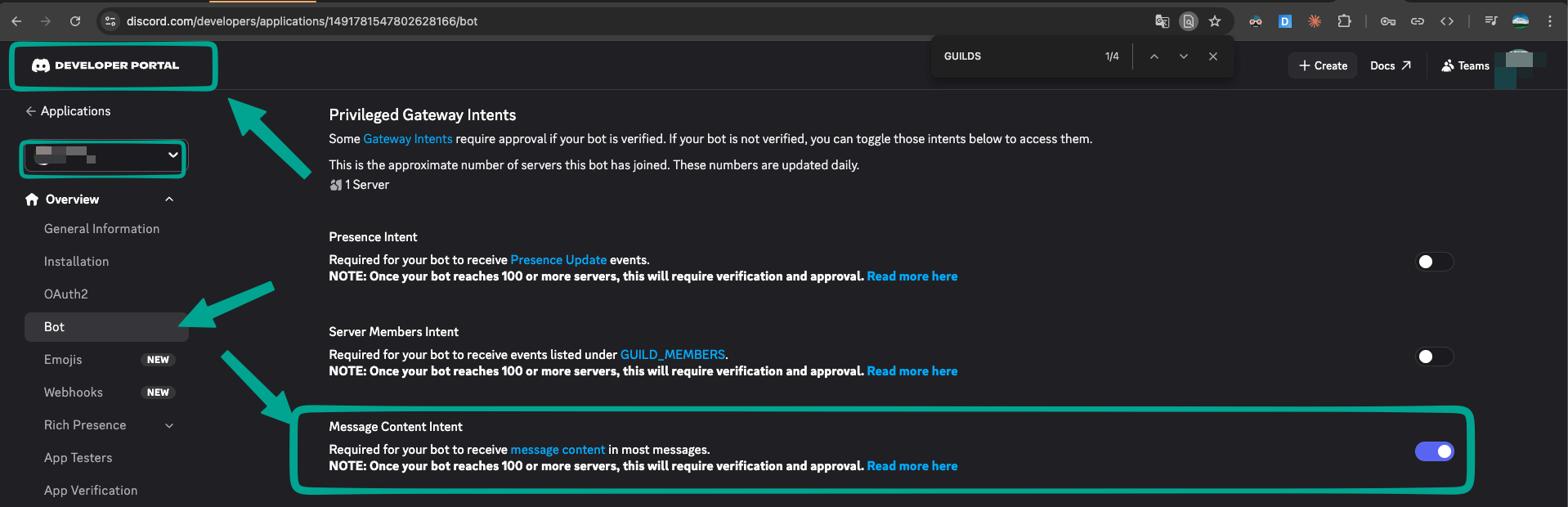
- Enable the required Privileged Gateway Intents on the bot page (see table below)
- Invite the bot to your server using the OAuth2 URL Generator with the scopes and permissions listed below
- Get the channel/thread ID: enable Developer Mode (
User Settings → Advanced → Developer Mode), right-click a channel → Copy Channel ID, then add it toallowed_channelsin your config
Required Gateway Intents
Configured in discord/adapter.go:
| Intent | Privileged? | Why |
|---|---|---|
GUILDS | No | Guild/channel lifecycle events |
GUILD_MESSAGES | No | Receive messages in guild channels and threads |
MESSAGE_CONTENT | ✅ Yes | Read raw message content (required to parse prompts and @mentions) |
GUILD_MESSAGE_REACTIONS | No | Receive reaction-add events for the tap-to-cancel 🛑 flow |
⚠️
MESSAGE_CONTENTis a privileged intent — you must toggle it on in the Developer Portal (Bot → Privileged Gateway Intents → Message Content Intent). Bots in 100+ servers also require Discord approval.Existing deployments upgrading across versions that added
GUILD_MESSAGE_REACTIONSmay need to re-invite the bot for the new intent to take effect.
Required OAuth2 Scopes
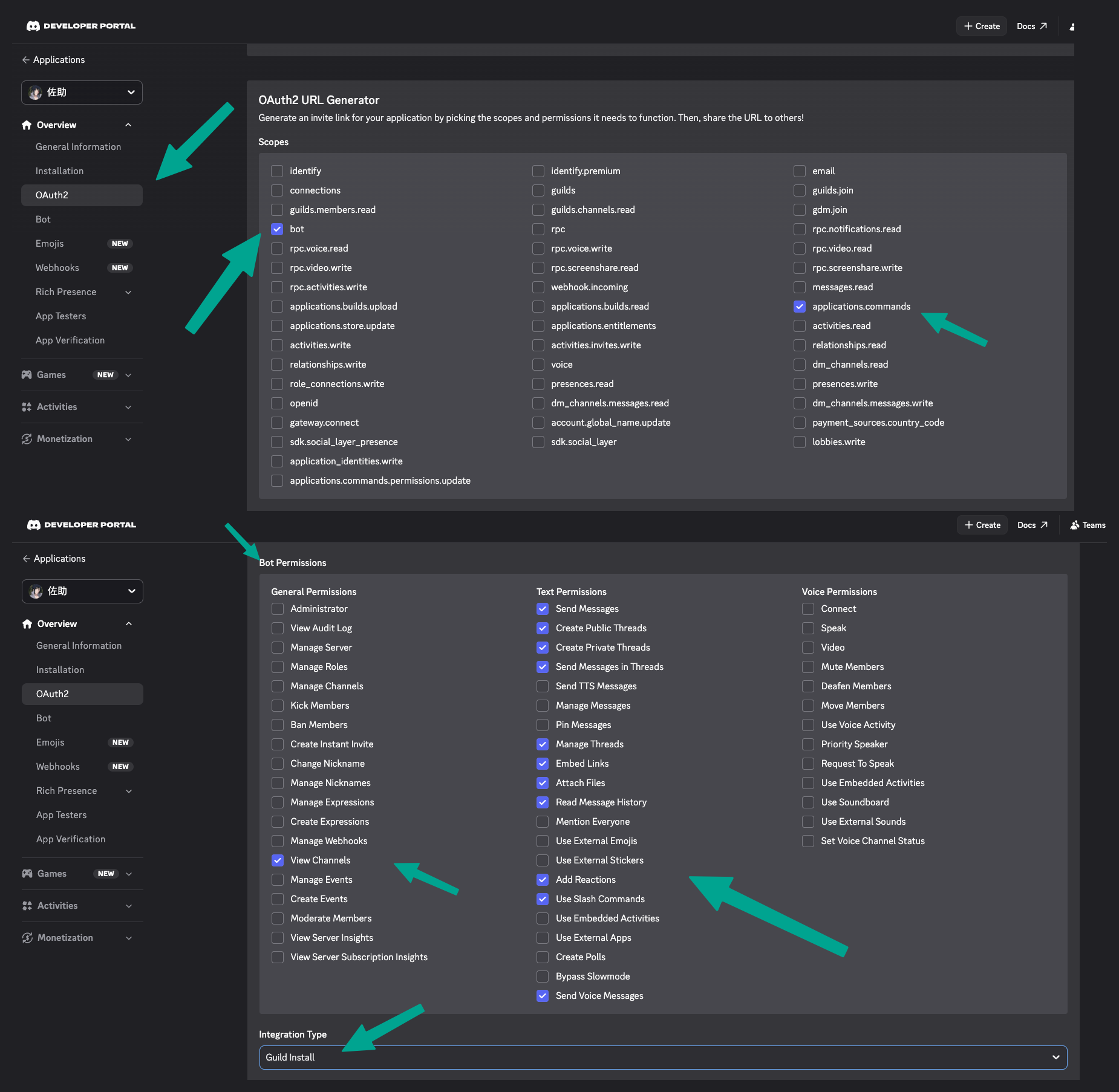
Select both scopes on the OAuth2 → URL Generator page:
| Scope | Why |
|---|---|
bot | Standard bot install scope |
applications.commands | Register Slash Commands (/sessions, /info, /reset, /resume, /stop, /pick, /mode, /model) via ApplicationCommandCreate |
Required Bot Permissions
Select these under Bot Permissions on the same page (permission integer: 397284474944, adjust as needed):
| Permission | Why |
|---|---|
| View Channels | Receive messages in allowed channels |
| Send Messages | Post replies and the 💭 thinking... placeholder |
| Send Messages in Threads | Stream replies inside auto-created threads |
| Create Public Threads | MessageThreadStartComplex — auto-creates a thread per prompt outside of existing threads |
| Manage Threads | Rename / archive threads the bot created |
| Embed Links | Render links and the session footer cleanly |
| Attach Files | ChannelFileSend for TTS voice replies (voice_reply.mp3) |
| Read Message History | Look up the originating message when editing streaming replies and resolving reactions |
| Add Reactions | MessageReactionAdd — status emojis (queued/thinking/tool/done) and the 🛑 tap-to-cancel affordance |
| Use Slash Commands | Invoke registered application commands in the server |
Telegram Setup Notes
- Create a bot via @BotFather and get the bot token
- Disable privacy mode via BotFather (
/setprivacy→ Disable) so the bot receives @mentions in groups, then remove and re-add the bot to the group - Get the group chat ID: start the bot without
allowed_chats, send a message in the group — the log will show🚨👽🚨 telegram message from unlisted chat ... chat_id=XXXXX - Add the
chat_idtoallowed_chatsin your config
Teams Setup Notes
⚠️ Beta: Teams support is still experimental. Inbound JWT verification, attachment handling, and the Helm chart's ingress routing may evolve. Report issues at https://github.com/neilkuan/quill/issues.
- Create an Azure Bot resource in Azure Portal — note the App ID, App Secret, and Tenant ID
- Set the messaging endpoint to
https://<your-domain>/api/messages(Quill listens on:3978by default) - Upload the app manifest to Teams Developer Portal — see
teams/appmanifest/README.mdfor packaging instructions - Bots created via Developer Portal are single-tenant by default — Quill's auth flow uses the tenant-specific token URL
Docker
Five image variants are published for each release:
| Image | Agent |
|---|---|
ghcr.io/neilkuan/quill | Kiro CLI |
ghcr.io/neilkuan/quill-claude | Claude Code |
ghcr.io/neilkuan/quill-codex | Codex |
ghcr.io/neilkuan/quill-copilot | GitHub Copilot CLI |
ghcr.io/neilkuan/quill-gemini | Gemini CLI |
docker run -v $(pwd)/config.toml:/etc/quill/config.toml \
  ghcr.io/neilkuan/quill:latest
Kubernetes (Helm)
⚠️ Beta: The Helm chart is experimental and primarily exercised on EKS with the AWS Load Balancer Controller. Values and templates may change between releases.
A Helm chart is included for EKS deployment (required for Teams webhook ingress):
helm install quill deploy/helm/quill \
  -n quill --create-namespace \
  --set instances.kiro.secrets.TEAMS_APP_ID="<app-id>" \
  --set instances.kiro.secrets.TEAMS_APP_SECRET="<secret>" \
  --set instances.kiro.secrets.TEAMS_TENANT_ID="<tenant>" \
  --set ingress.host="quill.example.com" \
  --set 'ingress.annotations.alb\.ingress\.kubernetes\.io/certificate-arn=arn:aws:acm:...'
The chart supports multi-instance deployment — run Kiro, Claude, and Codex in a single release. See deploy/helm/quill/README.md for details.
Development
Prerequisites
- Go 1.23+
- A Discord bot token with
MESSAGE_CONTENTintent enabled, a Telegram bot token, and/or a Teams Azure Bot registration (App ID + App Secret) - An ACP-compatible CLI installed (e.g.,
kiro-cli,claude,codex)
Build
go build -o quill .

# with version info
go build -ldflags "-X main.version=$(cat VERSION)" -o quill .
Run with debug logging
QUILL_LOG=debug ./quill config.toml
Project Structure
quill/
├── main.go              # Entry point: config, platform registration, graceful shutdown
├── platform/
│   └── platform.go      # Platform interface, shared message splitting
├── config/
│   └── config.go        # TOML config parsing, env var expansion, validation
├── acp/
│   ├── protocol.go      # JSON-RPC types, ACP event classification
│   ├── connection.go    # Child process management, stdio JSON-RPC, auto-permission
│   └── pool.go          # Session pool: get-or-create, LRU eviction, idle cleanup
├── command/
│   └── command.go       # Bot command parsing and execution (sessions/reset/info/resume/stop)
├── api/
│   └── server.go        # HTTP API server for session monitoring
├── stt/
│   └── stt.go           # Transcriber interface, OpenAI Whisper implementation
├── tts/
│   └── openai.go        # Synthesizer interface, OpenAI TTS implementation
├── discord/
│   ├── adapter.go       # Discord platform adapter (implements Platform interface)
│   ├── handler.go       # Discord message handler, thread creation, edit streaming
│   └── reactions.go     # Status reaction controller: debounce, stall detection
├── telegram/
│   ├── adapter.go       # Telegram platform adapter (implements Platform interface)
│   ├── handler.go       # Telegram message handler, mention/reply detection, edit streaming
│   └── reactions.go     # Telegram reaction controller via setMessageReaction API
├── teams/
│   ├── adapter.go       # Teams platform adapter (HTTP webhook server)
│   ├── auth.go          # Azure AD OAuth2 + JWT validation
│   ├── client.go        # Bot Framework REST API client
│   ├── handler.go       # Teams message handler, mention detection, ACP streaming
│   ├── types.go         # Bot Framework Activity types
│   └── appmanifest/     # Teams App Manifest, icons, packaging guide
├── deploy/
│   └── helm/quill/      # Helm chart for EKS deployment (multi-instance)
├── scripts/
│   └── release.sh       # Release automation (stable PR + RC tags)
├── Dockerfile           # Kiro CLI variant
├── Dockerfile.claude    # Claude Code variant
├── Dockerfile.codex     # Codex variant
├── Dockerfile.copilot   # GitHub Copilot CLI variant
├── Dockerfile.gemini    # Gemini CLI variant
├── config.toml.example  # Configuration reference
├── VERSION              # Semver version
└── RELEASING.md         # Release workflow documentation
Key Design Decisions
| Aspect | Choice | Why |
|---|---|---|
| Language | Go | Fast compile, single static binary, goroutine concurrency |
| Discord lib | discordgo | De facto Go Discord library |
| Telegram lib | go-telegram/bot | Actively maintained, native forum topic support |
| Config format | TOML | Human-readable, same as original Rust version |
| Logging | log/slog (stdlib) | Zero dependency, structured logging |
| Concurrency | goroutines + sync.Mutex / sync.RWMutex | Idiomatic Go, no external async runtime needed |
Releasing
Releases follow a "what you tested is what you ship" philosophy using scripts/release.sh:
- Merge PRs to main →
release.ymlauto-opens a Release PR (release/v0.4.1, only bumpsVERSION) - Create RC tag → checkout release branch →
./scripts/release.sh --rc→ full build of 5 image variants x 2 platforms - Merge the Release PR →
tag-on-merge.ymlauto-tags stable → promotes pre-release images (no rebuild)
See RELEASING.md for the full workflow.