
Nexus Memory
Neboy72/nexus-memory
Memória compartilhada e persistente para agentes MCP
Ver no GitHubCamada universal de memória persistente para agentes de IA compatíveis com MCP. Permite que múltiplos agentes (Claude, Cursor, Cline, etc.) compartilhem um contexto centralizado auto-hospedado, evitando perda de informações entre sessões. Inclui interface web com visualização em grafo das memórias armazenadas.
Instalação
npx convez-ai Neboy72/nexus-memory1 comando no terminal: detecta o formato do repositório (marketplace ou plugin avulso) e instala via Claude Code. Requer Node 18+ e o Claude Code instalado.
Métricas
Casos de uso
- Manter contexto consistente entre múltiplos agentes de IA
- Armazenar conhecimento de projetos e configurações de forma centralizada
- Recuperar informações históricas automaticamente em novos ciclos de chat
Veredito

Solução técnica sólida para o problema real de amnésia em agentes MCP. A arquitetura com Qdrant e embeddings plugáveis é bem executada, embora o ecossistema MCP ainda seja emergente e a adoção dependa do crescimento de agentes compatíveis.
README
A tradução para o português deste README ainda está na fila.
Your agents forget. Your context gets lost. Your setup knowledge is scattered across chats, tools and repos.
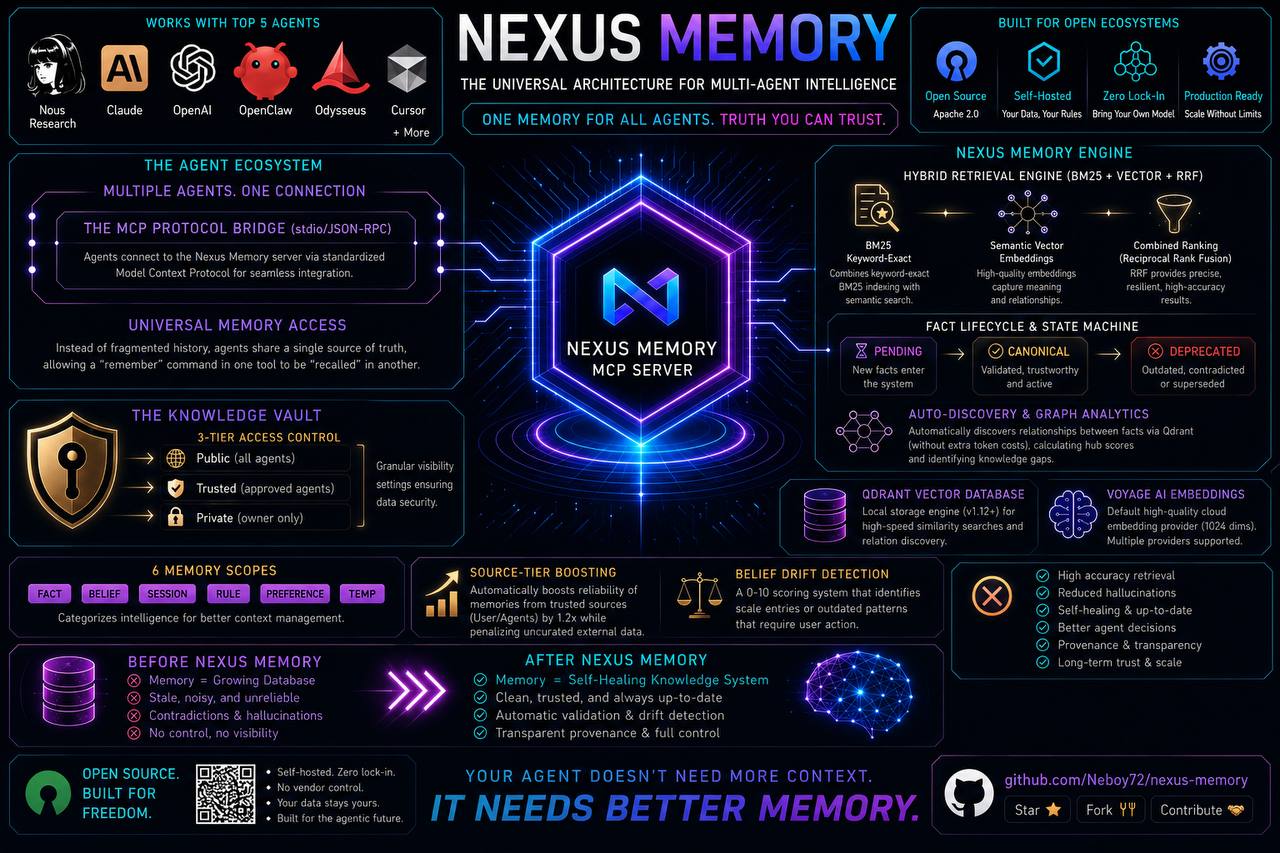
Nexus Memory gives every MCP-compatible agent one persistent, self-hosted memory they all share.
Hermes • OpenClaw • Claude Code • Codex • Cursor • Cline • Roo Code • GitHub Copilot • Pi • Continue • Odysseus • Kilo Code …and more!


🤖 Bot Self-Install: Tell your agent: "Read AGENTS.md and install Nexus Memory." It does the rest.
👉

👉 

🤖 Quick Start
Tell your agent to install it
Send this prompt to any MCP-compatible agent:
Read https://raw.githubusercontent.com/Neboy72/nexus-memory/main/AGENTS.md and follow the installation instructions.
Your agent will check prerequisites, install everything, configure the provider, and verify. Zero manual steps.
🛠️ Or install manually
git clone https://github.com/Neboy72/nexus-memory.git
cd nexus-memory
pip install -e .
Choose your embedding (auto-detected at runtime, you pick):
- 💚 Google / Vertex AI —
GOOGLE_API_KEYin.env(768d) - 💜 Jina —
JINA_API_KEYin.env(1024d) - 🦙 Ollama —
ollama pull nomic-embed-text - ☁️ Voyage —
VOYAGE_API_KEYinNEXUS_ENV_FILEor MCPenv:-block (1024d) - ☁️ OpenAI —
OPENAI_API_KEYinNEXUS_ENV_FILEor MCPenv:-block (1536d) - 🏠 Local (default) —
pip install nexus-memory[local](sentence-transformers, no key)
Start the server:
nexus-memory
🌐 Web UI (optional)
Nexus Memory comes with a live graph visualization — your memories as an interactive force-directed graph.
pip install nexus-memory[webui]
nexus-memory webui
Opens a dashboard at http://127.0.0.1:9120 — filter by category, search, click nodes to inspect details, and see drift status at a glance.
🔌 Platform Configuration
Choose your agent:
~/.hermes/config.yaml:
mcp_servers:
  nexus:
    command: nexus-memory
Restart: hermes gateway restart
~/.openclaw/openclaw.json (mcp.servers.<name>.env — nested, not top-level):
{
  "mcp": {
    "servers": {
      "nexus-memory": {
        "command": "nexus-memory",
        "env": { "VOYAGE_API_KEY": "vo-your-key-here" }
      }
    }
  }
}
~/.claude/settings.json or .mcp.json in project root:
{
  "mcpServers": {
    "nexus": {
      "command": "python3",
      "args": ["-m", "nexus_memory.mcp_server"]
    }
  }
}
~/.codex/config.toml:
[mcp_servers.nexus]
command = "python3"
args = ["-m", "nexus_memory.mcp_server"]
.vscode/mcp.json in your project:
{
  "mcpServers": {
    "nexus": {
      "command": "python3",
      "args": ["-m", "nexus_memory.mcp_server"]
    }
  }
}
Settings → Features → MCP Servers → Add:
- Name: nexus
- Command:
python3 - Arguments:
-m nexus_memory.mcp_server
MCP Server Config:
{
  "mcpServers": {
    "nexus": {
      "command": "python3",
      "args": ["-m", "nexus_memory.mcp_server"]
    }
  }
}
.mcp.json in your project:
{
  "mcpServers": {
    "nexus": {
      "command": "python3",
      "args": ["-m", "nexus_memory.mcp_server"]
    }
  }
}
~/.pi/config.json:
{
  "mcpServers": {
    "nexus": {
      "command": "python3",
      "args": ["-m", "nexus_memory.mcp_server"]
    }
  }
}
.mcp.json or ~/.continue/config.json:
{
  "mcpServers": {
    "nexus": {
      "command": "python3",
      "args": ["-m", "nexus_memory.mcp_server"]
    }
  }
}
Settings → MCP Management → Add Server:
- Name: nexus
- Command:
python3 - Arguments:
-m nexus_memory.mcp_server
Standard MCP stdio config:
{
  "mcpServers": {
    "nexus": {
      "command": "python3",
      "args": ["-m", "nexus_memory.mcp_server"]
    }
  }
}
🎯 MCP Tools
| Tool | Description | Parameters |
|---|---|---|
remember 💾 | Store a memory | text (req), category (req, default fact), access_level, source, source_url, confidence |
recall 🔍 | Hybrid search (BM25 + Vector + RRF) | query (req), limit, filter_level |
forget 🗑️ | Delete a memory | memory_id (req) |
update ✏️ | Update in-place, preserve metadata | memory_id (req), text, modified_by |
subscribe 🔔 | Register a webhook for memory events | event_type (req), webhook_url (req) |
unsubscribe 🔕 | Remove a webhook subscription | subscription_id (req) |
list_subscriptions 📋 | List all active webhooks | — |
health ❤️ | Check server status | — |
check_update 🔄 | Check for newer version on GitHub | — |
do_update ⬆️ | Pull + install + restart server | confirm (req, must be true) |
Memory Categories (State-Prefixing)
category is a required parameter on remember. The server applies "fact" as a backward-compatible default if a client omits it or sends an unknown value.
| Category | Scope | Use Case |
|---|---|---|
fact ✅ | Permanent | Verified facts, decisions (default) |
belief 🤔 | Drift-prone | Assumptions that may change over time |
session 🔄 | Ephemeral | Current conversation context |
rule 📏 | Permanent | Operating rules, policies |
preference ❤️ | Permanent | User likes, dislikes, habits |
temp ⏳ | Temporary | Short-lived notes, TTL-managed |
Access Levels 🛡️
| Level | Visible to | Example |
|---|---|---|
🟢 public | All agents | Project knowledge, technical info |
🟡 trusted | Approved agents only | Personal preferences, habits |
🔴 private | Owner only | Financial data, passwords, bills |
✨ Features
Hybrid Retrieval 🛡️
Pure vector search is vulnerable to RAG poisoning — adversarial documents that rank high semantically but contain garbage. Nexus Memory blends BM25 + Vector + Reciprocal Rank Fusion:
Query → ┌─ BM25 Index ──────→ Keyword Rankings
         │                          │
         └─ Vector Embeddings ──→ Semantic Rankings
                                        │
                               RRF Fusion ───→ Combined Rankings
| Method | Strengths | Weaknesses |
|---|---|---|
| BM25 🔤 | Keyword-exact, poison-resistant | Misses semantics |
| Vector 🧠 | Semantic matching, fuzzy queries | Vulnerable to poisoning |
| Hybrid (RRF) 🏆 | Best of both | — |
Source-Tier Boosting 🏷️
| Tier | Sources | Boost |
|---|---|---|
| 🟢 Tier 1 | Agent, user, official docs | 1.2× |
| 🟡 Tier 2 | Curated external | 1.0× |
| 🔴 Tier 3 | Uncurated / unknown | 0.8× |
MemoryCategory Enum 🏷️
Six scopes from Agentic Design Patterns (Ch8): fact, belief, session, rule, preference, temp. Every memory knows its purpose.
Provenance Tracking 📎
Every memory carries its origin: source_url, confidence (0.0–1.0), modified_by, timestamps. Full audit trail from creation to today.
Guardrails 🛡️
Content-length warnings for entries >5,000 chars. PII detection hints for emails and phone numbers in non-private entries.
Fact Lifecycle Model 🧬
Append-only state machine: pending → canonical | deprecated | rolled_back. Every revision is versioned with fact_id, version_id, content_hash, supersedes, and mandatory decision_event. No silent overwrites. No zombie facts.
Staging + Rollback 🔄
| Operation | What it does |
|---|---|
create_pending() | Stage new facts for review |
promote() | Promote staged → canonical |
deprecate() | Mark canonical as deprecated |
rollback() | Restore previous canonical version |
Auto-Discovery + Graph Analytics 🔄
Zero-token relation discovery between canonical facts via Qdrant (O(n·k)) + heuristic classification. Graph analytics: hub scores, isolation scores, knowledge gaps, connected components. Facts connect themselves — no manual edges needed.
Skill Export 🎯
export_skill() searches canonical facts → clusters into Steps/Pitfalls/Prerequisites/Verification → generates complete SKILL.md. Turn learned facts into reusable agent skills.
Belief Drift Detection 🔍
| Score | Status |
|---|---|
| 🟢 < 1 | Healthy |
| 🟡 1–3 | Attention needed |
| 🔴 > 3 | Action required |
Detects stale entries, old patterns ("X running as fallback" — but X was replaced), age thresholds. Weighted 0–10 scoring.
📊 vs Other Memory Solutions
| Feature | Nexus Memory 🦊 | Walrus Memory 🦭 | mem0 | Honcho | agentmemory | Holographic |
|---|---|---|---|---|---|---|
| 🔍 Semantic search | ✅ local or cloud | ✅ via API | ✅ Cloud | ✅ pgvector | ✅ Gemini | ✅ HRR algebra |
| 🔀 Hybrid retrieval | ✅ BM25 + Vector + RRF | ❌ | ✅ Multi-signal | ❌ | ❌ | ❌ |
| 🩺 Drift detection | ✅ Scored 0–10 | ❌ | ❌ * | ❌ | ❌ | ❌ |
| 🛡️ Anti-poisoning | ✅ Source tiers | ❌ | ❌ | ❌ | ❌ | ❌ |
| 🔗 Multi-Level Provenance | ✅ Source + Corroboration + Dep. | ✅ On-chain | ❌ | ❌ | ❌ | ❌ |
| 🏷️ MemoryCategory Enum | ✅ 6 scopes | ❌ | ❌ | ❌ | ❌ | ❌ |
| 🧬 Fact Lifecycle | ✅ Append-only | ❌ | ❌ | ❌ | ❌ | ❌ |
| 🔄 Staging + Rollback | ✅ Promote/Deprecate/Rollback | ❌ | ❌ | ❌ | ❌ | ❌ |
| 🎯 Skill Export | ✅ Facts → SKILL.md | ❌ | ❌ | ❌ | ❌ | ❌ |
| 🔗 SkillGraph | ✅ 5 relation types, BFS/DFS | ❌ | ❌ | ❌ | ❌ | ❌ |
| 🔄 Auto-Discovery | ✅ 0 token cost | ❌ | ❌ | ❌ | ❌ | ❌ |
| 📊 Graph Analytics | ✅ Hub scores, gaps | ❌ | ❌ | ❌ | ❌ | ❌ |
| 🚀 Graph Boost | ✅ Search ranking boost | ❌ | ❌ | ❌ | ❌ | ❌ |
| 🛡️ Access Control | ✅ public/trusted/private | ✅ Permissions | ❌ | ❌ | ❌ | ❌ |
| 🏠 Self-hosted | ✅ Your machine | ❌ Blockchain | ❌ Cloud | ❌ Cloud | ❌ Cloud | ✅ Local |
| 💰 Cost | 🆓 Free | WAL token | Subscription | Subscription | API costs | Free |
| 📦 Code size | ~9.6K Python | Managed service | Managed service | Managed service | ~50K TS | ~1.5K Python |
| ⏱️ Setup time | 1 command | Signup + SDK | API key + signup | Postgres + pgvector | 30+ min + OAuth | 1 command |
*Mem0 lists staleness as an "open problem" in their 2026 report but does not ship a solution.
Nexus Memory is the only solution with hybrid retrieval, drift detection, provenance, fact lifecycle, staging/rollback, auto-discovery, graph analytics, skill export, memory categories, and access control — all self-hosted, all in one package.
🧩 Embedding Providers
One server. Multiple backends. Same API.
| Provider | Type | Setup | Dims |
|---|---|---|---|
| Voyage ☁️ | Cloud | VOYAGE_API_KEY in MCP env: block | 1024 |
| OpenAI ☁️ | Cloud | OPENAI_API_KEY in MCP env: block | 1536 |
| Google / Vertex AI 💚 | Cloud | GOOGLE_API_KEY in .env | 768 |
| Jina 💜 | Cloud | JINA_API_KEY in .env | 1024 |
| Ollama 🦙 | Local | ollama pull nomic-embed-text | 768 |
| sentence-transformers 🏠 | Local | pip install sentence-transformers | 384 |
🔧 Troubleshooting
| Symptom | Check | Fix |
|---|---|---|
mcp_nexus_* tools missing | grep 'nexus' ~/.hermes/logs/agent.log | Gateway restart |
| Qdrant not running | curl http://127.0.0.1:6333/healthz | brew services start qdrant |
| Hybrid search missing | pip list | grep bm25s | pip install bm25s |
| Voyage embedding fails | echo $VOYAGE_API_KEY | Set in ~/.hermes/.env |
| ModuleNotFoundError | Check PYTHONPATH | Set PYTHONPATH=/path/to/nexus-memory |
🧪 Tests
pytest tests/ -v # 379 tests ✅
📋 Requirements
- Python 3.11+
- Qdrant v1.12+ running on
localhost:6333 - One embedding provider (auto-detected):
- 💚 Google / Vertex AI —
GOOGLE_API_KEYin.env(768d) - 💜 Jina —
JINA_API_KEYin.env(1024d) - 🦙 Ollama —
ollama pull nomic-embed-text - ☁️ Voyage —
VOYAGE_API_KEYin.env(1024d) - ☁️ OpenAI —
OPENAI_API_KEYin.env(1536d) - 🏠 Local —
pip install sentence-transformers
- 💚 Google / Vertex AI —
📜 License
MIT — use it, modify it, ship it.
⭐️ Found it useful? Give it a star on GitHub — it helps others find it!
Built by Nebo · June 2026 · v0.2.5 — One memory for all your agents