
Tokengotchi
NatBrian/tokengotchi
Pet Tamagotchi que cresce com seus tokens de IA no terminal
Ver no GitHubUm pet virtual no terminal que se alimenta de tokens consumidos por seus agentes de IA (Claude Code, Codex, Gemini CLI, Qwen) e evolui visualmente conforme seu uso. A criatura muda de aparência baseada no tópico que você está codificando, oferecendo uma visualização lúdica e honesta do seu consumo de tokens.
Instalação
npx convez-ai NatBrian/tokengotchi1 comando no terminal: detecta o formato do repositório (marketplace ou plugin avulso) e instala via Claude Code. Requer Node 18+ e o Claude Code instalado.
Métricas
Casos de uso
- Monitorar consumo de tokens de múltiplos agentes de IA em tempo real
- Gamificar e tornar visível o custo computacional do desenvolvimento com IA
- Visualizar evolução e adaptação da criatura conforme os tópicos de código mudam
Veredito

Projeto criativo que une estética retrô com métricas práticas de custo de IA. Útil para desenvolvedores que querem visibility honesta sobre token spend sem interferir em seus fluxos de trabalho.
README
A tradução para o português deste README ainda está na fila.
🍪 tokengotchi
A Tamagotchi for your AI coding CLI. A virtual pet that lives in your terminal and feeds on the tokens your coding agents burn — Claude Code, OpenAI Codex, Gemini CLI, Qwen Code, opencode, Charm Crush. The more you use them, the more your pet grows — and every ~1,000,000 tokens it evolves into a brand-new creature that reflects what you're currently working on.
Coding a food-production pipeline? Your pet becomes a little chef-egg. Switch to a legal contract review? It morphs into a book-monster with a gavel. The art is generated on the fly by Claude itself, then rendered as animated, transparent pixel art using Unicode half-blocks — right in your terminal, over SSH, inside tmux.
It's a joke project. It's also a completely serious one: LLM cost scales with tokens, so watching a pet fatten on your token spend is the most honest usage meter there is.
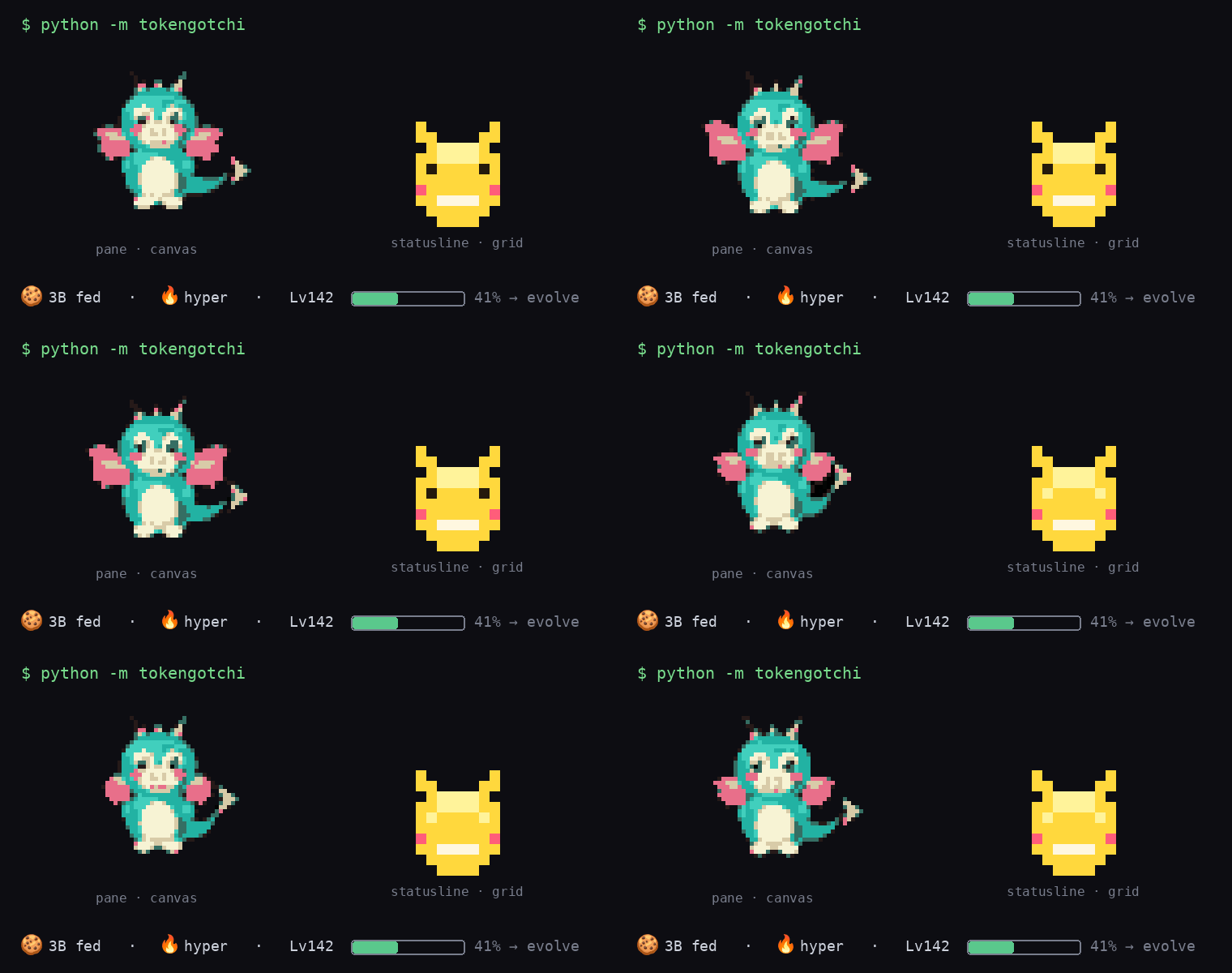
Left: the animated canvas pet in its own pane. Right: the tiny grid pet in Claude Code's statusline. Both feed off your token total — same level + progress, each its own creature.
How it works
tokengotchi is a standalone, read-only process. It does not install into any of these tools, does not touch their config or status lines, and does not use a separate API key. It just watches and reacts.
        each CLI's local session logs (Claude/Codex/Gemini/...)
                              │  read-only
                  ┌───────────▼────────────┐
                  │  PROVIDERS (per tool)   │  tokens + topic per session
                  └───────────┬─────────────┘
                              │
                  ┌───────────▼────────────┐
                  │        WATCHER          │  sum tokens · find active topic
                  └─────┬─────────────┬─────┘
         token          │             │   every frame
       milestone OR     │             │
       topic shift      │             │
          ┌─────────────▼──┐   ┌──────▼───────────┐
          │   SLOW CLOCK    │   │   FAST CLOCK      │
          │  regenerate art │   │  play animation   │
          └───────┬─────────┘   └──────┬───────────┘
        claude -p → canvas HTML         │  half-block render
        playwright → 12 PNGs            │  ~10fps, flicker-free
        pixel pipeline → frames ────────┘  → your terminal pane
Two signals, deliberately separated (so multiple sessions — and multiple tools — Just Work):
- Tokens = the food. A global sum across every session in scope, across every coding CLI you use. Run Claude Code in three directories and Codex in a fourth — they all feed one pet.
- Topic = the look. Taken from the single active session — the transcript most recently written to (newest mtime = the pane you're typing in), whichever tool it belongs to. Switch panes/projects/tools and the pet re-themes.
Supported coding CLIs (providers)
tokengotchi reads each tool's local session logs read-only. It auto-detects which
are installed; override with --provider (repeatable) or the providers config.
| Provider | Tool | Source | Tokens |
|---|---|---|---|
claude | Claude Code | ~/.claude/projects/**/*.jsonl | ✅ |
codex | OpenAI Codex CLI | ~/.codex/sessions/**/rollout-*.jsonl | ✅ |
gemini | Google Gemini CLI | ~/.gemini/tmp/*/chats/session-*.jsonl | ✅ |
qwen | Qwen Code | ~/.qwen/**/chats/*.jsonl | ✅ |
opencode | opencode (sst) | ~/.local/share/opencode/opencode.db (SQLite) | ✅ |
crush | Charm Crush | <data-dir>/**/*.db (SQLite) | ✅ |
python -m tokengotchi --list-providers          # show known + detected
python -m tokengotchi --provider claude --provider codex   # watch just these
Not (yet) supported because they don't persist token counts locally: Cursor CLI
(server-side usage) and the Antigravity IDE (opaque protobuf + RPC). Adding a
provider is ~30 lines — see tokengotchi/providers/.
Two clocks:
- Fast clock (free, always running): replays the current creature's frames ~10×/sec with in-place redraw — no flicker, no clear-screen.
- Slow clock (costs tokens, rare): on a token milestone or a sharp topic shift, it asks Claude to draw a new creature and hot-swaps it in — the old pet keeps dancing until the new one is ready. Two art types depending on target: canvas (pane mode — rich, animated) or a direct 10×10 pixel grid (statusline — tiny, crisp; see Statusline mode).
Self-critique gate (canvas): the pixelated result is shown back to Claude (just 2 frames — cheap) to judge the creature: legible, on-topic, and genuinely multi-colored (a dull one-hue blob fails). If not, it recolors/redraws and retries (up to 2×). Background transparency is not the critic's job — it's stripped deterministically in code, so no tokens are spent on it.
Install
Requires Python 3.11+, and (only for regenerating art) Node 18+ and the
claude CLI you're already logged into.
git clone https://github.com/yourname/tokengotchi
cd tokengotchi

# Python deps
pip install -r requirements.txt

# (optional, for live art generation) the headless capture toolchain
cd js && npm install && npx playwright install chromium && cd ..
You can run the pet without Node/playwright/claude — it ships with a
bundled default creature and will happily animate + count tokens. The art only
regenerates when the capture toolchain and claude CLI are present.
Run
In its own terminal (a tmux split beside your coding CLI works nicely, but isn't required — it auto-fits whatever window it's in):
python -m tokengotchi # global scope, default 1M-token evolutions
Useful flags:
python -m tokengotchi --status            # print token total + topic, then exit
python -m tokengotchi --once -v           # one poll tick, log what it'd do
python -m tokengotchi --regen-tokens 250000   # evolve 4× as often
python -m tokengotchi --scope project --project ~/.claude/projects/-home-you-myproj
python -m tokengotchi --scale 2           # bigger pet (2× nearest upscale)
python -m tokengotchi --config config.toml
Press Ctrl-C to quit (Claude Code is never touched).
A note on terminals
Rendering uses 24-bit truecolor + Unicode half-blocks (▀). It works in tmux
(falls back to default background for transparency). Sixel/kitty graphics are
not required — that's deliberate, so it works over plain SSH. Make sure your
terminal has truecolor (COLORTERM=truecolor).
Statusline mode — pet in Claude Code's corner (optional)
Claude Code is the one CLI with a statusLine hook an external command can fill,
so the pet can live in its status bar (like the /buddy Easter egg). Every other
CLI uses pane mode — they have no equivalent surface.
Two art pipelines, by target (each mode generates only its own type — no wasted tokens):
- Pane mode → canvas: Claude writes an HTML canvas (vivid multi-hue creature), captured → background stripped transparent for free (flood-fill, no LLM) → downscaled to ~46px → animated. A cheap self-critique (2 frames) judges only the creature (legible + colorful); transparency is handled in code, not tokens.
- Statusline → direct pixel grid: Claude emits a tiny 10×10 sprite (palette + char grid) rendered straight to half-blocks — no browser, no downscale, crisp at corner size. Bright saturated edges (no dark outline — it'd vanish on the black terminal), flat distinct-hue colors, silhouette-first.
Level, mood + progress. The bar shows three things: 🍪 total fed, a
mood, a level (Lv = total tokens ÷ regen_tokens — an achievement
counter that climbs with spend), and a bar to the next evolution. Mood comes
from a mechanical signal (smoothed feed-rate + idle) picking a slot
(asleep…hyper); the wording of each slot is LLM-authored per creature at
regen (a dragon "hoards", a frog "ribbits") — zero per-poll cost.
These shared bits (level + progress) are derived from the token total, so the
pane and statusline show the same numbers without sharing any state file
(race-free); only the art and mood vocabulary are per-mode (each its own
creature). Pane and statusline state live under ~/.tokengotchi/{canvas,grid}/.
Caveats worth knowing first: the statusline re-runs per assistant message
(300ms debounce, or refreshInterval ≥ 1s), so the corner pet is near-static
— it changes mainly when it evolves, not frame-by-frame. Pane mode is the
animated one. It also needs the background daemon running to stay live.
Install (two ways — see INSTALL_STATUSLINE.md):
# Path A (recommended): let Claude Code edit its own config — paste the prompt
#   from INSTALL_STATUSLINE.md into Claude Code; it backs up + merges + explains undo.

# Path B (deterministic): backs up settings.json, merges any existing statusline
python -m tokengotchi --install-statusline
python -m tokengotchi --daemon &        # keeps tokens + art live
By default the statusline is meter only (statusline_rows = 0). To show the
10×10 grid pet, set statusline_rows = 5 in your config (see config.example.toml).
Remove — one key, fully reversible:
python -m tokengotchi --uninstall-statusline   # restores your previous statusline
# or just delete the "statusLine" key from ~/.claude/settings.json
Safety: install always writes a timestamped settings.json.tokengotchi-bak-<ts>,
never discards an existing statusline (it chains yours + the pet), and the frame
command is a lightweight PIL-free entry (~45ms) that emits color codes only — no
cursor-movement codes that could corrupt the bar.
Configuration
Every knob lives in config.example.toml (copy it to config.toml). Highlights:
| Key | Default | Meaning |
|---|---|---|
regen_tokens | 1_000_000 | tokens per evolution |
scope | global | global / project / session |
topic_shift | true | also evolve when the topic changes sharply |
fps | 10.0 | animation speed |
width | 46 | pixel-art width (chars) |
scale | 1 | on-screen upscale |
max_critique_retries | 2 | art-quality retry budget (canvas) |
critique_frames | 2 | frames the canvas self-critique reads (was all 12) |
art_mode | auto | auto (pane=canvas, daemon=grid) / canvas / grid |
grid_size | 10 | statusline sprite NxN (10 → 5 rows) |
statusline_rows | 0 | corner-pet height in rows (0 = meter only; set 5 for the 10×10 grid pet) |
statusline_truecolor | true | false = meter only on terminals that mangle 24-bit |
Cleanup / uninstall
Everything tokengotchi generates lives in one work dir (default
~/.tokengotchi): the per-mode pets (canvas/, grid/), their frames, caches,
and state.json. Deleting it resets the pet — it just regrows from your tokens
next run. (If you set a custom work_dir, delete that path instead.)
Remove generated art + state
# macOS / Linux
rm -rf ~/.tokengotchi
# Windows PowerShell
Remove-Item -Recurse -Force "$HOME\.tokengotchi"
:: Windows cmd
rmdir /s /q "%USERPROFILE%\.tokengotchi"
Remove the statusline pet (restores your previous Claude Code statusline; a
timestamped backup sits at ~/.claude/settings.json.tokengotchi-bak-*):
python -m tokengotchi --uninstall-statusline
# delete the leftover backups too, if you want:
rm -f ~/.claude/settings.json.tokengotchi-bak-*          # macOS/Linux
# PowerShell: Remove-Item "$HOME\.claude\settings.json.tokengotchi-bak-*"
Remove the headless browser used for canvas capture (optional, frees a few hundred MB):
python -m playwright uninstall            # or delete the cache dir:
rm -rf ~/.cache/ms-playwright             # Linux
rm -rf ~/Library/Caches/ms-playwright     # macOS
# Windows PowerShell: Remove-Item -Recurse -Force "$env:LOCALAPPDATA\ms-playwright"
rm -rf js/node_modules                    # the capture toolchain
Full uninstall: stop the daemon (pkill -f "tokengotchi --daemon" / end the
process on Windows), run --uninstall-statusline, delete ~/.tokengotchi, then
pip uninstall tokengotchi if you installed it.
Project layout
tokengotchi/
  tokengotchi/        # the package
    providers/        # one module per coding CLI (claude, codex, gemini, ...)
    transcript.py     # pure Claude JSONL parsing (tokens + text)
    config.py         # TOML + defaults
    state.py          # atomic persisted state
    watcher.py        # provider-agnostic token sum, active topic, triggers
    regen.py          # canvas art: prompt → claude -p → capture → pixelate → critique
    gridart.py        # grid art: claude -p emits a tiny 10x10 sprite, rendered direct
    pipeline.py       # frames → shared-palette low-res pixel art
    renderer.py       # PIL image → truecolor half-block ANSI
    player.py         # threaded flicker-free playback
    statusline.py     # optional Claude Code corner pet (frame cache + safe install)
    vitals.py         # mood (feed-rate/idle → LLM-authored expression) + evolve progress
    pet.py            # orchestrator + CLI
  js/capture.js       # playwright: canvas → transparent PNG frames
  assets/             # bundled default pet
  tests/              # pytest suite (143 tests) + node smoke test
Development
pip install -r requirements.txt pytest
python -m pytest                 # 143 tests
node js/test_capture.mjs         # capture smoke test (skips if playwright absent)
python assets/make_default.py    # rebuild the bundled default pet
Privacy
tokengotchi reads your coding CLIs' session logs locally (read-only) to count
tokens and sample the current topic. When it regenerates art it sends a short
description of your recent topic to Claude via the claude CLI. Nothing else
leaves your machine. It writes only to its own work_dir (~/.tokengotchi by
default).
License
MIT — see LICENSE.