
Claude Code Telegram Bridge
naoufac/claude-code-telegram-bridge
Terminal Claude Code no Telegram — turnos headless, uploads, voice e dashboard
Ver no GitHubAgent que transforma um bot do Telegram em um terminal Claude Code completo, rodando headless na sua máquina. Permite enviar mensagens, fotos, áudios e arquivos do telefone para executar turns com acesso total a ferramentas, mantendo sessões sincronizadas e incluindo dashboard web para monitoramento.
Instalação
npx convez-ai naoufac/claude-code-telegram-bridge1 comando no terminal: detecta o formato do repositório (marketplace ou plugin avulso) e instala via Claude Code. Requer Node 18+ e o Claude Code instalado.
Métricas
Casos de uso
- Executar Claude Code turns do telefone enquanto está fora do desk
- Compartilhar screenshots/fotos para análise remota em tempo real
- Continuar sessões iniciadas no terminal direto do Telegram
- Automatizar rotinas de desenvolvimento com comandos por voz
Veredito

Solução robusta para quem quer acesso remoto legítimo ao Claude Code. Implementação sólida com stdlib apenas, auto-healing e ops integradas; exige Linux/systemd e setup manual cuidadoso, mas entrega mobilidade real sem comprometer segurança (owner-locked).
README
A tradução para o português deste README ainda está na fila.
claude-code-telegram-bridge
Your Claude Code terminal, in your pocket. A single-file Python daemon that turns a Telegram bot into a full Claude Code session — tools, memory, skills, everything — running on your own machine, owner-locked, always on.
Send a message from your phone; a real headless Claude Code turn runs on your server with full tool access and streams its replies back. Send a photo and Claude looks at it. Send a voice note and it's transcribed into the prompt. Attach to any past conversation — including ones you started in the terminal — and keep going.
Features
- Real Claude Code turns — each message runs
claude -pheadless with full tool access and--resumecontinuity, so a conversation on Telegram behaves exactly like one in the terminal. - Session remote-control —
/sessionslists every Claude Code conversation on the box,/attach <id>continues any of them from your phone,/lastjumps to the newest. Start something at your desk, finish it from the street. - Uploads in — documents, photos, albums, video land in
UPLOAD_DIRand their paths are injected into the turn (Claude Code reads images natively). Albums are batched into a single prompt, even when items download at different speeds. - Voice in — voice notes are transcribed (ElevenLabs
scribe_v1, falling back to Gemini) and the transcript becomes the prompt, with the audio path included. Speak your commands. - Files out —
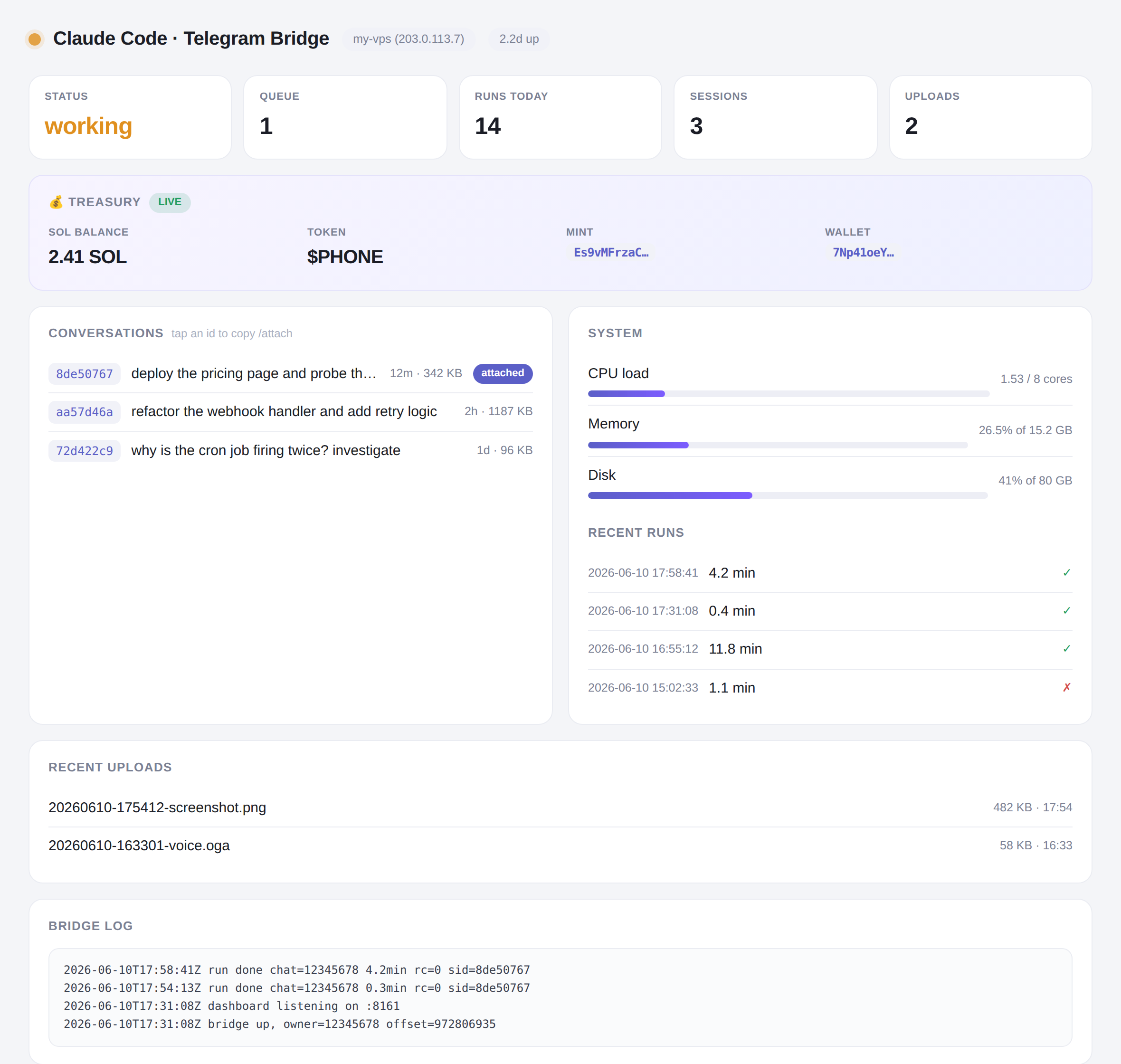
/file /pathsends any file from the server to your chat. Claude itself also getsTG_TOKEN/TG_CHAT_IDin its environment plus instructions, so it can push artifacts to you mid-task. - Web dashboard — optional light-theme status page (above): live status, queue, conversations with attach-ids, recent runs, uploads, log tail. Single static HTML file served by the bridge itself, token-gated.
- Self-healing — broken/pruned
--resumetargets are detected (file check + error-result heuristic) and the prompt is replayed once on a fresh session instead of failing forever. - Ops built in —
/stopkills a runaway turn,/statusand/loginspect the bridge,/rebootrestarts it (offset-safe: no redelivery loop), systemdRestart=alwayskeeps it up.
Quickstart
Requirements: Linux with systemd, Python 3.10+ (stdlib only — no pip installs), and a working Claude Code login for the user that runs the bridge.
# 1. Get a bot token from @BotFather, and your numeric user id from @userinfobot

# 2. Install
sudo git clone https://github.com/naoufac/claude-code-telegram-bridge /opt/claude-tg-bridge
sudo chown -R "$(whoami)" /opt/claude-tg-bridge
cd /opt/claude-tg-bridge
cp .env.example .env && $EDITOR .env       # set TG_TOKEN and OWNER_ID at minimum
chmod 600 .env

# 3. Run as a service
sudo cp claude-tg-bridge.service /etc/systemd/system/
sudo systemctl daemon-reload
sudo systemctl enable --now claude-tg-bridge

# 4. Open your bot in Telegram, press Start, say hi
To enable the dashboard, set DASH_PORT and DASH_KEY in .env, open the port in your firewall, and visit http://your-server:PORT/?key=YOUR_KEY.
Commands
| Command | What it does |
|---|---|
/new | Fresh conversation (drops the session id) |
/sessions | List recent Claude Code sessions with first-message snippets |
/attach <id> | Continue any session here (8-char prefix is enough) |
/last | Attach the most recent session |
/file <path> | Send a file from the server to the chat |
/stop | Kill the running turn and drain the queue |
/status /log | Bridge state / log tail |
/reboot | Restart the bridge process |
/help /restart | Aliases for /start and /new |
| anything else | Runs a Claude Code turn — including /slash skills, which pass through |
Security model
- Owner-locked: only
OWNER_IDgets turns. Strangers get silence in groups and one throttled refusal in DMs. - Claude runs with
--dangerously-skip-permissionsas your user on your machine — that is the point of the tool, but understand it: anyone who controls the owner Telegram account controls the server. Protect that account (2FA) and the bot token. - The bot token is redacted from every outbound message; the dashboard requires a key (constant-time compared) and serves read-only state.
- A
flockguarantees one poller per token — running a second copy exits instead of split-braininggetUpdates.
Design notes (the bugs you don't have to rediscover)
These came out of adversarial review and live testing:
- stderr must be drained in a thread, or a chatty claude child deadlocks on a full pipe mid-run.
- getUpdates offset is saved after handling, so a crash mid-handle replays the message instead of dropping it; exceptions still advance it, so a poison message can't loop the bridge.
/rebootexits only after the offset is persisted — otherwise Telegram redelivers/rebootafter every restart, forever.- A dead
--resumeid doesn't fail loudly: claude emits anis_errorresult and echoes the requested session id back. The bridge checks the session file on disk first and heal-retries once on a fresh session. - Albums race: items register with the batch buffer before their (variable-speed) downloads, so a slow video can't get split out of its album.
- Media handling runs off the poller thread, so
/stopstays responsive during a 2-minute transcription. - Restarting the service kills the whole cgroup, including an in-flight turn — deploy updates while idle.
Layout
bridge.py                 the entire bridge (~800 lines, stdlib only)
dashboard.html            light-theme dashboard (vanilla JS, served by bridge.py)
claude-tg-bridge.service  systemd unit
.env.example              all configuration, documented
Built on a Hetzner VPS by Claude Code driving itself — specified, written, adversarially reviewed and live-tested over Telegram before being published. MIT.