
TaskApp
nachobar3/TaskApp
Run Claude Code agents across your projects from a task board — local-first, mobile PWA via Tailscale
Instalação
npx convez-ai nachobar3/TaskApp1 comando no terminal: detecta o formato do repositório (marketplace ou plugin avulso) e instala via Claude Code. Requer Node 18+ e o Claude Code instalado.
Métricas
README
A tradução para o português deste README ainda está na fila.
TaskApp
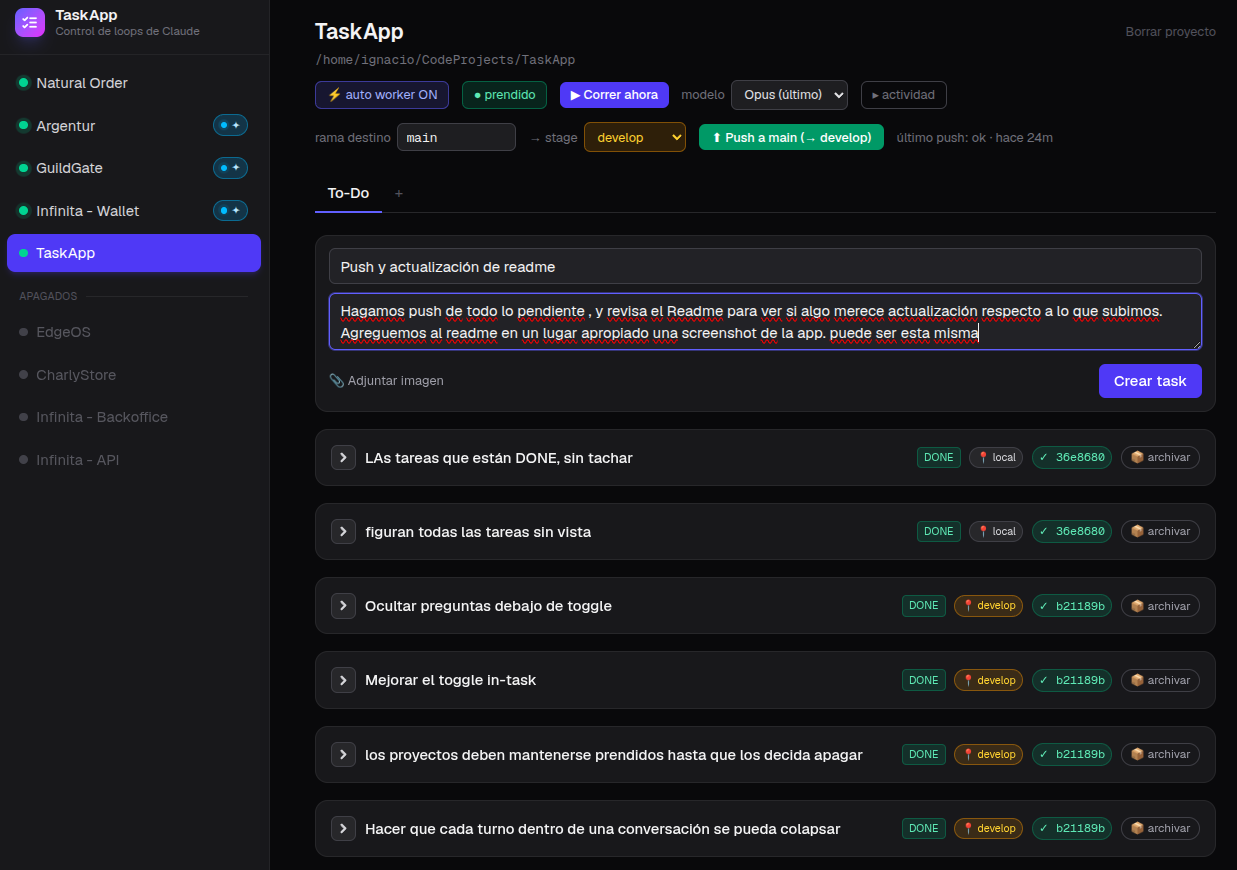
A local web app to run Claude Code agents across your projects from a task board — including from your phone, from anywhere.
You manage tasks per project in a web UI. Claude Code agents (long-running interactive loops, or ephemeral workers launched by the app) pick those tasks up, work inside each project's repo, report progress, ask you questions when they need a decision, and keep a per-task thread you can follow up on. The whole thing runs on your machine: your repos, your Claude Code, your data.
You (web UI / phone PWA)          Claude Code agents
        │                                 │
        ▼                                 ▼
   Next.js app  ◄──── SQLite ────►  taskapp CLI
 (localhost:7777)  (~/.taskapp/)   (runs inside each repo)
The UI texts, the CLI output and the agent protocol are currently in Spanish. PRs welcome.
Features
- Projects → documents → tasks, with status (
todo / in_progress / blocked / done), stage (local / develop / production), a human-only "tested" flag, and image attachments (paste screenshots into a task). - Blocking questions: when an agent needs a decision it asks, the task turns red in the UI, you answer from the board and the agent resumes.
- Task threads (follow-ups): ask for more on an already-done task; it reopens as a continuation with the full thread (original request, summary, Q&A) as context.
- Ephemeral workers: the app spawns
claude -pin the project's repo when you create a task, answer a question or send a follow-up (per-project toggle), or manually with a "Run now" button. Workers drain the queue and exit; a PID guard prevents double-spawning. - Git on demand: you request commits/pushes from the UI; the agent executes them and reports back the hash. Agents never touch git on their own.
- Mobile + PWA: responsive UI, installable on your phone, reachable from anywhere via Tailscale (see below).
Requirements
- Node.js 20+
- Claude Code installed, with
claudeavailable in yourPATH.
Install & run
git clone https://github.com/nachobar3/TaskApp.git
cd TaskApp
npm install

npm run dev      # dev server on http://localhost:7777
# or, for an always-on setup:
npm run build && npm start
The SQLite database is created automatically at ~/.taskapp/taskapp.db
(override with $TASKAPP_DB).
Install the CLI used by the agents (once):
npm link # makes the `taskapp` command global
Connect a project
-
Create the project in the UI with its absolute repo path. The CLI maps the current working directory to the project automatically — agents never need to pass a project name.
-
Give the agents the protocol skill, either globally:
ln -s "$(pwd)/skills/taskapp" ~/.claude/skills/taskappor per project (
<repo>/.claude/skills/taskapp).
Two ways to run agents
Interactive loop — open Claude Code in the repo and run a loop with the
taskapp skill (e.g. /loop taskapp). You keep the terminal, you approve
permissions, you can intervene. The UI shows the loop as active while it
reports.
Ephemeral workers — flip the project's "⚡ auto worker" toggle (or press "▶ Run now"). The app spawns:
claude --dangerously-skip-permissions -p "<work the queue>"
in the project's path; the worker processes tasks, re-checks the queue, and exits. If it blocks on a question, answering from the UI spawns a new worker that resumes the thread.
⚠️ Workers run with
--dangerously-skip-permissions: the agent can run any command inside your machine without asking. Only enable auto-worker on projects where you're comfortable with that, and don't combine it with an interactive loop on the same project. Worker logs land in~/.taskapp/logs/<project>.log. Use$TASKAPP_CLAUDE_BINto point to a specificclaudebinary.
Model picker — each project has a model selector (Opus / Sonnet / Haiku);
default is the latest alias (opus). The model is pinned explicitly on spawn
so the worker never inherits a default it can't access in headless mode.
Override the global default with $TASKAPP_WORKER_MODEL.
Live activity — toggle "actividad" on a project to see the worker's print
in real time (tool calls, file edits, commands, results), refreshed every 10s.
Workers run with --output-format stream-json, so the log is a live event
stream the UI tails and renders human-readably. Hidden by default.
Remote access & phone PWA (Tailscale)
TaskApp runs on your machine, so remote access means exposing your local server privately with Tailscale (free for personal use):
# 1. On your computer: install and log in
curl -fsSL https://tailscale.com/install.sh | sh
sudo tailscale up
sudo tailscale set --operator=$USER   # optional: manage serve without sudo

# 2. Publish the app inside your tailnet (HTTPS with a valid certificate)
tailscale serve --bg http://localhost:7777
tailscale serve status                # prints https://<machine>.<tailnet>.ts.net
If certificate issuance fails, enable MagicDNS and HTTPS Certificates in the admin console DNS page, and Serve when prompted. The serve config persists across reboots.
- On your phone: install the Tailscale app, log in with the same account,
turn the VPN on, and open your
https://….ts.netURL. Then install it as a PWA (Android Chrome: ⋮ → Install app · iOS Safari: Share → Add to Home Screen).
The dev config already allows *.ts.net origins (allowedDevOrigins in
next.config.ts); production (npm start) needs nothing.
⚠️ Never expose TaskApp to the public internet without authentication (port forwarding, open tunnels, etc.). The app has no login and can launch workers with full permissions on your machine — that's remote code execution. Tailscale is safe because the URL only exists inside your private network. If you need a public URL, put an authenticating proxy in front (e.g. Cloudflare Tunnel + Cloudflare Access).
Configuration reference
| What | Where |
|---|---|
| Database | ~/.taskapp/taskapp.db (override: $TASKAPP_DB) |
| Attachments | ~/.taskapp/attachments/ |
| Worker logs | ~/.taskapp/logs/ |
| Claude binary for workers | $TASKAPP_CLAUDE_BIN (default: claude) |
| Worker model | per-project picker; global default $TASKAPP_WORKER_MODEL (else opus) |
| Port | 7777 (npm run dev and npm start) |
| PWA icons | regenerate with node scripts/gen-icons.mjs |
Architecture notes
- The Next.js app and the CLI share the schema (
lib/schema.mjs) and talk to the same SQLite file (WAL); the CLI works even with the UI closed. - The UI polls
/api/stateevery 2s — no websockets, no cache, the service worker is a pass-through (real-time app; caching would show stale state). - Worker spawning lives in
lib/worker.ts; the agent protocol inskills/taskapp/SKILL.md.