
Drawing Diagrams
must-mohsin1/drawing-diagrams
Renderize qualquer diagrama em Excalidraw com um comando
Ver no GitHubSkill Claude que renderiza diagramas (arquitetura, dependências, sequência, máquina de estados, fluxogramas, ER) em canvas Excalidraw ao vivo com estética hand-drawn. Combina geradores determinísticos para diagramas factuais (extraindo de package.json, pyproject.toml, requirements.txt) com composição orientada por LLM para diagramas sintéticos.
Instalação
npx convez-ai must-mohsin1/drawing-diagrams1 comando no terminal: detecta o formato do repositório (marketplace ou plugin avulso) e instala via Claude Code. Requer Node 18+ e o Claude Code instalado.
Métricas
Casos de uso
- Visualizar mapas de dependências Python/Node automaticamente
- Gerar arquiteturas de repositórios e árvores de diretórios
- Criar diagramas de sequência, fluxogramas e máquinas de estado
- Exportar diagramas como JSON canonicalizados para versionamento
Veredito

Ferramenta robusta e bem-pensada para visualizar estruturas code-first com suporte determinístico real (não alucinação). Excelente para documentação viva e onboarding técnico; requer setup multicomponente (skill + servidor Excalidraw + deps Python).
README
A tradução para o português deste README ainda está na fila.
drawing-diagrams — a Claude Code skill
Render any diagram — architecture, dependency map (Node + Python), file tree, sequence, state machine, flowchart, data flow, ER — onto a live Excalidraw canvas, then export a canonicalized JSON snapshot. Two paths: deterministic generators for fact-based diagrams (deps from
package.json/pyproject.toml/requirements.txt; directory structure from a folder) and LLM-driven composition for synthesis diagrams.
Say "draw the architecture of this repo", "make a deps diagram for my pyproject.toml", or "show me the file tree" and Claude figures out the rest.
What it looks like
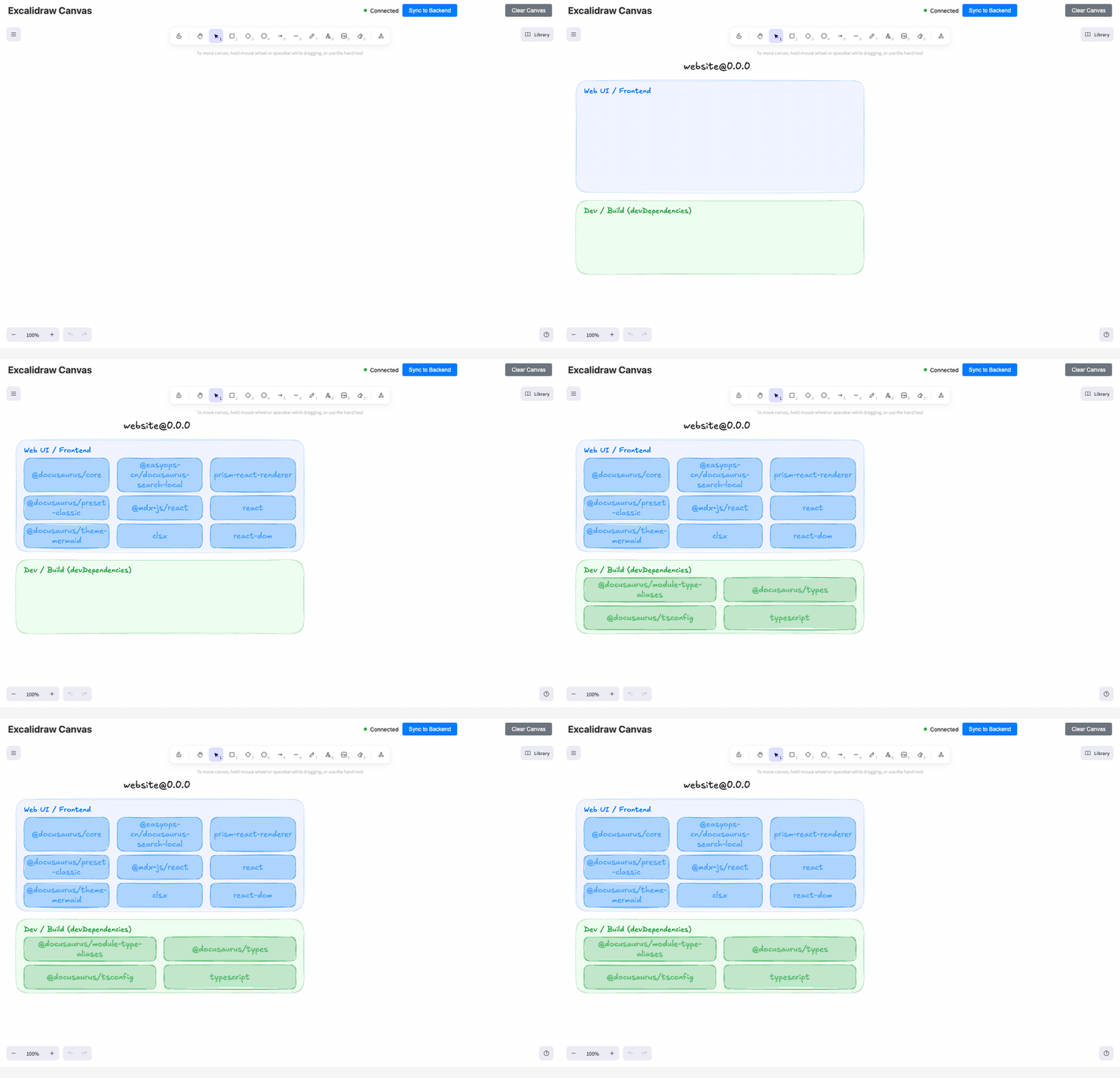
Watch it build a dep map progressively (deterministic path, ~3 seconds end-to-end):
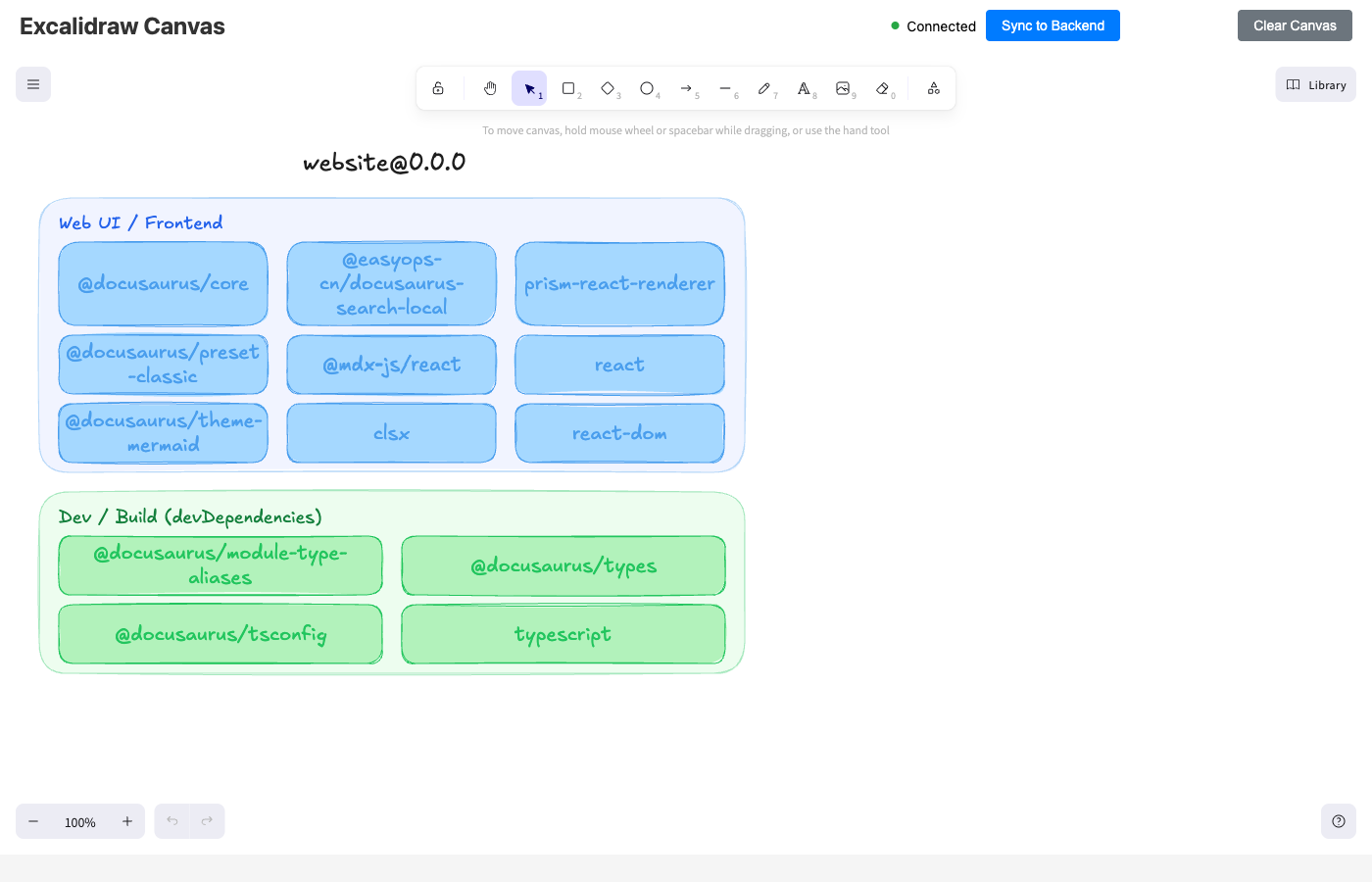
The completed dep map (docusaurus website, 13 deps across 2 zones):
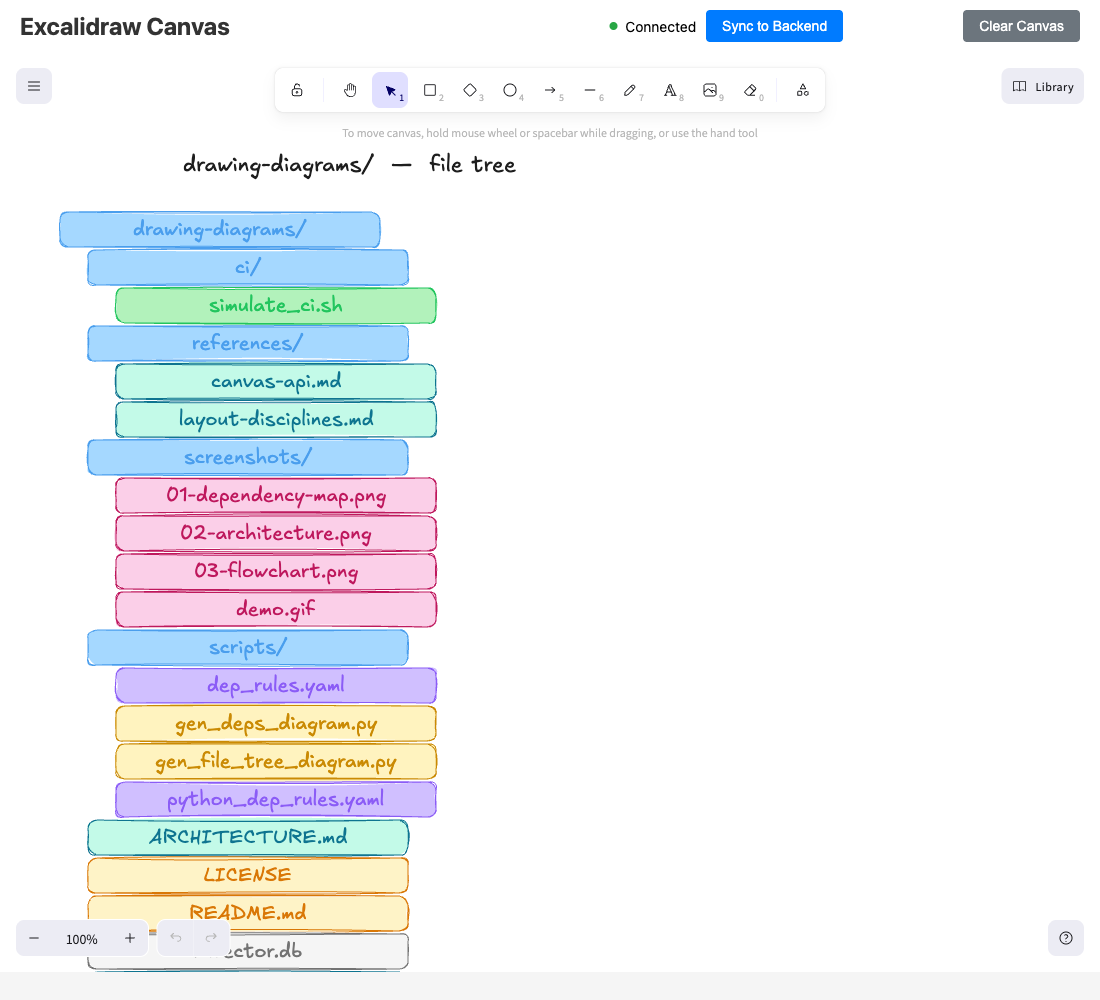
A directory tree (the skill's own repo, depth ≤ 4) — color-coded by file extension:
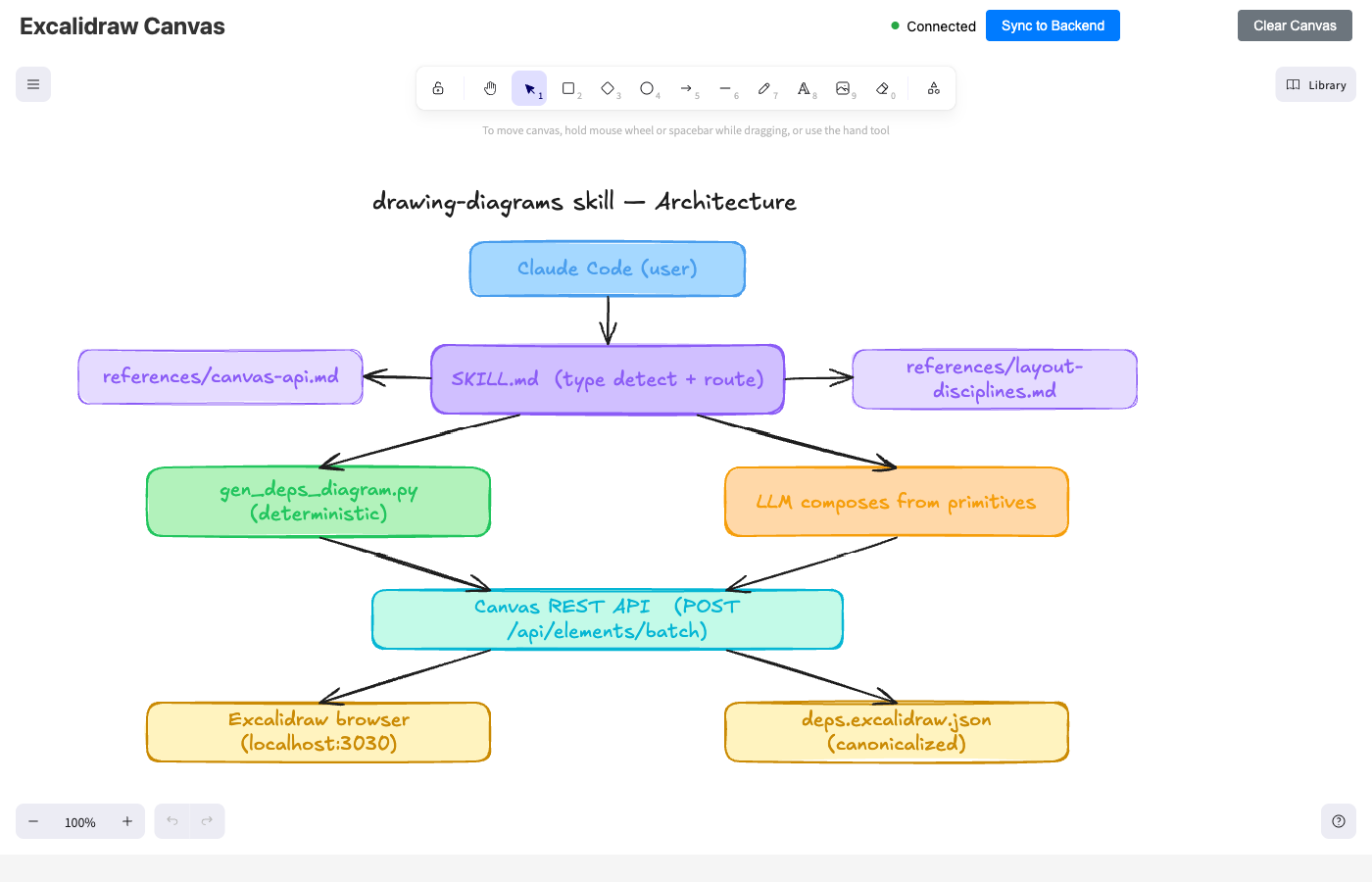
The skill's own architecture, drawn by the skill (LLM-driven composition path):
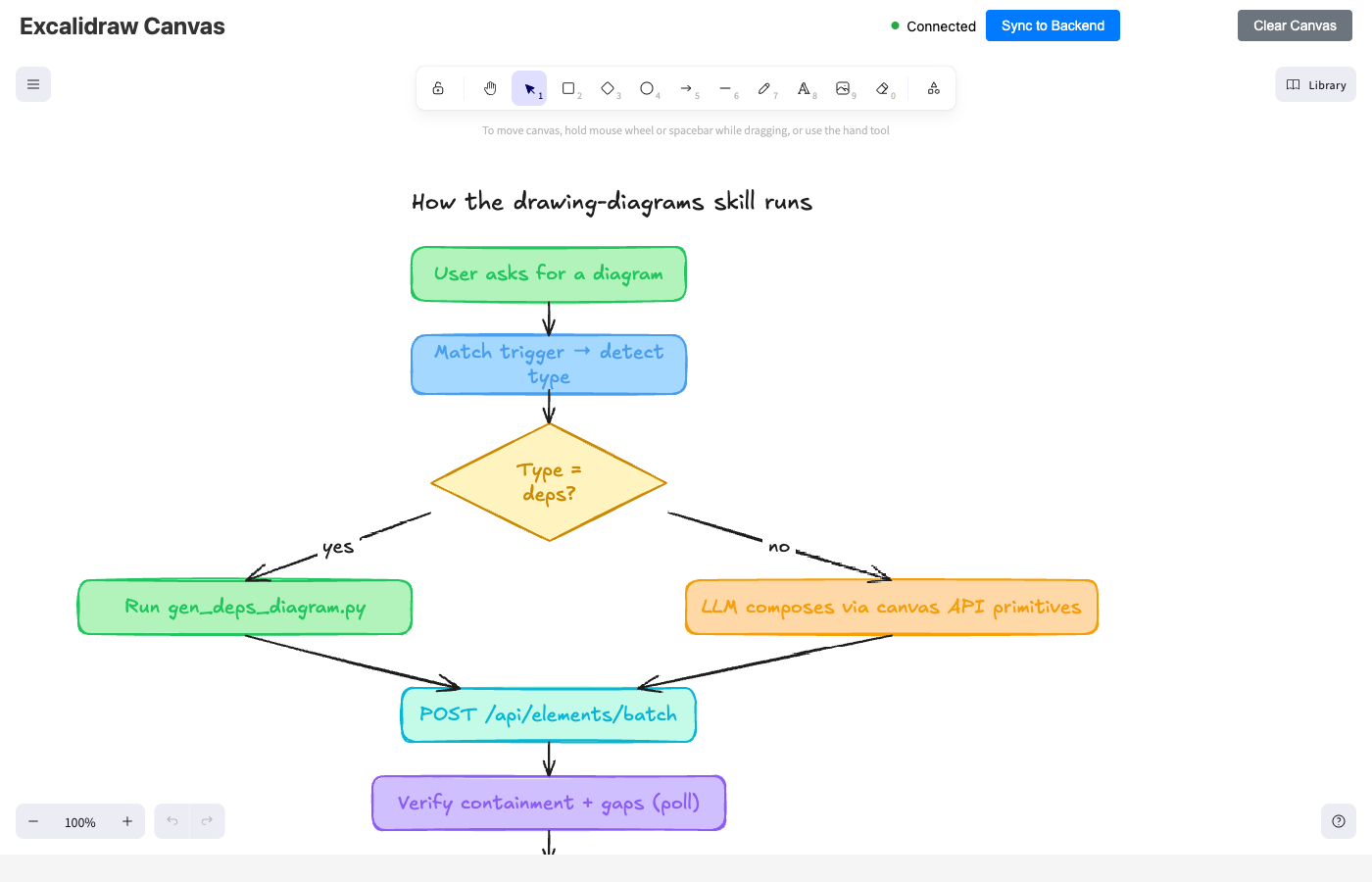
The skill's execution flow as a flowchart (showcasing decision diamonds and convergence):
For the full architecture writeup, see ARCHITECTURE.md.
Install
git clone https://github.com/must-mohsin1/drawing-diagrams.git ~/.claude/skills/drawing-diagrams
That's the skill installed. Now you need the canvas server (a one-time, separate install):
git clone https://github.com/yctimlin/mcp_excalidraw.git ~/mcp_excalidraw
cd ~/mcp_excalidraw && npm install && npm run build
And one Python dep (for the deterministic deps-map path):
pip3 install pyyaml
Restart Claude Code so it picks up the new skill. That's it.
Use it
Open a new Claude Code session and just ask for a diagram. The skill triggers on phrases like:
| You say | Skill does |
|---|---|
"Draw a deps diagram for ~/my-app" | Auto-detects package.json / pyproject.toml / requirements.txt. Categorizes deps into colored zones, draws on canvas, saves canonical JSON |
"Show me the file tree of ~/projects/foo" | Walks the directory (max-depth 4), draws an indented tree color-coded by file extension |
"Visualize the architecture of ~/projects/foo" | Reads source, picks modules, places them in a layered diagram |
| "Sequence diagram for OAuth: browser → app → IdP → callback" | Lifelines + numbered messages |
| "Flowchart for our onboarding" | Rectangles + diamonds for decisions |
| "State machine for an Order: created → paid → shipped → delivered" | Ellipses + transition arrows |
| "Convert this mermaid to excalidraw: …" | Passthrough via canvas API |
| "Move the auth box left" | Edits the existing canvas in-place |
Live canvas at http://127.0.0.1:3030 — open it in a browser to watch the agent draw.
Why this exists
There are AI diagram generators, but they tend to be one-shot, stateless, and lossy. This skill wires the yctimlin/mcp_excalidraw canvas server to a deterministic Python generator (for dep maps) and to a bundled reference library that teaches the LLM how to compose any diagram type from canvas primitives without rediscovering the layout gotchas every time:
- Arrow binding —
startBinding/endBindingwithfixedPointis mandatory for diagonal arrows - Defensive sizing — Excalidraw silently doubles a box height when its label wraps; zones must account for it
- Cascade rule — when a zone grows, the row below must shift; layouts are coupled, not independent
- Race condition — POST returns before WebSocket sync; poll-until-count-matches before snapshotting
- Canonicalization — strip volatile fields (timestamps, seeds, version nonces) for deterministic git diffs
All of this is encoded in references/canvas-api.md and references/layout-disciplines.md, which the skill explicitly tells the LLM to read before composing diagrams.
What's inside
drawing-diagrams/
├── SKILL.md                              ← The skill itself — Claude reads this first
├── README.md                             ← This file
├── ARCHITECTURE.md                       ← Technical deep-dive — how it all works
├── LICENSE                               ← MIT
├── references/
│   ├── canvas-api.md                     ← REST + MCP tool inventory, schemas, palette, toolbar zone
│   ├── layout-disciplines.md             ← Pitch, defensive sizing, cascade, anti-patterns, visual verify
│   └── complex-layouts.md                ← Named patterns: CP/DP, fan-out, hub-and-spoke, n-tier, etc.
├── scripts/
│   ├── gen_deps_diagram.py               ← Deterministic dep-map generator (Node + Python)
│   ├── dep_rules.yaml                    ← Node/npm categorization rules
│   ├── python_dep_rules.yaml             ← Python/PyPI categorization rules
│   └── gen_file_tree_diagram.py          ← Deterministic file-tree generator
├── ci/
│   ├── .github/workflows/
│   │   └── diagram-refresh.yml           ← Drop into target repo for auto-PR on dep changes
│   └── simulate_ci.sh                    ← Local dry-run of the CI flow
└── screenshots/                          ← Example renderings (see top of README)
    ├── 01-dependency-map.png
    ├── 02-architecture.png
    └── 03-flowchart.png
CI wiring (deps only, for now)
When you want your dep diagram to auto-refresh on every package.json change:
- Copy
ci/.github/workflows/diagram-refresh.ymlinto your target repo's.github/workflows/ - Copy
scripts/gen_deps_diagram.py+scripts/dep_rules.yamlinto your target repo's.ci/diagrams/ - Commit + push to
main - CI runs on every relevant push, opens a PR if the diagram changed
Dry-run locally first to verify it works against your codebase:
~/.claude/skills/drawing-diagrams/ci/simulate_ci.sh ~/projects/my-app
Customizing categorization
The deterministic dep-map path uses scripts/dep_rules.yaml. To add a new bucket (e.g., your codebase uses Remotion or Tauri and they keep landing in "Utils"):
- id: video
  title: Video / Rendering
  color_zone_bg: "#ffd8a8"
  color_zone_stroke: "#dc2626"
  color_header: "#991b1b"
  color_box_bg: "#fecaca"
  color_box_stroke: "#dc2626"
  patterns:
    - "^remotion$"
    - "^@remotion/"
Buckets matched in declaration order. First match wins. Unmatched runtime deps fall through to utils; unmatched dev deps fall through to dev.
Requirements
- macOS or Linux (Windows untested; should work via WSL)
- Node 18+ for the canvas server
- Python 3.7+ with PyYAML for the deterministic generator
- Claude Code installed and configured
License
MIT — see LICENSE.