
DockTerm
munvard/dockterm
Terminal-first workspace para Claude Code com Git, diffs e MCP integrados
Ver no GitHubWorkspace terminal-first para Claude Code que mantém o terminal como foco principal, mostrando painéis de arquivos, Git, MCP e skills sob demanda. Sem telemetria, sem contas, sem cloud — apenas uma camada visual minimalista ao redor do seu terminal real.
Instalação
npx convez-ai munvard/dockterm1 comando no terminal: detecta o formato do repositório (marketplace ou plugin avulso) e instala via Claude Code. Requer Node 18+ e o Claude Code instalado.
Métricas
Casos de uso
- Revisar e commitar mudanças feitas por Claude Code sem sair do terminal
- Visualizar diffs lado a lado e gerenciar staging/commit com segurança
- Gerenciar MCP servers e skills sem abrir IDE pesada como VS Code
Veredito

DockTerm preenche um nicho bem definido: desenvolvedores que vivem no terminal e usam Claude Code precisam de controle visual leve sobre arquivos, Git e MCP sem abrir uma IDE completa. A execução é sólida — xterm real, diffs segmentados, staging intuitivo — mas o público é específico e o projeto está em V1 precoce.
README
A tradução para o português deste README ainda está na fila.
DockTerm
Run claude. Everything else stays out of your way.
A terminal-first desktop workspace for Claude Code — with files, Git, MCP, and skills panels that appear only when you need them.
No telemetry. No accounts. No cloud. Not opt-out — just absent.




DockTerm is terminal-first. The terminal stays central. Panels only appear when you need them.
What is DockTerm?
You run Claude Code in a terminal. It edits files, runs commands, changes your repo — and you keep alt-tabbing to an editor just to see what happened, to a Git client to review and commit, to a file browser to poke around.
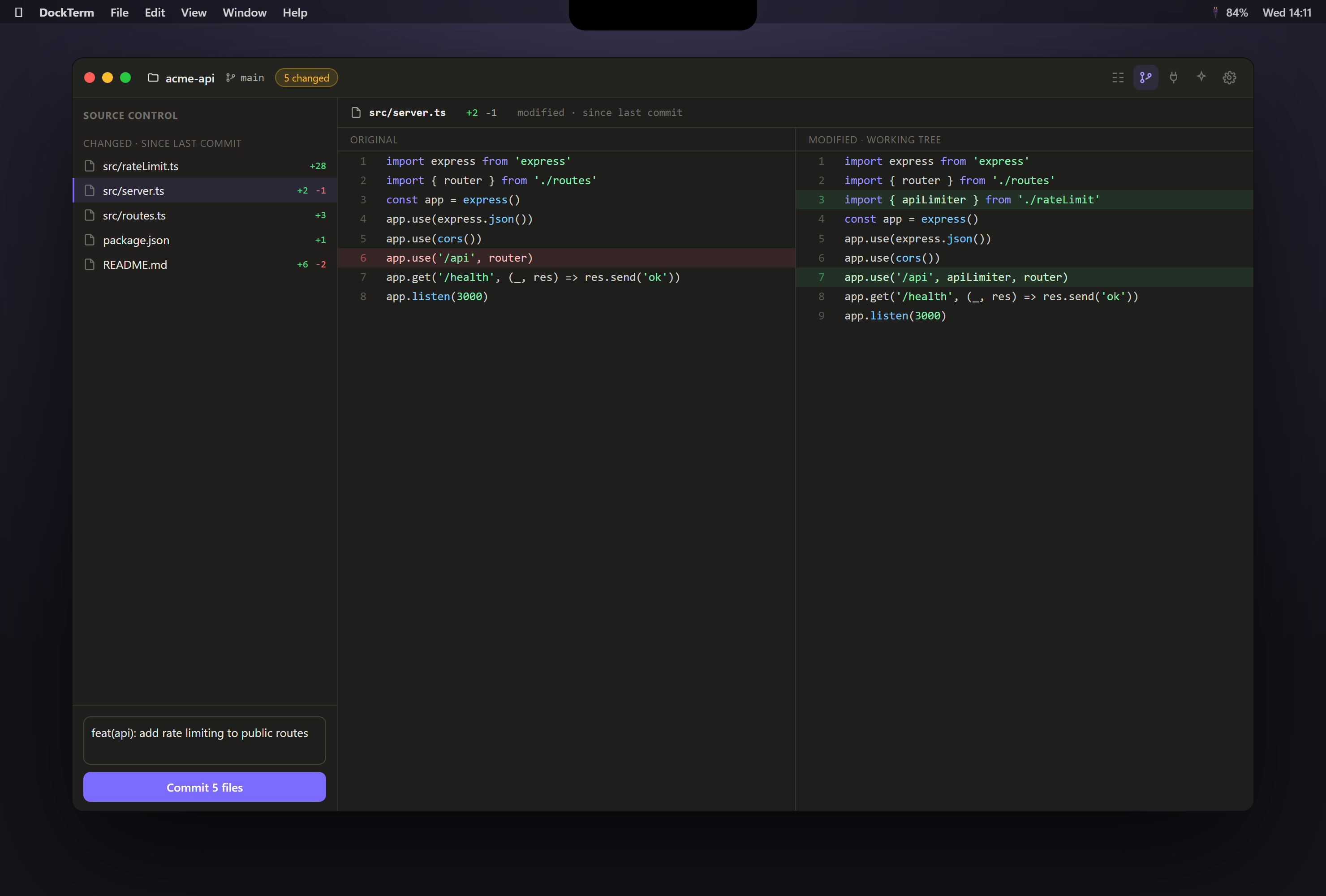
DockTerm is the workspace that was missing. A real terminal stays the hero of the screen — you run claude in it, exactly like you do today. When Claude changes things, DockTerm lights up what changed, lets you open a diff, stage, and commit safely, and shows your MCP servers and skills honestly — all without leaving the window, and without DockTerm ever calling an AI API of its own.
It is not an IDE, and it does not try to be. There is no LSP, no extension marketplace, no AI chat. The terminal is never subordinate to a panel.
Who is it for?
Developers who live in the terminal, use Claude Code, and want quick visual control over files, diffs, Git, and Claude's MCP/skills configuration — without booting a full IDE or trusting a cloud service with their code.
Why not just iTerm / Windows Terminal?
Those are excellent terminals — and DockTerm doesn't replace them. But a terminal alone can't show you a syntax-highlighted diff of what Claude just changed, let you stage and commit with one click and a beginner-safe guardrail, or render your .mcp.json with secrets masked. DockTerm wraps a terminal with exactly those on-demand views.
Why not VS Code / Cursor?
Because opening a 400 MB IDE to review a three-line change breaks the terminal flow, and because Cursor/Copilot want to be the AI. DockTerm's stance is the opposite: Claude Code is the AI; DockTerm is the calm workspace around it. No AI calls, no accounts, no cloud sync, no telemetry.
Core features
| Real terminal | xterm.js + a native PTY (your real shell). Run claude here. Resize, search, copy/paste, true-color, unicode. |
| Mini terminal | A second toggleable shell for manual commands while the main one is busy. |
| File tree + editor | Monaco editor with tabs, dirty indicators, save-with-conflict-guard, and binary/huge-file protection. |
| Beginner-safe Git | Grouped status, stage/unstage/discard, commit, push/pull with publish-branch flow, branches — with plain-language hints and confirmations on destructive actions. |
| Diff review + checkpoints | See what changed since your last commit, this session, or a pinned checkpoint; open a side-by-side diff for any file. |
| MCP panel | Read-only view of your configured MCP servers, with secrets masked. |
| Skills panel | Browse Claude Code skills & commands; scaffold new ones from templates. |
| Command palette | Ctrl/⌘+Shift+P for everything, with platform-correct shortcuts. |
The Claude Code workflow
- Open a project. The terminal starts in its directory.
- Run
claudeand let it work. - As files change, the top bar shows
N changedand the tree badges update. - Open Review (or Source Control), click a file → read the diff.
- Stage what you trust, write a message, Commit. Push when ready.
DockTerm watches the filesystem and Git only — it never reads your prompts, never calls an API, and never sends anything anywhere.
MCP & Skills visibility
DockTerm parses your Claude Code config read-only and never executes anything:
- Project
.mcp.jsonis shown by default; user-scope~/.claude.jsononly after you opt in. - Every
env/headervalue is masked to its key name; URLs are shown host-only (query tokens stripped). - A trust warning is always present: only use MCP servers you trust — external content can carry prompt-injection risk.

Git safety
Beginner Git Mode is on by default: short explanations of staged/unstaged/push/branch, and every destructive action shows a confirmation with the exact command it will run. Force push is only ever --force-with-lease; hard reset and unmerged-branch deletion simply aren't in the UI — that's the terminal's job.

Installation
Builds are produced by CI on each release. macOS and Windows builds are unsigned in this early V1 — see the bypass notes below. This is a developer tool; treat it accordingly.
- Go to Releases.
- Download the file for your OS:
- Windows —
DockTerm-<version>-windows-x64.exe(NSIS installer) - macOS —
DockTerm-<version>-mac-arm64.dmg(Apple Silicon) or-x64.dmg(Intel) - Linux —
DockTerm-<version>-linux-x64.AppImage
- Windows —
- Install and run.
macOS Gatekeeper (unsigned): right-click the app → Open, or run xattr -cr /Applications/DockTerm.app.
Windows SmartScreen (unsigned): More info → Run anyway.
Development
Requires Node 20+ and a C++ toolchain only if your platform lacks a node-pty prebuild (Windows ships prebuilds; macOS too).
git clone https://github.com/munvard/dockterm
cd dockterm
npm install
npm run dev          # launch the app with HMR
npm run typecheck    # strict TypeScript, no emit
npm test             # unit tests (Vitest)
npm run build        # production bundles
npm run package      # build an installer for your OS
See CONTRIBUTING.md for the architecture tour and platform notes.
Security model
contextIsolation: true,nodeIntegration: false,sandbox: true; production loads over a customapp://protocol with a strict CSP and no remote content.- Every IPC channel is an explicit verb, validated with zod, with a sender check. No generic dispatcher.
- Filesystem access is jailed to the open project (symlink-safe, case-insensitive on Windows). Reading
~/.claudeis a separate, opt-in capability. - Every
gitinvocation runs withcore.hooksPath=so a malicious repo's hooks can never execute. - "Run script" buttons paste into the mini terminal — visible execution, never a hidden
exec. - The telemetry code does not exist.
Full details: docs/SECURITY_MODEL.md.
Roadmap
Shipped in V1: terminal, mini terminal, files, editor, Git, review + checkpoints, MCP & skills panels, command palette, settings. Next up and further out (MCP health checks, live tool lists, per-project profiles) live in docs/ROADMAP.md.
Status
Early, production-focused V1. The core is real and tested, but this is young software. It is not a replacement for iTerm or Cursor, it makes no enterprise-security claims, there is no MCP marketplace, and the builds are unsigned. Bugs and rough edges are expected — please file them.
Contributing
Issues and PRs welcome — start with CONTRIBUTING.md and the Code of Conduct. Security reports: see SECURITY.md.
License
MIT © DockTerm contributors. Built with Electron, xterm.js, Monaco, and simple-git.