
Claude Agent
Mrliuch/claude-agent
Controle remoto auditável de Claude Code com aprovação humana integrada
Ver no GitHubAgent remoto em Go que permite controlar Claude Code em uma máquina alvo via WebSocket, com aprovação do usuário no navegador para cada ação sensível. Distribuído como um único binário com console web embutido e zero dependências externas.
Instalação
npx convez-ai Mrliuch/claude-agent1 comando no terminal: detecta o formato do repositório (marketplace ou plugin avulso) e instala via Claude Code. Requer Node 18+ e o Claude Code instalado.
Métricas
Casos de uso
- Executar Claude Code em servidores de produção remotos com controle local
- Automatizar tarefas em máquinas atrás de bastion ou VMs isoladas
- Auditar e aprovar manualmente cada ação perigosa (Bash, file writes) antes da execução
Veredito

Ferramenta especializada e bem-executada para quem precisa rodar Claude Code em infraestrutura remota com segurança. A arquitetura de human-in-the-loop é sólida e o zero-dependency binary elimina fricção de deployment.
README
A tradução para o português deste README ainda está na fila.
claude-agent
English · 简体中文
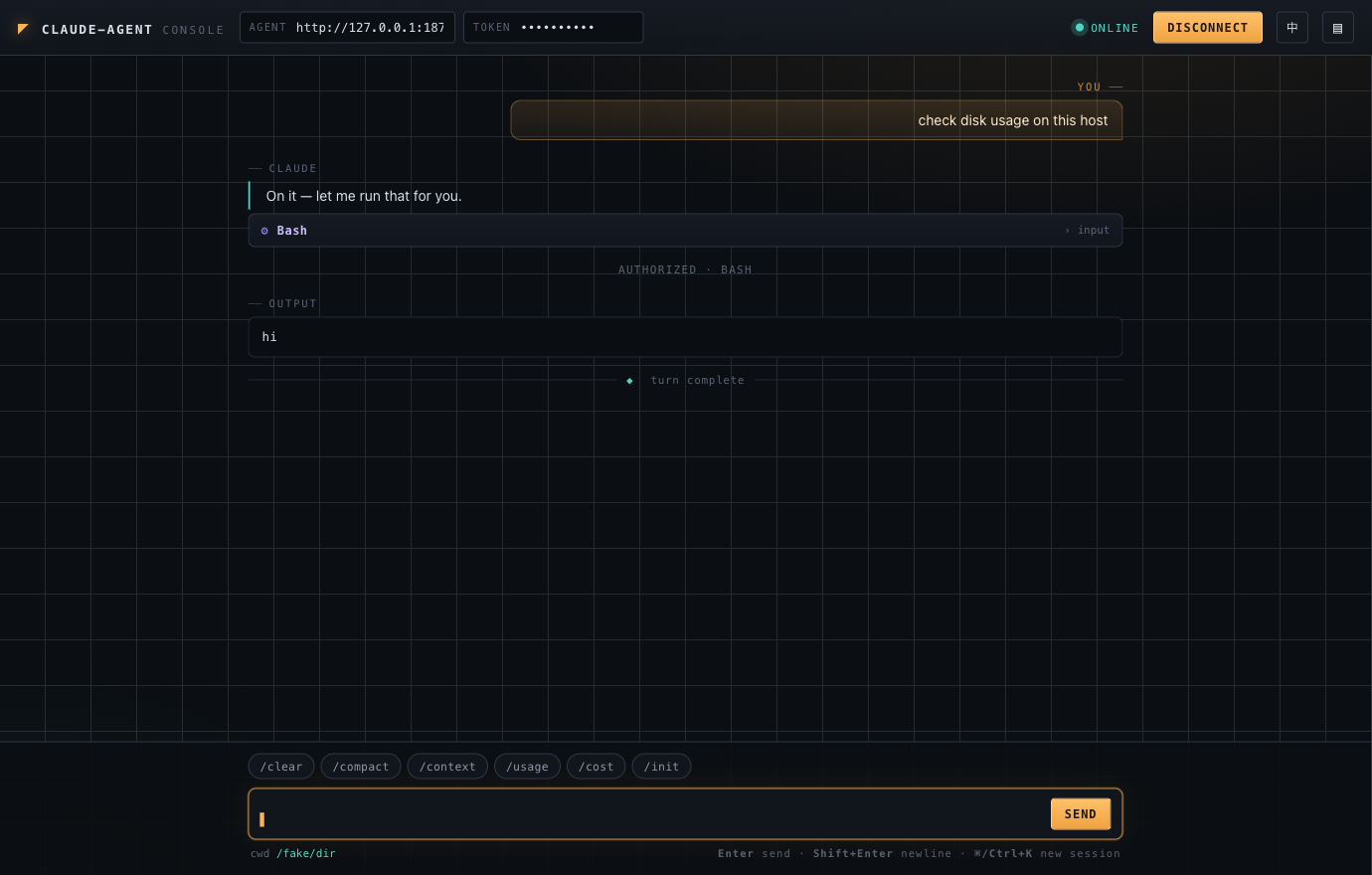
A tiny, single-binary agent that lets you drive Claude Code on a remote machine from your browser — over WebSocket, with human-in-the-loop approval for every dangerous action.
claude-agent runs on a target server, spawns the locally-installed claude CLI as a
subprocess (speaking its stream-json bidirectional control protocol), and exposes a
token-authenticated WebSocket endpoint. It ships with a zero-dependency web console
embedded in the binary, so you can point a browser at it and start working immediately.
  Browser ──WS──> claude-agent (target host) ──subprocess──> claude code CLI
   web console        token auth                              runs on the box itself
No API keys live in the agent. Credentials, model selection, and any third-party gateway
config are entirely owned by the claude CLI on the target machine — the agent just drives it.
Why
Sometimes the box you need Claude Code to work on isn't the box in front of you: a
production server, a build host, a VM behind a bastion. claude-agent gives that box a
thin, auditable remote-control surface:
- Single static binary, zero runtime dependencies — drop it on the host and run.
- Embedded web console — no separate frontend to build or host.
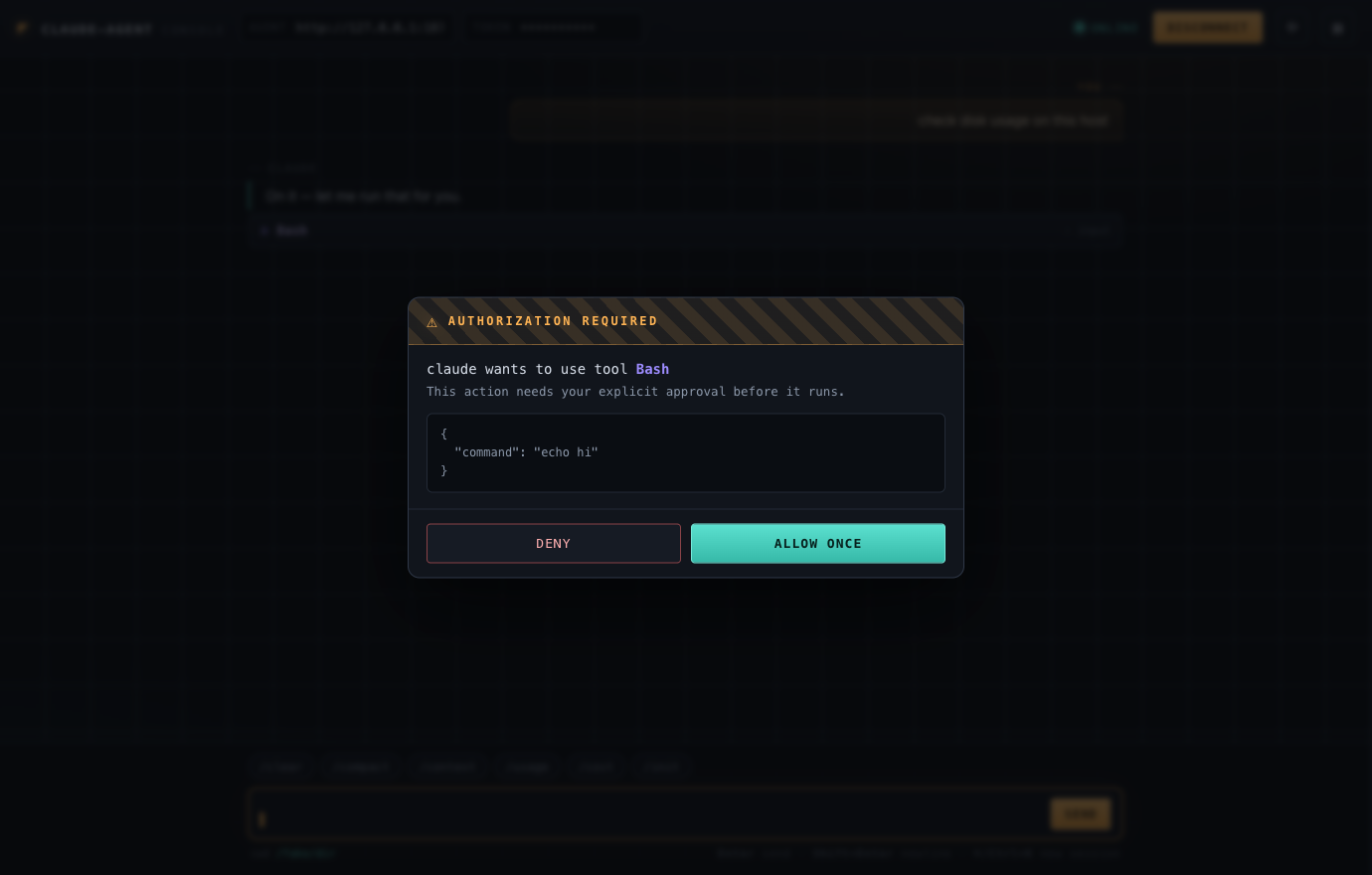
- Permission prompts surface in your browser. The agent runs
claudewith--permission-mode default, so every privileged tool call (Bash, file writes, …) is forwarded to you as apermission_requestand only executes after you click Allow. - Fenced file manager — browse / view / download / upload within the working
directory, with strict path-jail (no
..escape, no symlink escape). - Embeddable — the same WebSocket endpoint can sit behind your own auth-relay backend if you'd rather not expose the agent directly.
Quick start
1. Prerequisites
On the target machine:
- The
claudeCLI is installed and works when run manually by the same user that will run the agent (i.e.claudecan already authenticate and hold a conversation). The agent inherits whatever credentials/config that user'sclaudealready has. - Go 1.25+ (only if you build from source).
2. Build & run
git clone https://github.com/Mrliuch/claude-agent.git
cd claude-agent
go build -o claude-agent .

# pick a long random shared token
AGENT_TOKEN=$(openssl rand -hex 24) ./claude-agent
Then open http://<host>:8765/ in a browser, paste the same token, and hit Connect.
The web console is served at
/from the same origin, so there are no CORS hoops. The token you paste in the browser is not baked into the served HTML.
Configuration
All configuration is via environment variables.
| Variable | Description | Default |
|---|---|---|
AGENT_TOKEN | Required. Shared auth token; clients must present it. | — |
AGENT_LISTEN_ADDR | Listen address. | :8765 |
AGENT_UI | Set to off to disable the built-in web console at /. | on |
CLAUDE_BIN | Path/command for the Claude Code CLI. | claude |
CLAUDE_MODEL | Model to pass to claude; empty = CLI default. | (empty) |
CLAUDE_WORK_DIR | Working directory for claude (and the file-manager jail root). Empty = the run user's $HOME. | (empty) |
CLAUDE_PERMISSION_MODE | Passed to claude --permission-mode. Keep default so dangerous ops prompt. | default |
CLAUDE_IDLE_TIMEOUT | Seconds of inactivity before the session (and the claude child process) is reaped. 0 = disabled. | 1800 |
AGENT_DEBUG | Set to any value to log raw bridge traffic. | (empty) |
⚠️ Never set
CLAUDE_PERMISSION_MODEto anything that bypasses prompts on a host you care about. The whole point is that you approve each action.
Deployment
Option A — Run the binary directly (recommended)
Running on the host directly means claude can see the real host filesystem — best for
actually troubleshooting that machine.
/etc/systemd/system/claude-agent.service:
[Unit]
Description=claude-agent
After=network.target

[Service]
User=ops
Environment=AGENT_TOKEN=<your-random-token>
Environment=AGENT_LISTEN_ADDR=:8765
Environment=CLAUDE_WORK_DIR=/home/ops
ExecStart=/usr/local/bin/claude-agent
Restart=always

[Install]
WantedBy=multi-user.target
sudo systemctl daemon-reload && sudo systemctl enable --now claude-agent
Option B — Docker
The provided Dockerfile builds the agent and bundles Node + the Claude Code CLI.
docker build -t claude-agent .
docker run -d --name claude-agent -p 8765:8765 \
  -e AGENT_TOKEN=<your-random-token> \
  claude-agent
⚠️ Inside a container,
claudeonly sees the container's filesystem. To work on the host, prefer Option A, or mount host paths / use--network hostand grant access deliberately.
Security model
claude-agent gives a browser the ability to run commands on a machine. Treat the token
like a production credential and lock the surface down:
- Firewall the port. Only allow the networks/hosts that should reach it.
- The token rides in the query string (WebSocket can't carry custom headers easily).
Put TLS in front for anything beyond a trusted LAN/VPN — terminate
wss://at a reverse proxy, or tunnel over SSH/VPN. - Approval is mandatory by design. With
--permission-mode default, no privileged tool runs until you allow it in the browser. Deny is always one click away (orEsc). - The file manager is path-jailed to
CLAUDE_WORK_DIR: lexical..is neutralized and symlinks are resolved and re-checked against the jail root before any read/write. - Disable the console with
AGENT_UI=offif you only want to drive the agent from your own backend relay.
Web console
Served at / (unless AGENT_UI=off). It's a single self-contained HTML file embedded in
the binary — no build step, no external fonts or CDNs, works offline.
- Chat with the remote Claude: streamed assistant text, tool-use cards, and tool output.
- Native command bar — one click sends
/clear,/compact,/context,/usage,/cost, or/initstraight to Claude (these run over the samestream-jsonchannel). - Authorization overlay for every
permission_request— see the exact tool + input before allowing/denying. - Files drawer — browse the working directory, view text files, download, all jailed.
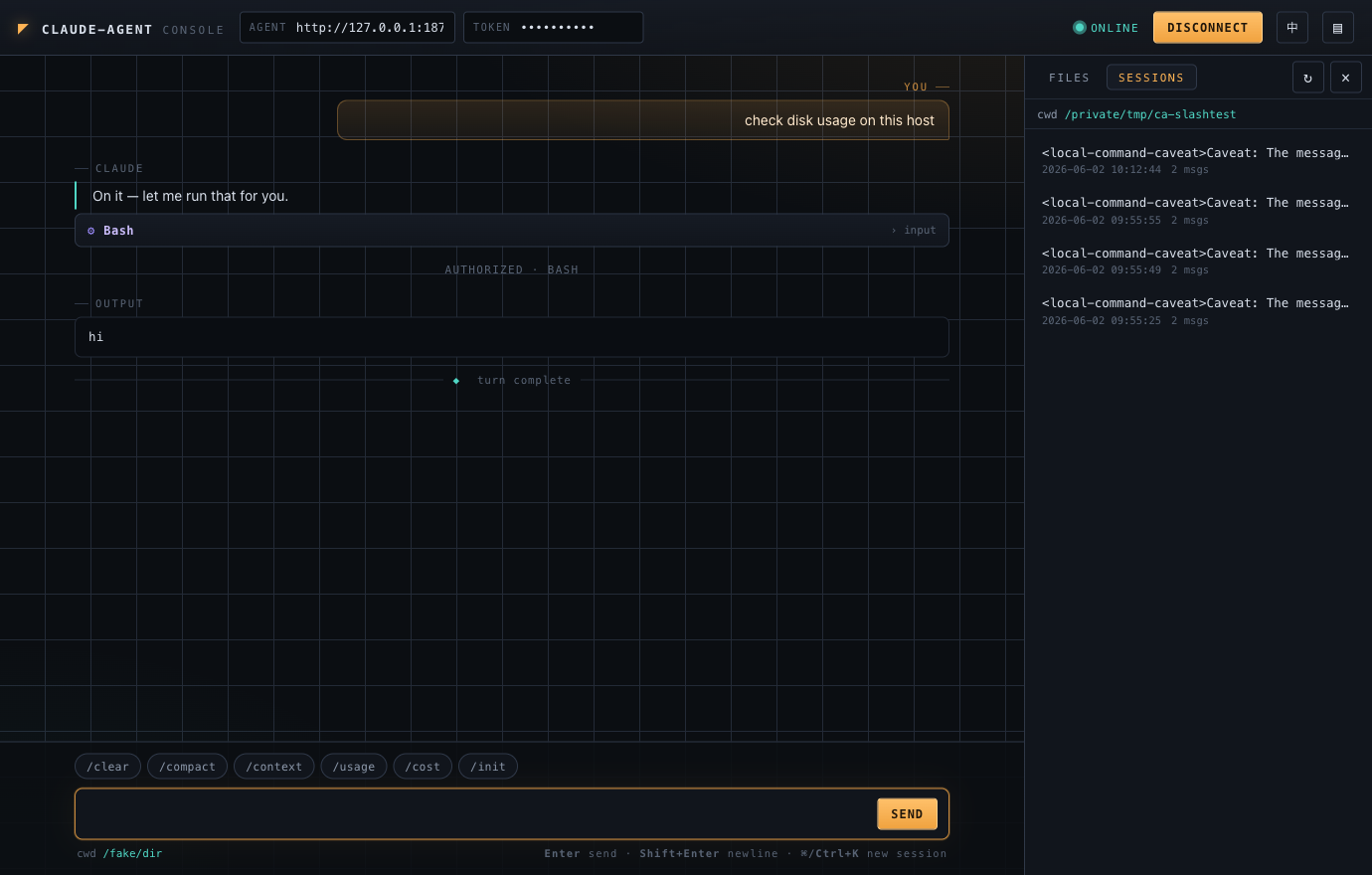
- History sessions — see the current directory's past Claude sessions, read any
transcript, and resume one to continue with full context (
--resume). - Session continuity — the console remembers the
session_idand reconnects with--resume;⌘/Ctrl+Kstarts a fresh session. - Bilingual UI — one-click English ⇄ 中文 toggle in the top-right (remembers your choice).
Every dangerous action stops for your approval:
Browse and resume the working directory's Claude history:
Using it behind your own backend (relay mode)
The WebSocket endpoint is transport-agnostic: any backend can authenticate its own users
however it likes, then transparently relay frames to claude-agent. The agent stays a
dumb, token-gated executor; your backend never needs an API key. Set AGENT_UI=off and the
agent becomes purely a protocol endpoint.
Protocol reference
WebSocket: GET /agent/chat?token=<AGENT_TOKEN>[&session_id=<id>]
Health check: GET /healthz → {"status":"ok"}
Client → server
{ "type": "user_message", "text": "check disk usage" }
{ "type": "user_message", "text": "/context" }   // native slash commands work too
{ "type": "permission_response", "request_id": "...", "allow": true, "tool_input": { } }
{ "type": "close" }
Native Claude slash commands (
/clear,/compact,/context,/usage,/cost,/init, …) are just user messages whose text starts with/— Claude interprets them over the samestream-jsonchannel, so the console's command bar simply sends them.
Server → client
type | Meaning |
|---|---|
ready | Session is up. Carries cwd, session_id. |
assistant | blocks[] of {kind:"text"} / {kind:"tool_use", name, input}. |
tool_result | results[] of {content, is_error}. |
permission_request | request_id, tool_name, tool_input, title, description. |
result | Turn summary: subtype, is_error, duration_ms, total_cost_usd, result. |
error | {msg}. |
closed | claude exited; stderr tail included. |
File-manager HTTP API
All require ?token=<AGENT_TOKEN>; all paths are relative to and jailed within
CLAUDE_WORK_DIR. Responses use the envelope {code, msg, data} (code:0 = ok).
| Method & path | Purpose |
|---|---|
GET /agent/fs/list?path= | List a directory. |
GET /agent/fs/read?path= | Read a text file (≤1 MB, truncates). |
GET /agent/fs/tree | Recursive relative paths (skips .git, node_modules, …). |
GET /agent/fs/download?path= | Stream any file. |
POST /agent/fs/write | {path, content}. |
POST /agent/fs/upload | {path, content_b64} (≤50 MB). |
POST /agent/fs/mkdir | {path}. |
DELETE /agent/fs/delete?path= | Remove (cannot delete the jail root). |
Session-history HTTP API
Read-only access to the current working directory's Claude session history (stored by
the CLI under ~/.claude/projects/<slug>/<id>.jsonl). Token-gated; same {code, msg, data}
envelope.
| Method & path | Purpose |
|---|---|
GET /agent/sessions/list | List this directory's sessions (id, title, messages, mtime, size) plus its cwd. |
GET /agent/sessions/read?id=<uuid> | Parse a session into a read-only transcript (items[] of {role, blocks, ts}). |
To resume a session, just open a chat WebSocket with &session_id=<id> — Claude
reattaches with --resume and the prior context.
Development
go vet ./...
go test ./...     # includes an end-to-end test against a fake claude (zero API cost)
go build -o claude-agent .
The test suite uses cmd/fakeclaude, a stub that speaks the stream-json control protocol,
so the full bridge + WebSocket + permission roundtrip is exercised without calling the real
Claude API. cmd/smoke is a one-shot client for verifying a live deployment:
go build -o smoke ./cmd/smoke
./smoke ws://<host>:8765/agent/chat <AGENT_TOKEN> "reply with: hello"
Project layout
main.go        entrypoint
config.go      env-driven config
server.go      HTTP/WebSocket routes, heartbeat, idle reaping
bridge.go      drives the claude CLI subprocess (stream-json)
protocol.go    translates claude messages → browser-friendly events
fs.go          path-jailed file-manager endpoints
sessions.go    read-only Claude session history (list + transcript)
web.go         embeds & serves the console
web/index.html the zero-dependency web console
cmd/fakeclaude a stub claude for tests
cmd/smoke      a one-shot deployment smoke client
License
This project drives the Claude Code CLI but is not affiliated with or endorsed by Anthropic. "Claude" and "Claude Code" are trademarks of Anthropic.