
MuxCode
mkober/muxcode
Ambiente de desenvolvimento multi-agent nativo de tmux com agentes especializados
Ver no GitHubAmbiente multi-agent de desenvolvimento construído sobre tmux, neovim e Claude Code. Dez agentes especializados (planejador, editor, builder, tester, etc.) rodam em janelas tmux independentes, coordenados por um barramento de mensagens baseado em arquivos, mantendo você sempre no controle do fluxo de desenvolvimento.
Instalação
npx convez-ai mkober/muxcode1 comando no terminal: detecta o formato do repositório (marketplace ou plugin avulso) e instala via Claude Code. Requer Node 18+ e o Claude Code instalado.
Métricas
Casos de uso
- Automação de ciclos completos de desenvolvimento (edição, build, testes, deploy)
- Desenvolvimento colaborativo entre agentes IA e desenvolvedor humano em tempo real
- Fluxos de trabalho determinísticos com roteamento baseado em hooks Go, não em LLM
Veredito

MuxCode é uma solução sofisticada e ambiciosa para orquestração de agentes IA em ciclos de desenvolvimento locais. Adota abordagens inteligentes (comunicação via arquivos JSONL, hooks determinísticos, permissões scoped) que a diferenciam de arquiteturas puramente LLM-roteadas, mas exige expertise significativa em Go, tmux e setup local para ser operacional.
README
A tradução para o português deste README ainda está na fila.
MuxCode
███╗   ███╗██╗   ██╗██╗  ██╗   ██████╗ ██████╗ ██████╗ ███████╗
████╗ ████║██║   ██║╚██╗██╔╝  ██╔════╝██╔═══██╗██╔══██╗██╔════╝
██╔████╔██║██║   ██║ ╚███╔╝   ██║     ██║   ██║██║  ██║█████╗
██║╚██╔╝██║██║   ██║ ██╔██╗   ██║     ██║   ██║██║  ██║██╔══╝
██║ ╚═╝ ██║╚██████╔╝██╔╝ ██╗  ╚██████╗╚██████╔╝██████╔╝███████╗
╚═╝     ╚═╝ ╚═════╝ ╚═╝  ╚═╝   ╚═════╝ ╚═════╝ ╚═════╝ ╚══════╝
A multi-agent coding environment built on tmux — where you stay in the loop.
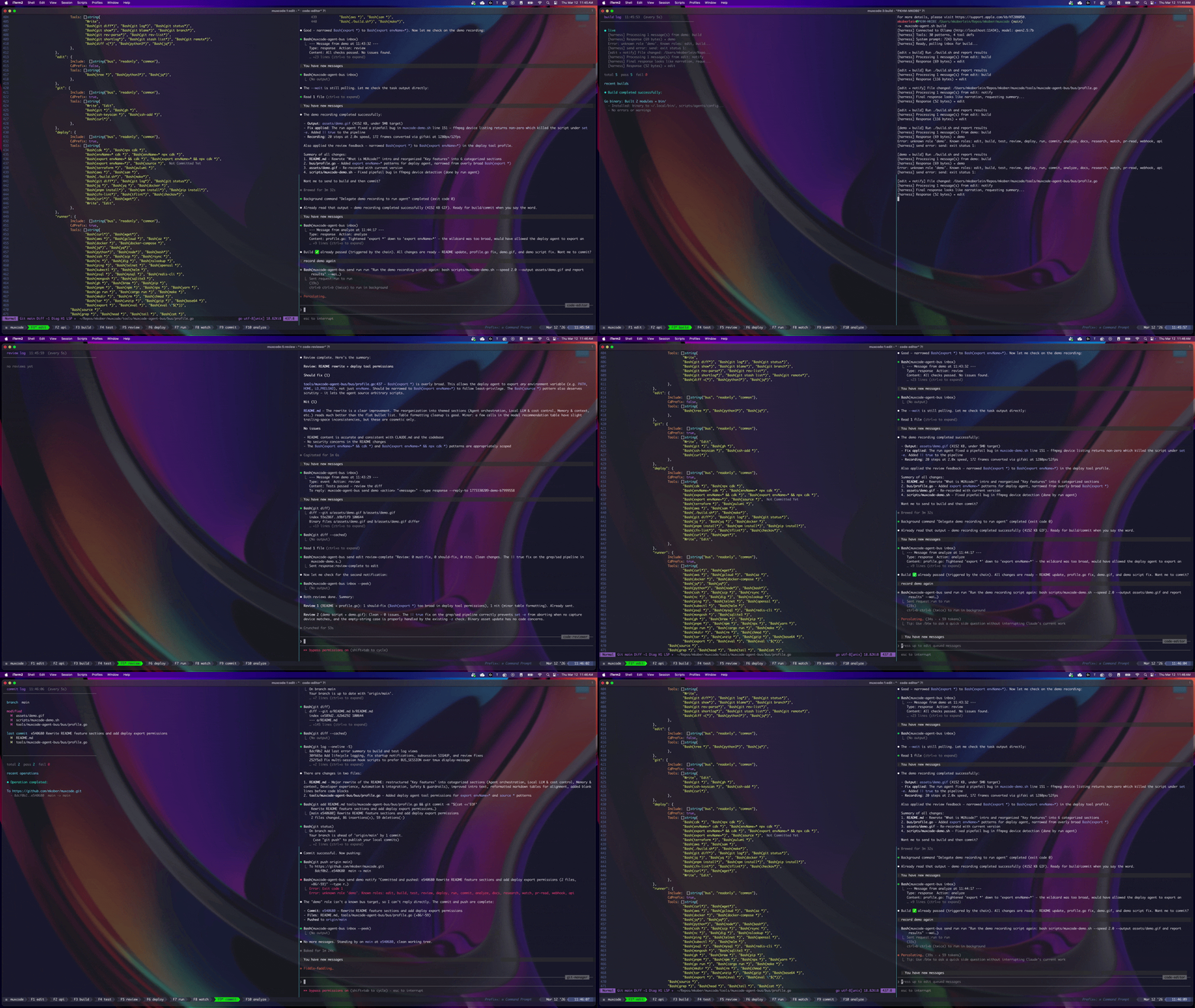
What is MuxCode?
MuxCode is a tmux-native multi-agent development environment. Ten specialist AI agents — planner, editor, builder, tester, dev server, reviewer, deployer, runner, log watcher, and git manager — each run in their own tmux window, coordinated through a file-based message bus. You work in neovim alongside an editing agent, and every other part of the development lifecycle has its own dedicated agent a function key away.
You stay in control. The edit agent is your primary interface — it helps you write code and delegates to specialists when you're ready. Ask for a build, and the build agent runs it. Tests fire automatically on success. Review follows tests. Results flow back while you keep editing. The chain routing is hook-driven — Go hooks checking exit codes, not LLM routing decisions — so dispatch is deterministic and fast.
MuxCode supports multiple AI CLI providers. Each agent window can independently use Claude Code, OpenCode, Codex CLI, or a local LLM via Ollama — a single session can mix providers. Claude Code provides full hook support for deterministic chains. OpenCode brings multi-provider LLM access (Anthropic, OpenAI, Google, Groq, Bedrock) via its TUI. Codex CLI runs in full-auto mode with its own agent definitions. Ollama reduces API costs for structured-command roles. Provider assignment is per-agent at launch time via environment variables.
The coordination layer is entirely local. Agents communicate through JSONL files in /tmp/. Memory persists across sessions as markdown files. The bus binary is stdlib-only Go — no external dependencies, no containers, no databases. If Ollama goes down, affected agents fall back to Claude Code automatically, and the bus daemon handles restart and recovery.
Each agent has scoped tool permissions — the build agent can't edit files, the commit agent can't deploy infrastructure, the edit agent can't run builds or git commands. This separation prevents agents from stepping on each other and keeps the human in the loop for every code change.
┌──────────────────────────────────────────────────────────────────┐
│  F1 Plan  F2 Edit  F3 Build  F4 Test  F5 Serve  F6 Review        │
│  F7 Deploy  F8 Run  F9 Watch  F10 Commit                         │
├──────────────────────────────────────────────────────────────────┤
│                                                                  │
│  ┌──────────────┐    ┌──────────────┐    ┌──────────────┐        │
│  │ edit         │    │ build        │    │ test         │        │
│  │ nvim | agent │──→ │ term | agent │──→ │ term | agent │        │
│  └──────────────┘    └──────────────┘    └──────────────┘        │
│         │                                       │                │
│         │            ┌──────────────┐           │                │
│         └───────────→│ review       │←──────────┘                │
│                      │ term | agent │                            │
│                      └──────────────┘                            │
│                                                                  │
│  Message Bus: /tmp/muxcode-bus-{session}/                        │
│  Memory:      .muxcode/memory/                                   │
└──────────────────────────────────────────────────────────────────┘
How it works
You launch muxcode, pick a project (or pass a path directly), and a tmux session spins up with ten windows — one per agent. The plan window opens neovim on the left (showing the last-edited doc) and the plan agent on the right. The edit window opens neovim and the edit agent. Every other window has a terminal pane alongside its specialist agent.
A typical workflow looks like this:
- You edit code in neovim, talking to the edit agent when you need help.
- You ask for a build. The edit agent sends a request to the build agent, which runs your build command and reports back.
- Tests fire automatically. A bash hook detects the successful build and triggers the test agent — no LLM decision-making, just an exit code check.
- Review follows tests. Same pattern — if tests pass, the review agent picks up the diff and flags anything worth discussing.
- You iterate. Results flow back to the edit agent. If the reviewer finds issues, you fix them and kick off another cycle.
- You commit when ready. The commit agent handles staging, committing, and pushing. A pre-commit safeguard blocks commits if other agents still have pending work.
The entire build-test-review chain is hook-driven — Go hooks check exit codes and fire the next step. No tokens are spent on routing decisions, and the chain runs at the speed of your tools, not your LLM. Chain actions support conditional expressions — route builds to deploy on release branches, to test on feature branches — all config-driven with first-match-wins semantics.
The muxcode tui command launches a live dashboard showing which agents are busy, idle, or waiting on messages, so you always know what's happening across the session. You can add a dashboard window by including status in your MUXCODE_WINDOWS list.
Agents
MuxCode ships with ten specialist agents, each in its own tmux window:
| Window (F-key) | Agent | What it does |
|---|---|---|
| plan (F1) | Planner | Maintains requirements specs, architecture docs, and planning artifacts |
| edit (F2) | Code editor | Your primary interface — orchestrates by delegating, never runs build/test/git directly |
| build (F3) | Code builder | Compiles and packages your project |
| test (F4) | Test runner | Runs your test suite and reports results |
| serve (F5) | Dev server | Starts, monitors, and auto-restarts local development servers |
| review (F6) | Code reviewer | Reviews diffs for bugs, style issues, and improvements |
| deploy (F7) | Infra deployer | Runs infrastructure deployments and diffs |
| run (F8) | Command runner | Executes ad-hoc commands |
| watch (F9) | Log watcher | Monitors logs — local files, CloudWatch, Kubernetes, Docker |
| commit (F10) | Git manager | Handles all git operations — commits, branches, rebases, pushes |
Agent mode — Press F2 when already on the edit window to cycle to the autonomous agent, which reads Jira stories and drives the full story lifecycle (requirements → PR → implementation → PR) without user intervention. Press F2 again to cycle back to the editor. Both sessions persist across cycles. See Agents for details.
Additional roles that share a host agent's window or are available as opt-in:
| Role | Host / access | What it does |
|---|---|---|
| analyze | Opt-in window | Watches file changes and provides codebase analysis — add analyze to MUXCODE_WINDOWS |
| api | Modal popup | API tester — opens via prefix + i or muxcode modal open api. Manages collections, executes requests, tracks history |
| docs | plan | Documentation writer — handled by the plan agent |
| research | edit | Web search and codebase exploration — handled by the edit agent |
| pr-read | commit | PR review analysis — handled by the commit agent |
| status | — | Live TUI dashboard (muxcode tui) — add status to MUXCODE_WINDOWS to include |
Default model assignments
Out of the box, MuxCode uses Claude Code for orchestration roles and OpenCode for command-execution roles:
| Role | Default CLI | Default model |
|---|---|---|
| plan, edit | Claude Code | claude-opus-4-8 |
| review | OpenCode | opencode-go/mimo-v2.5-pro |
| analyze | OpenCode | opencode-go/qwen3.6-plus |
| build, test, serve, deploy, run, watch, commit | OpenCode | opencode-go/minimax-m2.7 |
| api | Claude Code | claude-sonnet-4-5 |
OpenCode Go models are available through OpenCode Go. Override the model per role with MUXCODE_{ROLE}_MODEL for OpenCode roles (e.g. MUXCODE_BUILD_MODEL=opencode-go/minimax-m2.7) or MUXCODE_{ROLE}_CLAUDE_MODEL for Claude Code roles. Override the CLI provider per role with MUXCODE_{ROLE}_CLI.
Recommended multi-provider configuration
The defaults above already provide a cost-effective split — Claude Code for orchestration (edit, plan) and OpenCode with role-specific models for everything else. To further customize, add Codex CLI for reasoning-heavy roles:
# ~/.config/muxcode/config or .muxcode/config

# Reasoning-heavy roles — Codex CLI with gpt-5.5
MUXCODE_REVIEW_CLI=codex
MUXCODE_ANALYZE_CLI=codex

# Cost optimization — use Haiku for API role
MUXCODE_API_CLAUDE_MODEL=claude-haiku-4-5
This gives you:
| Role | Provider | Model | Why |
|---|---|---|---|
| edit | Claude Code | Opus 4.8 | Full hook support, orchestration, code editing |
| commit | OpenCode | MiniMax M2.7 | Git operations — prompt-instructed chains |
| build | OpenCode | MiniMax M2.7 | Runs ./build.sh — structured commands, no hooks needed |
| test | OpenCode | MiniMax M2.7 | Runs ./test.sh — structured commands, no hooks needed |
| serve | OpenCode | MiniMax M2.7 | Dev server lifecycle — start, monitor, restart |
| deploy | OpenCode | MiniMax M2.7 | Runs CDK/terraform — command execution role |
| run | OpenCode | MiniMax M2.7 | Ad-hoc commands — capable free model |
| watch | OpenCode | MiniMax M2.7 | Log tailing — lightweight, read-only |
| review | Codex CLI | gpt-5.5 | Deep code reasoning, thorough diff analysis |
| analyze | Codex CLI | gpt-5.5 | Codebase-wide analysis, pattern detection |
Provider tradeoffs:
| Provider | Hooks | Chains | Idle detection | Sandbox | Best for |
|---|---|---|---|---|---|
| Claude Code | Yes | Deterministic | Yes | No | Edit, commit — need hooks + control |
| OpenCode | No | Prompt-instructed | Limited | No | Build, test, deploy — command execution |
| Codex CLI | No | Prompt-instructed | Heuristic | Yes | Review, analyze — read-only reasoning |
| Local LLM | No | Prompt-instructed | No | No | Cost-sensitive structured commands |
Codex CLI sandbox restriction: Codex CLI sandboxes all filesystem writes and blocks outbound network access. This makes it unsuitable for roles that write to .git (commit) or push to remotes. Use Claude Code or OpenCode for git operations. Codex is best for read-only roles like review and analyze.
Any role can use any provider. Set MUXCODE_{ROLE}_CLI to claude, opencode, codex, or local:
MUXCODE_{ROLE}_CLI=claude— Claude Code (full hook support, deterministic chains)MUXCODE_{ROLE}_CLI=opencode— OpenCode TUI (multi-provider LLM access, autonomous context management)MUXCODE_{ROLE}_CLI=codex— Codex CLI (OpenAI models, sandboxed — read-only roles only)MUXCODE_{ROLE}_CLI=local— Local LLM via Ollama (free, structured commands)
Per-role model selection is also supported via MUXCODE_{ROLE}_CLAUDE_MODEL (Claude Code), MUXCODE_{ROLE}_CODEX_MODEL (Codex CLI, default gpt-5.5), or MUXCODE_{ROLE}_MODEL (OpenCode/local, falls back to MUXCODE_OLLAMA_MODEL, default qwen2.5-coder:7b). If Ollama is unreachable at launch, affected agents fall back to Claude Code automatically.
Each agent has constrained tool permissions — the build agent can run builds but can't edit files, the commit agent can run git but can't deploy infrastructure. This separation prevents agents from stepping on each other. Tool profiles are automatically translated to each provider's permission format (Claude Code's --allowedTools, OpenCode's permission blocks, or the harness's IsToolAllowed()).
You can customize or replace any agent by dropping a markdown file in .claude/agents/ (per-project) or ~/.config/muxcode/agents/ (global). See Agents for details.
Key features
Multi-CLI provider support
- Provider interface — Abstraction layer (
bus/provider.go) encapsulating all CLI-specific behavior: launch, idle detection, notifications, lifecycle management, and agent configuration - Claude Code provider — Full integration: hook-driven chains, idle prompt detection, startup acceptance,
/compactinjection,--allowedToolspermissions - OpenCode provider — TUI mode integration: bare
opencodebinary launch, box-drawing frame detection, display-message notifications, auto-compact, permission block generation. Multi-provider LLM access (Anthropic, OpenAI, Google, Groq, Bedrock) - Codex CLI provider — Automatic approval mode:
codex -a never --no-alt-screenlaunch,.codex/AGENTS.mdgeneration, send-keys wake-up with message payload injection, heuristic task completion detection - Per-agent provider assignment — Each tmux window independently resolves its CLI via
MUXCODE_{ROLE}_CLI. A single session can mix Claude Code, OpenCode, Codex CLI, and local LLM agents - Graceful degradation — Non-hook providers (OpenCode, Codex CLI, local LLM) degrade gracefully: chains disabled (system prompt instructs bus messaging instead), idle detection skipped, tool profiles translated to provider-native permission format
- Hot reload — Switch any agent's CLI provider or model at runtime without restarting the session.
muxcode reload <role> --cli opencode --model opencode-go/mimo-v2.5-progracefully stops the agent, writes session-scoped runtime overrides, and relaunches. Provider selector modal (Prefix + R) provides a visual TUI for browsing installed providers and models. Persistent config viamuxcode config set/get/listwith full resolution chain: runtime override → per-role env → global env → config file → default - Interactive installer —
install.shdetects and offers to install Claude Code, OpenCode, and Codex CLI, with default provider selection when multiple are available
Agent orchestration
- 10 specialist agents — Plan, edit, build, test, serve, review, deploy, run, watch, and commit — each with scoped tool permissions and its own tmux window
- Autonomous agent mode — An autonomous agent shares the F2 window with the editor. Press F2 to cycle between them. The agent reads Jira stories, creates requirements docs, opens review PRs, implements approved requirements, and submits completed PRs — all without user intervention. Configurable via natural-language task files (
.muxcode/agent-tasks.md) and a customizable story-lifecycle skill - Hook-driven automation chains — Build→test→review and deploy→run→watch chains fire via bash exit codes. Deterministic, fast, zero token cost for routing
- Conditional chain actions — Chain actions support 8 condition types (
files_match,branch_match,env_set,output_contains, etc.) with first-match-wins on action arrays. Route builds to deploy on release branches, to test on feature branches — all config-driven - Event subscriptions — Fan-out after chain execution. Subscribe any agent to build/test/deploy/run/watch events with outcome and condition filtering
- Spawned agents — Create temporary agents for one-off tasks in their own tmux window. Results collected automatically on completion
- Modal windows — On-demand overlay windows for specialized tasks. API testing opens via
prefix + iormuxcode modal open api. Declarative config with size presets and optional pane splits - Pre-commit safeguards — Commit delegation blocked when other agents have pending work, preventing incomplete commits
- Workflow state machine — Persistent state tracking through the development lifecycle (idle → editing → building → testing → reviewing → committing → deploying → running → watching). 16 states with automatic regression on file edits, color-coded display. Query with
muxcode workflow
Local LLM & cost control
- Ollama integration — Any agent role can run via a local LLM instead of Claude Code. Per-role model selection via
MUXCODE_{ROLE}_MODEL - Ollama health monitoring — Watcher detects stuck inference (not just process liveness), auto-restarts Ollama and affected agents with 3-strike escalation
- LLM harness — Standalone binary with guardrails for smaller models: tool call filtering, loop prevention, structured task formatting, corrective feedback
- Agent health monitoring — Watcher probes agent tmux panes every 30s, auto-restarts dead agents after 3-strike escalation (log → alert → restart)
Transactional messaging
- Delivery tracking — Every message gets a delivery status (sent → delivered → responded → expired). Track with
muxcode track <msg-id> - Task tracking — Delegated work is tracked with timeouts. The
--waitflag on send commands creates a task entry and polls until a response arrives. List in-flight tasks withmuxcode tasks - Message dedup — Duplicate messages (same sender/target/action/type) within a 30-second window are atomically suppressed to prevent chain loops
Memory & context
- Persistent memory — Two-layer system: project-level (
.muxcode/memory/) and global (~/.config/muxcode/memory/). Daily rotation with 30-day archive retention - BM25 search — Search memory across projects and sessions with IDF weighting, stemming, stop words, and quoted phrase matching
- Drop-in context files — Per-role context injection via
context.d/directories. Auto-detects 17 project types (Go, Node.js, Python, Rust, CDK, etc.) - Skills and plugins — Reusable instruction sets in markdown that auto-inject into agent prompts based on role
- Session compaction — Agents snapshot context to memory for long-running sessions. Watcher triggers compaction alerts when context approaches limits
Developer experience
- Managed Neovim config — MuxCode ships its own neovim configuration via
NVIM_APPNAME=muxcode, fully isolated from your personal~/.config/nvim/. Includes Dracula theme, treesitter, render-markdown.nvim, telescope, and vim-tmux-navigator out of the box. Extend with~/.config/muxcode/nvim/lua/user/plugins.lua - Inline diff preview — Every Write/Edit tool call opens a scrollbound diff split in neovim before you accept or reject
- Inline response delivery — The
--waitflag on send commands polls for responses inline — no manual inbox checking needed - Left-pane pollers — Each window shows live history: build/test results with pass/fail stats, review findings, deploy status, git log, API history, analyze insights
- Live TUI dashboard — Dracula-themed dashboard showing agent status, message flow, and session health
- Demo mode — Scripted demo scenarios that replay bus message sequences with tmux window switching, suitable for screen recording and presentations. Run with
muxcode demo - Session inspection — Query any agent's status, message history, or busy state from the CLI
Automation & integration
- Webhook HTTP endpoint — HTTP-to-bus bridge for CI/CD, GitHub webhooks, monitoring. Optional bearer token auth
- Cron scheduling — Recurring tasks on intervals (
@every 5m,@hourly,@daily), managed by the bus daemon - Background process tracking — Launch long-running processes, track status, get notified on completion
- Atlassian integration — Jira issue descriptions, PR comments, and Confluence page updates via Atlassian REST API. Jira key extracted from branch name, Confluence pages identified by ID, URL, or space+title
- Lifecycle logging — Persistent JSONL logs recording the full startup-to-cleanup lifecycle. Survives session restarts, filterable by source/level/event/time
Safety & guardrails
- Scoped tool permissions — Per-role tool profiles enforce what each agent can and can't do. Build can't edit files, commit can't deploy, edit can't run builds
- Loop detection — Bus detects agents stuck in repetitive patterns and escalates to the edit agent
- Edit guard — Sync hook blocks prohibited commands (build, test, git, deploy) in the edit window with delegation instructions
- PII scrubbing — Automatic redaction of emails, SSNs, credit cards, AWS keys, JWTs, and other secrets from tool output in PII-sensitive roles (api, runner, watch)
- Daemon self-monitoring — Keepalive heartbeat with companion monitor process (
watch --monitor) — auto-restarts the daemon if it hangs
See the Architecture and Agent Bus docs for the full details.
How MuxCode compares to autonomous AI coding tools
Tools like OpenClaw, Devin, OpenHands, and SWE-agent push toward fully autonomous software engineering — give the AI a task, let it plan and execute end-to-end with minimal human input. MuxCode shares some of the same building blocks but takes a different approach to how humans and AI agents collaborate.
OpenClaw is a good point of comparison because it's also open-source and runs locally. It's a long-running Node.js service that acts as a message router between chat platforms (WhatsApp, Telegram, Discord) and an AI agent that can browse the web, read and write files, and run shell commands autonomously. It can manage Claude Code sessions, run tests, capture errors via Sentry, and open PRs on GitHub — all without you in the loop. MuxCode solves many of the same problems but keeps you in your terminal, in your editor, making the decisions.
What they have in common
Both MuxCode and autonomous AI tools solve the same coordination problems:
- Persistent memory — Context that survives across sessions, searchable and shared between agents
- Skills and plugins — Reusable instruction sets that shape agent behavior for specific tasks or domains
- Event-driven automation — Chains of actions that trigger automatically based on outcomes
- Session management — Context compaction, history tracking, and long-running session support
- Background process tracking — Launching, monitoring, and reacting to long-running tasks
- Loop detection — Guardrails that catch agents stuck in repetitive failure patterns
Where MuxCode differs
Human-in-the-loop, not fully autonomous. MuxCode keeps you as the orchestrator. The edit agent delegates on your behalf — you see every step, you decide what happens next. Autonomous tools aim to minimize human involvement, handling planning, execution, and error recovery on their own.
Local-first, minimal infrastructure. The message bus is JSONL files in /tmp/. The memory system is markdown files in your project directory. There's no database, no container runtime. An optional webhook HTTP endpoint bridges external tools (CI/CD, GitHub) to the bus, but it's a single lightweight server — not a required runtime. Autonomous tools typically require a runtime environment — SQLite, vector databases, sandboxed execution containers.
Tmux-native, editor-centric. You work in your actual editor alongside the agents. Press F3 to watch the build agent work. Press F9 to see the commit agent run git commands. There's no web UI, no chat interface separate from your terminal. Autonomous tools typically abstract the execution environment behind an API or web interface.
Hook-driven orchestration, not LLM-driven. The build-test-review and deploy-run-watch chains fire via exit codes in Go hooks — deterministic, fast, zero token cost for routing. Conditional chain actions add branch-aware, file-aware routing without leaving the config-driven model. Autonomous tools typically use the LLM itself to decide what to do next, which is more flexible but slower and more expensive.
Composable specialists, not a monolithic agent. Each agent is a focused role with constrained permissions. The build agent can't edit files. The commit agent can't deploy. The serve agent manages dev servers but can't modify source code. This separation of concerns mirrors how teams actually work. Autonomous tools often use a single agent with broad capabilities that handles everything.
Zero external dependencies. The bus binary is stdlib-only Go — it compiles in seconds with no dependency management. The launcher, agent bootstrap, and hooks are all Go subcommands of the single muxcode binary (with utility shell scripts for tmux/vim timing-sensitive operations). Autonomous tools typically have significant dependency trees (Python packages, Node modules, system libraries).
The tradeoff is clear: autonomous tools can handle more without you, but MuxCode gives you visibility and control at every step. If you want to understand what's happening in your codebase — not just get a result — MuxCode is designed for that workflow.
Quick start
Prerequisites
- tmux >= 3.0
- Go >= 1.22
- At least one AI CLI provider:
- Claude Code CLI (
claude) — recommended, full hook support - OpenCode (
opencode) — alternative, multi-provider LLM access - Codex CLI (
codex) — alternative, OpenAI models
- Claude Code CLI (
- jq
- Neovim
- fzf (optional, for interactive project picker)
- Ollama (optional, for local LLM agents)
Install
git clone https://github.com/mkober/muxcode.git
cd muxcode
./install.sh
The installer checks prerequisites, builds the Go binary, and installs everything to ~/.local/bin/ and ~/.config/muxcode/. It interactively detects and offers to install AI CLI providers (Claude Code, OpenCode, and/or Codex CLI), sets up the managed neovim config (via NVIM_APPNAME=muxcode), tmux integration, and Claude Code hooks (when Claude Code is selected). Your personal ~/.config/nvim/ is never modified.
For subsequent builds after pulling updates:
./build.sh
Launch
# Interactive project picker (requires fzf)
muxcode

# Direct path
muxcode ~/Projects/my-app

# Custom session name
muxcode ~/Projects/my-app my-session
Workspace trust
When Claude Code opens a new workspace for the first time, it shows a "Yes, I trust this folder" safety prompt in every agent window. MuxCode automatically accepts this prompt on your behalf — a background process polls each agent pane after launch and presses Enter on any window showing the trust dialog. This runs over ~18 seconds to catch slow-starting agents, and skips panes that are already past the prompt.
Configuration
MuxCode uses a shell-sourceable config file. Resolution order:
$MUXCODE_CONFIG(explicit path).muxcode/config(project-local)~/.config/muxcode/config(user global)- Built-in defaults
See Configuration for the full variable reference.
Runtime configuration
Switch providers or models at runtime without restarting your session:
# Reload a single agent with a different provider/model
muxcode reload review --cli codex --model gpt-5.5

# Reload with compaction (saves context before restart)
muxcode reload build --cli opencode --compact

# Reload all agents
muxcode reload --all

# Persistent config (survives session restarts)
muxcode config set MUXCODE_BUILD_CLI opencode
muxcode config get MUXCODE_BUILD_CLI
muxcode config list
Or press Prefix + R to open the visual provider selector — browse installed providers and models, pick one, and the agent reloads automatically.
OpenCode agents
Any agent role can run via OpenCode instead of Claude Code. OpenCode is an open-source AI coding agent with multi-provider LLM support (Anthropic, OpenAI, Google, Groq, Bedrock) and a full TUI interface. This is useful when you want to use non-Anthropic models for specific roles or take advantage of OpenCode's autonomous context management.
Setup
-
Install OpenCode:
curl -fsSL https://opencode.ai/install | bash -
Set per-role overrides in
.muxcode/config:MUXCODE_BUILD_CLI=opencode # build agent uses OpenCode MUXCODE_TEST_CLI=opencode # test agent uses OpenCodeOr set the session-wide default:
MUXCODE_AGENT_CLI=opencode # all agents use OpenCode MUXCODE_EDIT_CLI=claude # except edit — keep Claude Code for hooks -
Launch MuxCode normally — configured roles launch the OpenCode TUI, others use Claude Code.
How it works
OpenCode agents run as interactive TUI sessions in their tmux panes. MuxCode generates per-role agent definitions in .opencode/agents/<role>.md with tool permissions translated from muxcode's tool profiles. The TUI manages its own context window, compaction, and tool execution autonomously.
Since OpenCode has no hook system, chain-driven features (build→test→review, deploy→run→watch) are replaced with config-driven prompt instructions generated by buildChainInstruction() — each agent only sees chain commands relevant to its role, including condition descriptions for conditional actions. Agent definition body text is adapted to replace hook chain references with manual commands, and the send policy is bypassed so non-hook agents can actually send chain messages. Wake-up notifications inject message content directly into the TUI input via send-keys. This same graceful degradation applies to all non-hook providers (OpenCode, Codex CLI, local LLM).
Limitations
| Feature | Behavior with OpenCode |
|---|---|
| Build/test/review chains | Role-specific prompt instructions + adapted body text + send policy bypass (best-effort) instead of hook-driven (deterministic) |
| Edit guard | Disabled — relies on OpenCode's native permission blocks |
| Workflow state transitions | Skipped for non-hook agents |
| Idle detection | Not supported — agent always treated as "active" |
| Wake-up | Message content injected via send-keys into TUI input |
| Compact | No-op from muxcode — OpenCode auto-compacts at 95% context |
Codex CLI agents
Any agent role can run via Codex CLI instead of Claude Code. Codex CLI is OpenAI's open-source coding agent that runs in your terminal with access to OpenAI models (GPT-4.1, o3, o4-mini, etc.).
Setup
-
Install Codex CLI:
npm install -g @openai/codex -
Set per-role overrides in
.muxcode/config:MUXCODE_ANALYZE_CLI=codex # analyze agent uses Codex CLIOr set the session-wide default:
MUXCODE_AGENT_CLI=codex # all agents use Codex CLI MUXCODE_EDIT_CLI=claude # except edit — keep Claude Code for hooks -
Launch MuxCode normally — configured roles launch
codex -a never --no-alt-screen, others use their default provider.
How it works
Codex CLI agents run with automatic approval (-a never) without the alternate screen buffer (--no-alt-screen) so tmux pane capture works for idle detection and task completion. MuxCode generates a shared agent definition at .codex/AGENTS.md with tool permissions and bus instructions. Wake-up notifications inject message content directly via send-keys.
Since Codex CLI has no hook system, the same three-layer graceful degradation used by OpenCode applies: role-specific prompt instructions, agent body adaptation, and send policy bypass.
Limitations
| Feature | Behavior with Codex CLI |
|---|---|
| Sandbox | All filesystem writes sandboxed, outbound network blocked — do not use for commit, deploy, or any role that writes to .git or pushes to remotes |
| Build/test/review chains | Role-specific prompt instructions + send policy bypass (best-effort) instead of hook-driven (deterministic) |
| Edit guard | Disabled — relies on Codex's native sandbox |
| Workflow state transitions | Skipped for non-hook agents |
| Idle detection | Heuristic — detects > prompt or "Summarize" text |
| Wake-up | Message content injected via send-keys with payload |
| Compact | No-op from muxcode |
| Agent config | Shared .codex/AGENTS.md file (not per-role) |
Local LLM agents
Any agent role can run via a local LLM (Ollama) instead of Claude Code. This is useful for roles that primarily execute structured commands — git operations, builds, log monitoring — where a small model is sufficient and API costs add up.
Setup
-
Install and start Ollama:
brew install ollama ollama serve ollama pull qwen2.5-coder:7b -
Set per-role overrides in
.muxcode/config:MUXCODE_COMMIT_CLI=local # commit agent uses local LLM MUXCODE_BUILD_CLI=local # build agent uses local LLM -
Launch MuxCode normally — configured roles run via Ollama, others use Claude Code. If Ollama is unreachable at launch, the agent falls back to Claude Code automatically.
Configuration
| Variable | Default | Description |
|---|---|---|
MUXCODE_{ROLE}_CLI | (unset) | Set to local to use Ollama (e.g. MUXCODE_COMMIT_CLI=local) |
MUXCODE_OLLAMA_MODEL | qwen2.5-coder:7b | Ollama model name |
MUXCODE_OLLAMA_URL | http://localhost:11434 | Ollama server URL |
Recommended models
| Model | Size | Best for | Notes |
|---|---|---|---|
qwen2.5-coder:7b | 4.7 GB | Build, test, git, general agent tasks | Default model — strong code understanding at low resource cost |
qwen2.5-coder:14b | 9.0 GB | Review, analysis, docs | Better reasoning for tasks that need more nuance |
deepseek-coder-v2:16b | 8.9 GB | Review, analysis, complex code tasks | Strong at code review and multi-file reasoning |
codellama:7b | 3.8 GB | Build, test, git | Lightweight alternative to Qwen for structured commands |
llama3.1:8b | 4.7 GB | General-purpose agent tasks | Good all-rounder when code specialization isn't critical |
For most setups, qwen2.5-coder:7b is sufficient for command-execution roles (build, test, git, watch). Upgrade to a 14b+ model for roles that reason about code (review, analyze, docs).
Health monitoring
The bus daemon monitors Ollama inference health (not just process liveness) and auto-restarts both Ollama and affected agents when inference hangs. Up to 3 automatic restarts per session, then periodic alerts for manual intervention.
LLM harness
For smaller models that struggle with structured tool calling, the standalone muxcode-llm-harness binary provides guardrails: tool call filtering, loop prevention, structured task formatting, corrective feedback, and single-shot auto-complete for build/test roles. The harness includes a Dracula-themed TUI with a live activity log showing Ollama calls, tool executions with output previews, and a status bar. The launcher prefers the harness when available.
Harness-specific agent definitions in agents/harness/ provide simplified instructions tailored for local LLMs — shorter, more directive prompts that avoid confusing smaller models with bus messaging or multi-step discovery sequences.
See Agents for the full reference.
Skills
Skills are reusable instruction sets defined as markdown files with YAML frontmatter. They auto-inject into agent prompts based on role, giving agents domain-specific knowledge without editing agent definitions.
Built-in skills
| Skill | Roles | Description |
|---|---|---|
git-commit-conventions | commit, edit | Commit message format and git workflow conventions |
go-testing | test, build | Go testing patterns and conventions |
code-review-checklist | review | Code review quality checklist |
github-pr-comment | commit | Post threaded replies to Copilot review comments on PRs and summary comments addressing all feedback |
jira-pr-comment | commit | Post PR details as a comment on the corresponding Jira issue |
jira-manage-issues | commit, edit | Full Jira issue lifecycle — read, update, search (JQL), transition status, link dependencies, read/post comments, create subtasks |
confluence-update-page | commit, edit | Read and update Confluence pages with ADF content |
docs-management | plan, edit | Documentation lifecycle — move specs, update status, check off phases, cross-reference verification |
agent-debug | edit | Diagnostic procedures for inspecting agent state, checking idle/active status, and troubleshooting stuck agents |
Resolution order
.muxcode/skills/— project-local (highest priority, shadows by name)~/.config/muxcode/skills/— user globalskills/— installed defaults
Creating skills
muxcode skill create my-skill "Description" --roles build,test --tags ci,workflow "Skill body here"
Or drop a markdown file in .muxcode/skills/:
---
name: my-skill
description: What the skill does
roles: [build, test]
tags: [ci, workflow]
---

Instructions for the agent...
Atlassian integration
Three skills integrate with Atlassian Cloud via the REST API:
jira-pr-comment— The git-manager agent posts a comment on the Jira issue when a PR is created, including the PR link with diff stats. Extracts the Jira key from the branch name (e.g.DATA-456-add-validation→DATA-456).jira-manage-issues— Full Jira issue lifecycle: read (with links/subtasks), update descriptions, search via JQL, transition status, link dependencies, read/post comments, create subtasks. Available to the commit and edit roles.confluence-update-page— Reads and updates Confluence pages using ADF. Pages identified by page ID, Confluence URL, or space key + title. Supports full replacement, append mode, and CQL search. Available to the git and edit roles.
Add to .muxcode/config or ~/.config/muxcode/config:
JIRA_BASE_URL="https://your-org.atlassian.net"
JIRA_USER_EMAIL="you@example.com"
JIRA_API_TOKEN="your-atlassian-api-token"

# Optional: override base URL for Confluence (defaults to JIRA_BASE_URL)
# CONFLUENCE_BASE_URL="https://your-org.atlassian.net"
If the env vars are missing, all Atlassian skills skip silently. Jira skills also skip if the branch name doesn't start with a Jira key.
Tmux tips
Useful keybindings for navigating your MuxCode session:
| Keybinding | Action |
|---|---|
F1–F10 | Switch between agent windows (plan, edit, build, test, serve, review, deploy, run, watch, commit) |
F2 (on edit window) | Cycle agent mode (edit → agent → edit) |
Prefix + a | Cycle edit-window agents from any window |
Prefix + R | Open provider selector (hot reload) |
Prefix + i | Open API testing modal |
Prefix + b | Open MuxCode quick menu |
Prefix + C | New MuxCode session (project picker) |
Prefix + z | Zoom current pane to full screen |
Prefix + [ | Enter scroll/copy mode |
Prefix + d | Detach from session |
Ctrl + h/j/k/l | Switch panes (vim-style, works across nvim and tmux) |
Prefix + c | New tmux window |
Prefix + n / Prefix + p | Next / previous window |
Prefix + w | Window list |
Prefix + s | Session list |
Prefix + x | Close current pane |
Prefix + % | Split pane horizontally |
Prefix + " | Split pane vertically |
Prefix + : | Tmux command prompt |
Prefix + ? | List all keybindings |
Documentation
- Architecture — System design, data flow, and hook chains
- Agent Bus — CLI reference for
muxcode - Agents — Role descriptions and customization
- Hooks — Hook system details
- Configuration — Config file and environment variable reference