
Claude Computer Use Beta para Windows 64-bit
MinjaeKIM753/ClaudeComputerUseBeta-Win64
Claude controlando seu Windows: automação de desktop via IA
Ver no GitHubPlugin que implementa o Claude 3.5 Sonnet Computer Use (Beta) para ambientes Windows 64-bit, permitindo que Claude controle o computador via interface gráfica. Inclui captura de tela, controle de mouse e teclado, com opções de configuração como delay de ação e downscaling de resolução.
Instalação
npx convez-ai MinjaeKIM753/ClaudeComputerUseBeta-Win641 comando no terminal: detecta o formato do repositório (marketplace ou plugin avulso) e instala via Claude Code. Requer Node 18+ e o Claude Code instalado.
Métricas
Casos de uso
- Automação de tarefas repetitivas no Windows
- Testes e QA de aplicações desktop
- Assistência em tarefas que requerem interação com GUI
Veredito

Projeto experimental bem estruturado que leva o Computer Use do Claude para Windows. Recomenda-se uso em VM por segurança. Ainda está em beta com limitações em resoluções altas, mas oferece interface clara e configurações úteis para quem precisa de automação nativa de desktop.
README
A tradução para o português deste README ainda está na fila.
ClaudeComputerUseBeta-Win64
Beta trial code for the Claude 3.5 Sonnet Computer Use (Beta) on Win64.
⚠️ Warning: Please use this script with caution.
As noted in the Anthropic Computer Use (Beta) Documentation, it is recommended that the Computer Use to be ran on Virtual Machines.
For Docker based Computer Use (Beta), please visit Anthropic Computer Use (Beta).
For Macos Demo Computer Use, please visit PallavAg's Repo.
This repo is made to run on Windows but are large part compatible for other major operating systems. Any participation is welcome, please let me know if there are issues or advices.
This repo manually implements user tools, whereas the claude tools are subject to update in later stage.
Installation and Setup
Recommended: Using a Virtual Machine
-
Set up a virtual machine using software like VMware or VirtualBox.
-
Clone the repository in your virtual machine:
git clone https://github.com/MinjaeKIM753/ClaudeComputerUseBeta-Win64.git cd ClaudeComputerUseBeta-Win64 -
Install the required packages:
pip install -r requirements.txt -
(Optional) Set API key as an environment variable:
-
You can set the API key as an environment variable using one of the following methods:
- Windows Command Prompt
setx ANTHROPIC_API_KEY your_api_key- Windows PowerShell
[Environment]::SetEnvironmentVariable("ANTHROPIC_API_KEY", "your_api_key", "Machine")- macOS (using Terminal)
export ANTHROPIC_API_KEY=your_api_key- Linux (using Terminal)
export ANTHROPIC_API_KEY=your_api_key- Other Operating Systems
Please refer to your operating system's documentation for setting environment variables.
-
-
Run the application:
python main.py
Note: Make sure you have Python 3.7 or higher installed on your system.
Usage
Step 1. Initialize with API Key
Insert your Claude API Key in the main window, and press Initialize.
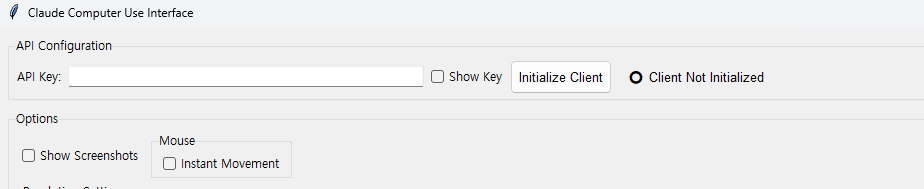
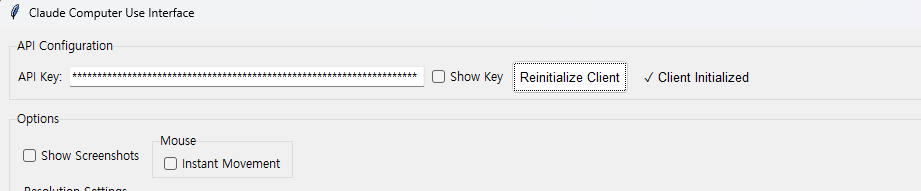
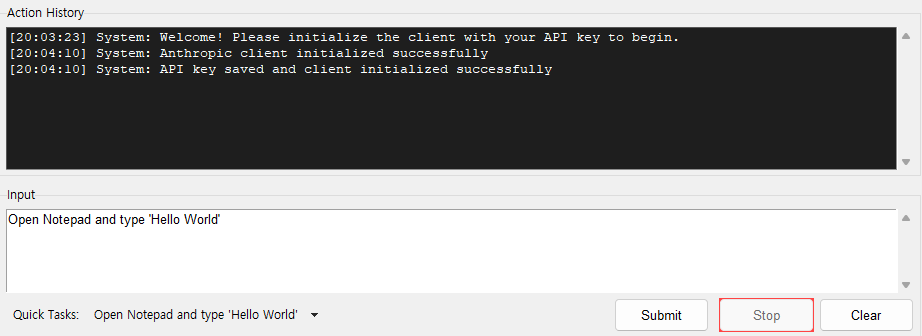
Step 2. Submit Your Prompt
Write your prompt in the input box and press Submit.
Options
-
Show Screenshots in Conversation : This will show halved resolution screenshots from the image sent to the Claude. Displays on the right.
-
Teleport Mouse : For mouse movement, if checked, this will teleport the mouse. Otherwise it will gradually move.
-
Downscale : Downscale factor for the screenshots. (Practically, 0.5 is believed to perform best.)
-
Action Delay : Time for delay in between each conversation. (Practically, 3.0 seconds is good enough)
-
Coordinate Debug : For reference.
-
Quick Tasks : List of available prompts for testing.
Current Status
- Coordinate accuracy falls for higher resolutions (Approx 1280X720 is tested good).
Upcoming Features
-
Improve GUI
-
Prompt format Claude responses for better accuracy
Updated Features
Add actions (double clicking, scrolling, waiting, right clicking, dragging, special keys(changing typing language))(Nov 1st)Improve memory lag (Currently, it reflects the previous task and the first task. This is to prevent hallucinations and repetitions.)(Nov 1st)Load API key by environment varaible(Nov 3rd)Corrected malfunctioning of mouse coordinate logging(Nov 19th)
Known Errors
Error: Client initialization failed: Failed to validate API key: 'Beta' object has no attribute 'messages'
Solution: pip install --upgrade anthropic
Error: Client initialization failed: cannot access local variable 'e' where it is not associated with a value
Solution: Check API Budget (and VPN Connection if your location does not allow Anthropic API)