
Agent Usage Manager
minglong51/agent-usage-manager
htop para agentes IA — monitora e mata processos headless com segurança
Ver no GitHubDashboard web leve para monitorar agentes IA headless em execução (OpenClaw, Hermes, Claude Code, Ollama, vLLM). Mostra liveness, uso de CPU/RAM/GPU e permite encerrar agentes via kill switch, sem banco de dados ou camada de autenticação.
Instalação
npx convez-ai minglong51/agent-usage-manager1 comando no terminal: detecta o formato do repositório (marketplace ou plugin avulso) e instala via Claude Code. Requer Node 18+ e o Claude Code instalado.
Métricas
Casos de uso
- Monitorar agentes IA em produção e desenvolvimento
- Visualizar consumo de recursos (CPU, RAM, GPU) em tempo real
- Encerrar agentes travados ou consumindo recursos excessivos
Veredito

Ferramenta prática e minimalista para quem roda múltiplos agentes IA localmente. Segurança bem pensada (allowlist, redação de secrets, proteção CSRF) compensa a falta de persistência e autenticação formal.
README
A tradução para o português deste README ainda está na fila.
agent-usage-manager
A tiny, single-file web dashboard for headless AI agents running on a machine — OpenClaw, Hermes, Claude Code, Ollama, vLLM, llama.cpp, or anything you name. It shows which agents are alive and what they're costing you (CPU, memory, GPU), and gives you a kill button per agent.
No database, no auth layer, no dependencies beyond FastAPI + psutil. Runs on macOS and Linux. Meant to be cloned, configured, and run on any node in a fleet.
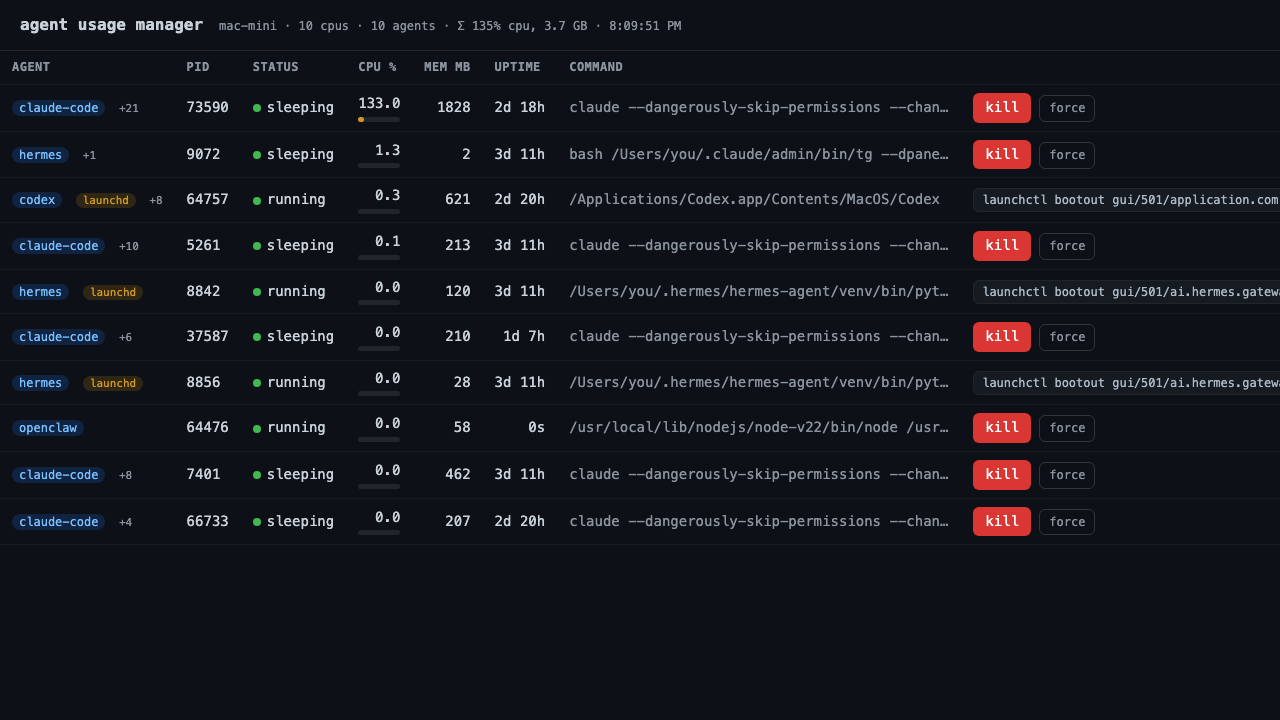
A real run: ten agents grouped by process tree (+N = children rolled up),
per-agent CPU/memory/uptime, launchd-supervised jobs flagged, and a kill button
per row.
AGENT          PID    STATUS     CPU %   MEM MB   GPU MB   UPTIME   COMMAND          ┆
openclaw +3    48213  ● running    62.4    1840     7320     2h 11m  openclaw serve … [kill] [force]
claude-code +9 73590  ● running    97.4    7630        —     1h 02m  claude --chann … [kill] [force]
hermes         49001  ● running    18.0     512        —     44m     hermes worker …  [kill] [force]
ollama         50122  ● running     3.1    9210    14080     6h 02m  ollama runner …  [kill] [force]
(+N = child processes rolled up under the agent; CPU/mem/GPU are tree totals.)
The schematic above shows the GPU column (NVIDIA only); the screenshot is a real run on Apple Silicon, where per-process GPU stats aren't available so that column is hidden. The UI auto-refreshes every 3s.
What it does
- One row per agent. Agents are grouped by process tree — the spawned children
of an agent (inference subprocesses, MCP servers, helpers) are rolled up under it
with a
+Nbadge instead of cluttering the list as separate rows. - Liveness — green dot = running, red = zombie/dead. Status column shows the OS state.
- Usage — CPU %, resident memory (MB), GPU memory (MB, NVIDIA only), and uptime, refreshed every 3s. CPU/mem/GPU are tree totals — the agent's true cost including everything it spawned.
- Kill the tree —
killsends SIGTERM to the agent and its children (so spawned helpers don't leak resources),forcesends SIGKILL. SIGTERM auto-escalates to SIGKILL after 3s. The confirm dialog tells you how many child processes will stop.
Safety
This is the important part — a web page that can kill processes needs guardrails:
- Allowlist only. Only processes matching a pattern in
agents.yamlare ever listed or killable. The kill endpoint re-checks the match server-side before sending any signal, so the dashboard can never be used to kill an arbitrary PID. - Protected patterns. Anything matching
protect:inagents.yaml— plus the monitor's own process and PID 1 — shows a disabled, greyed-out kill button and is refused server-side. - Secret redaction. Command lines often carry tokens/keys in env vars or flags
(
FOO_TOKEN=...,--api-key ...,sk-...,ghp_..., JWTs). The command column redacts these to***before they ever reach the browser — safe to screenshot. - Browser guard (CSRF + DNS rebinding). Binding to localhost doesn't keep
browsers out — any web page you visit can
fetch()a localhost port. Requests whoseHostis a non-local DNS name are refused (DNS-rebinding guard), and a kill request carrying a foreignOriginis refused (CSRF guard) — so a malicious page can't kill your agents or read your process list.curland the dashboard itself are unaffected. - Bind local by default. It listens on
127.0.0.1. Don't expose it to a network without putting auth in front of it (reverse proxy + basic auth, SSH tunnel, etc.) — it has no built-in authentication.
Quick start
Recommended — one command, nothing to install first:
uvx agent-usage-manager
# then open http://127.0.0.1:8765 (it also opens automatically)
uvx fetches and runs it in one step — no separate install, no virtualenv, no
leftovers. Don't have uv yet? One line:
curl -LsSf https://astral.sh/uv/install.sh | sh      # macOS / Linux
# or: pip install uv
pipx install agent-usage-manager     # clean isolated global CLI (needs pipx)

pip install agent-usage-manager      # universal; use inside a venv —
                                     # system Python may refuse with
                                     # "externally-managed-environment"
Then run agent-usage-manager (flags below).
From a clone (for hacking on it):
git clone <this-repo> && cd agent-usage-manager
./run.sh                           # venv + editable install, serves on :8765
It opens the dashboard in your browser automatically. Flags: --host, --port,
--config /path/to/agents.yaml, --no-browser (for headless/server use).
Configure which processes are "agents"
Edit agents.yaml:
agents:
  - label: openclaw           # shown as the badge in the UI
    match: openclaw           # case-insensitive substring of the command line
  - label: hermes
    match: hermes
  - label: claude-code
    match: "claude(\\s|$|-code)"
    regex: true               # treat `match` as a regex instead of substring

protect:                      # matched + listed, but never killable
  - uvicorn

ignore:                       # never an agent: not listed, not killable
  - crashpad                  # incidental processes that share a name/bundle
  - shipit                    # path with a real agent (crash handlers,
  - kiro-cli-term             # auto-updaters, integrated-terminal shells, …)
A process matches if the pattern hits its executable basename + first few
arguments — deliberately not the whole command line, so a long embedded arg
(e.g. a system prompt mentioning "claude") can't misclassify a wrapper. On macOS
the outermost .app bundle name is also included, so GUI agents that launch
a generically-named binary (Kiro.app → Electron) are still matched by app name.
protect: keeps a matched process listed but refuses to kill it; ignore:
drops it from agent classification entirely. Point at a different file with
AGENTS_CONFIG=/path/to/agents.yaml.
launchd-supervised agents (macOS)
Some agents run as launchd services (a ~/Library/LaunchAgents/*.plist, or
anything started by brew services). If such a job sets KeepAlive, a signal
can't stop it: the process dies, launchd immediately respawns it under a new PID,
and the dashboard's "kill" looks like it silently failed.
The dashboard detects these (via launchctl list) and marks them with a
launchd badge. Instead of dead-end kill/force buttons it shows the command
that actually stops the job — click to copy:
launchctl bootout gui/<uid>/<label>            # stop now
launchctl disable gui/<uid>/<label>            # …and don't auto-start at login
The kill endpoint refuses signals for these jobs (HTTP 409) and returns the same
guidance, so the API never lies about a kill that won't stick. The message is
tailored to the job: KeepAlive jobs are told a signal won't stick at all;
RunAtLoad-only jobs are told a signal works now but the job restarts at next
login. Limitation: detection runs in your user launchd domain, so root
LaunchDaemons (which need a privileged launchctl print system/…) aren't
flagged — a known gap, not silently handled.
GPU notes
Per-process GPU memory comes from nvidia-smi when it's on PATH (Linux / NVIDIA).
Apple Silicon has no per-process GPU accounting API, so the GPU column stays blank
on Macs — CPU and memory are the meaningful resource signals there.
API
GET /api/agents→{ agents: [...], host, cpu_count, ts }POST /api/kill/{pid}?force=false→ SIGTERM (or SIGKILL withforce=true)
Run as a service
Linux (systemd), ~/.config/systemd/user/agent-usage-manager.service:
[Unit]
Description=agent usage manager
[Service]
ExecStart=%h/agent-usage-manager/.venv/bin/uvicorn app:app --port 8765
WorkingDirectory=%h/agent-usage-manager
Restart=on-failure
[Install]
WantedBy=default.target
systemctl --user enable --now agent-usage-manager
Development
git clone https://github.com/minglong51/agent-usage-manager && cd agent-usage-manager
pip install -e ".[dev]"
pytest -q
CI runs the test suite on Linux + macOS (Python 3.9 and 3.12) on every push and PR.
Cross-platform note: kill uses psutil's terminate()/kill(), which map to
SIGTERM/SIGKILL on POSIX and TerminateProcess on Windows.
License
MIT