
SWSD MCP — SolarWinds Service Desk
mikimatsub/swsd-mcp
Acesso a SolarWinds Service Desk via Model Context Protocol
Ver no GitHubServidor MCP que integra SolarWinds Service Desk (Samanage) com clientes Claude e compatíveis. Permite ler e modificar tickets, comentários, artigos de base de conhecimento e catálogo de serviços usando tokens JWT do usuário, sem armazenar credenciais.
Instalação
npx convez-ai mikimatsub/swsd-mcp1 comando no terminal: detecta o formato do repositório (marketplace ou plugin avulso) e instala via Claude Code. Requer Node 18+ e o Claude Code instalado.
Métricas
Casos de uso
- Consultar e atualizar tickets de suporte diretamente no Claude
- Buscar artigos da base de conhecimento durante atendimento
- Automatizar criação e gerenciamento de tickets em fluxos de IA
- Integrar SWSD com agentes de IA para automação de ITSM
Veredito

Integração sólida e bem-documentada para ITSM via MCP. Implementação segura com zero persistência de credenciais e suporte a múltiplos clientes. Ideal para equipes que usam SolarWinds Service Desk e querem potencializar fluxos com IA.
README
A tradução para o português deste README ainda está na fila.
swsd-mcp





MCP server for SolarWinds Service Desk (SWSD / Samanage). Works with any Model Context Protocol client to read and modify SWSD tickets, comments, knowledge-base articles, and more, using each user's own SWSD API token. See the client compatibility matrix for the tested list.
📖 Full docs: mcp-swsd.pages.dev
The server holds zero credentials at rest. Tokens are forwarded per-request, never persisted, never logged, and only sent to the configured SWSD API host.
Quick start
You need:
- An MCP client installed — any MCP-compatible client works (compatibility matrix)
- A SolarWinds Service Desk admin token (JWT) — generate one in the SWSD UI: Setup → Users & Groups → Users → click your user → Actions → Generate JSON Web Token (Service Desk administrator rights required)
1. Add the config
Every stdio-capable MCP client uses the same JSON shape. Add this under mcpServers in your client's config file:
{
  "mcpServers": {
    "swsd": {
      "command": "npx",
      "args": ["-y", "swsd-mcp"],
      "env": {
        "SWSD_TOKEN": "your-jwt-here",
        "SWSD_BASE_URL": "https://api.samanage.com"
      }
    }
  }
}
Replace your-jwt-here with your token. EU tenants use https://apieu.samanage.com instead. To customize behavior, add any configuration variable (most common: SWSD_PROFILE to choose the tool set) into the same env block.
2. Drop it in the right file
| Client | Config file path |
|---|---|
| Claude Desktop (macOS) | ~/Library/Application Support/Claude/claude_desktop_config.json |
| Claude Desktop (Windows) | %APPDATA%\Claude\claude_desktop_config.json |
| Claude Desktop (Linux) | ~/.config/Claude/claude_desktop_config.json |
| Claude Code | ~/.claude.json (or use the shortcut below) |
| Cursor | ~/.cursor/mcp.json |
| Continue, Cline, other clients | check your client's docs — same JSON shape |
Create the file if it doesn't exist. Then restart your client.
Claude Code shortcut — skip editing the file by hand. This single line pastes verbatim into any shell (bash, zsh, PowerShell, cmd):
claude mcp add swsd --env SWSD_TOKEN="your-jwt-here" --env SWSD_BASE_URL="https://api.samanage.com" -- npx -y swsd-mcp
Microsoft Copilot Studio — different path. Copilot Studio can't spawn local processes, so it needs an HTTP-transport server. See copilot-studio/README.md and the Azure Container Apps recipe.
3. Verify it works
In your MCP client, ask:
"Use swsd to check if you can connect."
The agent should call swsd_health_check and report success. If it does, you're set up. Try a few more:
- "Show me incident 60310" — id-keyed tools accept either the internal id (≥7 digits) or the human-facing number visible in the SWSD UI (≤6 digits).
- "List incidents updated in the last 7 days" —
updated_within: "7d"(also"24h","1w","30d"). - "What tickets are assigned to me?" —
swsd_list_my_incidentscallsswsd_get_meinternally, so you don't have to spell out an email.
Tools (35 across 10 categories)
| Category | Tools |
|---|---|
| Utility | swsd_get_server_info, swsd_health_check, swsd_get_me |
| Incidents | swsd_list_incidents, swsd_list_my_incidents, swsd_get_incident, swsd_create_incident, swsd_update_incident, swsd_assign_incident, swsd_update_incident_state, swsd_link_solution_to_incident |
| Comments | swsd_list_incident_comments, swsd_add_incident_comment, swsd_update_comment |
| Tasks | swsd_list_incident_tasks, swsd_create_incident_task, swsd_update_task_state |
| Problems | swsd_list_problems, swsd_get_problem, swsd_create_problem |
| Solutions / KB | swsd_search_solutions, swsd_get_solution, swsd_create_solution, swsd_update_solution |
| Service Catalog | swsd_list_catalog_items, swsd_get_catalog_item, swsd_create_service_request |
| Lookups | swsd_list_categories, swsd_list_sites, swsd_list_departments, swsd_list_users, swsd_list_groups, swsd_list_roles |
| Custom fields | swsd_describe_custom_fields |
| Audits | swsd_get_record_audits |
Each tool's input schema, description, and output shape is auto-discovered by your MCP client at runtime. See the Tools reference for full per-tool documentation.
MCP Apps widgets (rich UI)
Seven read tools ship interactive UI bundles using the MCP Apps capability. On capable hosts (Claude Desktop, Claude Web, VS Code Copilot Chat, ChatGPT, Goose, Postman), the tool returns a rendered widget alongside the structured response. On text-only hosts (Claude Code, LM Studio), the same tools return their normal structured payload.
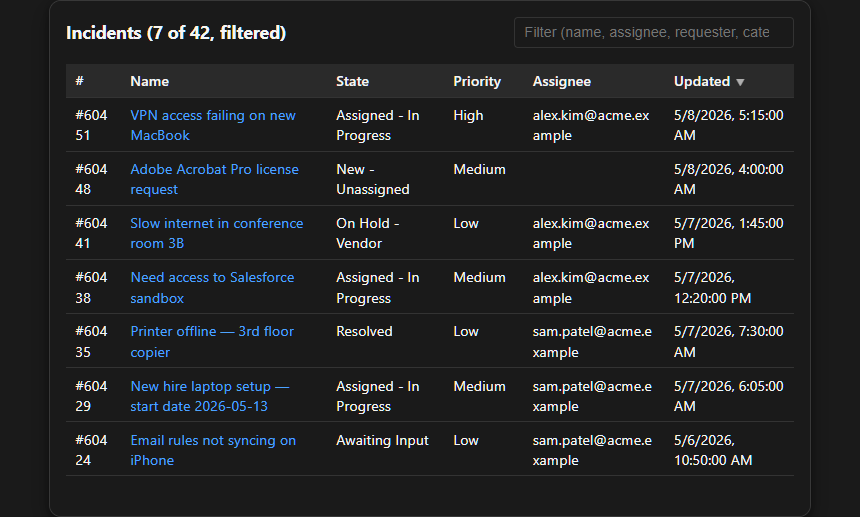
Example — swsd_list_incidents rendering the incident-list widget. Synthetic data; no real tenant info. See the full gallery for screenshots of all seven widgets.
| Tool | Widget | What it renders |
|---|---|---|
swsd_get_incident | incident-detail | Single-record card (description, due date, SLA, resolution, custom fields) |
swsd_get_solution | solution-detail | Knowledge-base article with sanitized HTML body |
swsd_list_incidents, swsd_list_my_incidents | incident-list | Filterable, sortable table |
swsd_list_incident_comments | comment-thread | Vertical conversation with author chips, public/private badges |
swsd_get_record_audits | audit-timeline | Timeline grouped by day with action chips and field diffs |
swsd_get_catalog_item | catalog-item-form | Form that submits via swsd_create_service_request |
swsd_describe_custom_fields | custom-fields | Searchable explorer with scope/module filters |
See the Widgets reference for screenshots and per-widget detail.
Configuration
Most users only need SWSD_TOKEN and SWSD_BASE_URL:
| Variable | Default | Notes |
|---|---|---|
SWSD_TOKEN | — | Required. Your SWSD admin token (JWT). |
SWSD_BASE_URL | https://api.samanage.com | EU tenant: https://apieu.samanage.com |
SWSD_PROFILE | agent | triage, agent, knowledge, or full — see Profiles |
For the full env-var reference (HTTP transport, retries, rate limits, allowlists), see Configuration.
Profiles
Profiles control which tools are registered at startup. Cannot be changed mid-session.
| Profile | Intent | Tool count |
|---|---|---|
triage | Read-heavy first-line support + commenting | 14 |
agent | Full ticket-handler workflow (default) | 33 |
knowledge | KB-author workflow + incident reads | 15 |
full | Every tool | 35 |
Use SWSD_ENABLE_EXTRAS=swsd_foo,swsd_bar to add specific tools on top of a profile.
Hosting an HTTP server (advanced)
Quick Start above runs swsd-mcp on your own machine — your MCP client spawns it on demand via npx. Most users stop there.
Set up an HTTP-mode server only if you need:
- Microsoft Copilot Studio integration — Copilot Studio can't spawn local processes
- One shared instance for a team — one deploy, many users, each providing their own token per-request
- Stricter network control — private VNet, IP allowlist, custom domain
The Docker image runs anywhere — Azure, AWS, GCP, Render, Fly.io, your own VM. See Deployment for the full guide and the Azure Container Apps recipe (recommended for Copilot Studio; scale-to-zero pricing).
Documentation
SECURITY.md— vulnerability reporting via GitHub Security Advisoriesdocs/SECURITY-POSTURE.md— security controls, supply-chain hardening, verification methodsCONTRIBUTING.md— bug reports, PR review criteria, local development setupCHANGELOG.md— version historycopilot-studio/— Microsoft Copilot Studio Swagger connector specs and import guidedocs/deployment/— cloud deployment recipes
License
MIT — see LICENSE. Provided "as is" without warranty.
Trademarks
SolarWinds, Samanage, and Service Desk are trademarks of SolarWinds Worldwide, LLC. This project is not affiliated with, endorsed by, or sponsored by SolarWinds. It wraps the publicly documented SWSD REST API.