
Claude Statusline
michalschroeder/claude-statusline
Statusline ANSI compacta com modelo, custo, git, skills e context window
Ver no GitHubSkill que renderiza uma linha de status compacta em ANSI mostrando modelo, custo, duração, branch git, worktree, skills ativas e tokens de contexto. Integra-se nativamente ao Claude Code via hooks customizados que capturam dados de sessão em tempo real.
Instalação
npx convez-ai michalschroeder/claude-statusline1 comando no terminal: detecta o formato do repositório (marketplace ou plugin avulso) e instala via Claude Code. Requer Node 18+ e o Claude Code instalado.
Métricas
Casos de uso
- Monitorar custo e tokens de contexto durante sessões Claude Code
- Visualizar branch git e worktree atual na interface
- Rastrear skills ativos e duração de sessão em tempo real
Veredito

Skill especializada e bem-executada para quem usa Claude Code regularmente. Requer setup manual de hooks e Node.js 18+, mas adiciona visibilidade real sobre custo/tokens — valores tangíveis para fluxos de trabalho intensivos.
README
A tradução para o português deste README ainda está na fila.
claude-statusline
My Claude Code statusline and the two hooks that feed it. One compact ANSI line with the stuff I actually look at: model, cost, duration, git branch, worktree, active skills, context window with input tokens. All of it pulled from the JSON Claude Code pipes in and custom hooks for getting loaded skills.

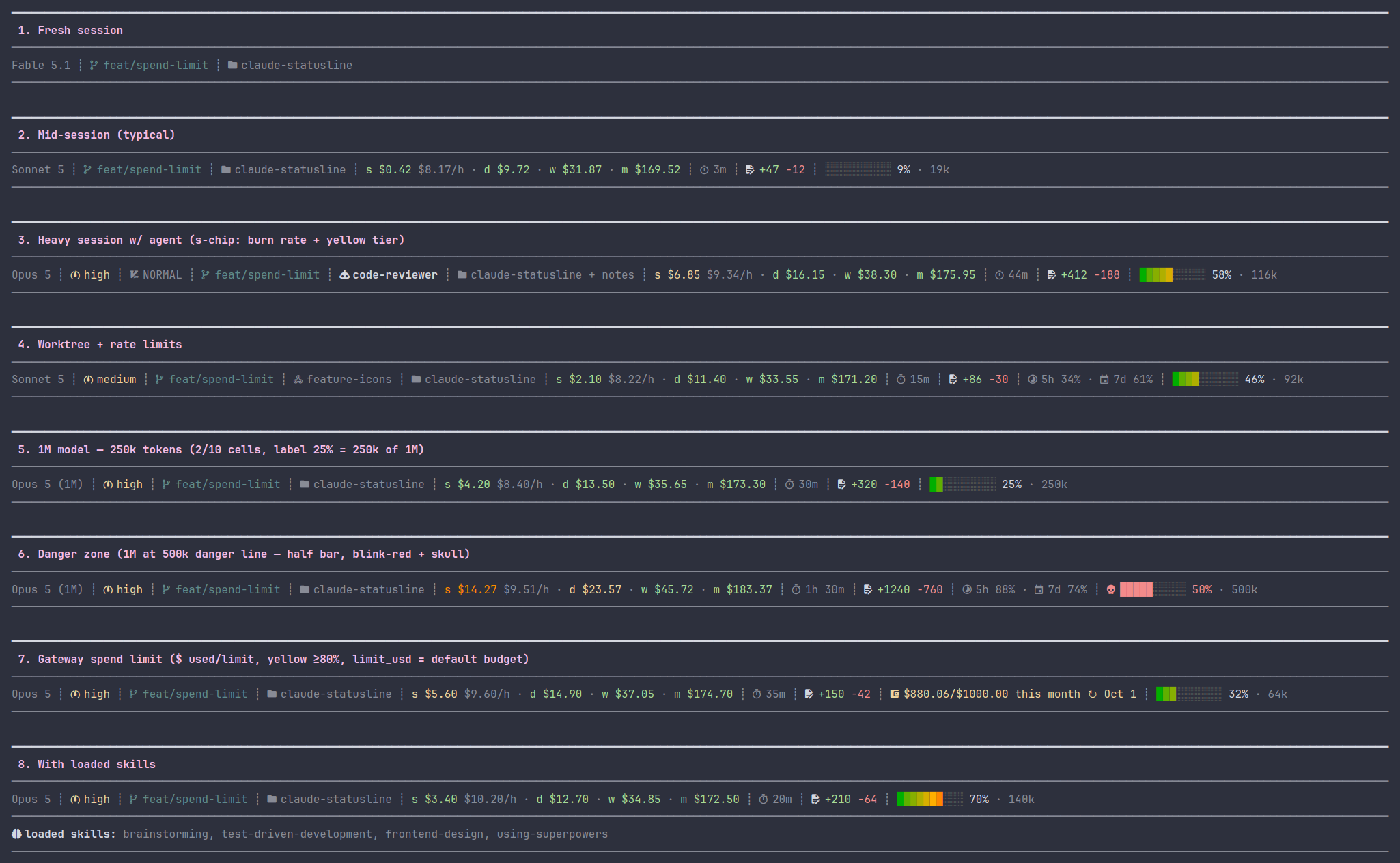
To reproduce locally, run bash demo/screenshots.sh.
Requirements
- Node.js 18+
jqif you want the skills chip (used by the logging hooks; not bundled on most distros or macOS —apt install jq/brew install jq). The statusline renderer itself doesn't need it.- A Nerd Font if you want the
nerdicon set — I useJetBrainsMono Nerd Font, but any official Nerd Font works (they're all patched--complete, so they all carry the Material Design Icons glyphs the statusline uses). The other two icon sets need no font setup. See Icons.
Install
The fast way: paste SETUP_PROMPT.md into a Claude Code session. It'll clone the repo, edit settings.json, pick an icon mode, and wire up the hooks for you.
Doing it by hand? Clone first:
git clone https://github.com/michalschroeder/claude-statusline.git <repo>
Then add to ~/.claude/settings.json (swap <repo> for your clone path):
Statusline:
"statusLine": {
  "type": "command",
  "command": "node <repo>/hooks/statusline.js"
}
Skill-tool logger (only needed if you want the skills chip):
"hooks": {
  "PreToolUse": [
    {
      "matcher": "Skill",
      "hooks": [{ "type": "command", "command": "<repo>/hooks/log-skill.sh" }]
    }
  ]
}
Slash-command logger + cost-cache refresh (the slash logger feeds the skills chip; refresh-cost-cache.js rebuilds the daily/weekly/monthly cost cache once per prompt):
"hooks": {
  "UserPromptSubmit": [
    { "hooks": [
      { "type": "command", "command": "<repo>/hooks/log-slash-skill.sh" },
      { "type": "command", "command": "node <repo>/hooks/refresh-cost-cache.js" }
    ]}
  ]
}
Skills-log cleanup (deletes the session log when you exit, sweeps anything older than 30 days):
"hooks": {
  "SessionEnd": [
    { "hooks": [{ "type": "command", "command": "<repo>/hooks/cleanup-skills-log.sh" }] }
  ]
}
If you'd rather, symlink the individual files into ~/.claude/hooks/.
Icons
Three icon sets, picked with STATUSLINE_ICONS:
| value | requires |
|---|---|
nerd | A Nerd Font installed and selected in your terminal (I use JetBrainsMono Nerd Font; any will work) |
unicode | Any modern Unicode-capable font (almost every desktop terminal) |
ascii | Nothing. Pure ASCII, works anywhere |
The nerd example is the screenshot at the top. GitHub's UI has no Nerd Font, so inline nerd glyphs would just show up as tofu boxes here.
Here's the unicode set with the same payload as the "mid-session" panel in that screenshot:
Sonnet 4.6 ┊ ⎇ main ┊ ▸ claude-statusline ┊ $0.42 ┊ ⏱ 3m ┊ Δ +47 -12 ┊ ██░░░░░░░░ 22% · 19k
And ascii:
Sonnet 4.6 | git: main | dir: claude-statusline | $0.42 | t: 3m | d +47 -12 | ##-------- 22% , 19k
The full glyph table for each mode lives in ICON_SETS inside hooks/statusline.js.
First run: if STATUSLINE_ICONS is unset and there's no cached choice yet, the statusline falls back to ascii and prints a one-line hint. Set the env var when you're ready to upgrade — put it in ~/.claude/settings.json under env (recommended; portable across however you launch Claude Code):
"env": {
  "STATUSLINE_ICONS": "nerd"
}
A shell-level export (export STATUSLINE_ICONS=nerd in .zshrc/.bashrc) also works, but only when Claude Code is launched from a shell that sourced it.
The cache lives at ~/.cache/claude-statusline/icons. Delete it if you want the hint back. The env var always overrides the cache.
Configuration
Set STATUSLINE_SEGMENTS to limit which segments render and in what order. Leave it unset to get everything (the default).
In ~/.claude/settings.json:
"env": {
  "STATUSLINE_SEGMENTS": "model,cost,context"
}
Segment names:
| name | what it shows |
|---|---|
model | display name |
effort | effort level |
skills | all unique loaded skills, oldest→newest |
style | output style (non-default) |
vim | vim mode |
branch | git branch |
worktree | worktree name |
agent | agent name |
dir | directory label |
addeddirs | +N added dirs |
cost | session + daily/weekly/monthly cost |
duration | session duration |
lines | +added -removed |
ratelimits | 5h / 7d usage % |
context | context bar + input token count |
Unknown names get dropped. Segments with no data don't render anyway.
Cost tracking
The cost segment shows a session chip (s $X.XX) plus daily, weekly, and monthly chips (d/w/m) covering spend across all sessions. Costs are recomputed from raw token counts × LiteLLM per-token prices — never trusting Claude Code's reported cost.total_cost_usd. The price table ships as a bundled snapshot (data/model_prices.json) and is refreshed in the background at most once every 24h.
The d/w/m totals are rebuilt once per prompt by the UserPromptSubmit hook (hooks/refresh-cost-cache.js), off the render hot path; the renderer just reads the cache and folds in the current session's live cost.
STATUSLINE_MONTHLY_BUDGET controls the budget-relative coloring of the d/w/m chips (daily = monthly/30, weekly = monthly×7/30):
- unset → $500/mo default
0→ hide the d/w/m chips (session chip stays)- a number → your monthly budget
"env": {
  "STATUSLINE_MONTHLY_BUDGET": "300"
}
The session chip keeps absolute USD tiers (green <$1, yellow <$5, orange <$10, red ≥$10).
The session viewer (bin/sessions.js) also shows a per-session COST column and a today/week/month footer, using the same recomputed costs.
Session viewer
List recent sessions and what each was about (reusing Claude Code's own session
title and /recap summary, parsed from the transcript — no extra AI spend):
$ node bin/sessions.js --last 10
WHEN         SESSION   TITLE / RECAP
06-05 14:02  e7ddfb1f  Refactor cost parser
06-05 00:25  a3f1c0d2  Address timezone comment
                       └ Applied 4 reviewer changes…
Sessions are discovered from the transcripts under <config-dir>/projects/,
newest-first by file mtime. Flags: --last N (default 10), --since YYYY-MM-DD,
--config-dir <path> (target another Claude Code profile).
Files
hooks/statusline.js- the renderer. Reads JSON from stdin, writes one ANSI line to stdout.hooks/log-skill.sh-PreToolUsehook. LogsSkilltool invocations to<STATE>/skills/<session>.log, where<STATE>is the per-subscription state root (see "Skills chip" below).hooks/log-slash-skill.sh-UserPromptSubmithook. Logs/slashskill invocations to the same file.hooks/cleanup-skills-log.sh-SessionEndhook. Deletes the session's skill log and sweeps any older than 30 days.
How it works
Segments, left to right:
- model - display name (e.g.
claude-sonnet-4-6) - effort - effort level, when set
- skills - all unique loaded skills this session, oldest→newest, no truncation
- output style - only shows up when it isn't
default - vim mode - when vim mode is on
- branch - current git branch. Read straight from
.git/HEAD, no subprocess. Handles worktree indirection. Truncated past 50 chars - worktree - worktree name, when you're in one
- agent - agent name, when set
- dir - basename of the current directory. Inside
.claude/worktrees/<name>/it shows the parent project's name instead - cost - a chip group:
s(this session) plusd/w/m(today / this week / this month, across all sessions). See Cost tracking - duration - total session time (s / m / h m)
- lines - lines added and removed
- rate limits - 5h and 7d usage percentages, when the payload includes them
- context - 10-cell bar with per-cell 256-color gradient (forest-green → olive → amber → red), dim-grey empty cells, percentage-of-panic-threshold label, dim absolute token count suffix. The step size and panic threshold scale with the model — see below
Context bar — per-cell gradient
Each of the 10 cells has its own color from the muted "ramp B" palette:
cell:    0   1   2   3   4   5   6   7   8   9
256:    34  70 106 142 178 214 208 202 196 160
hue:  forest…olive……amber……orange……red……dark-red
A half-full bar fades from forest-green at cell 0 through olive at cell 4. The rightmost filled cell tells you which tier you're in; empty cells are dim grey 240.
Step size and panic threshold scale with the model:
| Model | Cell step | Panic (blink-red + ``) |
|---|---|---|
| 200k | 20k tokens / cell | ≥ 160k tokens (cell 8 = 80%) |
| 1M | 50k tokens / cell | ≥ 500k tokens (cell 10 = danger line) |
The 200k tier panics at 80% to keep the historical "loud blink+skull alarm" early-warning contract. The 1M tier panics only at the explicit 500k danger line — where /compact or handoff should already be considered. Past the panic threshold the whole bar blink-reds and gets a `` skull prefix.
1M detection: inferred total = total_input_tokens / (used_percentage / 100). The 1M scale engages only when 800k < total < 1.2M — a tight band that accepts integer-rounded 1M payloads but rejects cumulative-token leaks that would otherwise promote a 200k model into the 1M tier.
Percent-only fallback: when total_input_tokens is missing OR the inference is unreliable (used_percentage == 0 makes the inferred total undefined), the bar fills at 10% per cell with the same ramp; panic kicks in at ≥ 80% (matches the original contract).
The N% label is the raw used_percentage from the payload — i.e. the model's actual context usage. On the 1M tier this decouples from the bar: the bar is calibrated to the 500k panic threshold while the label always tracks "% of the model's full context window". So 218k tokens on a 1M model renders a 4-cell bar with label 22% (218k = 22% of 1M, but 44% of the way to the 500k danger line). The bar tells you "how close to the alarm"; the label tells you "how much of the context you've actually consumed".
Worktree convention: when you're in a worktree and the branch name matches worktree-<name>, the branch chip is hidden. The worktree chip already says it. The branch chip comes back the moment the branch diverges (manual checkout, detached HEAD, rename).
Skills chip: reads <STATE>/skills/<session>.log, where each line is <timestamp> <skill-name>. The two bash hooks write it. plugin: prefixes get stripped. Skill-existence checks use ${CLAUDE_CONFIG_DIR:-$HOME/.claude}.
State dir (<STATE>): ${XDG_STATE_HOME:-$HOME/.local/state}/claude-statusline/<profile>, resolved the same way by the renderer and all hooks. Logs always live in this XDG namespace — never inside CLAUDE_CONFIG_DIR (Claude Code's own managed dir). CLAUDE_CONFIG_DIR is used only as a per-subscription key: its path (leading / stripped, remaining /→_, e.g. /home/u/.claude-x → home_u_.claude-x) becomes <profile>, so different Claude Code subscriptions/profiles keep separate skill logs. Unset → empty profile → flat …/claude-statusline/ layout.
License
MIT