
Statux - Display de Status para AI Agents
Meteorkid/statux
Dashboard terminal para monitorar Claude Code, custos e performance em tempo real
Ver no GitHubAgent que exibe informações de status em tempo real para Claude Code e iTerm2, incluindo modelo, contexto, tokens, custos e métricas de Git. Oferece 72 widgets configuráveis com interface TUI interativa e renderização Powerline.
Instalação
npx convez-ai Meteorkid/statux1 comando no terminal: detecta o formato do repositório (marketplace ou plugin avulso) e instala via Claude Code. Requer Node 18+ e o Claude Code instalado.
Métricas
Casos de uso
- Monitorar tokens, contexto e custos durante sessões Claude Code
- Exibir status de Git, taxa de limite e histórico de uso em iTerm2
- Diagnosticar integração com Codex, Claude Code e APIs de uso
Veredito

Ferramenta madura e bem-documentada para engenheiros que usam Claude Code intensivamente. Integração nativa com statusLine do Claude e suporte multiplataforma (macOS/Linux) com binários independentes agregam valor, embora requeira configuração inicial em JSON e familiarity com terminal.
README
A tradução para o português deste README ainda está na fila.
statux
AI Agent status display for Claude Code, Codex (OpenAI), and iTerm2



statux 是一个终端状态显示工具,为 Claude Code、Codex (OpenAI) 和 iTerm2 提供 AI Agent 的实时状态信息。支持 72 个可配置 Widget、Powerline 渲染、交互式 TUI 配置界面。
[CC] mdl:opus-4.7 │ ctx:[████████░░] 82% │ tok:in:45k out:12k cache:30k │ cost:~$0.35 │ time:25m
git:main │ ±5 │ $/min:$0.01/min │ rl:42% │ tools:Read→Edit
目录
- 功能特性
- 安装
- 快速开始
- Claude Code 集成
- iTerm2 集成
- Widget 目录
- 渲染模式
- 配置参考
- TUI 配置界面
- 架构
- 从源码构建
- 与 ccstatusline 的对比
- License
截图
终端运行界面
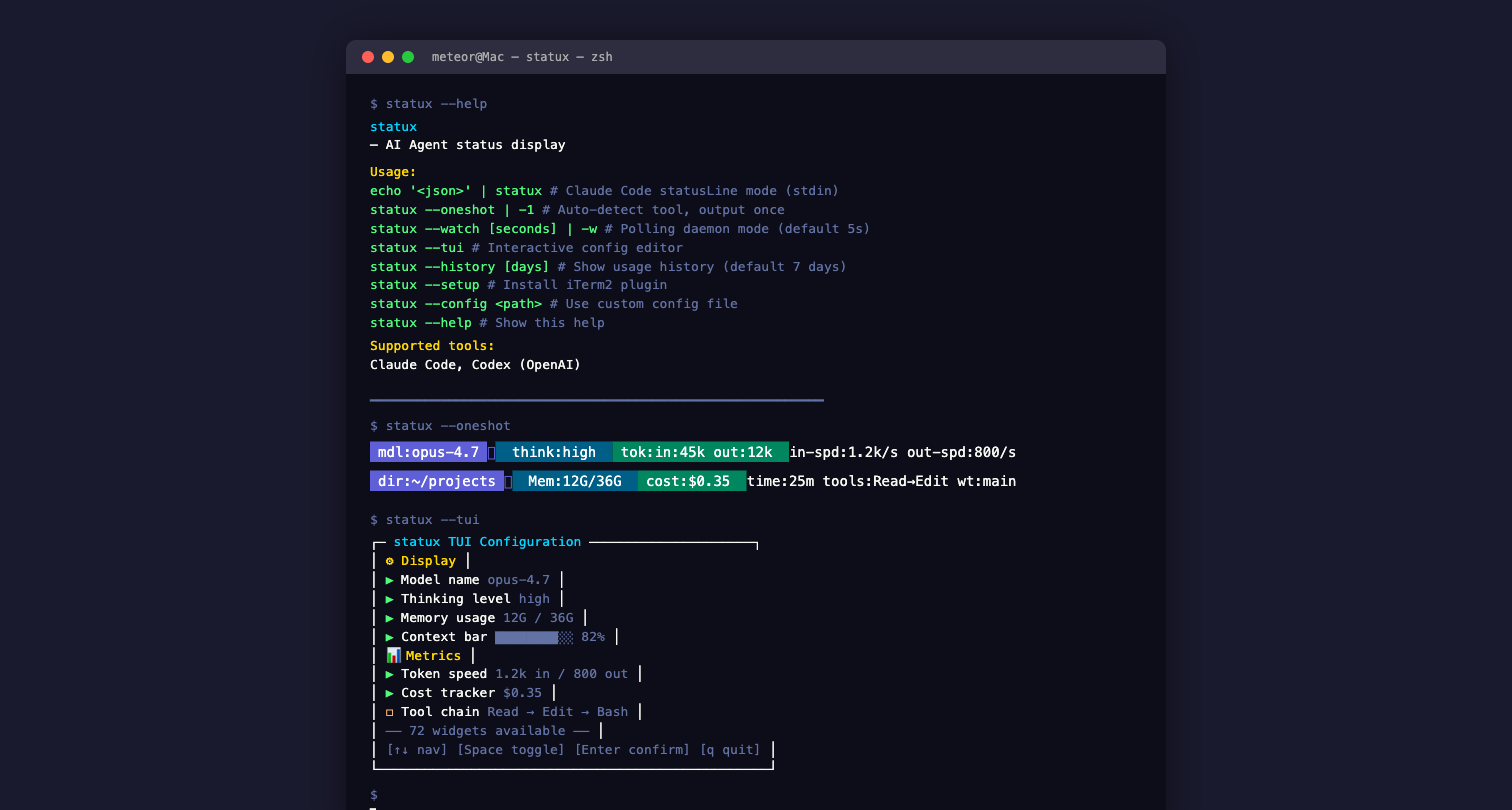
功能特性
- 72 个 Widget — 覆盖模型、上下文、Token、Git、会话、费用、速率限制、历史统计、效率指标、Jujutsu VCS 等
- 双通道输出 — Claude Code statusLine + iTerm2 状态栏
- Codex 支持 — 自动检测 Codex/Claude Code 进程,通过 SQLite + hooks bridge 获取会话数据
- Powerline 渲染 — 内置 dark/ocean 主题,箭头分隔符
- TUI 配置界面 — 基于 Ink (React for CLI) 的交互式配置,支持搜索、排序、预览
- 本地诊断命令 —
statux doctor检查配置、Claude Code、Codex、iTerm2 和 Usage 凭证状态 - Anthropic Usage API — 实时获取 session/weekly 用量数据
- 多平台二进制 — macOS (arm64/x64) + Linux (x64/arm64),无依赖独立运行
- 标签系统 — 每个 Widget 支持
label前缀,无数据时自动隐藏 - 10 种颜色 — 支持 black, red, green, yellow, blue, magenta, cyan, white, orange, pink
安装
npm / bun(推荐)
# npm
npm install -g @statux/cli

# bun
bun install -g @statux/cli
独立二进制
从 GitHub Releases 下载对应平台的二进制文件:
| 平台 | 文件名 |
|---|---|
| macOS (Apple Silicon) | statux-darwin-arm64 |
| macOS (Intel) | statux-darwin-x64 |
| Linux (x64) | statux-linux-x64 |
| Linux (ARM64) | statux-linux-arm64 |
# 下载后添加执行权限
chmod +x statux-darwin-arm64

# 移动到 PATH
mv statux-darwin-arm64 /usr/local/bin/statux
每个 Release 附带 .sha256 校验文件,可验证完整性:
sha256sum -c statux-darwin-arm64.sha256
从源码构建
git clone https://github.com/Meteorkid/statux.git
cd statux
bun install

# 多平台构建
bun run build

# 当前平台本地构建
bun run build:local
快速开始
# 使用模拟数据测试
echo '{"model":{"display_name":"opus-4.7"},"context_window":{"used_percentage":42},"cost":{"total_cost_usd":0.35}}' | statux

# 启动 TUI 配置界面
statux --tui

# 检查本地集成状态
statux doctor

# 安装 iTerm2 插件
statux --setup
Claude Code 集成
在 ~/.claude/settings.json 中添加 statusLine 配置:
{
  "statusLine": {
    "type": "command",
    "command": "statux",
    "refreshInterval": 10
  }
}
如果使用 bun 直接运行(未全局安装):
{
  "statusLine": {
    "type": "command",
    "command": "bun /path/to/statux/src/cli.ts",
    "refreshInterval": 10
  }
}
refreshInterval 单位为秒,控制状态栏刷新频率。建议值:5-15。
Codex (OpenAI) 集成
statux 通过双重数据源支持 Codex:
1. SQLite 直接读取(自动)
当 Codex 进程运行时,statux 自动从 ~/.codex/state_5.sqlite 读取活跃线程数据。
2. statux-bridge 插件(推荐)
通过 Codex hooks API 获取 transcript_path,解析 transcript JSONL 获取精确的 per-turn token 数据,实现与 Claude Code 模式接近的指标覆盖。
# 插件目录:~/.codex/plugins/statux-bridge/
# hooks.json:SessionStart + Stop hooks
# 数据流:hook → bridge JSON → transcript JSONL → token 指标
启用方式:
# ~/.codex/config.toml
[features]
hooks = true

[plugins."statux-bridge"]
enabled = true
使用方式
# 单次检测(自动识别 Codex 还是 Claude Code)
statux --oneshot

# 轮询模式(持续刷新)
statux --watch 3
指标覆盖对比
| 指标 | Claude Code | Codex |
|---|---|---|
| 模型名称 | ✅ | ✅ |
| Token 输入/输出 | ✅ JSONL 精确值 | ✅ transcript JSONL |
| Cache token | ✅ | ✅ |
| 速度指标 | ✅ | ✅ |
| 会话时长 | ✅ | ✅ |
| Git 信息 | ✅ | ✅ (bridge 模式: live git; SQLite 模式: 不显示) |
| 成本估算 | ✅ | ✅ (GPT 定价表) |
| Context window % | ✅ | ❌ (概念不同) |
| Rate limits | ✅ | ❌ (概念不同) |
iTerm2 集成
自动安装
statux --setup
此命令会将 Python Plugin 安装到 iTerm2 的 AutoLaunch 目录。
手动安装
- 将
iterm2/statux.py复制到~/Library/Application Support/iTerm2/Scripts/AutoLaunch/ - 重启 iTerm2
- 进入 Preferences → Profiles → Session → Status bar
- 拖拽 "Agent Status" 到活动组件区域
工作原理
statux CLI → OSC 1337 自定义序列 → iTerm2 Python daemon → 状态栏 + 标签颜色
- CLI 每次渲染时输出 OSC 1337 序列
- iTerm2 的
CustomControlSequenceMonitor接收并解析 - 自动更新状态栏内容和标签颜色(运行中=蓝色,完成=绿色,限速=红色)
Widget 目录
statux 提供 72 个 Widget,分为 11 个类别。每个 Widget 都支持自定义颜色、粗体和标签。
Core — 核心信息
9 个 Widget,显示 AI Agent 的基础状态。
| Widget | 类型 | 说明 | 输出示例 |
|---|---|---|---|
tool-indicator | tool-indicator | 当前工具标识(CC=Claude Code, CX=Codex) | [CC] [CX] |
model | model | 当前使用的模型名称 | opus-4.7 |
output-style | output-style | 当前输出风格 | style:concise |
version | version | Claude Code 版本号 | v1.2.3 |
session-id | session-id | 当前会话 ID(短格式) | sid:a3f2 |
thinking-effort | thinking-effort | 思维努力级别 | think:high |
vim-mode | vim-mode | Vim 模式指示器 | [N] [I] [V] |
terminal-width | terminal-width | 终端宽度(列数) | cols:120 |
free-memory | free-memory | 系统可用内存 | Mem:12G/36G |
thinking-effort 颜色:
| 级别 | 显示 | 颜色 |
|---|---|---|
| low | think:low | 灰色 |
| medium | think:med | 黄色 |
| high | think:high | 绿色 |
| xhigh | think:xhigh | 青色 |
Context — 上下文
6 个 Widget,显示上下文窗口使用情况。
| Widget | 类型 | 说明 | 输出示例 |
|---|---|---|---|
context-bar | context-bar | 上下文使用率进度条(含 ctx: 标签) | ctx:[████████░░] 82% |
context-pct | context-pct | 上下文使用率(纯数字) | ctx:82% |
context-length | context-length | 当前上下文长度 | len:85k |
context-window | context-window | 上下文窗口总大小 | win:200k |
context-pct-usable | context-pct-usable | 可用上下文百分比 | usable:18% |
compaction | compaction | 上下文压缩次数 | compact:2 |
context-bar 颜色(随百分比动态变化,含 ctx: 标签同色):
| 使用率 | 颜色 |
|---|---|
| 0-20% | 白色 |
| 20-60% | 绿色 |
| 60-80% | 紫色 |
| > 80% | 红色 |
Tokens & Speed — Token 与速度
9 个 Widget,显示 Token 消耗和生成速度。
| Widget | 类型 | 说明 | 输出示例 |
|---|---|---|---|
tokens | tokens | 输入/输出/缓存 Token 汇总 | in:45k out:12k cache:30k |
tokens-input | tokens-input | 输入 Token 数量 | in:45k |
tokens-output | tokens-output | 输出 Token 数量 | out:12k |
tokens-cached | tokens-cached | 缓存命中 Token 数量 | cache:30k |
tokens-total | tokens-total | 总 Token 数量(含缓存) | total:87k |
input-speed | input-speed | 输入 Token 速度 | in-spd:1.2k/s |
output-speed | output-speed | 输出 Token 速度 | out-spd:800/s |
total-speed | total-speed | 总 Token 速度 | 120/s |
速度格式化:
- < 1000/s:
85/s - ≥ 1000/s:
1.2k/s
窗口速度: 支持 metadata.window 参数,计算指定时间窗口内的平均速度。
Git — 版本控制
17 个 Widget,显示 Git 仓库状态。
基础信息
| Widget | 类型 | 说明 | 输出示例 |
|---|---|---|---|
git-branch | git-branch | 当前分支名 | main |
git-status | git-status | 文件变更摘要 | +3 ~1 ?2 |
git-sha | git-sha | 当前 commit SHA(短) | sha:a3f2b1c |
git-origin | git-origin | 远程仓库地址 | origin:github.com/user/repo |
变更统计
| Widget | 类型 | 说明 | 输出示例 |
|---|---|---|---|
git-changes | git-changes | 总变更文件数 | chg:5 |
git-insertions | git-insertions | 新增行数 | +120 |
git-deletions | git-deletions | 删除行数 | -45 |
文件计数
| Widget | 类型 | 说明 | 输出示例 |
|---|---|---|---|
git-staged-files | git-staged-files | 已暂存文件数 | S:3 |
git-unstaged-files | git-unstaged-files | 未暂存文件数 | U:2 |
git-untracked-files | git-untracked-files | 未跟踪文件数 | ?1 |
git-clean-status | git-clean-status | 工作区是否干净 | ✓ clean 或 ✗ dirty |
高级信息
| Widget | 类型 | 说明 | 输出示例 |
|---|---|---|---|
git-root-dir | git-root-dir | Git 仓库根目录名 | statux |
git-ahead-behind | git-ahead-behind | 与远程的 ahead/behind | ↑2 ↓1 |
git-conflicts | git-conflicts | 合并冲突数 | conflicts:1 |
git-is-fork | git-is-fork | 是否为 fork 仓库 | fork |
git-worktree | git-worktree | 是否在 worktree 中 | worktree |
git-pr | git-pr | 关联的 PR 编号 | pr:#42 |
git-status 符号:
+新增文件~修改文件?未跟踪文件-删除文件
Session — 会话
7 个 Widget,显示会话相关信息。
| Widget | 类型 | 说明 | 输出示例 |
|---|---|---|---|
session-clock | session-clock | 会话持续时间 | 25m 1h30m |
session-name | session-name | 会话名称 | session:debug-auth |
cost | cost | 本次会话费用(USD) | $0.35 |
rate-limit | rate-limit | 速率限制使用率 | rl:42% |
tool-calls | tool-calls | 最近工具调用 | Read→Edit→Bash |
account-email | account-email | Anthropic 账户邮箱 | user@example.com |
skills | skills | Skill 调用统计 | 3 skills |
skills 模式(通过 metadata.mode 设置):
| 模式 | 说明 | 输出示例 |
|---|---|---|
count(默认) | 调用总数 | 3 skills |
last | 最近调用的 skill 名 | code-review |
list | 去重列表(逗号分隔) | code-review,init,triage |
rate-limit 颜色:
| 使用率 | 颜色 |
|---|---|
| < 50% | 绿色 |
| 50-80% | 黄色 |
| > 80% | 红色 |
session-clock 时间格式:
- < 60s:
45s - < 60m:
25m - ≥ 60m:
1h30m
Usage — 用量统计
5 个 Widget,基于 Anthropic Usage API 的用量数据。
| Widget | 类型 | 说明 | 输出示例 |
|---|---|---|---|
block-timer | block-timer | 当前 5 小时计费窗口倒计时 | block:2h15m |
rate-limit-timer | rate-limit-timer | 速率限制重置倒计时 | rl-reset:45m |
session-usage | session-usage | 当前 session token 用量 | session:125k |
weekly-usage | weekly-usage | 本周 token 用量 | week:2.5M |
weekly-reset-timer | weekly-reset-timer | 周用量重置倒计时 | week-reset:3d |
数据来源策略:
- 优先从 StatusJSON 的
rate_limits字段提取 - 数据不完整时,调用 Anthropic Usage API 补充
- API 结果缓存 3 分钟,避免频繁请求
OAuth Token 获取顺序:
- macOS Keychain:
security find-generic-password -s "Claude Code-credentials" -w - 文件:
~/.claude/.credentials.json
History — 历史统计
3 个 Widget,基于本地 SQLite 历史记录,显示累计用量和费用。
| Widget | 类型 | 说明 | 输出示例 |
|---|---|---|---|
history-today | history-today | 今日 token 用量和费用汇总 | today: $1.23 (1.5M, 3 sess) |
history-week | history-week | 本周 token 用量和费用汇总 | week: $8.45 (12M, 15 sess) |
history-cost | history-cost | 今日费用(仅金额) | hist: $1.23 |
数据来源: 本地 SQLite 数据库 ~/.config/statux/history.db,每次会话自动记录。
查看历史命令:
statux --history 7    # 最近 7 天用量统计
statux --history 30   # 最近 30 天
Efficiency — 效率指标
3 个 Widget,衡量当前会话的费用和 token 吞吐效率。
| Widget | 类型 | 说明 | 输出示例 |
|---|---|---|---|
cost-rate | cost-rate | 每分钟费用($/min) | $0.12/min |
token-rate | token-rate | 每分钟 token 吞吐率 | 8.5K/min |
session-efficiency | session-efficiency | 综合效率:token 速率 + 费用 | 8.5K/min $0.35 |
cost-rate 颜色(随费率动态变化):
| 费率 | 颜色 |
|---|---|
| < $0.5/min | 用户自定义色(默认 cyan) |
| $0.5-$1/min | 黄色 |
| > $1/min | 红色 |
依赖: 需要 LiteLLM 定价数据(首次运行自动从 GitHub 拉取,缓存 24h)。
Custom — 自定义
4 个 Widget,支持用户自定义内容。
| Widget | 类型 | 说明 | 输出示例 |
|---|---|---|---|
custom-command | custom-command | 执行命令并显示输出 | 命令的 stdout |
custom-text | custom-text | 静态自定义文本 | 任意文本 |
custom-symbol | custom-symbol | 自定义符号/图标 | 任意符号 |
link | link | 可点击链接 | link:docs |
custom-command 示例:
{
  "type": "custom-command",
  "metadata": {
    "command": "date +%H:%M"
  }
}
custom-text 示例:
{
  "type": "custom-text",
  "metadata": {
    "text": "DEV"
  },
  "color": "red",
  "bold": true
}
Jujutsu — Jujutsu VCS
8 个 Widget,支持 Jujutsu 版本控制系统。
| Widget | 类型 | 说明 | 输出示例 |
|---|---|---|---|
jj-bookmarks | jj-bookmarks | 当前 bookmark | bm:main |
jj-workspace | jj-workspace | 工作区名称 | ws:default |
jj-root-dir | jj-root-dir | 仓库根目录名 | my-project |
jj-changes | jj-changes | 变更数量 | jj:5 |
jj-insertions | jj-insertions | 新增行数 | +80 |
jj-deletions | jj-deletions | 删除行数 | -20 |
jj-description | jj-description | 当前变更描述 | desc:fix auth |
jj-revision | jj-revision | 当前 revision ID | rev:kqmpx |
Layout — 布局
2 个 Widget,用于控制布局和间距。
| Widget | 类型 | 说明 | 输出示例 |
|---|---|---|---|
separator | separator | 静态分隔符 | │ |
flex-separator | flex-separator | 自动填充空格 | (占据剩余宽度) |
separator 默认值: │(可自定义为任意字符串,通过 metadata.separator 设置)
flex-separator 用途: 在多 Widget 布局中,将左右两侧的内容分别推到屏幕两端。
渲染模式
Normal 模式(默认)
标准 ANSI 文本渲染,Widget 之间使用分隔符连接。
mdl:opus-4.7 │ think:high │ Mem:12G/36G │ ctx:[████████░░] 82% │ len:85k
Powerline 模式
使用 Powerline 箭头符号,视觉效果更紧凑。
opus-4.7 [████████░░] 82% in:45k out:12k main $0.35
在配置中切换:
{
  "renderMode": "powerline",
  "powerline": {
    "theme": "dark"
  }
}
可用主题:
| 主题 | 说明 |
|---|---|
dark | 深色背景适配 |
ocean | 海洋蓝色调 |
配置参考
配置文件路径:~/.config/statux/settings.json
默认配置(双行布局)
{
  "version": 1,
  "lines": [
    [
      { "id": "tool", "type": "tool-indicator", "merge": "no-padding" },
      { "id": "s0", "type": "separator", "color": "white", "merge": "no-padding", "metadata": { "separator": " " } },
      { "id": "model", "type": "model", "label": "mdl", "color": "orange", "merge": "no-padding" },
      { "id": "s1", "type": "separator", "color": "white", "merge": "no-padding", "metadata": { "separator": " │ " } },
      { "id": "ctxbar", "type": "context-bar", "merge": "no-padding" },
      { "id": "s2", "type": "separator", "color": "white", "merge": "no-padding", "metadata": { "separator": " │ " } },
      { "id": "tok", "type": "tokens", "label": "tok", "color": "magenta", "merge": "no-padding" },
      { "id": "s3", "type": "separator", "color": "white", "merge": "no-padding", "metadata": { "separator": " │ " } },
      { "id": "cost", "type": "cost", "label": "cost", "color": "green", "merge": "no-padding" },
      { "id": "s4", "type": "separator", "color": "white", "merge": "no-padding", "metadata": { "separator": " │ " } },
      { "id": "clock", "type": "session-clock", "label": "time", "color": "yellow", "merge": "no-padding" }
    ],
    [
      { "id": "branch", "type": "git-branch", "label": "git", "color": "cyan", "merge": "no-padding" },
      { "id": "s5", "type": "separator", "color": "white", "merge": "no-padding", "metadata": { "separator": " │ " } },
      { "id": "changes", "type": "git-changes", "color": "yellow", "merge": "no-padding" },
      { "id": "s6", "type": "separator", "color": "white", "merge": "no-padding", "metadata": { "separator": " │ " } },
      { "id": "crate", "type": "cost-rate", "label": "$/min", "color": "cyan", "merge": "no-padding" },
      { "id": "s7", "type": "separator", "color": "white", "merge": "no-padding", "metadata": { "separator": " │ " } },
      { "id": "rl", "type": "rate-limit", "color": "yellow", "merge": "no-padding" },
      { "id": "s8", "type": "separator", "color": "white", "merge": "no-padding", "metadata": { "separator": " │ " } },
      { "id": "tools", "type": "tool-calls", "label": "tools", "color": "blue", "merge": "no-padding" }
    ]
  ],
  "renderMode": "normal",
  "colorLevel": 3,
  "globalBold": true,
  "minimalistMode": false
}
配置字段
| 字段 | 类型 | 默认值 | 说明 |
|---|---|---|---|
version | number | 1 | 配置版本号,用于迁移 |
lines | Widget[][] | 双行布局 | 多行 Widget 布局 |
renderMode | "normal" | "powerline" | "normal" | 渲染模式 |
colorLevel | 0 | 1 | 2 | 3 | 3 | 颜色级别(0=无色, 3=真彩色) |
globalBold | boolean | true | 全局粗体 |
minimalistMode | boolean | false | 极简模式 |
powerline.theme | string | "dark" | Powerline 主题名 |
Widget 配置项
每个 Widget 对象支持以下字段:
| 字段 | 类型 | 说明 |
|---|---|---|
id | string | 唯一标识符 |
type | string | Widget 类型(见上方目录) |
label | string | 缩写标签,有值时前置 label:,无值时隐藏 |
color | string | 自定义颜色(覆盖默认值) |
bold | boolean | 是否粗体 |
hide | boolean | 是否隐藏 |
rawValue | boolean | 是否显示原始值(无标签) |
merge | boolean | "no-padding" | 合并模式,"no-padding" 去除 Widget 前后空格 |
maxWidth | number | 最大显示宽度 |
metadata | object | Widget 特定参数 |
可用颜色: black, red, green, yellow, blue, magenta, cyan, white, gray, orange, pink
orange和pink使用 256 色码(\x1b[38;5;208m和\x1b[38;5;213m),需要终端支持 256 色。
label 行为:
- Widget 有值且文本不以
label:开头 → 前置label:前缀 - Widget 有值且文本已以
label:开头 → 不重复添加 - Widget 返回 null → 隐藏(不显示
label:none)
merge 行为:
- 默认(不设置):Widget 前后各加一个空格
true:与相邻 Widget 紧密拼接"no-padding":与相邻 Widget 紧密拼接,适用于紧贴分隔符的场景
TUI 配置界面
交互式终端配置界面,无需手动编辑 JSON。
statux --tui
快捷键
| 快捷键 | 功能 |
|---|---|
↑/↓ 或 j/k | 选择 Widget |
Enter | 添加选中的 Widget |
Backspace / Delete | 删除选中的 Widget |
Tab | 切换到下一行 |
Shift+Tab | 切换到上一行 |
Shift+A | 在下方新增一行 |
Shift+D | 删除当前行 |
←/→ | 移动当前 Widget 位置 |
c | 循环切换颜色 |
b | 切换粗体 |
Shift+H | 切换隐藏 |
m | 切换 Normal/Powerline 模式 |
/ | 搜索 Widget |
Ctrl+S | 保存配置 |
? | 显示帮助 |
q / Ctrl+C | 退出 |
架构
statux (TypeScript/Bun)
├── src/
│   ├── cli.ts                 # CLI 入口:statusLine/oneshot/watch/TUI 模式
│   ├── cli/
│   │   ├── args.ts            # CLI 参数解析
│   │   ├── doctor.ts          # 本地集成诊断
│   │   ├── output.ts          # iTerm2 OSC + status.json 输出
│   │   └── session-history.ts # 会话历史输出与记录
│   ├── setup.ts               # iTerm2 plugin 安装
│   ├── types/
│   │   ├── StatusJSON.ts      # 输入 schema (Zod)
│   │   ├── Widget.ts          # Widget 接口定义(含 Tool 枚举)
│   │   ├── Tool.ts            # AI 工具进程检测
│   │   └── Config.ts          # 配置 schema
│   ├── widgets/               # 72 个 Widget 实现
│   │   ├── registry.ts        # Widget 注册表
│   │   ├── tool-indicator.ts  # 工具标识 [CC]/[CX]
│   │   └── *.ts               # 各 Widget 文件
│   ├── render/
│   │   ├── pipeline.ts        # 两阶段渲染
│   │   ├── ansi.ts            # ANSI 工具
│   │   └── powerline.ts       # Powerline 渲染
│   ├── data/
│   │   ├── render-context.ts  # Claude/Codex RenderContext 构建
│   │   ├── widget-requirements.ts # 根据配置判断需要采集的数据
│   │   ├── jsonl.ts           # Claude Code JSONL 解析(适配器)
│   │   ├── codex.ts           # Codex SQLite + bridge + transcript 解析
│   │   ├── iterm2-status.ts   # iTerm2 状态 payload 构建
│   │   ├── transcript.ts      # 统一 transcript 解析层(NormalizedEntry)
│   │   ├── claude-session.ts  # Claude Code 会话检测
│   │   ├── model-pricing.ts   # 双层定价:精选表 + LiteLLM 2200+ 模型
│   │   ├── litellm-fetcher.ts # LiteLLM 定价数据拉取和缓存
│   │   ├── history.ts         # SQLite 会话历史存储和查询
│   │   ├── git.ts             # Git 状态采集
│   │   ├── jujutsu.ts         # Jujutsu 状态采集
│   │   └── usage-api.ts       # Anthropic Usage API 客户端
│   ├── config.ts              # 配置加载/保存/迁移
│   └── tui/                   # Ink TUI 配置界面
│       ├── App.tsx            # 主应用组件
│       └── index.tsx          # TUI 入口
├── iterm2/
│   └── statux.py              # iTerm2 Python Plugin(setup.ts 的单一来源)
└── scripts/
    └── build.ts               # 多平台构建脚本
数据流
Claude Code → stdin(StatusJSON) → statux CLI → 解析 JSON + JSONL
                                                  ↓
Codex → SQLite (state_5.sqlite)                  ↓
     → hooks bridge (codex-bridge.json)          ↓
     → transcript JSONL                          ↓
                                                  ↓
  → Widget 渲染 → stdout(ANSI) → 终端显示
                       ↓
                OSC 1337 序列 → iTerm2 → 状态栏 + 标签颜色
从源码构建
前置条件
- Bun >= 1.0
构建命令
# 安装依赖
bun install

# 类型检查
bun run typecheck

# 当前平台本地构建
bun run build:local

# 多平台构建
bun run build
发布流程
发布通过 GitHub Actions 自动化,由 git tag 触发:
# 更新版本号
# 编辑 package.json 中的 version

# 创建 tag 并推送
git tag v0.2.0
git push origin v0.2.0
自动执行:
- 4 平台交叉编译 (darwin-arm64, darwin-x64, linux-x64, linux-arm64)
- 创建 GitHub Release(附带二进制文件和 SHA256 校验和)
- 发布到 npm(
@statux/cli)
与 ccstatusline 的对比
| 维度 | statux | ccstatusline |
|---|---|---|
| Widget 数量 | 72 | 73 |
| Codex 支持 | ✅ SQLite + hooks bridge | ❌ |
| 标签系统 | ✅ 自动 label/none 回退 | ❌ |
| 颜色数量 | 10(含 orange/pink 256 色) | 8 |
| Powerline 渲染 | ✅ 内置支持 | ❌ |
| TUI 配置界面 | ✅ Ink (React) | ❌ |
| iTerm2 状态栏集成 | ✅ Python Plugin | ❌ |
| iTerm2 标签颜色 | ✅ 自动变色 | ❌ |
| Jujutsu VCS 支持 | ✅ 8 个 Widget | ❌ |
| Anthropic Usage API | ✅ 实时用量 | ❌ |
| LiteLLM 2200+ 模型定价 | ✅ 自动拉取+缓存 | ❌ |
| 会话历史统计 | ✅ SQLite 本地存储 | ❌ |
| 效率指标 | ✅ $/min, tok/min | ❌ |
| 独立二进制 | ✅ 无依赖 | ❌ Node.js 运行时 |
| 多行布局 | ✅ | ✅ |
| Powerline 主题 | ✅ dark/ocean | ❌ |